1. 제품 오버view
The Alcatel 1B 2022 is a reliable smartphone designed for essential communication and daily tasks. It operates on Android 11 (Go Edition), offering an optimized experience for devices with 2GB RAM. Key features include a 5.5-inch HD+ display, 32GB of internal storage, and an 8MP rear camera.
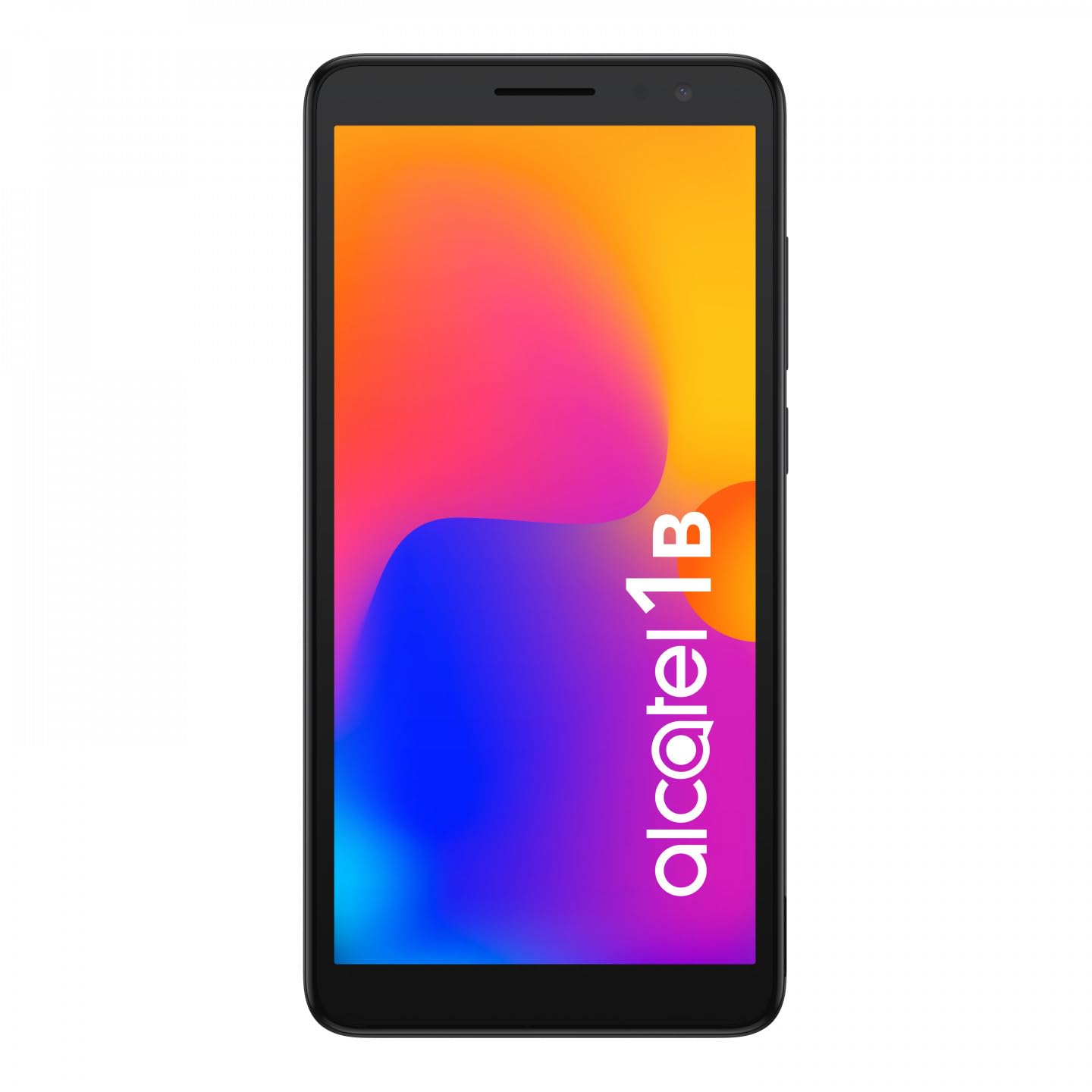
이미지 1.1: 앞면 view of the Alcatel 1B 2022 smartphone, showcasin디스플레이와 세련된 디자인이 특징입니다.
This manual provides comprehensive instructions to help you set up, operate, and maintain your device effectively.
2. 시작하기
2.1 패키지 내용
패키지에 다음 품목이 포함되어 있는지 확인하세요.
- Alcatel 1B 2022 Smartphone
- USB 충전 케이블
- 전원 어댑터
- 빠른 시작 가이드(지역에 따라 다를 수 있음)
- 안전 및 보증 정보
2.2 SIM 카드 및 MicroSD 카드 설치
The Alcatel 1B 2022 supports Nano SIM cards and a MicroSD card for expandable storage. The battery is removable to access the SIM and MicroSD slots.
- 뒷면 커버를 제거하세요: Carefully locate the small notch on the bottom right side of the phone. Use a thin, flat-blade tool (such as a 5mm flat-blade screwdriver or a plastic pry tool) to gently pry open the back cover.
- 배터리 제거: Once the back cover is off, lift the battery out of its compartment.
- 유심 카드를 삽입하세요: Locate the SIM card slot(s). Insert your Nano SIM card(s) into the designated slot(s) with the gold contacts facing down.
- MicroSD 카드 삽입: Locate the MicroSD card slot. Insert your MicroSD card with the gold contacts facing down.
- Reinsert the Battery: Place the battery back into its compartment, ensuring the contacts align correctly.
- 뒷면 커버를 교체하세요: Align the back cover with the phone's edges and press firmly around the perimeter until it clicks securely into place.

이미지 2.1: 뒤 view of the Alcatel 1B 2022 smartphone, showing the camera module and the Alcatel logo. The back cover needs to be removed to access SIM and MicroSD slots.
2.3 배터리 충전
Before first use, fully charge the phone's battery. Connect the USB cable to the phone's Micro USB port and the other end to the power adapter. Plug the adapter into a wall outlet. A full charge typically takes approximately two hours.
2.4 전원 켜기 및 끄기
- 전원을 켜려면: Press and hold the Power button (usually on the right side of the device) until the Alcatel logo appears.
- 전원을 끄려면: 전원 옵션 메뉴가 나타날 때까지 전원 버튼을 길게 누르세요. "전원 끄기"를 선택하고 확인하세요.
3. 기본 동작
3.1 화면 잠금 및 잠금 해제
To lock the screen, briefly press the Power button. To unlock, press the Power button and swipe up on the screen. You can set up various security methods, including a PIN, pattern, password, or facial recognition (if enabled).
3.2 전화 걸기 및 메시지 보내기
- 전화: Tap the Phone icon on the home screen, enter the number, and tap the call button.
- 메시지: Tap the Messages icon, tap "Start chat," enter the recipient's number or select from contacts, type your message, and tap send.
3.3 네트워크 연결
- 와이파이: 이동하다 설정 > 네트워크 및 인터넷 > Wi-FiWi-Fi를 켜고, 원하는 네트워크를 선택한 후, 필요한 경우 비밀번호를 입력하세요.
- 모바일 데이터(4G): 이동하다 설정 > 네트워크 및 인터넷 > 모바일 네트워크. Ensure "Mobile data" is turned on.
- Hotspot (Tethering): To share your phone's internet connection, go to 설정 > 네트워크 및 인터넷 > 핫스팟 및 테더링 and enable "Wi-Fi hotspot."
3.4 카메라 사용
The Alcatel 1B 2022 features an 8MP rear camera and a front camera. Tap the Camera icon to open the application. You can switch between photo and video modes, and access settings for flash, timer, and other options.
3.5 오디오 기능
The phone includes a standard headphone jack for connecting earphones. You can also access the built-in FM Radio application (requires headphones to be plugged in as an antenna).
4. 유지관리 및 관리
4.1 장치 청소
Use a soft, lint-free cloth to clean the screen and body of your phone. Avoid using harsh chemicals or abrasive materials, which can damage the device's surface.
4.2 배터리 관리
The Alcatel 1B 2022 uses a Lithium-ion battery. To prolong battery life:
- 극한의 온도를 피하세요.
- 배터리가 자주 완전히 방전되지 않도록 하세요.
- 제공된 충전기나 인증된 호환 충전기만 사용하세요.
4.3 소프트웨어 업데이트
기기에 최신 기능, 보안 패치, 성능 향상 기능이 적용되어 있는지 확인하려면 소프트웨어 업데이트를 정기적으로 확인하고 설치하세요. 설정 > 시스템 > 시스템 업데이트.
4.4 스토리지 관리
The phone comes with 32GB of internal storage. You can expand this using a MicroSD card. To manage storage, go to 설정 > 저장소 에게 view usage and free up space by uninstalling apps or deleting files.
5. 문제 해결
This section addresses common issues you might encounter with your Alcatel 1B 2022 smartphone.
5.1 장치 전원이 켜지지 않음
- 배터리가 충전되어 있는지 확인하십시오. 휴대전화를 충전기에 연결하고 몇 분 정도 기다린 후 다시 전원을 켜보세요.
- 최소 10~15초 동안 전원 버튼을 길게 눌러 강제 재시작을 실행하세요.
5.2 네트워크 연결 문제
- 신호 없음: Check if your SIM card is properly inserted. Try restarting the phone. Ensure you are in an area with network coverage.
- Wi-Fi 연결 문제: 와이파이 공유기를 재시작하세요. 휴대폰에서 네트워크 연결을 해제한 후 다시 연결하세요.
5.3 애플리케이션 충돌 또는 멈춤 현상
- 애플리케이션을 닫았다가 다시 여세요.
- 앱의 캐시와 데이터를 지웁니다(설정 > 앱 및 알림 > 모든 앱 보기 > [앱 이름] > 저장 공간 및 캐시).
- 문제가 있는 애플리케이션을 제거한 후 다시 설치하십시오.
5.4 공장 초기화 수행
공장 초기화를 하면 휴대전화의 모든 데이터가 지워지고 원래 공장 설정으로 복원됩니다. 계속하기 전에 중요한 데이터를 모두 백업하세요.
- 이동하다 설정 > 시스템 > 재설정 옵션.
- Select "Erase all data (factory reset)."
- 화면의 지시에 따라 재설정을 확인하십시오.
6. 사양
Below are the technical specifications for the Alcatel 1B 2022 smartphone (Model: 5031G-2AALWE12).
| 특징 | 세부 사항 |
|---|---|
| 상표 | 알카텔 |
| 모델명 | 5031G 1B |
| 모델 번호 | 5031G-2AALWE12 |
| 운영 체제 | 안드로이드 11 (Go Edition) |
| 디스플레이 크기 | 5.5 인치 |
| 디스플레이 해상도 | 1609 x 720 |
| 숫양 | 2GB (XNUMX기가바이트) |
| 내부 저장소 | 32GB (XNUMX기가바이트) |
| 확장 가능한 스토리지 | MicroSD (최대 128GB) |
| 후방 카메라 | 8 Megapixels (AF, F2.0, FOV 81°) |
| 전면 카메라 | 예 |
| Processor (CPU Model) | 미디어텍 디멘시티 900 |
| 연결성 | 4G Cellular, Wi-Fi, Bluetooth |
| 커넥터 유형 | 마이크로 USB |
| 배터리 구성 | Lithium-ion (Removable) |
| 색상 | 검은색 |
| 무선 통신사 | 잠금 해제됨 |
Note: Some specifications, such as CPU model, may vary slightly by region or specific production batch. The phone supports 4G cellular connectivity.
7. 보증 및 지원
For detailed warranty information, please refer to the warranty card included in your product package or visit the official Alcatel web사이트. 보증 약관은 지역에 따라 다를 수 있습니다.
For technical support, service, or further assistance, please contact Alcatel customer service through their official channels. Information regarding spare parts availability and guaranteed software updates is not available in this document; please consult the manufacturer's official resources for the most current details.
You can often find support resources, FAQs, and contact information on the official Alcatel support web대지.


