1. 소개 및 이상view
The COVERT SCOUTING CAMERAS MP9 is a compact trail camera designed for outdoor surveillance and wildlife monitoring. It captures high-resolution images and video, featuring a quick trigger speed and an infrared flash for night vision. This manual provides detailed instructions for setting up, operating, and maintaining your MP9 trail camera.
주요 특징:
- 9 MP resolution for clear images.
- Video recording mode.
- 0.9-inch settings screen for easy configuration.
- Fast 1-second trigger speed to capture fleeting moments.
- 100 ft. infrared (IR) low glow LED flash for discreet night vision.
- Supports 8-32GB SD cards.
- AA 배터리 4 개로 구동됩니다.
- Multiple capture modes: 1 Shot, 3 Shot, and Video.
2. 패키지 내용
패키지에 모든 품목이 들어 있는지 확인하세요.
- 2 x COVERT SCOUTING CAMERAS MP9 Trail Cameras
- 8 x AA Batteries (4 per camera)
- 2 x SD Cards
- 사용 설명서 (본 문서)
3. 설정
3.1. 배터리 설치
The MP9 camera requires 4 AA batteries for operation. Ensure you use high-quality alkaline or lithium batteries for optimal performance and battery life.
- 카메라 측면에 있는 배터리함을 찾으세요.
- Open the latch and gently open the camera housing.
- Insert 4 AA batteries according to the polarity indicators (+/-) molded into the battery tray.
- 배터리 칸을 단단히 닫으세요.

Figure 1: Open camera housing showing the battery compartment for 4 AA batteries.
3.2. SD 카드 설치
A compatible SD card (8-32GB) is required to store images and videos. Ensure the SD card is formatted before first use.
- 카메라 본체를 열고 SD 카드 슬롯을 찾으세요.
- SD 카드의 금속 접촉면이 아래쪽을 향하도록 하여 딸깍 소리가 나면서 제자리에 고정될 때까지 삽입하십시오.
- 제거하려면 SD 카드를 딸깍 소리가 날 때까지 살짝 밀어 넣은 다음 놓으면 카드가 분리됩니다.
4. 사용 설명서
4.1. 전원 켜기 / 끄기
To power on the camera, slide the power switch to the "ON" position. The camera will perform a self-check and enter monitoring mode. To power off, slide the switch to "OFF".
4.2. Accessing the Settings Screen
The MP9 features a 0.9-inch settings screen for configuring camera parameters. Open the camera housing to access the screen and control buttons.
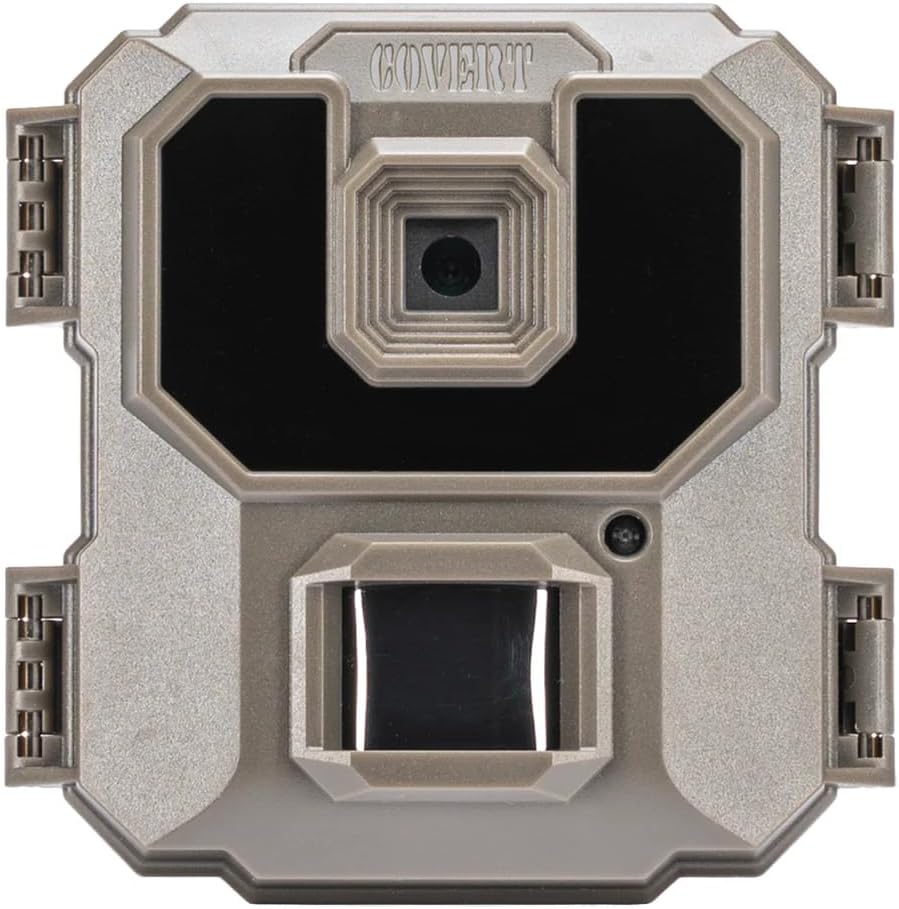
그림 2: 전면 view of the COVERT MP9 trail camera.
Use the navigation buttons (up, down, left, right, OK) to navigate through the menu options and adjust settings such as:
- 방법: Select between 1 Shot, 3 Shot (burst), or Video mode.
- 해결: Adjust image or video resolution.
- 트리거 간격: 감지 간 지연 시간을 설정하세요.
- 타임 스트리트amp: Enable or disable date and time on captures.
- SD 카드 포맷 : SD 카드에 있는 모든 데이터를 삭제하세요.
- 날짜/시간: 현재 날짜와 시간을 설정합니다.
4.3. 카메라 장착
The MP9 camera can be mounted using a strap or wall mount. Position the camera to cover the desired area, ensuring it is stable and secure. For optimal motion detection, avoid pointing the camera directly at the sun or heat sources.
5. 유지관리
- 청소: Use a soft, dry cloth to clean the camera lens and IR LEDs. Do not use abrasive cleaners or solvents.
- 배터리 교체: Replace all batteries when the low battery indicator appears or when performance degrades. Do not mix old and new batteries or different battery types.
- SD 카드 관리 : Regularly check and format your SD card to ensure optimal performance and prevent data corruption. Back up important files를 포맷하기 전에.
- 저장: 장기간 사용하지 않을 때는 배터리를 제거하고 카메라를 서늘하고 건조한 곳에 보관하십시오.
6. 문제 해결
| 문제 | 가능한 원인 / 해결책 |
|---|---|
| 카메라 전원이 켜지지 않습니다. |
|
| 이미지/동영상이 촬영되지 않았습니다. |
|
| 이미지/비디오 품질이 좋지 않습니다. |
|
| 배터리 수명이 짧습니다. |
|
7. 사양
| 특징 | 세부 사항 |
|---|---|
| 모델명 | MP9 (CC0043) |
| 이미지 해상도 | 9 MP |
| 비디오 해상도 | 720p (MPEG-4 format) |
| 트리거 속도 | 1초 |
| 플래시 유형 | 17 IR Low Glow LEDs |
| 플래시 범위 | 100 피트 |
| 디스플레이 화면 | 0.9 인치 |
| 메모리 | SD Card (8-32GB compatible) |
| 전원 | 4 x AA 배터리 |
| 실내/실외 사용 | 집 밖의 |
| 연결성 | Wi-Fi (for control, not data transfer) |
| 치수(길이 x 너비 x 높이) | 8 x 14 x 6인치(제품 크기) |
| 무게 | 1 파운드 |
| IP 등급 | IP54 |
8. 보증 및 지원
보증: This product is sold without an explicit warranty from the manufacturer. Please refer to your retailer's return policy for details on returns or exchanges.
고객 지원: For technical assistance or inquiries, please contact COVERT SCOUTING CAMERAS customer support through their official web해당 웹사이트 또는 판매점에서 제공한 연락처 정보를 확인하세요.
9. 중요한 안전 정보
경고: 이 제품에는 캘리포니아주에서 암과 선천적 결함 또는 기타 생식적 피해를 일으키는 것으로 알려진 화학 물질이 포함되어 있습니다.
Always handle batteries safely. Do not expose the camera to extreme temperatures or direct flame. Keep out of reach of children.


