제품 끝view
The Essl MB20 is a facial biometric time and attendance device designed for efficient workforce management. It integrates advanced facial recognition, fingerprint scanning, and card identification technologies to provide secure and accurate attendance tracking. This device is suitable for various environments, offering robust performance and user-friendly operation.
- 사용자 용량: 1,000
- Finger Capacity: 500
- Face Capacity: 200
- Transaction Capacity: 50,000
- 의사소통: TCP/IP, USB2.0 HOST
- 데이터 전송: Push Data functionality supported
- 표시하다: 컬러 LCD
- 오디오: 스테레오 스피커

이미지: 앞면 view of the Essl MB20 device, showing the color LCD screen, keypad, and fingerprint scanner.
설치 가이드
1. 언박싱 및 초기 검사
- Carefully open the packaging and remove the device and all accessories.
- 포장 목록에 기재된 모든 구성품이 있는지 확인하십시오.
- Inspect the device for any visible damage. If damage is found, contact your supplier immediately.
2. 하드웨어 설치
- Choose a suitable location for installation, ensuring it is stable, dry, and away from direct sunlight or extreme temperatures.
- Mount the device securely to a wall using the provided mounting bracket and screws. Ensure it is at an appropriate height for users to comfortably access the facial scanner and fingerprint sensor.
- Connect the power adapter to the device's power input port and then plug it into a standard electrical outlet.
3. Network Connection (TCP/IP)
- Connect an Ethernet cable from your network router/switch to the LAN port on the device.
- On the device's menu, navigate to 의사소통 > 네트워크 설정.
- Configure the IP Address, Subnet Mask, Gateway, and DNS settings according to your network configuration. You may use DHCP if your network supports it.
- Verify network connectivity by pinging the device's IP address from a computer on the same network.
작동 지침
1. 사용자 등록
Before users can record attendance, they must be enrolled in the device's system.
- Access the device's main menu (usually by pressing 'M/OK' and entering administrator credentials).
- 로 이동 사용자 관리 > 새로운 사용자.
- Enter the User ID and User Name.
- 등록 얼굴: Select 'Enroll Face' and position the user's face within the camera's frame as instructed by the device. Ensure good lighting and a neutral expression.
- 지문 등록: Select 'Enroll Finger' and place the user's finger on the scanner. Repeat the process multiple times (typically 3 times) for accurate registration.
- Enroll Card (if applicable): Select 'Enroll Card' and present the proximity card to the device's card reader.
- Set the user's role (e.g., Normal User, Administrator).
- 사용자 정보를 저장하세요.
2. Time & Attendance Recording
Users can record their attendance using their enrolled credentials.
- Approach the device.
- Present your face to the camera, place your enrolled finger on the scanner, or present your enrolled card to the reader.
- The device will confirm successful verification with an audible prompt and display a confirmation message on the screen.
- The transaction (e.g., Check-in, Check-out) will be automatically recorded.
3. 데이터 관리
Transaction data can be retrieved from the device for reporting and payroll processing.
- USB 데이터 다운로드: Insert a USB flash drive into the device's USB HOST port. Navigate to 데이터 관리 > Download Attendance Log to transfer data to the USB drive.
- Software Download (TCP/IP): Use the provided time attendance management software (e.g., eSSL BioTime) on a networked computer to connect to the device via TCP/IP and download attendance records.
유지
- 청소: Regularly clean the device's screen, camera lens, and fingerprint sensor with a soft, dry, lint-free cloth. Do not use abrasive cleaners or solvents.
- 소프트웨어 업데이트: Periodically check the eSSL official web펌웨어 업데이트 사이트입니다. 펌웨어를 최신 상태로 유지하면 최적의 성능과 보안을 보장할 수 있습니다.
- 데이터 백업: Regularly back up attendance data to an external storage device or computer to prevent data loss.
- 환경 조건: 기기의 수명을 연장하려면 기기가 지정된 온도 및 습도 범위 내에서 작동하도록 하십시오.
문제 해결
| 문제 | 가능한 원인 | 해결책 |
|---|---|---|
| 장치 전원이 켜지지 않음 | 전원 공급 없음; 어댑터/케이블 결함 | Check power connection; test power adapter; ensure outlet is functional. |
| 지문 인식 불가 | Finger wet/dirty; improper placement; poor enrollment quality | Ensure finger is clean and dry; place finger flat on sensor; re-enroll fingerprint if necessary. |
| Face not recognized | Poor lighting; face too close/far; changes in appearance; poor enrollment quality | Ensure adequate lighting; maintain proper distance; re-enroll face if significant changes occurred. |
| 네트워크 연결 문제 | Incorrect IP settings; faulty Ethernet cable; network firewall | Verify network settings; check cable; temporarily disable firewall for testing. |
| 데이터 전송 실패 | USB drive format issue; software connection error | Ensure USB drive is FAT32 format; check software connection settings and device IP. |
기술 사양
| 특징 | 사양 |
|---|---|
| 사용자 용량 | 1,000 |
| Finger Capacity | 500 |
| 얼굴 용량 | 200 |
| 거래 용량 | 50,000 |
| 의사소통 | TCP/IP, USB2.0 HOST |
| 푸시 데이터 | 예 |
| 표시하다 | 컬러 LCD |
| 소리 | 스테레오 스피커 |
| 모델 번호 | MB20+ID |
| 제품 크기(LxWxH) | 16.19 x 15.28 x 3.05cm |
| 품목 무게 | 750g |
| 제조업체 | eSSL Private Limited. |
| 원산지 | 인도 |
보증 및 지원
This Essl MB20 device comes with a standard manufacturer's warranty. Please refer to the warranty card included in your product packaging for specific terms and conditions, including the warranty period and coverage details. For any warranty claims or service requests, please retain your purchase receipt.
For technical assistance, software installation support, or any queries regarding the operation of your device, please contact eSSL customer support. Online support resources, including FAQs and software downloads, may also be available on the official eSSL web대지.
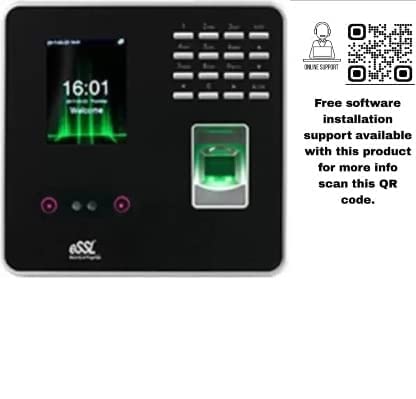
Image: Essl MB20 device displaying the time, alongside a QR code for online support.
Scan this QR code for free software installation support and more information: https://qr.page/g/1RCdIB1BFGZ


