소개
This manual provides detailed instructions for the operation and maintenance of your Midland T10 FRS Walkie Talkie. The T10 is a compact and user-friendly two-way radio designed for reliable communication in various settings, including family activities, camping, and hiking. It features 22 FRS channels, NOAA Weather Alert, and eVOX hands-free operation. Please read this manual thoroughly to ensure proper use and to maximize the performance of your device.
제품 끝view
주요 특징:
- 22 FRS Channels for clear communication.
- 38 CTCSS Privacy Codes to minimize interference.
- eVOX (Easy Voice and Sound Activated Transmission) for hands-free operation.
- NOAA Weather Scan + Alert for severe weather updates.
- Channel Scan and Monitor Mode functions.
- Keystroke Tones and Silent Operation options.
- Up to 20-mile range in open areas.
상자 안에 무엇이 들어있나요?
- Midland T10 Two-Way Radios (quantity as purchased, e.g., 4 radios)
- Belt Clips (one per radio)
- 사용 설명서(이 문서)
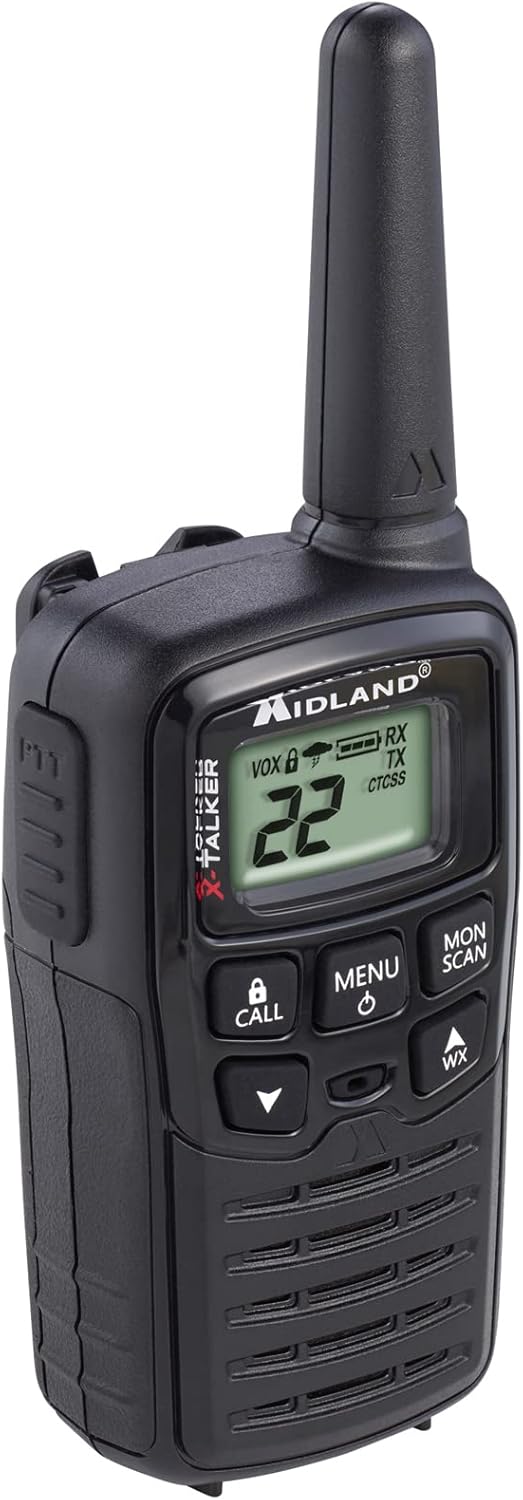
Figure 1: Midland T10 Walkie Talkie, angled front view 화면과 버튼을 보여줍니다.
설정
1. 배터리 설치
- 라디오가 꺼져 있는지 확인하십시오.
- 라디오 뒷면에서 배터리 덮개를 찾으세요.
- 탭을 누른 상태에서 덮개를 아래로 밀어 분리하세요.
- Insert 3 AAA alkaline batteries (not included) into the compartment, observing the correct polarity (+/-) as indicated.
- 배터리 칸 덮개를 위로 밀어서 딸깍 소리가 날 때까지 제자리에 끼웁니다.
중요한: Use only AAA alkaline batteries. Do not mix old and new batteries, or different types of batteries.
2. 벨트 클립 부착
- 벨트 클립을 라디오 뒷면의 홈에 맞춰 정렬합니다.
- Slide the belt clip upwards until it locks securely into position.
- 제거하려면 벨트 클립의 해제 탭을 누르고 아래로 밀어 내리세요.

그림 2: 측면 view of the Midland T10 Walkie Talkie with the belt clip attached.
작동 지침
1. 전원 켜기/끄기
- 전원을 켜려면: 를 누르고 계세요 메뉴/전원 button until the display illuminates and you hear a tone.
- 전원을 끄려면: 를 누르고 계세요 메뉴/전원 디스플레이가 꺼질 때까지 버튼을 누르세요.
2. 볼륨 조절
- 를 누르세요 UP (▲) button to increase the volume.
- 를 누르세요 아래에 (▼볼륨을 줄이려면 버튼을 누르세요.
- The current volume level (1-8) will be displayed.
3. 채널 선택
- 라디오를 켠 상태에서 메뉴 버튼을 한 번 누르세요. 채널 번호가 깜빡입니다.
- 사용하세요 UP (▲) 또는 아래에 (▼) buttons to select one of the 22 FRS channels.
- 를 누르세요 메뉴 button again to confirm your selection, or wait 5 seconds for the selection to be automatically saved.
4. 송신 및 수신
- 전송하려면: 를 누르고 계세요 PTT(푸시투톡) button located on the side of the radio. Speak clearly into the microphone. Release the PTT button to stop transmitting.
- 받으려면: PTT 버튼이 눌려 있지 않은지 확인하세요. 무전기는 선택한 채널의 신호를 자동으로 수신합니다.
5. Privacy Codes (CTCSS)
Privacy Codes help reduce interference from other users on the same channel. Your radio has 38 CTCSS codes.
- 채널을 선택한 후, 버튼을 누르세요. 메뉴 버튼을 두 번 누르세요. 개인 정보 보호 코드 번호가 깜빡입니다.
- 사용하세요 UP (▲) 또는 아래에 (▼) buttons to select a privacy code (01-38). Code 00 means no privacy code is active.
- 를 누르세요 메뉴 button again to confirm, or wait 5 seconds.
메모: Both radios must be set to the same channel and privacy code to communicate.
6. eVOX (Hands-Free Operation)
eVOX allows you to transmit without pressing the PTT button.
- 를 누르세요 메뉴 button three times. The eVOX sensitivity level will flash (oF, 1-3).
- 사용하세요 UP (▲) 또는 아래에 (▼) buttons to select a sensitivity level (1 being highest sensitivity, 3 being lowest). Select "oF" to turn eVOX off.
- 를 누르세요 메뉴 button again to confirm, or wait 5 seconds.
7. NOAA 날씨 스캔 + 경보
Your radio can receive NOAA Weather Radio alerts.
- To Activate Weather Scan: 를 누르세요 WX button. The radio will scan 10 NOAA weather channels and lock onto the strongest signal.
- To Activate Weather Alert: While in Weather Scan mode, press the 메뉴 button. The "AL" icon will flash. Use UP (▲) 또는 아래에 (▼) to turn the alert ON or OFF. Press 메뉴 to confirm. When activated, the radio will sound an alarm if a severe weather alert is broadcast.
- 날씨 모드를 종료하려면: 를 누르세요 WX 버튼을 다시 누르세요.
8. 통화 알림
를 누르세요 부르다 button to send an audible call tone to other radios on the same channel and privacy code.
9. 모니터 기능
The Monitor function allows you to temporarily disable the squelch to listen for weak signals or to check for activity on a channel.
- 를 누르고 계세요 월/스캔 button to activate the Monitor function.
- Release the button to deactivate.
10. 스캔 기능
The Scan function allows you to scan all 22 channels for activity.
- 를 누르세요 월/스캔 button once (do not hold). The radio will begin scanning.
- When activity is detected, the scan will pause on that channel.
- 를 누르세요 월/스캔 스캔을 중지하려면 버튼을 다시 누르세요.
유지
- 청소: 부드러운 d를 사용하세요amp cloth to clean the radio's exterior. Do not use abrasive cleaners or solvents.
- 배터리 관리 : 장기간 라디오를 사용하지 않을 경우 배터리 누출을 방지하기 위해 배터리를 제거하세요.
- 저장: 라디오는 직사광선과 극한의 온도를 피해 서늘하고 건조한 곳에 보관하세요.
- 방수 기능: This radio is not water-resistant. Avoid exposure to water or high humidity.
문제 해결
| 문제 | 가능한 해결책 |
|---|---|
| 전기가 없습니다. |
|
| Poor range or static. |
|
| 전송할 수 없습니다. |
|
| Hearing other conversations. |
|
명세서
| 모델 번호 | FBA-4PK-T10 |
| 채널 | 22 FRS 채널 |
| 개인정보보호법 | 38 CTCSS Codes |
| 주파수 범위 | 462.5625MHz - 462.7250MHz |
| 통화 범위 최대 | Up to 20 Miles (in open areas) |
| 전원 | AAA 알칼리 건전지 3개 (별도 구매) |
| 품목 무게 | 1.23 pounds (for the pack of 4) |
| 제품 치수 | 7 x 7 x 4 인치 |
| 방수 레벨 | 방수가 되지 않음 |
보증 및 지원
The Midland T10 FRS Walkie Talkie comes with an industry-leading 3년 보증 against defects in materials and workmanship. This warranty covers normal use and service. For warranty claims or technical support, please refer to the contact information provided with your purchase or visit the official Midland web대지.
For additional information, FAQs, or to register your product, please visit www.midlandusa.com.