소개
The Apple iPad Air (5th Generation) is a versatile tablet featuring the M1 chip, a 10.9-inch Liquid Retina display, and advanced capabilities for productivity and entertainment. This manual provides instructions for setting up, operating, maintaining, and troubleshooting your device.
주요 특징은 다음과 같습니다.
- M1 칩: Provides enhanced performance for demanding applications and graphics-intensive tasks.
- 10.9-inch Liquid Retina Display: Features True Tone, P3 wide color, and ultralow reflectivity for a clear view경험.
- 와이파이 6: Offers fast wireless connectivity for internet access and data transfer.
- 터치 ID: 상단 버튼에 안전한 인증 및 Apple Pay 기능이 통합되어 있습니다.
- 고급 카메라: Includes a 12MP Ultra Wide front camera with Center Stage and a 12MP Wide back camera with 4K video recording.
- USB-C 커넥터 : For charging and connecting accessories.

Image: The Apple iPad Air (5th Generation) in Space Gray.
상자 안에 무엇이 들어있나요?
모든 품목이 포장에 들어 있는지 확인하세요.
- 10.9-inch iPad Air
- USB-C 충전 케이블(1미터)
- 20W USB-C 전원 어댑터

Image: Contents of the iPad Air packaging, including the device, USB-C cable, and power adapter.
설정
1. 초기 전원 켜기 및 충전
To power on your iPad Air, press and hold the top button until the Apple logo appears. If the device does not power on, connect it to the 20W USB-C Power Adapter using the provided USB-C Charge Cable and allow it to charge for at least 30 minutes before attempting to power on again.
2. Basic iPadOS Setup
Follow the on-screen instructions to complete the initial setup. This includes selecting your language and region, connecting to a Wi-Fi network, and setting up Touch ID.
3. Wi-Fi 연결
During setup, select your preferred Wi-Fi network from the list and enter the password if required. To connect to Wi-Fi later, go to 설정 > 와이파이 네트워크를 선택하세요.
4. Touch ID Setup
Touch ID allows you to unlock your iPad Air and make purchases securely using your fingerprint. During setup, you will be prompted to register your fingerprint by placing your finger on the top button. You can add more fingerprints later via 설정 > 터치 ID 및 패스코드.
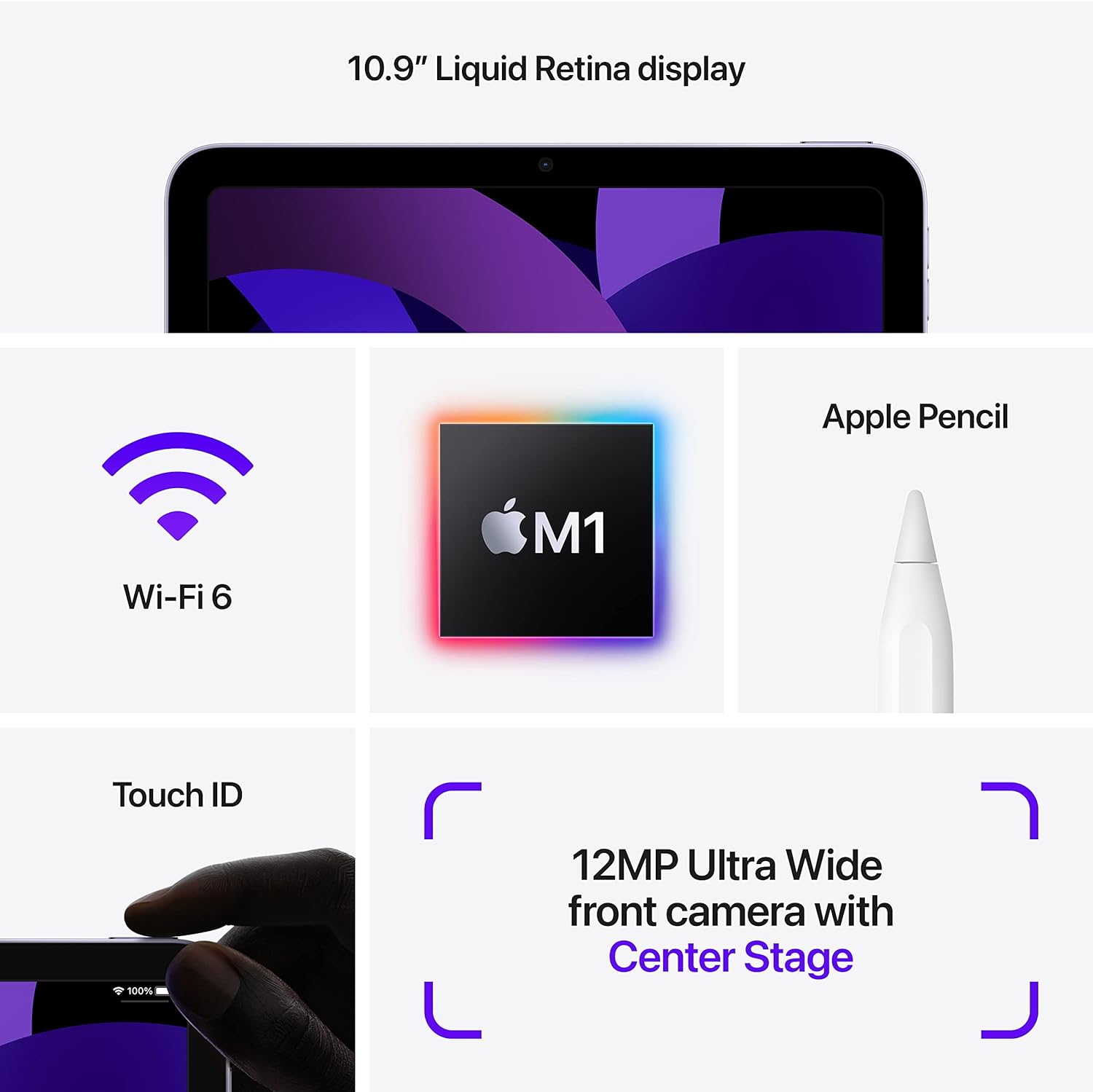
Image: Visual representation of iPad Air features, including Touch ID on the top button.
작동 지침
1. Navigating iPadOS
The iPad Air operates using touch gestures on its Liquid Retina display. Swipe up from the bottom to go to the Home screen, swipe down from the top-right for Control Center, and swipe down from the top-center for Notifications. Multitasking is supported, allowing you to run multiple apps simultaneously.

Image: Two iPad Airs demonstrating app usage, including gaming and 3D design.
2. 카메라 사용
The iPad Air features a 12MP Ultra Wide front camera and a 12MP Wide back camera. Open the Camera app to take photos or record 4K videos. The front camera supports Center Stage, which automatically keeps you centered during video calls.
3. Apple Pencil (2nd Generation) and Magic Keyboard (Accessories)
The iPad Air is compatible with the Apple Pencil (2nd Generation) for drawing, note-taking, and marking up documents. It also supports the Magic Keyboard for a laptop-like typing experience and trackpad functionality. These accessories are sold separately.

Image: iPad Air with Magic Keyboard and Apple Pencil, demonstrating accessory compatibility.

Image: A user interacting with the iPad Air using an Apple Pencil.
4. Apple Pay
Use Touch ID to securely authorize purchases with Apple Pay within apps and on websites. Set up Apple Pay in 설정 > 지갑 및 Apple Pay.
유지
1. Cleaning Your iPad Air
To clean the display, use a soft, lint-free cloth. Avoid abrasive materials, aerosols, solvents, or ammonia-based cleaners. For the enclosure, use a soft, damp 옷감. 장치를 물에 담그지 마십시오.
2. 배터리 관리
The iPad Air uses a rechargeable lithium-ion battery. For optimal battery life, avoid exposing the device to extreme temperatures. Charge the device using the provided USB-C Power Adapter and cable. Periodically update iPadOS to ensure efficient battery management.
3. 소프트웨어 업데이트
Keep your iPad Air's software up to date to benefit from the latest features, security enhancements, and performance improvements. Go to 설정 > 일반적인 > 소프트웨어 업데이트 업데이트를 확인하고 설치합니다.
문제 해결
1. 장치가 응답하지 않음
If your iPad Air is unresponsive, force restart it: Press and quickly release the Volume Up button, press and quickly release the Volume Down button, then press and hold the Top button until the Apple logo appears.
2. Wi-Fi 연결 문제
If you experience issues connecting to Wi-Fi, try the following:
- Wi-Fi가 활성화되어 있는지 확인하십시오. 설정.
- Wi-Fi 라우터를 다시 시작하세요.
- 네트워크를 잊고 다시 연결하세요: 이동 설정 > 와이파이, tap the "i" next to your network, then tap 이 네트워크를 잊어 버리세요.
3. 앱 성능 문제
If an app is not functioning correctly, try closing and reopening it. If the issue persists, check the App Store for updates to the app. As a last resort, delete and reinstall the app.
4. 배터리가 빠르게 소모됨
배터리 사용량을 확인하세요 설정 > 배터리 to identify apps consuming significant power. Adjust screen brightness, disable background app refresh for non-essential apps, and ensure iPadOS is updated.
명세서
| 모델명 | 아이패드 에어(5세대) |
| 품목 모델 번호 | MM9L3LL/A |
| 표시하다 | 10.9인치 리퀴드 레티나 디스플레이 (트루톤 기술 적용) |
| 디스플레이 해상도 | 2360 x 1640 픽셀 |
| 칩 | Apple M1 chip with 8-core CPU, 8-core GPU, Next-generation Neural Engine |
| 메모리 저장 용량 | 256 GB (variant shown, also available in 64GB) |
| 전면 카메라 | 12MP Ultra Wide with Center Stage |
| 후면 카메라 | 12MP Wide with Smart HDR 3 and 4K video recording |
| 배터리 수명 | Up to 10 hours (Wi-Fi), Up to 9 hours (cellular data) |
| 커넥터 | USB-C |
| 치수(높이 x 너비 x 깊이) | 9.74 x 7.02 x 0.24인치(247.6 x 178.5 x 6.1mm) |
| 무게 | 1.0 pound (458 grams) Wi-Fi model; 1.02 pounds (462 grams) Wi-Fi + Cellular model |
| 첫 번째 이용 가능 날짜 | 11년 2022월 XNUMX일 |
보증 및 지원
For detailed warranty information and technical support, please refer to Apple's official website or contact Apple Support directly. Warranty terms and conditions may vary by region and purchase date.
You can find additional resources and support at support.apple.com/ipad.


