
1. 서론
This manual provides detailed instructions for the installation, operation, and maintenance of your DEKCO Solar Security Camera and Wireless Doorbell Camera system. Please read this manual thoroughly before using the product to ensure proper function and safety. Keep this manual for future reference.
2. 패키지 내용
포장을 풀 때 모든 구성품이 들어 있고 상태가 양호한지 확인하세요.
- DEKCO Solar Security Camera
- 무선 초인종 카메라
- 실내 차임 장치
- Solar Panel (integrated with camera)
- 장착 브래킷 및 나사
- USB 충전 케이블
- 사용 설명서 (본 문서)
3. 제품 오버view
The DEKCO security system combines a solar-powered outdoor camera with a wireless doorbell camera to provide comprehensive home surveillance.
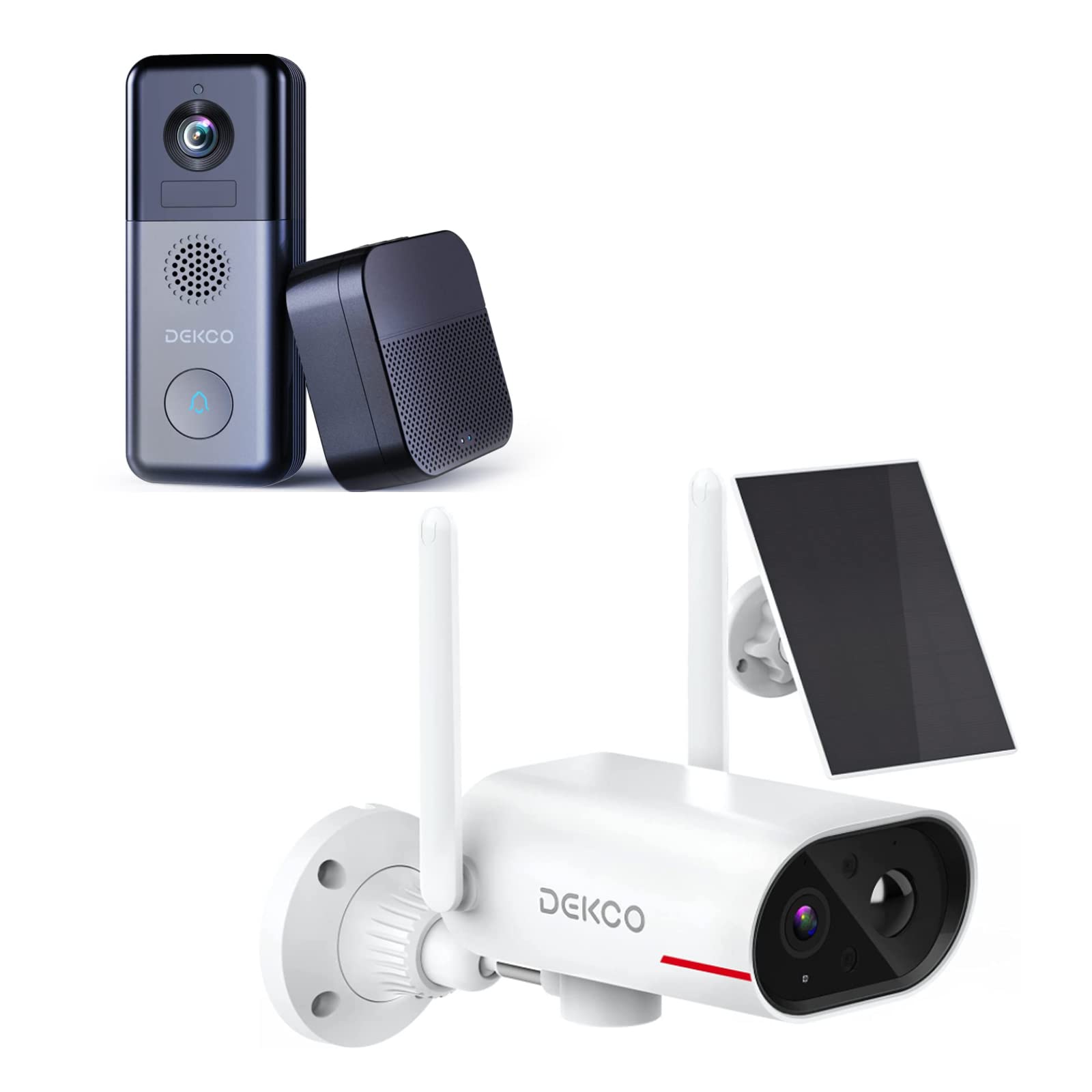
An image showing the DEKCO solar-powered security camera, the wireless doorbell camera, and its indoor chime unit. The security camera is white with two antennas and a solar panel, while the doorbell is dark grey with a camera lens and a call button. The chime is a compact black box.
3.1 Solar Security Camera Features
- 260° View범위: Achieved through a 170° rotating design.
- 100% 무선: Flexible installation without power cables.
- 태양열 전원: Integrated solar panel for continuous power with adequate sunlight.
- 야간 투시경: Features color night vision for clear images in low light.
- 저장: Supports Micro SD card and cloud storage (no monthly fees).
- 방수 등급: IP65 for outdoor use.
3.2 Wireless Doorbell Camera Features
- 180일간의 배터리 수명: 장시간 사용을 위해 10000mAh 충전식 배터리가 내장되어 있습니다.
- 양방향 오디오 : 방문객과 원격으로 소통하세요.
- 동작 감지: 집 앞 움직임에 대한 알림을 받으세요.
- 무선 차임벨: Connects to an indoor chime unit.
- 방수 등급: IP65 for outdoor use.
4. 설정 가이드
Follow these steps to set up your DEKCO security system.
4.1 앱 설치
- Download the DEKCO app from your smartphone's app store (available for Android and iOS).
- 새 계정을 등록하거나 이미 계정이 있는 경우 로그인하세요.
4.2 Solar Security Camera Setup
- 초기 청구 : Before installation, fully charge the camera using the provided USB cable.
- 설치: Choose a location with good Wi-Fi signal and direct sunlight exposure for the solar panel. Use the mounting bracket and screws to securely attach the camera to a wall. Ensure the camera has a clear view 원하는 모니터링 영역.
- 편성: Open the DEKCO app, select 'Add Device', and follow the on-screen instructions to connect the camera to your Wi-Fi network.
4.3 Wireless Doorbell Camera Setup
- 초기 청구 : Fully charge the doorbell camera using the provided USB cable.
- 설치: Install the doorbell camera at your desired location near your front door using the provided mounting hardware. Ensure it has a clear view 그리고 와이파이 신호가 좋습니다.
- 편성: In the DEKCO app, select 'Add Device' and follow the instructions to connect the doorbell camera to your Wi-Fi network.
- Chime Setup: Plug the indoor chime unit into a power outlet. Follow the app's instructions to pair the chime with the doorbell camera. You can select different chime tones and adjust the volume through the app.
5. 사용 설명서
Learn how to use the features of your DEKCO security system.
5.1 Solar Security Camera Operation
- 살다 View: Open the DEKCO app and select your camera to view 라이브 푸tage. You can manually pan/tilt the camera within its 260° range.
- 동작 감지: The camera is configured for motion-only alerts. Adjust sensitivity settings in the app to optimize detection and minimize false alarms.
- 녹음: Motion-triggered events are recorded and stored on the Micro SD card (if installed) or in the cloud. Access recordings via the app's playback feature.
- 야간 투시경: The camera automatically switches to color night vision in low-light conditions.
5.2 Wireless Doorbell Camera Operation
- 전화 받기: When a visitor presses the doorbell button, your smartphone will receive a notification. Tap the notification to answer and engage in two-way audio communication.
- 동작 감지: The doorbell camera detects motion and sends alerts to your phone. Review motion events in the app.
- 살다 View: You can initiate a live view of your front door at any time through the DEKCO app.
- 차임 기능: The indoor chime will sound when the doorbell button is pressed. Adjust settings in the app.
6. 유지관리
Regular maintenance ensures optimal performance and longevity of your devices.
- 렌즈 세척: 카메라 렌즈와 태양광 패널을 주기적으로 부드러운 천으로 닦아주세요.amp 먼지와 오물을 닦아낼 때는 천을 사용하세요. 연마성 세제는 사용하지 마세요.
- 태양광 패널 효율성: Ensure the solar panel is free from obstructions (leaves, snow, etc.) to maximize charging efficiency.
- 배터리 상태: While solar-powered, ensure the security camera receives sufficient sunlight. For the doorbell, monitor battery levels via the app and recharge when necessary.
- 펌웨어 업데이트: Check the DEKCO app regularly for firmware updates. Install updates to ensure your devices have the latest features and security enhancements.
7. 문제 해결
일반적인 문제에 대한 해결책은 이 섹션을 참조하세요.
- 장치가 Wi-Fi에 연결되지 않음:
- Wi-Fi 네트워크가 2.4GHz 대역을 사용하는지 확인하십시오(5GHz는 지원되지 않습니다).
- 와이파이 비밀번호의 정확성을 확인하세요.
- 기기를 와이파이 공유기 가까이로 옮기세요.
- Restart your router and the device.
- 동작 감지 알림 없음:
- 앱 설정에서 동작 감지가 활성화되어 있는지 확인하세요.
- 동작 감도를 조정합니다.
- 장치에 명확한 내용이 있는지 확인하십시오. view 그리고 방해받지 않습니다.
- 낮은 비디오 품질:
- 와이파이 신호 강도를 확인하세요.
- 카메라 렌즈를 청소하세요.
- 초인종 배터리가 빨리 소모됩니다:
- 동작 감지 감도 또는 빈도를 줄이십시오.
- 사용하기 전에 장치가 완전히 충전되었는지 확인하십시오.
- Solar Camera Not Charging:
- Ensure the solar panel receives at least 1 hour of direct sunlight daily.
- 태양광 패널 표면을 청소합니다.
8. 사양
| 특징 | 사양 |
|---|---|
| 상표 | 덱코 |
| 모델 번호 | B09TF8K2W8 |
| 연결 기술 | 무선(Wi-Fi) |
| 전원 | Solar Powered (Camera), Battery (Doorbell) |
| Doorbell Battery Capacity | 10000mAh |
| View앵글(카메라) | 260° (170° rotating design) |
| 나이트 비전 | 컬러 나이트 비전 |
| 방수 등급 | IP65 |
| 호환 장치 | 스마트폰(안드로이드) |
| 경고 유형 | 모션 전용 |
| 마운트 유형 | 벽걸이형 |
| 비디오 캡처 형식 | MPEG-4 |
9. 보증 및 지원
For warranty information, technical support, or further assistance, please refer to the DEKCO official website or contact DEKCO customer service directly. Keep your purchase receipt as proof of purchase.