1. 서론
Welcome to the user manual for your new inkBOOK Calypso Plus E-Reader. This guide provides essential information on setting up, operating, and maintaining your device to ensure a seamless reading experience. The inkBOOK Calypso Plus is designed for comfortable and extensive digital reading, featuring a high-resolution, anti-glare screen and ample storage for your entire e-book library.
2. 제품 오버view
2.1 주요 특징
- Seamless reading experience with the Skoobe application.
- Intuitive and easy-to-navigate menu system.
- Perfectly readable text with 212 pixels per inch screen resolution.
- Storage capacity for up to 10,000 e-books.
- Anti-glare, paper-like screen for comfortable reading in various lighting conditions, including direct sunlight.
2.2 장치 구성 요소

그림 2.1: 전면 View. This image shows the front of the inkBOOK Calypso Plus E-Reader, featuring its display with a book cover depicting a tropical island scene. The inkBOOK logo is visible at the top and bottom of the bezel.

그림 2.2: 후면 View. This image displays the back of the inkBOOK Calypso Plus E-Reader, showcasing its distinctive green casing and the inkBOOK branding.

그림 2.3: 측면 View with Buttons. 이 이미지는 측면 프로를 제공합니다file of the inkBOOK Calypso Plus E-Reader, highlighting the physical page-turn buttons located on the side for convenient navigation.
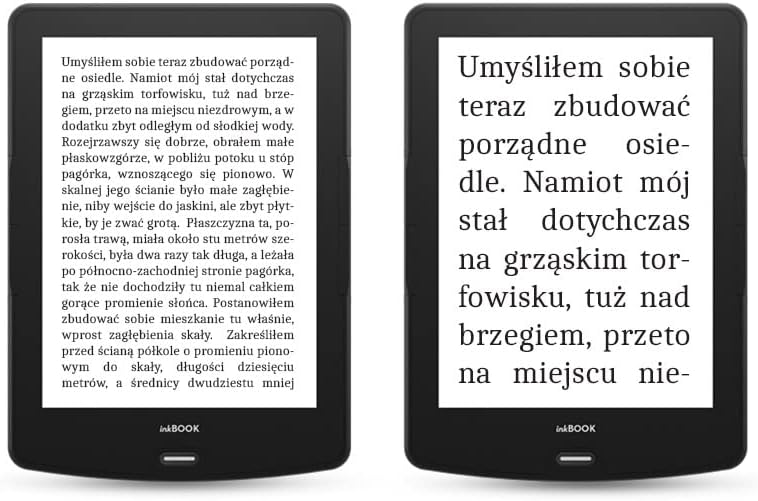
Figure 2.4: Text Clarity Comparison. This image shows two inkBOOK Calypso Plus E-Readers side-by-side, demonstrating the clarity and readability of text on the screen. One device displays a full page of text, while the other shows a zoomed-in view to emphasize the sharp character rendering.
3. 설정
3.1 장치 충전
Before first use, fully charge your inkBOOK Calypso Plus. Connect the included USB cable to the device's USB port and the other end to a compatible USB power adapter (not included) or a computer's USB port. The charging indicator will show the charging status.
3.2 초기 전원 켜기 및 설정
- 화면이 켜질 때까지 전원 버튼을 길게 누릅니다.
- 화면의 지시에 따라 원하는 언어를 선택하세요.
- Wi-Fi 네트워크에 연결하여 온라인 기능을 이용하고 콘텐츠를 다운로드하세요.
- Complete any initial registration or account setup as prompted.
4. 사용 설명서
4.1 인터페이스 탐색
The inkBOOK Calypso Plus features an intuitive touchscreen interface. Tap to select items, swipe to turn pages or scroll through lists. Physical page-turn buttons are also available on the side for quick navigation within books.
4.2 전자책 읽기
- From the home screen, tap on a book cover to open it.
- Tap the left or right side of the screen, or use the physical buttons, to turn pages.
- Tap the center of the screen to bring up reading options, such as font size, line spacing, and brightness settings.
4.3 Using the Skoobe Application
The inkBOOK Calypso Plus supports the Skoobe application for unlimited reading. Ensure you are connected to Wi-Fi, then locate and open the Skoobe app from your device's applications menu. Log in with your Skoobe account credentials to access their extensive library.
4.4 Wi-Fi에 연결하기
- 이동하다 설정 홈 화면에서.
- 선택하다 와이파이.
- 목록에서 원하는 네트워크를 선택하고 메시지가 표시되면 비밀번호를 입력하세요.
5. 유지관리
5.1 장치 청소
Use a soft, lint-free cloth to gently wipe the screen and body of the e-reader. Do not use liquid cleaners or abrasive materials, as they may damage the screen or finish.
5.2 배터리 관리
To prolong battery life, avoid exposing the device to extreme temperatures. For long-term storage, it is recommended to charge the battery to about 50% before turning off the device.
5.3 소프트웨어 업데이트
Periodically check for software updates in the device's settings menu to ensure optimal performance and access to the latest features. Connect to Wi-Fi before attempting any updates.
6. 문제 해결
6.1 장치가 켜지지 않음
Ensure the device is sufficiently charged. Connect it to a power source and wait a few minutes before attempting to power it on again. If the issue persists, try holding the power button for an extended period (e.g., 10-15 seconds) for a forced restart.
6.2 Screen Display Issues (Ghosting/Pixelation)
E-ink screens may occasionally show faint remnants of previous images (ghosting) or appear pixelated. This is often normal for e-ink technology. The device typically performs a full screen refresh every few pages to clear ghosting. If ghosting is excessive or persistent, ensure your software is up to date. For pixelation, verify that the font settings are appropriate for the screen resolution.
6.3 Wi-Fi 연결 문제
Check if other devices can connect to your Wi-Fi network. Restart your router and the e-reader. Ensure you are entering the correct Wi-Fi password. If the problem continues, try forgetting the network on your e-reader and reconnecting.
6.4 터치스크린 반응 없음
If the touchscreen is unresponsive, try restarting the device. If a restart does not resolve the issue, ensure the screen is clean and free of debris. Avoid using sharp objects on the screen.
7. 사양
| 특징 | 사양 |
|---|---|
| 상표 | inkBOOK |
| 모델 | Calypso Plus |
| 색상 | 녹색 |
| 화면 크기 | 6 인치 |
| 디스플레이 기술 | 전자잉크 |
| 연결 기술 | USB |
| 휴먼 인터페이스 입력 | 터치스크린 |
| 블루투스 호환성 | 아니요 |
| ASIN | B09SBFWR1N |
8. 보증 및 지원
For warranty information and customer support, please refer to the documentation included with your purchase or visit the official inkBOOK web해당 사이트는 예비 부품 공급 여부 및 소프트웨어 업데이트 보장에 대한 정보를 현재 제공하지 않습니다.
For further assistance, please contact inkBOOK customer service through their official channels.


