1. 서론
This manual provides essential information for the safe and efficient use of your new Hyundai 43-inch 4K Ultra HD Smart LED TV, model UHDHY43WSR4BYI5. Please read these instructions thoroughly before operating the television and retain them for future reference. This guide covers setup, operation, maintenance, and troubleshooting to ensure you get the best experience from your device.

Image: Hyundai 43-inch 4K Smart LED TV front view ~와 함께 WebOS 인터페이스.
2. 안전 정보
감전, 화재 또는 텔레비전 손상의 위험을 줄이려면 항상 다음과 같은 기본 안전 수칙을 준수하십시오.
- 전원: TV는 올바른 볼륨을 지원하는 AC 전원 콘센트에만 연결하십시오.tag제품 라벨에 표시된 대로입니다.
- 통풍: Ensure adequate ventilation around the TV. Do not block ventilation openings or place the TV on soft surfaces that may block airflow.
- 물과 습기: TV를 비나 습기에 노출시키지 마세요. 꽃병 등 액체가 담긴 물건을 TV 위에 올려놓지 마세요.
- 청소: 청소하기 전에 TV 플러그를 뽑으세요. 부드럽고 마른 천을 사용하세요. 액체 세제나 에어로졸 세제는 사용하지 마세요.
- 놓기: TV를 안정적이고 평평한 곳에 놓으세요. 직사광선이나 열원 근처에 두지 마세요.
- 어린이들: Supervise children to ensure they do not climb on the TV or furniture it is placed on.
3. 패키지 내용
패키지에 모든 품목이 들어 있는지 확인하세요.
- 1 x Hyundai 43-inch LED TV
- 1 x Remote Control (Magic Remote)
- 1 x 사용자 설명서
- 1 x 보증 카드
- 1 x Pair of Table Stand
- 1 x 벽걸이 키트
4. 물리적 설정
4.1. TV 설치
Your TV supports both table-top placement and wall mounting. Choose the method that best suits your environment.
테이블 스탠드 설치:
- 화면 손상을 방지하려면 부드럽고 깨끗한 표면에 TV를 뒤집어서 조심스럽게 놓으세요.
- Attach the provided table stands to the designated slots on the bottom of the TV using the screws included in the kit. Ensure they are securely fastened.
- TV를 안정적이고 평평한 표면에 놓으세요.
벽 장착 설치:
Use the included wall mount kit. Follow the instructions provided with the wall mount kit for safe and secure installation. It is recommended to have professional assistance for wall mounting.

Image: Diagram illustrating the dimensions of the Hyundai 43-inch Smart LED TV, showing width, height, and depth with stand. Also indicates screen size and weights.
4.2. 케이블 연결하기
Connect the power cord to the TV and then to a wall outlet. Connect your external devices (e.g., set-top box, gaming console, Blu-ray player) to the appropriate ports.
- HDMI : For high-definition audio and video. Your TV has multiple HDMI ports.
- USB: For connecting USB storage devices for media playback. Your TV has 2 USB ports.
- RF 입력: 안테나나 케이블 TV를 연결하는 데 사용합니다.
- 이더넷(RJ45): 유선 인터넷 연결의 경우.
- AV 입력 : 복합 비디오 및 스테레오 오디오 케이블을 사용하여 오래된 장치를 연결하는 데 사용됩니다.
- 광학: 사운드바 또는 홈시어터 시스템으로 디지털 오디오를 출력하기 위한 용도입니다.

이미지: 후면 view of the Hyundai 43-inch Smart LED TV, showing the mounting points and general layout of the back panel.
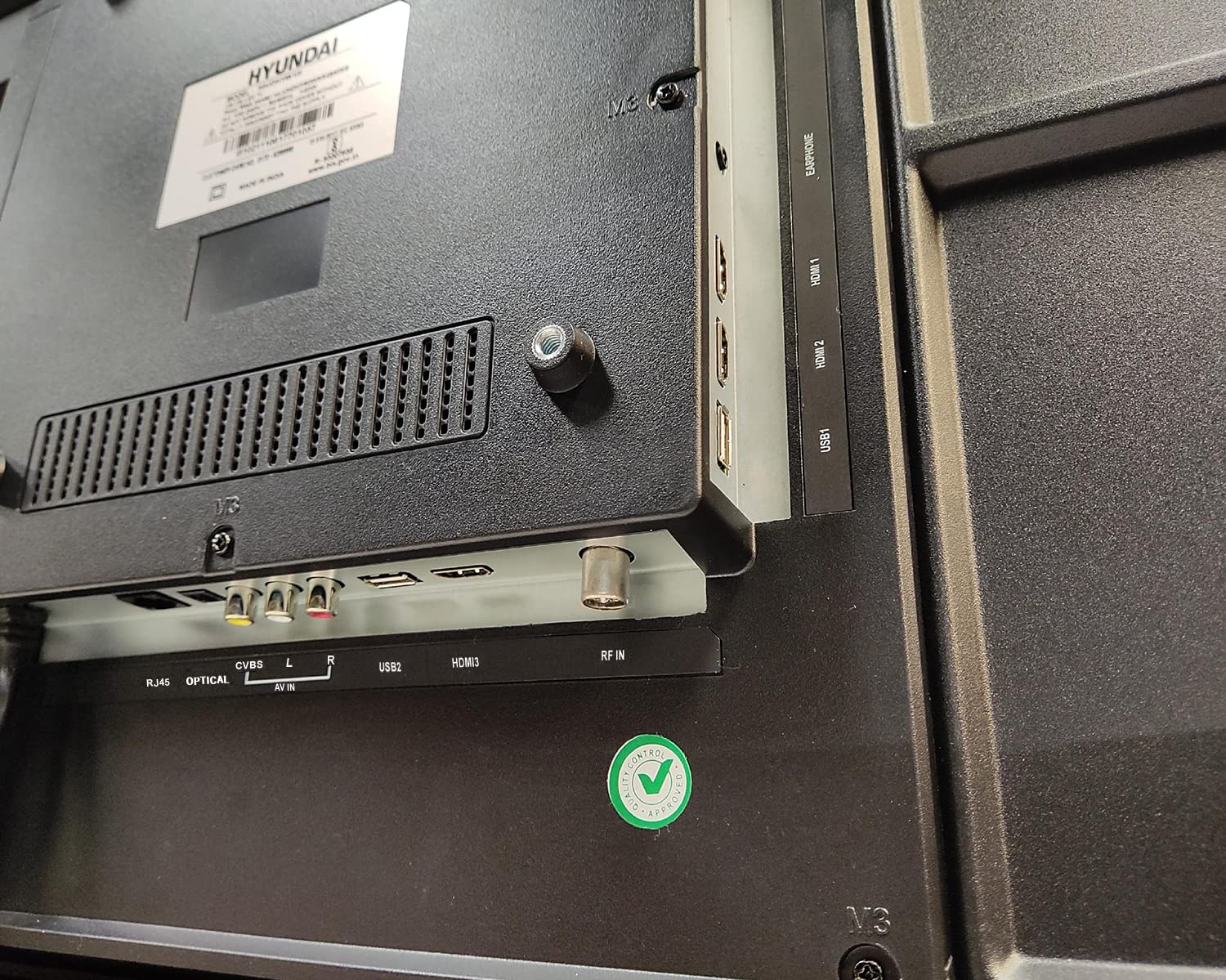
이미지: 클로즈업 view of the connectivity ports on the rear of the Hyundai 43-inch Smart LED TV, including HDMI, USB, RF IN, AV IN, Optical, and RJ45 Ethernet.
5. Initial Power On & Basic Operation
5.1. 최초 설정
After connecting the power, press the power button on the remote control or the TV. The TV will guide you through the initial setup process, which includes:
- 언어 선택
- 국가/지역 선택
- 네트워크 연결(Wi-Fi 또는 이더넷)
- Channel scanning (for antenna/cable TV)
- 이용약관 동의
5.2. 매직 리모컨 사용하기
Your Hyundai TV comes with a Magic Remote, offering intuitive control through pointing, clicking, scrolling, and voice commands.

Image: Diagram detailing the features of the Hyundai Magic Remote, including Air Mouse, Single Click Access, Scroll wheel, Voice Control, Universal Control, and Hot Keys for Netflix and Prime Video.
- 에어 마우스: 커서를 움직이려면 리모컨을 화면에 대세요.
- 스크롤 휠: Use the wheel to scroll through menus and web pages, or zoom in/out.
- 음성 제어: Press the microphone button and speak your commands to search for content or control the TV.
- 바로 가기 키 : Dedicated buttons for popular streaming services like Netflix and Prime Video for quick access.
- 범용 제어: The Magic Remote can control compatible external devices such as set-top boxes and sound systems.

Image: Front and angled side view of the Hyundai Magic Remote, showcasin인체공학적 디자인과 버튼 레이아웃이 특징입니다.
6. 스마트 TV 기능 (Web운영 체제)
Your Hyundai TV is powered by WebOS, offering a user-friendly interface and access to a wide range of smart features.
6.1. 인터넷에 연결하기
For smart features, connect your TV to the internet:
- 와이파이: Go to Settings > Network > Wi-Fi Connection, select your network, and enter the password. The TV supports 5 GHz / 2.4 GHz Dual Band Wi-Fi.
- 이더넷: Connect an Ethernet cable from your router to the RJ45 port on the TV.
6.2. 탐색 WebOS and Apps
그만큼 WebOS launcher bar provides quick access to installed applications, inputs, and settings. Use the Magic Remote to navigate.
- 사전 설치된 앱: Enjoy popular streaming services like Netflix, Prime Video, Disney+ Hotstar, YouTube, ZEE5, SonyLIV, Voot, ALT Balaji, and Hungama.
- Content Store: Download additional applications from the WebOS Content Store.
- ThinQ AI: AI 기능을 활용해 개인화된 추천과 스마트 홈 통합을 제공합니다.
- 매직 모바일 커넥션: Easily connect your smartphone to the TV for content sharing.
- 공유 제어 : 모바일 기기의 콘텐츠를 TV로 공유하세요.
- Miracast : Wirelessly mirror your compatible device's screen to the TV.

Image: Hyundai 43-inch Smart TV displaying WebOS home screen with various smart features like ThinQ AI, 4K Upscaling, HDR10, Magic Remote, MEMC, Miracast, Bezel-less design, Dual Band Wi-Fi, Dolby Audio, Bluetooth 5.0, Real Cinema Experience, and Alexa.

이미지: 위에서 아래로 view of the Hyundai 43-inch Smart TV screen showing popular streaming app logos including Netflix, Disney+ Hotstar, Prime Video, ZEE5, SonyLIV, Voot, YouTube, ALT Balaji, and Hungama.
7. 유지관리
7.1. TV 청소
청소하기 전에는 항상 TV의 플러그를 뽑아 두세요.
- 화면: 부드럽고 보풀이 없는 천으로 화면을 부드럽게 닦으세요. 잘 지워지지 않는 얼룩은 가볍게 닦아주세요.amp물이나 전용 화면 세척제(LED 화면에 안전한지 확인하세요)를 천에 묻혀 조심스럽게 닦아주세요. 화면에 직접 액체를 뿌리지 마세요.
- 몸: TV 프레임과 뒷면 패널을 부드럽고 마른 천으로 닦으십시오. 연마성 세제나 용제를 사용하지 마십시오.
7.2. 소프트웨어 업데이트
Your TV may receive software updates to improve performance and add new features. It is recommended to keep your TV connected to the internet to receive these updates automatically or check for them manually in the settings menu.
8. 문제 해결
TV에 문제가 발생하면 다음의 일반적인 문제와 해결 방법을 참조하세요.
| 문제 | 가능한 해결책 |
|---|---|
| 전원이 없습니다 | Check if the power cord is securely plugged into both the TV and the wall outlet. Ensure the outlet is working. Try a different power outlet. |
| 그림이나 소리가 나지 않습니다 | Verify that the correct input source is selected. Check all cable connections (HDMI, AV, etc.). Ensure external devices are powered on. |
| 리모컨이 작동하지 않습니다 | Check the batteries and replace them if necessary. Ensure there are no obstructions between the remote and the TV. Re-pair the Magic Remote if it has become disconnected. |
| Wi-Fi 연결 문제 | Restart your router and modem. Check the Wi-Fi password. Ensure the TV is within range of your Wi-Fi router. Try a wired Ethernet connection. |
| 스마트 기능이 작동하지 않습니다 | Check your internet connection. Restart the TV by unplugging it for a few minutes and plugging it back in. Ensure the TV's software is up to date. |
이러한 해결 방법을 시도한 후에도 문제가 지속되면 고객 지원팀에 문의하세요.
9. 사양
Key technical specifications for the Hyundai UHDHY43WSR4BYI5 TV:
- 모델: UHDHY43WSR4BYI5
- 화면 크기: 109cm(43인치)
- 해결: 4K 울트라 HD(3840 x 2160 픽셀)
- 디스플레이 기술: LED, A+ Display Type
- 운영 체제: WebOS
- 프로세서: ARM CA55 1.1 GHz Quad Core Processor
- 숫양: 1.5GB (XNUMX기가바이트)
- 집시 남자: 8GB (XNUMX기가바이트)
- 새로 고침 빈도: 60Hz
- 오디오 출력: 20 Watts Box Speakers, Dolby Ultra Surround
- 연결성: Wi-Fi (Dual Band 5 GHz / 2.4 GHz), Bluetooth 5.0, HDMI (multiple), USB (2 ports), Ethernet (RJ45), Headphone, AV In, Optical
- 특별 기능: Simplink (HDMI CEC), Magic Mobile Connection, Share Control, ThinQ AI, Magic Remote with Voice Control and Air Mouse, HDR10, 4K Upscaling, MEMC, Miracast, Bezel-less design, Alexa built-in.
- 제품 크기(LxWxH): 96.2 x 56.7 x 9cm(스탠드 제외)
- 품목 무게: 6.7 kg (without stand), 6.8 kg (with table stand)
- 전원: 교류 130볼트, 108와트
- View각도: 178도
10. 보증 및 지원
Your Hyundai 43-inch 4K Ultra HD Smart LED TV comes with a 1년 보증 구매일로부터 보증됩니다. 보증 청구를 위해 구매 영수증과 보증 카드를 보관해 주십시오.
For technical support, service requests, or further assistance, please contact Goldenarch Consumer Electronics Pvt. Ltd., the manufacturer, at smiles@Hyundaice.in or call 0172 52-99-999.


