1. 서론
Thank you for choosing the Omega OM0520WB 1600 dpi Wireless Optical Mouse. This manual provides detailed instructions for setting up, operating, maintaining, and troubleshooting your new device. Please read this manual carefully before use to ensure optimal performance and longevity of your mouse.
2. 패키지 내용
다음 품목이 패키지에 포함되어 있는지 확인하세요.
- Omega OM0520WB Wireless Optical Mouse
- 사용자 설명서
- 1 x AA Battery (may be pre-installed or included separately)
3. 제품 오버view
Familiarize yourself with the components of your Omega OM0520WB mouse:
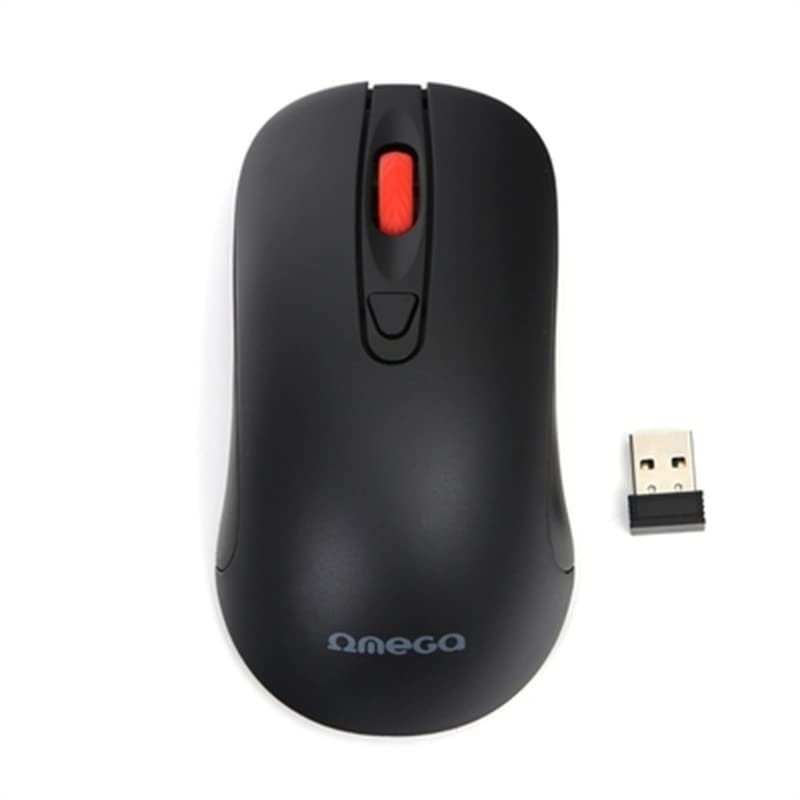
Image: The Omega OM0520WB Wireless Optical Mouse, shown in black. It features a sleek, ergonomic design with standard left and right click buttons, a scroll wheel, and a smooth finish.
- 왼쪽 클릭 버튼: 표준 기본 클릭 기능.
- 오른쪽 클릭 버튼: 표준 보조 클릭 기능.
- 스크롤 휠: 수직 스크롤과 가운데 클릭 기능.
- 광학 센서: Located on the underside, for precise tracking.
- 배터리 칸: Located on the underside, for inserting the AA battery.
- 전원 스위치: On/Off switch, usually on the underside of the mouse.
4. 설정 지침
Follow these steps to set up your Omega OM0520WB mouse:
- 배터리 설치 : Open the battery compartment cover on the underside of the mouse. Insert one AA battery, ensuring the polarity (+/-) matches the diagram inside the compartment. Close the cover securely.
- 마우스 켜기: 마우스 아랫면에 있는 전원 스위치를 찾아 '켜짐' 위치로 밀어주세요.
- 블루투스를 통해 연결:
- On your computer or laptop, navigate to the Bluetooth settings.
- 블루투스가 활성화되어 있는지 확인하십시오.
- 검색 new devices. The mouse should appear as 'Omega OM0520WB' or similar.
- Select the mouse to pair. Once paired, your mouse is ready for use.
5. 사용 설명서
Your Omega OM0520WB mouse is designed for intuitive use:
- 기본 탐색: 평평한 표면에서 마우스를 움직여 화면상의 커서를 조작하세요.
- 클릭: Use the left button for primary clicks (e.g., selecting items) and the right button for secondary clicks (e.g., opening context menus).
- 스크롤링: 문서 사이를 이동하려면 스크롤 휠을 위아래로 굴리세요. web pages. Press the scroll wheel for a middle-click function, if supported by your application.
- DPI 설정: The mouse operates at a fixed 1600 dpi, providing a balance of speed and precision for most tasks.
- 양손잡이 디자인: 대칭형 디자인으로 왼손잡이와 오른손잡이 사용자 모두 편안하게 사용할 수 있습니다.
6. 유지관리
마우스의 수명과 최적의 성능을 보장하려면 다음 유지 관리 지침을 따르세요.
- 청소: 부드럽고 마른 천을 사용하여 마우스 표면을 닦으세요. 잘 지워지지 않는 오염의 경우, 살짝 damp천에 물을 묻혀 닦으세요. 강한 화학 물질이나 연마성 세제는 사용하지 마세요.
- 광학 센서: 아래쪽 광학 센서를 깨끗하게 유지하고 먼지나 이물질이 묻지 않도록 하십시오.
- 배터리 교체: 마우스 성능이 저하되거나 작동이 멈추면 AA 배터리를 교체하십시오. 항상 새롭고 품질 좋은 배터리를 사용하십시오.
- 저장: When not in use for extended periods, turn off the mouse using the power switch to conserve battery life. Store it in a cool, dry place.
7. 문제 해결
If you encounter issues with your Omega OM0520WB mouse, refer to the following solutions:
- 마우스가 응답하지 않음:
- 마우스가 켜져 있는지 확인하세요.
- 배터리를 확인하세요. 필요하면 교체하세요.
- Verify that Bluetooth is enabled on your computer and the mouse is paired. Try re-pairing the mouse.
- Move the mouse closer to your computer to ensure a strong Bluetooth signal.
- 불규칙한 커서 움직임:
- 마우스 밑면의 광학 센서를 청소하세요.
- 마우스는 깨끗하고 반사되지 않으며 평평한 표면에서 사용하십시오. 마우스 패드를 사용하는 것이 좋습니다.
- 연결 문제:
- 컴퓨터를 다시 시작하고 다시 연결해 보세요.
- Remove the mouse from your computer's Bluetooth device list and then re-pair it.
- Ensure there are no other devices interfering with the Bluetooth signal.
8. 사양
| 모델명 | OM0520WB |
| 연결 기술 | 무선(블루투스) |
| 움직임 감지 기술 | 광학 |
| 디피에이 | 1600dpi |
| 버튼의 수 | 3(왼쪽, 오른쪽, 스크롤 휠) |
| 손의 방향 | 양손잡이 |
| 전원 | 1 x AA Lithium-ion battery (required) |
| 호환 장치 | 개인용 컴퓨터, 노트북 |
| 무게 | 약 73g |
| 색상 | 검은색 |
9. 보증 및 지원
Omega products are designed for reliability and performance. For information regarding warranty coverage, technical support, or service, please refer to the warranty card included with your product or visit the official Omega web사이트. 구매 증빙 자료로 구매 영수증을 보관하세요.


