소개
This manual provides essential information for the safe and efficient use of your Haier HW80-B14959TU1 Freestanding Washing Machine. Please read these instructions carefully before installation, operation, and maintenance. Keep this manual for future reference.

이미지: 오른쪽 앞면 view of the Haier HW80-B14959TU1 washing machine, showcasing its white finish, large dark porthole door, and black control panel with an LED display.
안전 지침
화재, 감전, 부상의 위험을 줄이기 위해 전기 제품을 사용할 때는 항상 기본적인 안전 예방 조치를 따르세요.
- 기기가 올바르게 접지되었는지 확인하십시오.
- 어린이가 제품 위에서 또는 제품 안에서 놀지 못하게 하십시오.
- 청소나 유지관리 작업을 하기 전에는 반드시 기기의 플러그를 뽑으세요.
- 제품이 손상되었거나 제대로 작동하지 않는 경우에는 제품을 작동하지 마십시오.
- 가연성 물질을 기기 근처에 두지 마십시오.
- Only use the appliance for its intended purpose of washing laundry.
설치
1. 풀기
Carefully remove all packaging materials. It is crucial to remove all transit bolts and their rubber bungs from the rear of the machine before operation. Failure to do so will cause excessive vibration and potential damage.
2. 포지셔닝
Place the washing machine on a firm, level floor. Adjust the leveling feet to ensure the machine is stable and does not rock. Maintain adequate space around the machine for ventilation and access.

Image: Diagram showing the dimensions of the Haier HW80-B14959TU1 washing machine: 85cm height, 59.5cm width, and 49.7cm depth.
3. 물 공급 연결
Connect the inlet hose to a cold water tap with a 3/4-inch thread. Ensure all connections are tight to prevent leaks. Do not overtighten.
4. 배수 연결
Securely attach the drain hose to a standpipe or a sink trap. Ensure the drain hose is not kinked or obstructed and is positioned at an appropriate height (between 60 cm and 100 cm from the floor).
5. 전기적 연결
전원 코드를 접지된 콘센트에 꽂으세요. 볼륨을 확인하세요.tage와 주파수가 기기 사양과 일치해야 합니다. 연장 코드나 어댑터를 사용하지 마십시오.
작업
1. 제어판 오버view
The control panel features an LED display, a program selection dial, and touch-sensitive buttons for various functions.
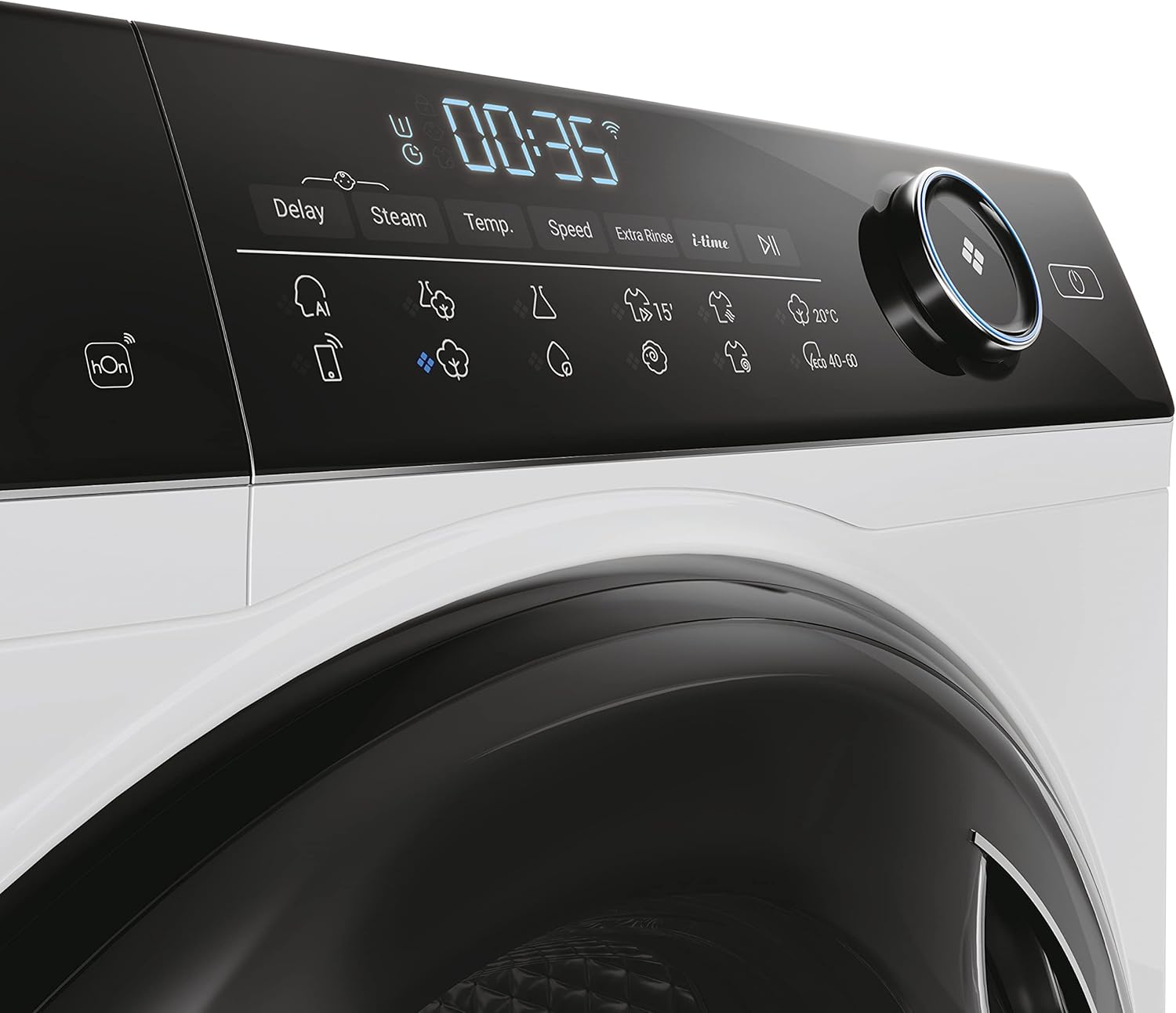
이미지: 클로즈업 view of the Haier HW80-B14959TU1 washing machine's black control panel, showing the LED display with '00:35' and icons for Delay, Steam, Temp, Speed, Extra Rinse, and i-Time, alongside the program selection dial.
2. 세탁물 넣기
Open the porthole door and load laundry into the drum. Do not overload the machine; ensure there is enough space for clothes to tumble freely. The maximum load capacity is 8 kg.
3. 세제 추가
Pull out the detergent dispenser drawer. Add the appropriate amount of detergent and fabric softener to the designated compartments. Refer to your detergent packaging for dosage recommendations.
4. 프로그램 선택
Turn the program selection dial to choose the desired wash program (e.g., Cotton, Synthetics, Delicates, Quick Wash). The LED display will show the default settings for the selected program.
5. 설정 조정
Use the touch buttons to adjust temperature, spin speed, or add special functions like 'Steam' or 'Extra Rinse' if available for the selected program.
6. 세탁 시작
Press the 'Start/Pause' button to begin the wash cycle. The machine will automatically lock the door and start filling with water.
7. 특수 기능
- 지연 시작: Allows you to postpone the start of a wash cycle for a specified number of hours.
- 직접 구동 모터: Provides quiet and efficient operation with fewer moving parts.
- 앱 제어: This model supports control via a mobile application, allowing remote scheduling and monitoring of wash cycles.
유지관리 및 청소
1. 세제 디스펜서
Regularly clean the detergent dispenser drawer to prevent residue buildup. Remove the drawer, rinse it under running water, and use a brush to clean any stubborn deposits.
2. 드럼 청소
Run a maintenance wash cycle (e.g., 'Drum Clean' or a hot wash with no laundry and a descaling agent) periodically to remove detergent residue and prevent odors.
3. 필터 청소
Locate the drain pump filter, usually at the bottom front of the machine. Open the cover, drain any residual water, and unscrew the filter. Clean the filter of lint and foreign objects, then reassemble securely.
4. 외부 관리
부드러운 천으로 기기 외부를 닦아주세요.amp 천. 연마성 세척제나 용매를 사용하지 마십시오.
문제 해결
| 문제 | 가능한 원인 | 해결책 |
|---|---|---|
| 기계가 시작되지 않습니다 | Power cord unplugged; door not closed properly; 'Start/Pause' not pressed. | 전원 연결을 확인하고, 문이 제대로 잠겼는지 확인한 후 '시작/일시정지' 버튼을 누르세요. |
| 과도한 진동 | 운반 볼트가 제거되지 않음; 기계가 수평이 아님; 하중이 고르지 않음. | Remove transit bolts and rubber bungs; adjust leveling feet; redistribute laundry. |
| 물 누출 | Hoses loose or damaged; detergent drawer overflowing. | Check hose connections; ensure detergent drawer is clean and not overfilled. |
| 불량한 세탁 결과 | Incorrect program; insufficient detergent; overloaded machine. | Select appropriate program; use correct detergent dosage; reduce load size. |
기술 사양
| 특징 | 사양 |
|---|---|
| 모델명 | HW80-B14959TU1 |
| 상표 | 하이얼 |
| 용량 | 8 킬로그램 |
| 최대 회전 속도 | 1400 RPM |
| 제품 크기(D x W x H) | 49.7 x 59.5 x 85cm |
| 품목 무게 | 65 킬로그램 |
| 에너지 효율 등급 | A |
| 모터 유형 | Direct Motion Motor |
| 특별 기능 | Delay Start, App Control |
| 컨트롤 타입 | 다이얼 |

Image: EU Energy Label for the Haier HW80-B14959TU1 washing machine, indicating an 'A' energy efficiency rating, 49 kWh/100 cycles, 8.0 kg capacity, 3:48 program duration, 48 L water consumption, and 70 dB noise level during spinning. For more details, visit 에너지 라벨.ec.europa.eu.

Image: Product Information Sheet for the Haier HW80-B14959TU1, detailing energy consumption, water consumption, spin speed, and other technical data as per EU regulations.
보증 및 고객 지원
This appliance comes with a manufacturer's guarantee of 24 months. For warranty claims or technical assistance, please contact Haier customer support.
For further information and support, please visit the official Haier web대지: www.haier.com.


