소개
Thank you for choosing the Carro 52-inch Low Profile Smart Ceiling Fan with Light. This manual provides essential information for the safe installation, operation, and maintenance of your new smart ceiling fan. Please read this manual thoroughly before installation and keep it for future reference.
This smart ceiling fan is designed to provide efficient air circulation and illumination, featuring smart control options via app, voice commands (Alexa, Google Assistant, Siri Shortcuts), and a wall control switch. Its low-profile design is ideal for various indoor spaces, including living rooms, bedrooms, and kitchens.
안전 정보
경고: To reduce the risk of fire, electric shock, or personal injury, always turn off power at the main circuit breaker or fuse box before beginning installation or performing any maintenance.
- All electrical connections must be in accordance with local codes, ordinances, or national electrical codes. If you are unfamiliar with proper electrical wiring, consult a qualified electrician.
- Ensure the installation site is structurally sound and can support the weight of the fan.
- Do not connect the fan to a dimmer switch unless specifically designed for ceiling fans. The included wall control switch is designed for this fan.
- This fan is designed for flush-mount installation only and cannot be angled.
- Requires Neutral Wire (White), Live Wire (Red or Black), Bare or Ground Wire (Green), and separate Load Wires (2 wires) for Fan & Light. Confirm your home's wiring compatibility before purchase.
패키지 내용
Carefully unpack all components and ensure all items are present before beginning installation. If any parts are missing or damaged, contact customer support.
- 천장선풍기 모터 조립
- 팬 블레이드 (3)
- LED Light Kit with Frosted Glass Cover
- Wall Control Switch
- 장착 하드웨어(나사, 전선 너트 등)
- 사용 설명서

Image: The Carro 52-inch Low Profile Smart Ceiling Fan with Light, showcasing its gold/black finish and three blades.
명세서
| 특징 | 세부 사항 |
|---|---|
| 상표 | 카로 |
| 모델 번호 | VWGS-523B-L11-G2-1 |
| 색상 | 골드/블랙 |
| 재료 | Engineered Wood (Blades), Glass (Shade) |
| 제품 치수 | 52인치 길이 x 52인치 너비 x 11.6인치 높이 |
| 실내/실외 사용 | 실내 |
| 전원 | 코드식 전기 |
| 설치 유형 | Flush Mount (Cannot be angled) |
| 광원 유형 | 주도의 |
| 명도 | 1062루멘 |
| 밝은 색상 | 따뜻한 빛(3000K) |
| 권tage | 120 볼트 |
| 왓tage | 68 와트 |
| 제어 방법 | App, Wall Control, Voice (Alexa/Google Assistant/Siri) |
| 모터 유형 | Reversible AC Motor |
| 품목 무게 | 16.7 파운드 |
설치
Before starting, ensure the power is turned off at the circuit breaker. It is recommended to have a second person assist with the installation.
1. 팬 장착
- 천장 배선함에 장착 브래킷을 고정하십시오. 배선함이 건물 구조물에 단단히 고정되었는지 확인하십시오.
- 팬 모터 어셈블리를 장착 브래킷에 부착합니다.

Image: The Carro 52-inch Low Profile Smart Ceiling Fan installed flush against a ceiling in a room.
2. 팬 배선
This fan requires specific wiring for proper operation. You will need a Neutral Wire (White), Live Wire (Red or Black), Bare or Ground Wire (Green), and two separate Load Wires for the fan and light functions.
- Connect the fan's light wire to the light load wire from the ceiling.
- Connect the fan's motor wire to the fan load wire from the ceiling.
- Connect the fan's neutral wire to the neutral wire from the ceiling.
- Connect the fan's ground wire to the ground wire from the ceiling.

Image: A detailed diagram illustrating the wiring connections for the Carro Smart Ceiling Fan's wall control switch, showing connections for Live, Neutral, Ground, and separate Load wires for fan and light.
3. Wiring Instruction Video
For a visual guide on wiring, please refer to the official instruction video below:
Video: A step-by-step guide demonstrating the wire connection process for the smart ceiling fan, showing how to link light, neutral, motor, and ground wires.
4. Attaching the Blades and Light Kit
- Attach the fan blades securely to the motor housing.
- Install the LED light kit and secure the frosted glass cover.
Setup & Smart Features
Your Carro Smart Ceiling Fan offers multiple control methods for convenience.
1. 벽 제어
The included wall control switch allows direct control of fan speeds and light functions. The fan and light can be operated separately.
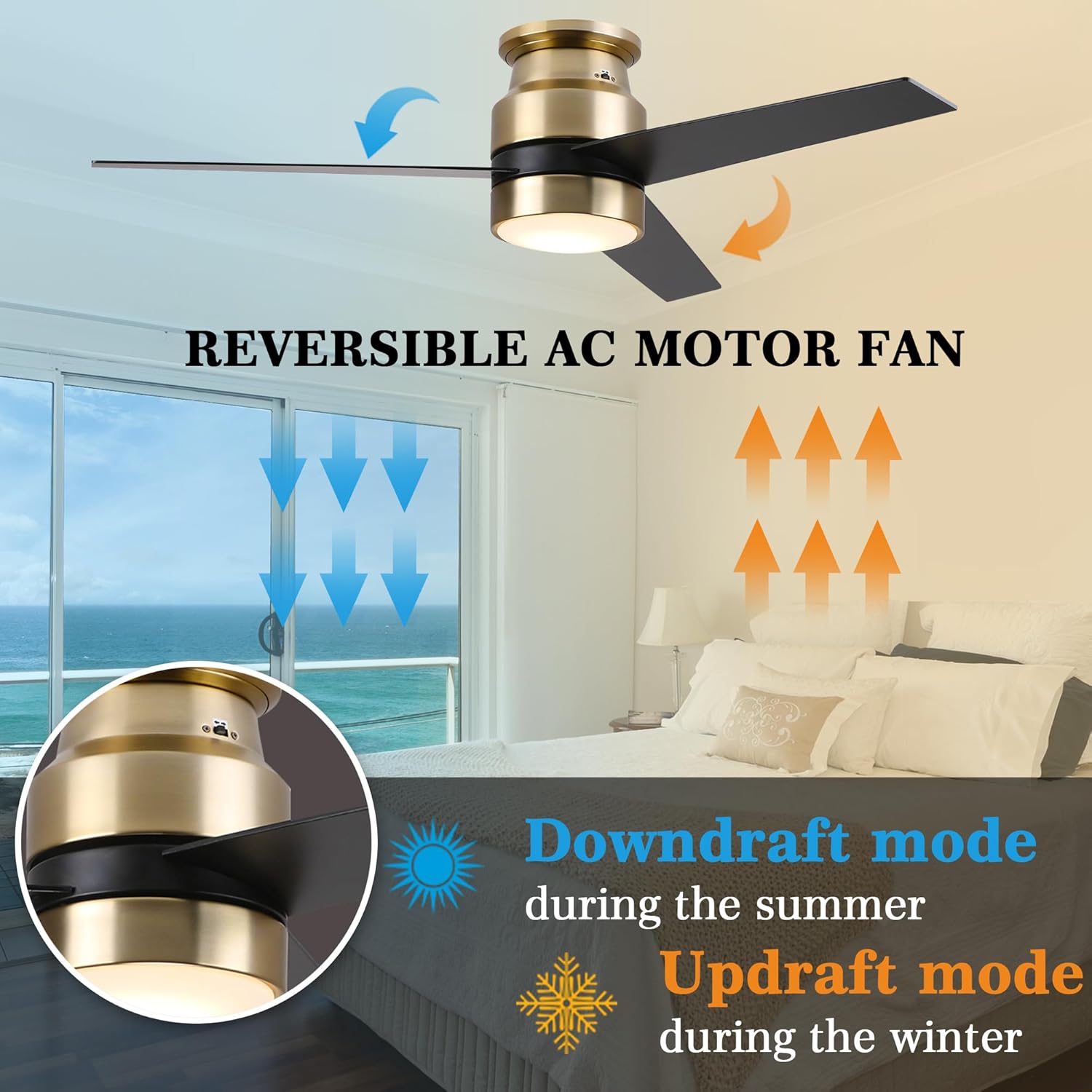
Image: The Carro Smart Ceiling Fan wall control switch, showing buttons for fan speed, light on/off, and other functions.
2. 앱 제어
Download the official Carro app from your smartphone's app store. Follow the in-app instructions to connect your fan. The fan requires a 2.4GHz Wi-Fi connection for initial setup; after connection, it can operate on 5GHz networks.
The app provides full functionality, including fan speed adjustment, light control, and advanced features like scheduling and timing (up to 24 hours).

Image: An illustration showing the four control methods for the Carro Smart Ceiling Fan: Wall Control, App Control, Voice of Alexa, and Google Assistant, with a couple dancing in a room with the fan.
3. Voice Control (Alexa, Google Assistant, Siri Shortcuts)
Integrate your Carro Smart Ceiling Fan with your preferred smart home ecosystem. Once connected via the app, you can use simple voice commands to control the fan and light.
- "Alexa, turn on ceiling fan to speed 3."
- "Hey Google, turn off the ceiling fan and light."
- "Siri, set fan to low."

Image: A kitchen scene demonstrating voice control, with an Amazon Echo device and speech bubbles showing commands like "Alex, turn on ceiling fan to speed 3" and "Alex turn off the ceiling fan and light."
작동 지침
팬 속도 제어
Adjust the fan speed using the wall control or the Carro app. The fan offers multiple speed settings to suit your comfort needs.
조명 제어
Turn the LED light on or off using the wall control, app, or voice commands. The integrated LED light provides 1062 Lumens of 3000K warm light.
가역 모터 기능
The fan features a reversible AC motor, allowing you to change the direction of airflow for year-round comfort. This function is typically controlled via a button on the fan housing or through the app.
- 하강풍 모드(여름): 날개가 시계 반대 방향으로 회전하면서 시원한 공기를 아래로 밀어냅니다.
- 상승기류 모드(겨울): 날개가 시계 방향으로 회전하면서 차가운 공기를 위로 끌어올리고 천장 근처에 갇힌 따뜻한 공기를 순환시킵니다.

Image: An illustration demonstrating the downdraft mode (blue arrows, pushing air down for summer) and updraft mode (orange arrows, pulling air up for winter) of the reversible AC motor fan.
일정 관리 및 타이머
Utilize the Carro app to set schedules for your fan and light to automate operation according to your daily routine. You can also set countdown timers for automatic shut-off.
Image: A visual representation of the timer and scheduling features, showing examples like "Timer: 7:30/ON" and "Countdown: 15 min/OFF" with people waking up and sleeping.
유지
정기적인 유지 관리는 천장 선풍기의 수명과 성능을 연장하는 데 도움이 됩니다.
- 청소: To avoid damage to the finish, clean the fan with a soft, damp cloth only. Do not use abrasive cleaners or solvents.
- 블레이드 관리: 날 나사가 제대로 조여졌는지 주기적으로 확인하십시오. 날이 헐거워지면 흔들림과 소음이 발생할 수 있습니다.
- 조명 키트: The LED light kit is integrated and designed for long life (50,000+ hours). Replacement of individual LEDs is not typically required.
문제 해결
선풍기에 문제가 발생하면 다음의 일반적인 문제 해결 단계를 참조하십시오.
| 문제 | 가능한 원인 | 해결책 |
|---|---|---|
| 팬이 작동하지 않습니다 | No power; loose wiring; incorrect wiring; circuit breaker tripped. | Check power supply; ensure all wire connections are secure; verify wiring against diagram; reset circuit breaker. |
| 빛이 작동하지 않습니다 | Loose wiring; incorrect wiring; LED failure (rare). | Check light wire connections; verify wiring; contact support if LED is suspected to be faulty. |
| 팬이 흔들린다 | Loose blades; unbalanced blades; loose mounting bracket. | Tighten blade screws; ensure blades are balanced (balancing kit not included, but can be purchased); secure mounting bracket. |
| Wi-Fi/앱에 연결할 수 없습니다 | Incorrect Wi-Fi band (not 2.4GHz); weak signal; incorrect password. | Ensure your router is broadcasting a 2.4GHz network; move closer to router; re-enter Wi-Fi password carefully. |
| 음성 제어가 응답하지 않습니다 | Not linked to smart assistant; incorrect voice commands. | Verify fan is linked in Alexa/Google Home app; use precise commands as listed in manual or app. |
보증 및 지원
Carro offers a 5-year guarantee to resolve any quality problems related to the motor. If there is any problem with the product, please contact us. We will be glad to assist with replacement or refund.
For further assistance, please visit the official Carro web사이트를 방문하거나 고객 지원팀에 직접 문의하세요. 보증 청구를 위해 구매 영수증을 보관하세요.
연락처 정보: Please refer to the product packaging or official Carro web최신 연락처 정보는 사이트에서 확인하세요.


