1. 서론
This manual provides detailed instructions for the safe and efficient operation of your InFocus P120 INL412 Multimedia Projector (Model INL4128). Please read this manual thoroughly before using the projector and keep it for future reference. This projector is designed for high-quality image projection, suitable for various applications including presentations, home entertainment, and gaming.
2. 안전 정보
프로젝터 손상을 방지하고 사용자의 안전을 확보하려면 다음 안전 예방 조치를 준수하세요.
- 통풍: 프로젝터 주변에 충분한 환기가 이루어지도록 하십시오. 통풍구를 막지 마십시오. 벽이나 기타 물체와의 최소 거리는 30cm(12인치) 이상 유지하십시오.
- 전원: 지정된 전원 공급 장치와 볼륨만 사용하십시오.tage. 전원 코드를 단단히 연결하십시오.
- 열: The projector generates heat during operation. Do not touch the projector's vents or exhaust areas directly after use.
- 광 출력: l을 사용할 때 프로젝터 렌즈를 직접 쳐다보지 마십시오.amp 강렬한 빛이 눈 손상을 유발할 수 있으므로 켜져 있어야 합니다.
- 놓기: Place the projector on a stable, level surface. Avoid placing it in direct sunlight, near heat sources, or in areas with high humidity or dust.
- 청소: 청소하기 전에 전원 코드를 분리하세요. 부드럽고 마른 천을 사용하세요. 액체 또는 에어로졸 세척제는 사용하지 마세요.
- 서비스: 프로젝터를 직접 수리하려고 하지 마십시오. 모든 수리는 자격을 갖춘 서비스 담당자에게 맡기십시오.
3. 제품 오버view
3.1 Top Panel and Lens Area
The top panel features the control buttons for basic operation and the lens area with focus and zoom adjustments.

그림 3.1: 상단 view of the InFocus P120 INL412 projector, highlighting the control panel on the right and the lens adjustment area on the left. The InFocus logo is visible on the top surface.
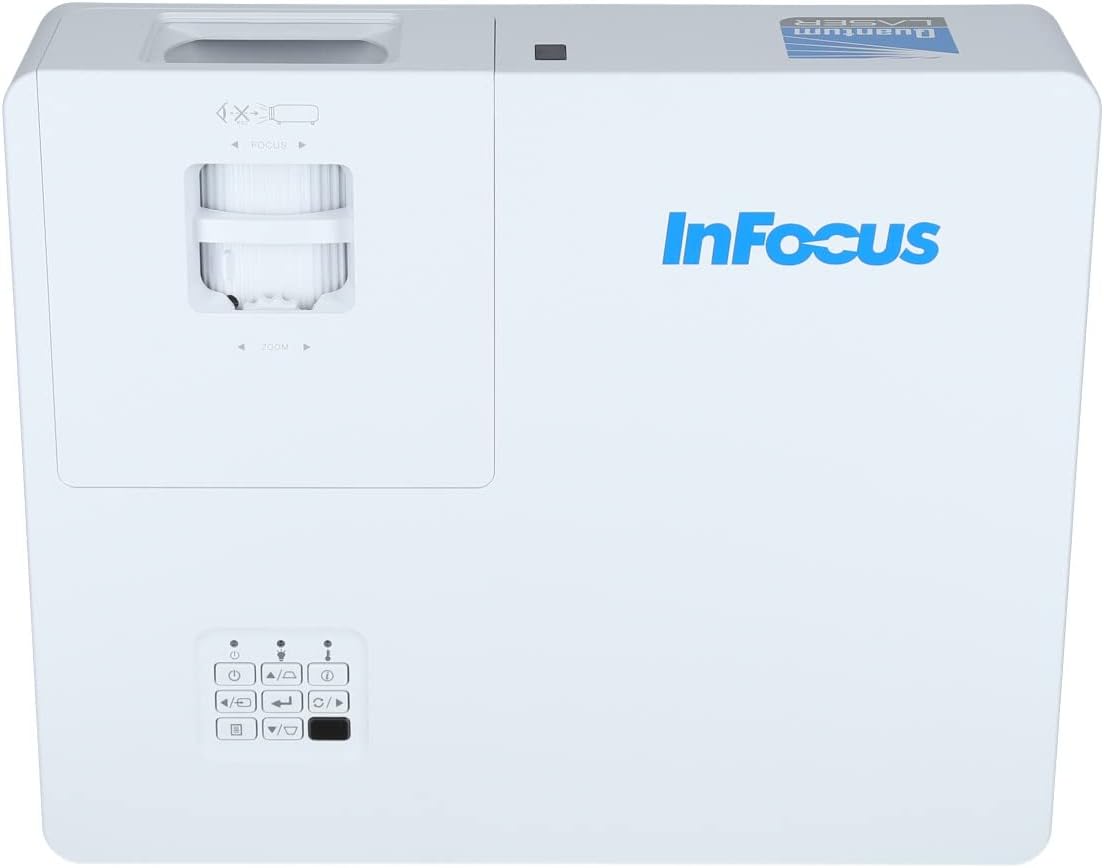
그림 3.2: 더 자세히 view of the projector's top panel, showing the focus and zoom rings near the lens opening and the array of control buttons for power, menu, source selection, and navigation.
3.2 후면 패널 연결
후면 패널에는 외부 장치 연결을 위한 다양한 입력 및 출력 포트가 있습니다.

Figure 3.3: Rear panel of the InFocus P120 INL412 projector, displaying a comprehensive array of connectivity options including HDMI (x2), USB, S-Video, Ethernet (LAN), VGA In (x2), VGA Out, RS232, and Audio In/Out ports. The power input is located on the bottom left.
주요 포트는 다음과 같습니다.
- HDMI 1 및 2: For connecting high-definition digital video and audio sources.
- USB: For connecting USB devices, potentially for media playback or firmware updates.
- S- 비디오 : For connecting older video sources.
- VGA IN 1 & 2: For connecting computers or other devices with VGA output.
- VGA 출력: 외부 모니터 연결용입니다.
- 이더넷(LAN): 네트워크 연결 및 제어를 위해.
- Audio IN 1 & 2 / Audio OUT: 아날로그 오디오 연결용입니다.
- RS232 : 직렬 제어용입니다.
- 전원 입력: AC 전원 코드를 연결합니다.
3.3 Front and Side Panels
The front panel houses the projection lens and front ventilation, while the side panels feature additional ventilation grilles.

그림 3.4: 전면 view of the InFocus P120 INL412 projector, displaying the main projection lens on the right and the extensive front ventilation grille on the left, crucial for heat dissipation.
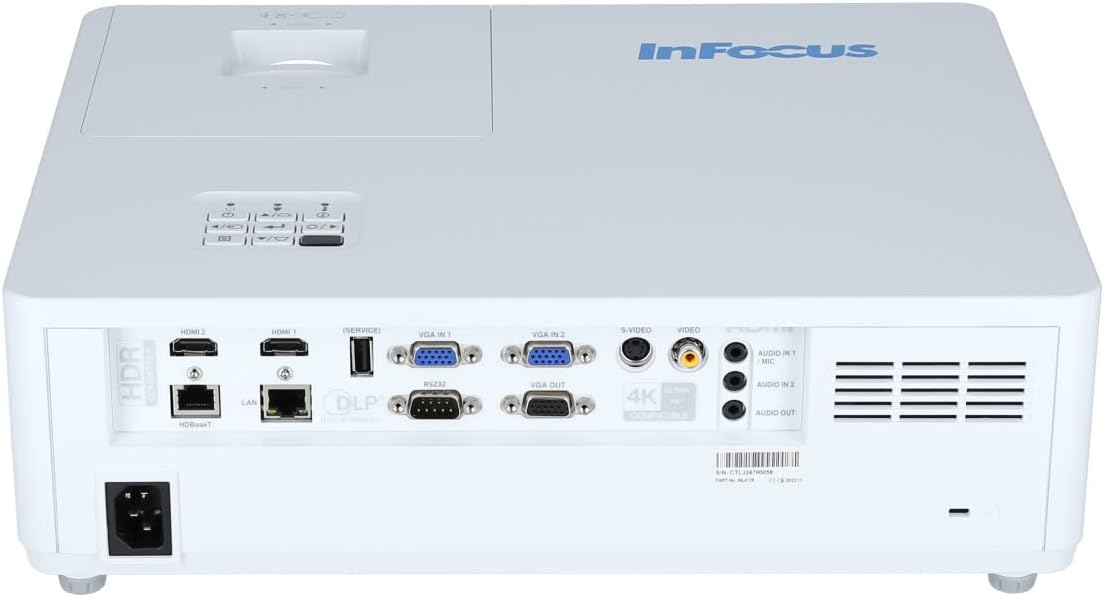
그림 3.5: 측면 view of the InFocus P120 INL412 projector, illustrating the side ventilation grilles that contribute to maintaining optimal operating temperature.
4. 설정
4.1 프로젝터 배치
Position the projector on a stable, flat surface or mount it securely. Ensure the projector is within the optimal projection distance for your screen size. Maintain clear space around the projector for proper ventilation.
4.2 장치 연결
Before connecting any cables, ensure the projector and all source devices are powered off.
- HDMI 연결: Connect an HDMI cable from your source device (e.g., laptop, Blu-ray player, gaming console) to either the HDMI 1 or HDMI 2 port on the projector.
- VGA 연결: Connect a VGA cable from your computer to either VGA IN 1 or VGA IN 2. For audio, connect a separate audio cable from your computer's audio output to the corresponding Audio IN port on the projector.
- USB 연결: Insert a USB drive into the USB port for media playback (if supported by firmware) or service functions.
- 이더넷(LAN) 연결: Connect an Ethernet cable to the LAN port for network control or updates.
- 오디오 출력: If using external speakers, connect an audio cable from the Audio OUT port on the projector to your audio system.
4.3 전원 연결
Connect the power cord to the projector's power input and then plug the other end into a grounded electrical outlet.
5. 사용 설명서
5.1 전원 켜기/끄기
- 전원 켜기: 를 누르세요 힘 프로젝터 제어판이나 리모컨의 버튼을 누르세요. 전원 표시등의 색상이 바뀝니다.
- 전원 끄기 : 를 누르세요 힘 button again. A confirmation message may appear. Press the button a second time to confirm shutdown. Allow the projector to cool down before unplugging it.
5.2 초점 및 줌 조정
Rotate the focus ring around the lens until the image appears sharp and clear. Use the zoom ring to adjust the image size to fit your screen.
5.3 입력 소스 선택
를 누르세요 원천 button on the control panel or remote control to cycle through available input sources (HDMI 1, HDMI 2, VGA 1, VGA 2, S-Video, USB). Select the input corresponding to your connected device.
5.4 메뉴 탐색
사용하세요 메뉴 button to access the on-screen display (OSD) menu. Use the arrow buttons to navigate through menu options and the 입력하다 선택하려면 버튼을 누르세요. 메뉴 다시 종료합니다.
6. 유지관리
6.1 렌즈 청소
Gently wipe the lens with a soft, lint-free cloth specifically designed for optical surfaces. Do not use abrasive cleaners or excessive force, as this can scratch the lens.
6.2 Cleaning the Projector Exterior
Use a soft, dry cloth to clean the projector's casing. For stubborn dirt, dampen the cloth slightly with water, then wipe dry immediately. Avoid getting liquids into the projector's openings.
6.3 인공호흡기 관리
Regularly check the projector's ventilation grilles for dust accumulation. Use a soft brush or a vacuum cleaner with a brush attachment to gently remove dust from the vents to ensure proper airflow and prevent overheating.
7. 문제 해결
7.1 이미지가 표시되지 않음
- 프로젝터 전원이 켜져 있고 전원 표시등이 켜져 있는지 확인하십시오.
- Verify that the video cable (HDMI, VGA, etc.) is securely connected to both the projector and the source device.
- 프로젝터에서 올바른 입력 소스가 선택되었는지 확인하세요.
- Confirm that the source device (laptop, player) is powered on and outputting a signal.
7.2 이미지가 흐릿하거나 초점이 맞지 않음
- 프로젝터 렌즈의 초점 링을 조정하여 이미지가 선명해질 때까지 맞추십시오.
- Ensure the projector is at the correct distance from the screen.
- 프로젝터 렌즈가 더러워 보이면 청소하세요.
7.3 소리가 나지 않습니다
- If using HDMI, ensure the source device's audio output is set to HDMI.
- If using VGA, ensure a separate audio cable is connected from the source to the projector's Audio IN port.
- 프로젝터와 소스 기기의 볼륨 설정을 모두 확인하십시오.
- If using external speakers, ensure they are properly connected to the Audio OUT port and powered on.
8. 사양
| 특징 | 세부 사항 |
|---|---|
| 상표 | 인포커스 |
| 제조업체 | 초점에 맞춰 |
| 모델명 | P120 INL412 |
| 모델 번호 | INL4128 |
| 년도 | 2023 |
| 하드웨어 인터페이스 | Ethernet, HDMI, S-Video, USB |
| 항목 수 | 1 |
| 종횡비 | 16시 9분 |
| 왓tage | 341 와트 |
| 배터리 포함 | 아니요 |
| 필요한 배터리 | 아니요 |
| 폼 팩터 | 데스크탑 |
| 장착 유형 | 테이블 마운트 |
| 원격 제어 포함 | 예 |
| 제품 치수 | 56.13 x 46.48 x 25.15cm |
| 품목 무게 | 5.5kg |
| 최대 이미지 크기 | 308.28인치 |
| 최소 이미지 크기 | 910.63 밀리미터 |
| 첫 번째 가능한 날짜 | 5년 2022월 XNUMX일 |
9. 보증 및 지원
For warranty information and technical support, please refer to the documentation included with your purchase or visit the official InFocus web사이트. 보증 청구를 위해 구매 증빙 자료를 보관하세요.


