소개
This manual provides comprehensive instructions for setting up, operating, and maintaining your new Tecno Pop 5 LTE smartphone. Designed for seamless performance and a vibrant user experience, your device comes equipped with advanced features to keep you connected and entertained.

Figure 1: Tecno Pop 5 LTE - Front and Back View
제품 끝view 동영상
이 공식 영상을 시청하여 빠르게 살펴보세요.view of the Tecno Pop 5 LTE's main features and design.
Video 1: Tecno Pop 5 LTE Product Overview
패키지 내용
Upon unboxing your Tecno Pop 5 LTE, please ensure all the following items are present:
- Tecno Pop 5 LTE Smartphone
- 전원 어댑터
- 마이크로 USB 케이블
- SIM 이젝터 도구
설치 가이드
SIM 카드 및 SD 카드 설치
Your Tecno Pop 5 LTE supports dual Nano SIM cards and expandable memory via a microSD card.
- 기기 측면에서 SIM 트레이를 찾으세요.
- SIM 꺼내기 도구를 트레이 옆에 있는 작은 구멍에 넣고 트레이가 튀어나올 때까지 가볍게 누르세요.
- 나노 SIM 카드 및/또는 microSD 카드를 트레이의 지정된 슬롯에 올바른 방향으로 삽입하십시오.
- 트레이를 조심스럽게 장치 안으로 밀어 넣어 측면과 맞닿게 합니다.
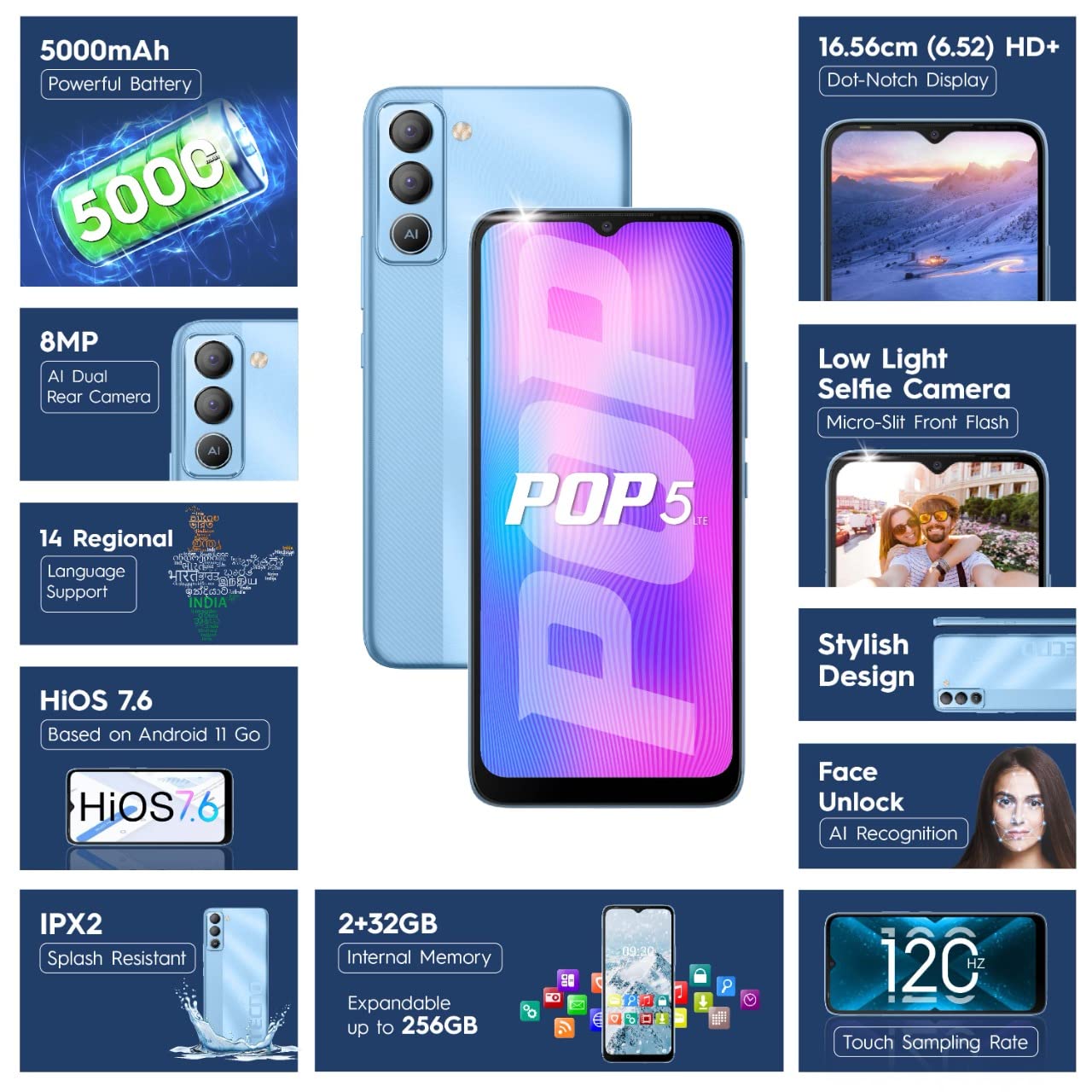
Figure 2: SIM Tray Insertion
초기 전원 켜기 및 설정
Press and hold the power button located on the side of the device until the Tecno logo appears. Follow the on-screen prompts to select your language, connect to Wi-Fi, and set up your Google account.
주요 기능 이상view
생생한 디스플레이
The Tecno Pop 5 LTE features a vibrant 6.52-inch Dot Notch HD+ display with a 90% screen-to-body ratio, offering an immersive viewing experience. With up to 480 nits maximum brightness, content remains clear even in bright conditions.

Figure 3: Immersive Dot Notch Display
오래 지속되는 배터리
강력한 기능을 갖춘 5000mAh 배터리, the Tecno Pop 5 LTE provides extended usage times, including up to 48 hours of video playback and 31 days of standby time. The Ultra Power Saving Mode further optimizes battery life.
고급 카메라 시스템
Capture clear and detailed images with the 8MP Portrait Dual rear Camera, featuring excellent image processing and a dual flashlight for enhanced low-light photography. For selfies, the 5MP F2.0 Aperture Front Camera includes a Micro Slit Front Flash with adjustable brightness for brighter night selfies.

그림 4: 후면 카메라 모듈
성능 및 스토리지
The device runs on a 2GB 램 and is powered by a MediaTek Helio A22 2GHz Quad-core processor, ensuring smooth daily operations. It comes with 32GB 내장 저장공간, expandable up to 256GB, providing amp앱과 미디어를 위한 공간입니다.
소프트웨어 및 보안
Your smartphone operates on HiOS 7.6 based on Android 11, offering a user-friendly interface and various localized features. Security features include 얼굴 인식 잠금 해제 with closed eye protection for instant and secure access. Additional features like Kids Mode, Anti-Theft Alarm, Vault 2.0, and Voice Changer enhance usability and safety.
향상된 내구성
The Tecno Pop 5 LTE is Splash Resistant up to IPX2 rating, providing protection against water splashes.
장치 작동
기본 탐색
Navigate your device using intuitive touch gestures. The 120Hz 터치 Samp링율 ensures a smoother and more responsive touch experience.
Using Face Unlock
To set up Face Unlock, go to 설정 > 보안 > 얼굴 인식 잠금 해제 and follow the instructions. Once set up, simply look at your phone to unlock it instantly.
카메라 기능
Open the Camera app to access various modes like AI Portrait, HDR, AI Beauty, and Filters. Tap the shutter button to capture photos or switch to video mode for 1080P video recording.
절전 모드
To extend battery life, activate Ultra Power Saving Mode via the quick settings panel or in Settings > Battery Lab.
Regional Language Support
The device supports 14 regional languages. To change your device language, go to Settings > System > Languages & input > Languages.
Phone Cloner
Easily migrate your data from an old device to your new Tecno Pop 5 LTE using the Phone Cloner feature, which allows one-tap data migration without using mobile data.
유지 보수 및 관리
배터리 관리
To maximize battery lifespan, avoid extreme temperatures and try to keep the battery charge between 20% and 80%. Use only the provided adaptor and Micro USB cable for charging.
장치 청소
Use a soft, lint-free cloth to gently wipe the screen and body of your phone. Avoid using harsh chemicals or abrasive materials.
소프트웨어 업데이트
Regularly check for and install software updates to ensure your device has the latest features, security patches, and performance improvements. You can find updates in 설정 > 시스템 > 시스템 업데이트.
문제 해결
일반적인 문제 및 솔루션
- 장치가 켜지지 않음: 배터리가 충전되어 있는지 확인하십시오. 전원을 켜기 전에 최소 15분 동안 휴대폰을 충전기에 연결해 두세요.
- 화면이 반응하지 않음: Try restarting the device by holding the power button for 10-15 seconds. If the issue persists, a factory reset might be necessary (참고: 이렇게 하면 모든 데이터가 삭제됩니다.).
- 네트워크 신호가 약함: SIM 카드 삽입 상태를 확인하세요. 네트워크 커버리지가 더 좋은 지역으로 이동하세요.
- 앱 충돌: 문제가 있는 앱의 캐시를 지웁니다.설정 > 앱 및 알림 > 앱 정보 > [앱 이름] > 저장공간 및 캐시 > 캐시 지우기문제가 계속되면 앱을 다시 설치하세요.
기술 사양
자세한 사양
| 특징 | 세부 사항 |
|---|---|
| 모델 번호 | BD4i |
| 운영 체제 | HiOS 7.6 based on Android 11 |
| 숫양 | 2GB (XNUMX기가바이트) |
| 내부 저장소 | 32GB (최대 256GB까지 확장 가능) |
| 프로세서 | MediaTek Helio A22, 2 GHz Quad-core |
| 표시하다 | 6.52" Dot Notch HD+ (720p), 480 nits max. brightness, 120Hz Touch Samp링율 |
| 후방 카메라 | 8MP + AI Lens, Dual Flashlight, F2.0 Aperture, AI Portrait, HDR, AI Beauty, Filters, 16 AI Scene Detection, 4X Zoom, 1080P Video |
| 전면 카메라 | 5MP F2.0 Aperture, Micro Slit Front Flash |
| 배터리 | 5000mAh 리튬 폴리머 |
| 연결성 | Cellular (LTE), Bluetooth, Wi-Fi, USB, GPS/GNSS/BEIDOU/Galileo |
| 오디오 잭 | 3.5mm (XNUMXmm) |
| 치수 | 16.5 x 7.6 x 0.9cm |
| 무게 | 195g |
| 색상 | 아이스 블루 |
| 특별 기능 | Enhanced Regional Language Supports (14 languages), Kids Mode, Anti Theft Alarm, Vault 2.0, Voice Changer, Splash Resistant (IPX2), Face Unlock (0.93 Sec Instant Unlock) |
보증 및 지원
제품 지원
Your Tecno Pop 5 LTE comes with a 1년 보증 from the manufacturer, G Mobiles India.
For any technical assistance, service, or warranty claims, please contact Tecno customer support. You can find more information on their official website or visit one of their 950+ Service Centers across India.
Manufacturer: G Mobiles India, Ismartu India Private Limited, D-197 and 198, Sector 63, Noida, Gautam Buddha nagar, Uttar Pradesh 201301.
Importer: G-Mobile Devices Private Limited, Unit No. B 301, Third Floor Tower B Plot no 7, Sec - 142, Noida, Uttar Pradesh PIN - 201301.
For further information, you may also visit the product detail page on 아마존.인.


