소개
This manual provides instructions for the setup, operation, and maintenance of your RCA RCDC45 Alarm Clock Caddy Charging Station. Please read this manual thoroughly before using the device to ensure proper functionality and safety. This device combines an alarm clock with a convenient storage caddy and USB charging capabilities.
중요한 안전 정보
- Ensure the device is connected to an AC power outlet with the correct voltage.
- 이 제품은 실내에서만 사용하도록 설계되었습니다.
- 기기를 물, 습기 또는 극한 온도에 노출시키지 마세요.
- 장치를 분해하거나 개조하지 마십시오. 모든 정비는 자격을 갖춘 기술자에게 맡기십시오.
- 라디에이터, 난방 장치, 스토브 또는 기타 장치(예: 열원)에서 장치를 멀리 두십시오. amp열을 생성하는 발전기.
패키지 내용
- RCA RCDC45 Alarm Clock Caddy Charging Station
- AC 전원 어댑터
- CR2032 Battery (for backup)
제품 특징
- 1-inch tall / 3.25-inch diagonal red LED display with 4-level brightness control.
- Integrated small device and item organizer with a soft, non-scratch interior floor.
- USB charging port (5V/2A) for compatible devices.
- Alarm clock with 3 separate alarms.
- Displays indoor temperature in either Fahrenheit (°F) or Celsius (°C).
- Battery backup option (CR2032 battery included) to retain time settings during power outag에스.
제품 끝view
Familiarize yourself with the various components of your alarm clock caddy.

그림 1: 전면 View. This image displays the front of the RCA RCDC45 Alarm Clock Caddy, featuring its prominent red LED digital display showing the time 6:18. The device is black with a smooth finish.

그림 2: 후면 View 및 제어. The back of the unit features the USB charging port on the left, followed by three control buttons: 아래에, UP, 그리고 세트. These buttons are used for adjusting time, alarms, and other settings.

Figure 3: Storage Caddy in Use. This image illustrates the integrated storage caddy, shown holding a remote control, a pair of eyeglasses, and two pens. The caddy provides a convenient space for organizing small items.

Figure 4: Labeled Features. This diagram highlights the key features of the device, including the large dimmable display, the storage space, the USB charging port, and indicates its dual alarm capability.
설정
- AC 전원 연결: Plug the provided AC power adapter into the DC IN jack on the back of the alarm clock, then plug the adapter into a standard wall outlet. The display will light up.
- 백업 배터리를 설치하세요: Open the battery compartment on the bottom of the unit. Insert the CR2032 battery (included) with the correct polarity (+/-). This battery retains time settings during a power outage, though the display will not be active and USB charging will not function without AC power.
작동 지침
시간 설정
- 를 누르고 계세요 세트 button on the back of the unit for approximately 3 seconds until the hour digits begin to flash.
- 사용하세요 UP or 아래에 buttons to adjust the hour. Pay attention to the AM/PM indicator if present.
- 를 누르세요 세트 버튼을 다시 눌러 시간을 확인하고 분 설정으로 이동하세요. 분 숫자가 깜빡입니다.
- 사용하세요 UP or 아래에 버튼을 사용하여 분을 조정합니다.
- 를 누르세요 세트 분을 확인하고 시간 설정 모드를 종료하려면 버튼을 한 번 더 누르십시오.
Setting Alarms (Alarm 1, Alarm 2, Alarm 3)
This device supports up to three independent alarms.
- 반복해서 누르세요 세트 button (do not hold) until 'AL1' (Alarm 1) appears on the display and the hour digits flash.
- 사용하세요 UP or 아래에 원하는 알람 시간을 설정하는 버튼입니다.
- 누르다 세트 시간을 확인하고 분 설정으로 이동합니다.
- 사용하세요 UP or 아래에 원하는 알람 시간을 분 단위로 설정하는 버튼입니다.
- 누르다 세트 to confirm the minutes. The display will show 'OFF' or 'ON'. Use UP or 아래에 to toggle the alarm ON or OFF.
- 누르다 세트 to save Alarm 1 settings.
- Repeat steps 1-6 for 'AL2' (Alarm 2) and 'AL3' (Alarm 3) by pressing 세트 until the respective alarm indicator appears.
- To stop a sounding alarm, press any button. The alarm will reset for the next day.
디스플레이 밝기 조정
The display has 4 levels of brightness.
- While the clock is displaying the time, repeatedly press the 아래에 button to cycle through the 4 brightness levels (High, Medium, Low, Off). Select your preferred brightness.
온도 표시 (°F/°C)
The device displays the indoor temperature.
- 화씨(°F)와 섭씨(°C) 사이를 전환하려면 다음을 누릅니다. UP button while the clock is displaying the time.
USB 충전
The integrated USB port allows you to charge compatible devices.
- Locate the USB charging port on the back of the unit.
- 기기의 USB 충전 케이블을 포트에 연결하세요.
- 케이블의 다른 쪽 끝을 기기에 연결하세요. 충전이 자동으로 시작됩니다.
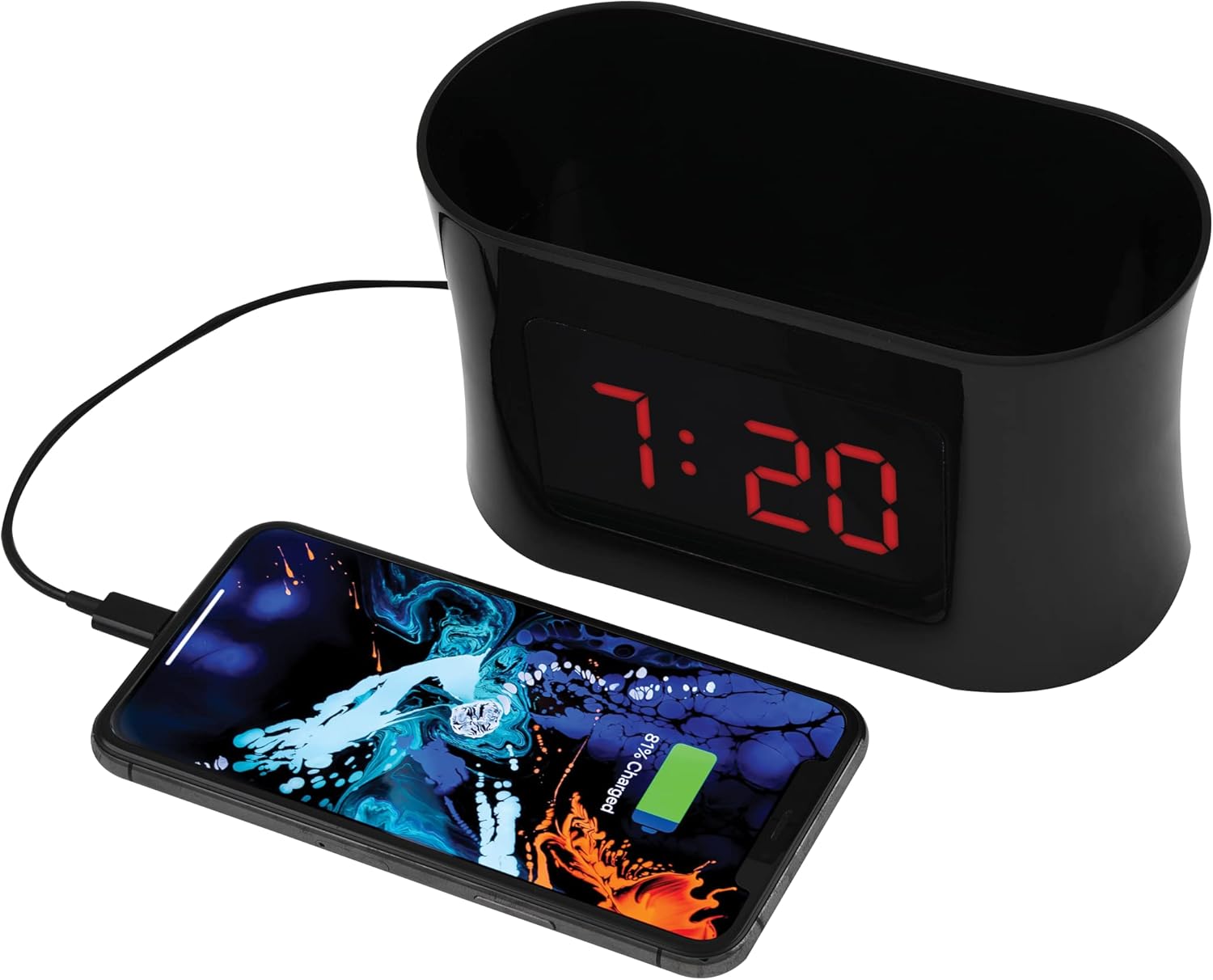
Figure 5: USB Charging. This image shows a smartphone connected to the USB port of the alarm clock caddy, illustrating its charging capability.
Using the Storage Caddy
The top compartment serves as a convenient organizer for small items.
- Place items such as remote controls, eyeglasses, pens, or other small personal devices into the caddy.
- The interior floor is designed with a soft, non-scratch material to protect your belongings.
유지
관리 및 청소
- 청소하기 전에 전원 콘센트에서 장치의 플러그를 뽑으십시오.
- 부드럽고 마른 천으로 외부 표면을 닦으세요.
- 연마성 세척제, 왁스 또는 용제는 마감재를 손상시킬 수 있으므로 사용하지 마십시오.
- Ensure no liquids enter the device's openings.
문제 해결
Refer to the table below for solutions to common issues.
| 문제 | 해결책 |
|---|---|
| Display is blank during a power outage. | The battery backup retains time settings but does not power the display or USB charging port. These functions resume when AC power is restored. |
| Difficulty setting time or alarms. | 버튼을 누른 상태로 유지하고 있는지 확인하십시오. 세트 button for 3 seconds to enter time setting mode, or pressing it repeatedly to cycle through alarm settings. Use UP/아래에 buttons to adjust values. Refer to the 'Operating Instructions' section for detailed steps. |
| USB 충전이 작동하지 않습니다. | Verify the AC power adapter is securely plugged into both the clock and a working wall outlet. Ensure your device's charging cable is fully inserted into both the clock's USB port and your device. Confirm your device is compatible with 5V/2A charging. |
| Temperature display is incorrect or not showing. | Ensure the device is in a stable indoor environment. If the issue persists, try unplugging and re-plugging the AC adapter to reset the unit. |
명세서
| 특징 | 세부 사항 |
|---|---|
| 상표 | (주)알에이씨에이 |
| 모델 | RCDC45 |
| 디스플레이 유형 | 디지털 LED(적색) |
| 디스플레이 크기 | 1-inch tall / 3.25-inch diagonal |
| 밝기 조절 | 4단계 |
| USB 충전 포트 | 5V/2A |
| 알람 | 3 separate alarms |
| 온도 표시 | Indoor (°F/°C) |
| 전원 | AC 전원 |
| 배터리 백업 | CR2032 (포함) |
| 색상 | 검은색 |
| 제조업체 | Voxx International, Inc |

그림 6: 제품 치수 This image provides the approximate dimensions of the alarm clock caddy, indicating a length of 15.9 cm and a height of 9 cm.
보증 및 지원
This RCA product is covered by a limited manufacturer's warranty. For specific warranty terms and conditions, please refer to the documentation included with your purchase or contact RCA customer support.
For technical assistance or customer service inquiries, please visit the official RCA website or contact their support line. Contact details are typically found on the product packaging or the manufacturer's web대지.


