소개
Thank you for choosing the MageGee GT860 96-Key Wired RGB Backlit Gaming Keyboard. This keyboard is designed for both gaming and daily use, featuring a compact layout, ergonomic design, and customizable RGB backlighting. This manual will guide you through the setup, operation, and maintenance of your new keyboard to ensure optimal performance and user experience.
패키지 내용
- MageGee GT860 96-Key Wired RGB Backlit Gaming Keyboard
- 사용자 설명서
제품 끝view
키보드 레이아웃
The MageGee GT860 features a 92% compact layout, retaining essential keys while offering a space-saving design. It includes a full numeric keypad and function keys.

Image: The MageGee GT860 keyboard showcasing its 96-key layout with RGB backlighting and black and yellow keycaps.

이미지: 자세한 view of the standard 96-key layout with full RGB backlighting, highlighting the compact yet functional design.
주요 특징
- 92% 컴팩트 레이아웃: Offers a balance between full functionality and a space-saving design.
- 기계적 느낌이 있는 멤브레인: Utilizes advanced imitation mechanical technology for a tactile typing experience.
- 인체공학적 디자인: Key layout is engineered for comfortable use during extended periods, reducing fatigue.
- RGB 백라이트: Features multiple lighting modes and colors, with adjustable brightness and breathing speed.
- 플러그 앤 플레이: 기본 기능을 사용하는 데 드라이버가 필요하지 않습니다.
- 폭넓은 호환성: Supports Windows 10, 8, 7, XP, VISTA, and Mac OS.
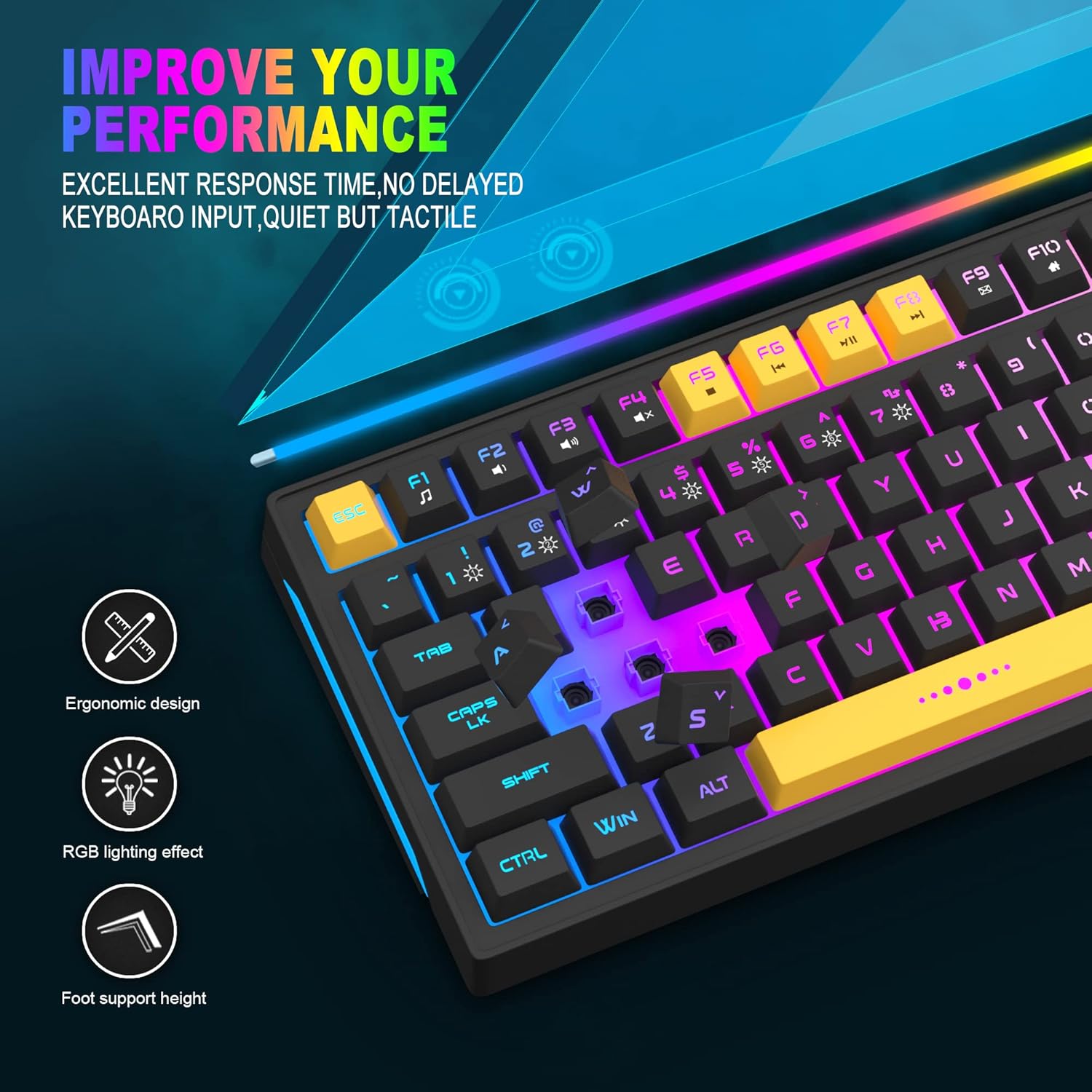
Image: Close-up showing the ergonomic design and RGB lighting effect of the keyboard, emphasizing comfort and visual appeal.

이미지: 측면 view of the keyboard illustrating its thoughtful ergonomic design with a 7-degree tilt for improved typing posture.
설치 지침
- Unpack the keyboard and ensure all package contents are present.
- 키보드의 USB 케이블을 컴퓨터의 사용 가능한 USB 포트에 연결하세요.
- The keyboard is plug-and-play and should be automatically recognized by your operating system (Windows, Mac OS). No additional drivers are typically required for basic functionality.
- Once connected, the RGB backlighting will illuminate, indicating the keyboard is powered on and ready for use.
작동 지침
RGB 백라이트 제어
The MageGee GT860 keyboard features customizable RGB backlighting with various modes and effects.
- 조명 모드 변경: 를 누르세요 FN key combined with keys 1 ~을 통해 6 to cycle through different RGB lighting effects and colors.
- 밝기 조정: Use specific key combinations (refer to keyboard legends or experiment with FN + Arrow keys if not explicitly labeled) to increase or decrease backlight brightness.
- 호흡 속도 조절하기: Some modes allow adjustment of the breathing or animation speed.

Image: The keyboard displaying various RGB backlit lighting modes, illustrating the range of color options available.

이미지: 역동적인 view 키보드 쇼c의asing its 18 RGB LED light effects, highlighting the vibrant backlighting.
멀티미디어 및 기능 키
The keyboard includes dedicated function keys (F1-F12) that can be accessed by pressing the FN 원하는 F 키와 동시에 키를 누릅니다.
| 키 조합 | 기능 |
|---|---|
| FN + F1 | 미디어 플레이어 |
| FN + F2 | 볼륨 낮추기 |
| FN + F3 | 볼륨을 높이다 |
| FN + F4 | 무음 |
| FN + F5 | 이전 트랙 |
| FN + F6 | 다음 트랙 |
| FN + F7 | 재생/일시정지 |
| FN + F8 | 멈추다 |
| FN + F9 | 이메일 |
| FN + F10 | 홈페이지 |
| FN + F11 | 스크롤 잠금 |
| FN + F12 | 계산자 |

Image: Diagram illustrating the various multimedia and function key combinations using the FN key (FN + F1-F12).
유지
To ensure the longevity and optimal performance of your MageGee GT860 keyboard, follow these maintenance guidelines:
- 청소: Regularly clean the keyboard with a soft, dry cloth. For deeper cleaning, use compressed air to remove dust and debris from between the keys. A slightly damp cloth (not wet) can be used for keycap surfaces.
- 액체를 피하세요: 키보드에 액체를 쏟지 마십시오. 액체를 쏟은 경우 즉시 키보드를 컴퓨터에서 분리하고 완전히 말린 후 다시 연결하십시오.
- 저장: 장시간 사용하지 않을 때는 키보드를 직사광선과 극한의 온도를 피해 서늘하고 건조한 곳에 보관하세요.
- 케이블 관리: 내부 손상을 방지하려면 USB 케이블을 과도하게 구부리거나 비틀지 마세요.

이미지: 클로즈업 view of the keyboard with some keycaps removed, showing the underlying switches. This illustrates the internal structure for cleaning purposes.
문제 해결
If you encounter issues with your MageGee GT860 keyboard, please refer to the following common troubleshooting steps:
- 키보드가 응답하지 않음:
- Ensure the USB cable is securely connected to both the keyboard and your computer's USB port.
- 키보드를 컴퓨터의 다른 USB 포트에 연결해보세요.
- 다른 컴퓨터에서 키보드를 테스트하여 문제가 키보드에 있는지, 아니면 시스템에 있는지 확인하세요.
- 백라이트가 작동하지 않거나 잘못 작동함:
- Verify that the keyboard is properly connected and receiving power.
- Cycle through the RGB lighting modes using FN + 1-6 모드가 선택되었는지 확인하기 위해서입니다.
- 밝기 설정을 조정하세요.
- 키가 등록되지 않음:
- Clean the affected keys to remove any debris that might be obstructing the switch.
- 다른 키보드 드라이버나 게임 소프트웨어와의 소프트웨어 충돌이 없는지 확인하십시오.
- 예상치 못한 동작:
- 컴퓨터를 다시 시작하세요.
- If the issue persists, contact MageGee customer support for further assistance.
명세서
| 특징 | 세부 사항 |
|---|---|
| 상표 | 메이지 |
| 모델 | GT860 |
| 공들여 나열한 것 | 96키(92% 컴팩트) |
| 연결성 | 유선 USB |
| 백라이트 | RGB Backlit (Multiple modes) |
| 키 유형 | Membrane with Mechanical Feeling |
| 인간 공학 | 인체공학적 디자인 |
| 호환 OS | Windows 10, 8, 7, XP, VISTA, Mac OS |
| 제품 치수 | 35.56 x 10.16 x 5.08cm(14 x 4 x 2인치) |
| 무게 | 744g(1.64파운드) |
| 권tage | 5 볼트 |
| 색상 | 검은색 노란색 |
보증 및 지원
For warranty information or technical support, please refer to the documentation provided with your purchase or contact MageGee customer service directly. Contact details can typically be found on the manufacturer's official web사이트 또는 제품 포장에 표시되어 있습니다.
보증 청구를 위해 구매 증빙서류를 보관하세요.


