소개
The OBSBOT Tiny 2 Remote Control is designed to enhance your experience with OBSBOT Tiny series webcams, including Tiny 2 Lite, Tiny 2, Tiny 4K, Tiny 1080P, Tiny SE, and the OBSBOT UVC to HDMI Adapter 2nd Gen. This smart remote provides intuitive control over various camera functions and AI features, offering a more convenient and pleasant usage experience.
It combines the functionality of a remote control with a presentation clicker, allowing for seamless control during video calls, live streaming, and presentations.
패키지 내용
- OBSBOT Tiny 2 Remote Control
- USB Receiver Dongle (stored inside the remote's battery compartment)
- User Guide/Instructions
동영상: Unboxing and initial setup of the OBSBOT Tiny Remote Control, including battery installation and USB dongle location.
설정
1. 배터리 설치
- 리모컨 뒷면의 배터리실 커버를 엽니다.
- AAA 배터리 2개를 올바른 극성(+/-)에 맞춰 삽입합니다.
- 배터리 덮개를 닫습니다.
2. USB 수신기 연결
- Locate the USB receiver dongle inside the remote's battery compartment.
- Plug the USB receiver dongle into an available USB 2.0 or higher port on your computer.
3. Software Setup (OBSBOT TinyCam)
- Ensure your OBSBOT Tiny series webcam is connected to your computer and the OBSBOT TinyCam software is running.
- Navigate to the settings within the OBSBOT TinyCam software.
- Scroll down to find the "Remote Control" option and enable it.
- The remote control should now be paired and ready for use.
작동 지침
리모컨 레이아웃 및 기능
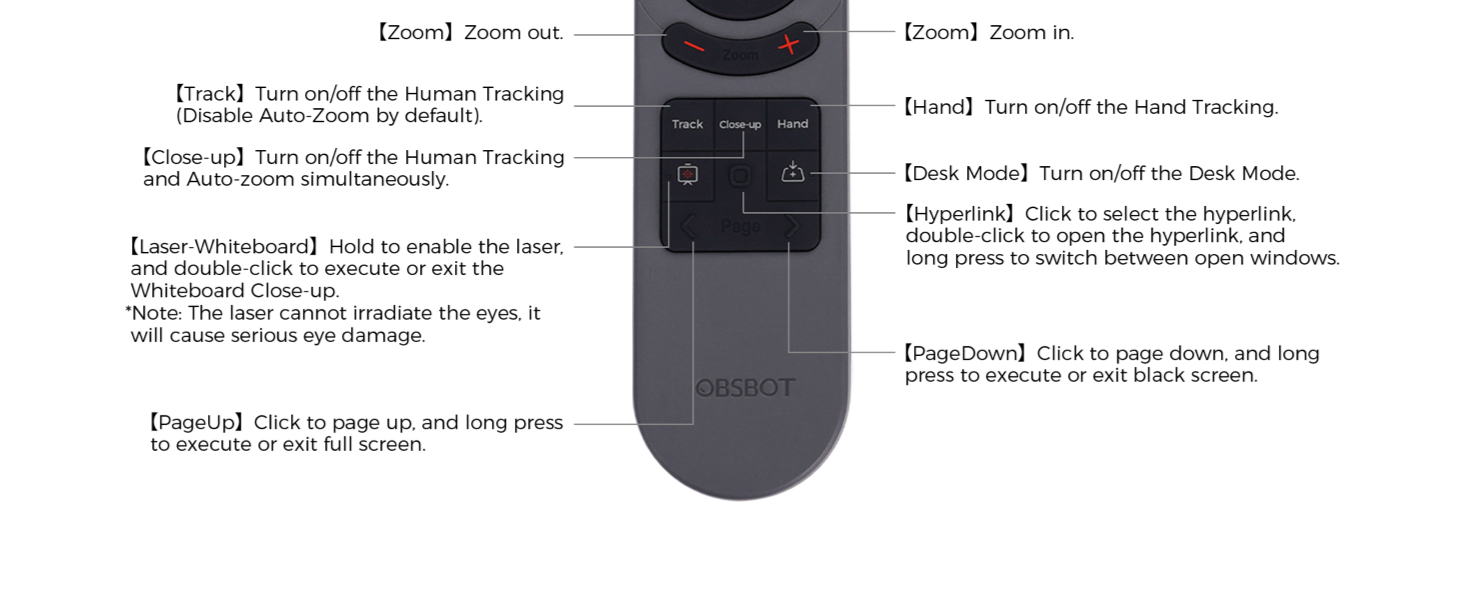
영상: Detailed diagram illustrating the buttons and their corresponding functions on the OBSBOT Tiny 2 Remote Control.
- 전원 버튼: Turns the connected OBSBOT Tiny series web캠 켜기 또는 끄기.
- 방향 버튼: Control the pan and tilt of the web캠.
- 재설정 버튼: Resets the camera's position to its default (square zero).
- Device Selection Buttons (Left/Right Arrows): Allows switching control between multiple connected OBSBOT devices (if connected to the same computer).
- Zoom In/Out Buttons: 카메라의 줌 레벨을 조정하세요.
- P1, P2, P3 Buttons: Preset buttons to save and recall specific camera positions and zoom levels.
- Track Button: Toggles Human Tracking on/off. Disables Auto Zoom by default.
- Close-up Button: Activates Close-up mode, turning on Human Tracking and Auto Zoom simultaneously.
- Hand Button: Toggles Hand Tracking on/off.
- Desk Mode Button: Toggles Desk Mode on/off.
- Laser-Whiteboard Button: Hold to enable the laser pointer. Double-click to execute or exit Whiteboard Close-up. Note: The laser cannot irradiate the eyes; it will cause serious eye damage.
- Hyperlink Button: Click to select a hyperlink. Double-click to open the hyperlink. Long press to switch between open windows.
- PageDown Button: Click to page down. Long press to execute or exit a black screen.
- PageUp Button: Click to page up. Long press to execute or exit full screen.
중요 참고 사항: Some keys on the remote controller will not work with OBSBOT Tiny 4K and OBSBOT Tiny, as the features controlled by those keys (e.g., Close-up, Hand, Laser-Whiteboard, Desk Mode) are not integrated into those specific models.
음성 제어
The OBSBOT Tiny 2 webcam supports voice control for various functions, including waking up the device, initiating tracking, and adjusting zoom. Refer to the OBSBOT TinyCam software settings for a full list of voice commands and to enable/disable this feature.
동영상: Demonstration of the OBSBOT Meet Remote Control features and functions.
응용 프로그램

Video Meetings: Control your camera's focus and framing during online conferences.

Remote Classes: Utilize presentation clicker features and camera control for engaging online teaching.

라이브 스트리밍: Adjust camera angles and zoom on the fly for dynamic broadcasts.
유지
- Keep the remote control clean and dry. Use a soft, dry cloth for cleaning.
- Avoid exposing the remote to extreme temperatures or direct sunlight.
- 장기간 리모컨을 사용하지 않을 경우, 배터리 누출을 방지하기 위해 배터리를 제거하세요.
- Store the USB receiver dongle securely within the remote's battery compartment to prevent loss.
문제 해결
- 리모컨이 응답하지 않음:
- 배터리가 올바르게 설치되었고 충전량이 충분한지 확인하세요. 필요하면 교체하세요.
- Ensure the USB receiver dongle is securely plugged into your computer.
- Verify that the "Remote Control" option is enabled in the OBSBOT TinyCam software settings.
- Restart the OBSBOT TinyCam software and/or your computer.
- Specific features not working:
- Confirm that your OBSBOT webcam model supports the specific feature (e.g., Close-up, Desk Mode). Refer to your webcam's manual for compatibility.
- Ensure your OBSBOT TinyCam software and webcam firmware are up to date.
- 간섭:
- Avoid using the remote near strong electromagnetic interference sources.
명세서
| 제품 치수 | 10 x 2 x 0.01 인치 |
| 품목 무게 | 1.76 온스 |
| 품목 모델 번호 | OBS-200002 |
| 배터리 | AAA 배터리 2개 (포함되지 않음) |
| 상표 | 옵스봇 |
| 특징 | 인체공학적 |
| 색상 | 검은색 |
| 지원되는 최대 장치 수 | 4 |
| 호환 장치 | OBSBOT Tiny series webcams, OBSBOT UVC to HDMI Adapter 2nd Gen, Personal Computer |
보증 및 지원
For warranty information, technical support, or further assistance, please visit the official OBSBOT web사이트를 방문하거나 고객 서비스에 직접 문의하세요. 보증 청구를 위해 구매 영수증을 보관하세요.


