1. 서론
This manual provides comprehensive instructions for installing and operating your BRIKSMAX LED Lighting Kit, specifically designed to enhance the LEGO 10281 Bonsai Tree model. This lighting kit is intended to bring your LEGO creation to life with vibrant illumination. Please note that the LEGO building set is not included with this lighting kit.
2. 패키지 내용
Before beginning installation, please verify that all components listed below are present in your package. If any items are missing or damaged, please contact customer support.
- LED Light Set (various dot lights, adhesive light strips)
- Expansion Boards (e.g., 12-port expansion board)
- Connecting Cables (various lengths, e.g., 5cm, 15cm)
- Battery Holder (requires AA batteries, not included)
- USB 전원 케이블
- 접착 사각형
- Block Parts (random color)
- 사용 설명서
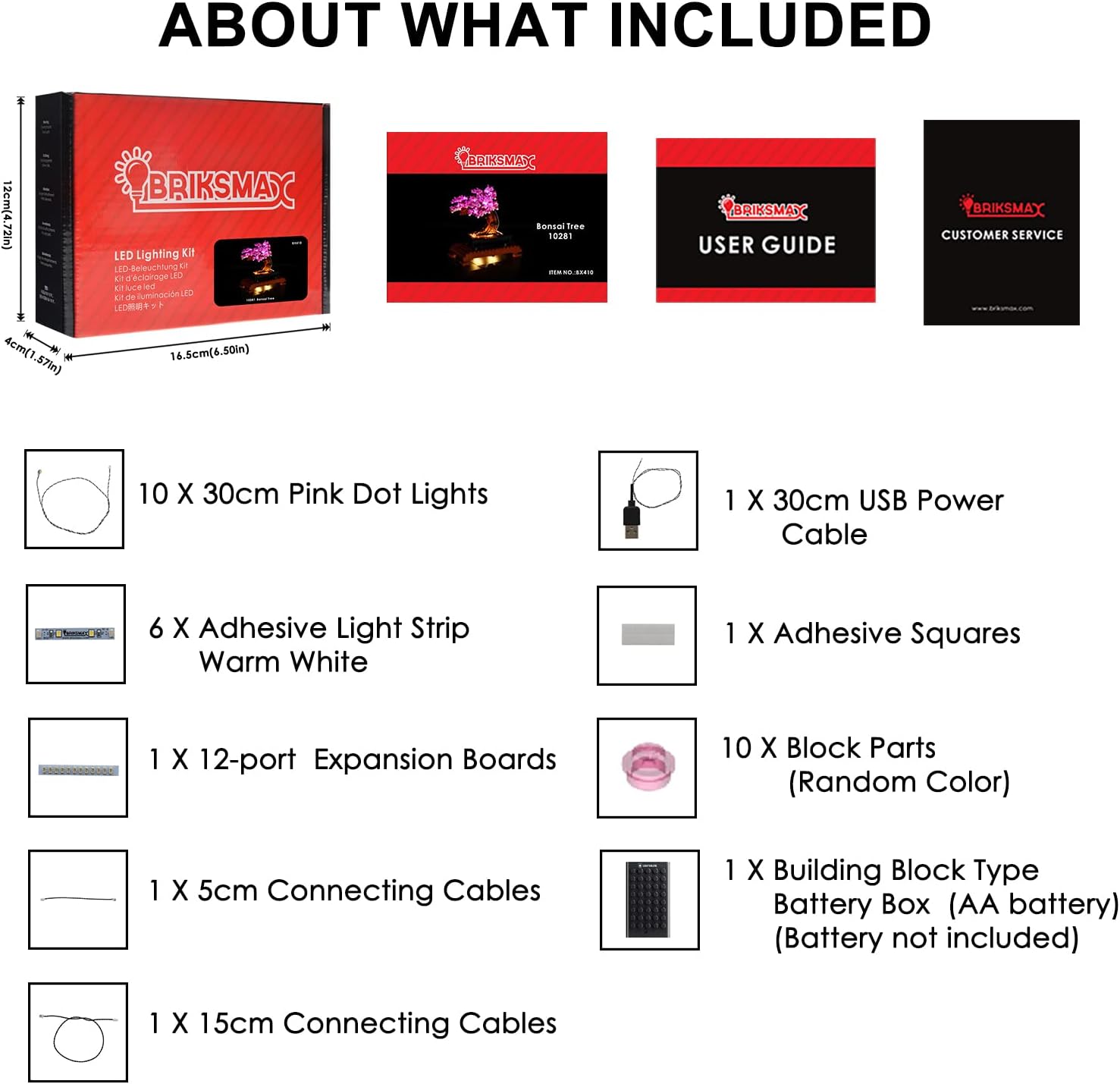
이미지: 이상view of the BRIKSMAX LED Lighting Kit package contents, including lights, cables, and power accessories.
3. 설정 및 설치
Careful installation is crucial for optimal performance and to avoid damage to the lighting kit or your LEGO model. Refer to the included step-by-step instruction manual for detailed diagrams and placement guidance. It is often easier to integrate the lighting kit during the initial construction of the LEGO model or by carefully disassembling relevant sections.
3.1 일반 설치 팁
- 전선을 조심스럽게 다루십시오: Avoid pinching or sharply bending wires, as this can cause damage.
- 테스트 구성 요소: It is recommended to test lights and connections periodically during installation to ensure functionality.
- 전선 숨기기: Route wires discreetly between LEGO bricks and plates to maintain the aesthetic integrity of your model.
- 보안 연결: Ensure all connectors are firmly seated into the expansion boards.
3.2 시각적 설치 가이드
The following video demonstrates key aspects of the installation process for the BRIKSMAX LED Lighting Kit for the LEGO 10281 Bonsai Tree.
Video: Installation guide for the BRIKSMAX LED Lighting Kit on the LEGO 10281 Bonsai Tree, focusing on part 3 of the process.
3.3 Completed Model Examp레
Observe the illuminated LEGO 10281 Bonsai Tree with the BRIKSMAX LED Lighting Kit installed, showcasing the final effect.

이미지: 앞면 view of the LEGO Bonsai Tree with the lighting kit activated, highlighting the pink blossoms and warm white base lights.

이미지: 측면 view of the illuminated LEGO Bonsai Tree, showing the light distribution across the branches and base.

이미지: 상세 view of the pink LED lights integrated into the LEGO Bonsai Tree's blossoms.
4. 사용 설명서
Once the BRIKSMAX LED Lighting Kit is fully installed, you can power it using either the included battery holder or a USB power source.
4.1 조명 전원 공급
- 배터리 전원: Insert the required AA batteries (not included) into the battery holder. Connect the battery holder to the main expansion board.
- USB 전원 : Connect the provided USB power cable to the main expansion board and plug the other end into a compatible USB power adapter (e.g., phone charger, power bank, computer USB port).
4.2 켜기/끄기
The lights will activate automatically once a stable power source is connected. Disconnect the power source to turn off the lights.
4.3개 제품 이상view 동영상
이 영상에서 개요를 확인하세요.view of the BRIKSMAX LED Lighting Kit for the Bonsai Tree.
비디오: 오버view of the BRIKSMAX LED Lighting Kit for the LEGO 10281 Bonsai Tree, demonstrating its illuminated appearance.
5. 유지관리
적절한 유지 관리는 조명 장비의 수명과 최적의 성능을 보장합니다.
- 청소: Use a soft, dry cloth to gently wipe dust from the lights and wires. Avoid using liquid cleaners directly on electrical components.
- 배터리 교체: If using battery power, replace all AA batteries simultaneously when lights dim or cease to function. Ensure correct polarity.
- 저장: If storing the LEGO model with the lighting kit for an extended period, disconnect the power source (remove batteries or unplug USB) to prevent battery leakage or unnecessary power drain.
6. 문제 해결
If you encounter issues with your BRIKSMAX LED Lighting Kit, refer to the following common troubleshooting steps:
| 문제 | 가능한 원인 | 해결책 |
|---|---|---|
| 표시등이 켜지지 않습니다. | 전원이 안 들어옴, 연결 불량, 부품 불량. | Check battery installation (polarity, charge) or USB connection. Ensure all wires are securely connected to expansion boards. Inspect wires for visible damage. |
| 일부 조명이 작동하지 않습니다. | 연결이 헐거워졌거나, 전선/LED가 손상되었을 수 있습니다. | Verify connections for the specific non-working lights. Gently check wires for kinks or breaks. If a single LED is faulty, it may need replacement (contact support). |
| 조명이 어둡습니다. | 배터리 전원이 부족합니다. | Replace batteries with fresh ones or switch to USB power. |
| Wires are visible or difficult to hide. | Improper routing during installation. | Carefully re-route wires through gaps in LEGO bricks or under plates. Refer to the detailed instruction manual for suggested routing paths. |
If these steps do not resolve the issue, please contact BRIKSMAX customer support for further assistance.
7. 사양
Key technical details for the BRIKSMAX LED Lighting Kit (Model BX410):
- 모델 번호: BX410
- Compatible LEGO Set: 10281 Bonsai Tree
- 광원 유형: LED (Dot Lights, Adhesive Light Strips)
- 밝은 색상: Pink and Warm White
- 전원: Battery Powered (AA batteries, not included) or USB Powered
- 권tage: 1.5볼트(배터리 작동용)
- 최대 호환 광원 와트tage: 5 와트
- 재료: 플라스틱
- 품목 무게: 약 207그램(7.3온스)
- 추천 연령: 8세 이상
8. 보증 및 지원
BRIKSMAX is committed to providing high-quality products and customer satisfaction. If you encounter any issues or have questions regarding your lighting kit, please do not hesitate to contact our customer support team.
For assistance, please refer to the contact information provided in your product packaging or visit the official BRIKSMAX web대지.


