1. 서론
Thank you for choosing the Dalton 10 kVA Uninterruptible Power Supply (UPS) unit. This manual provides essential information for the safe and efficient operation of your UPS. Please read this manual thoroughly before installation and operation, and keep it for future reference.
This UPS is designed to provide reliable power protection for critical equipment, safeguarding against power outages, surges, and fluctuations. Its advanced technology ensures stable and clean power delivery, extending the lifespan of your connected devices.
2. 안전 정보
부상이나 UPS 및 연결된 장비의 손상을 방지하기 위해 항상 다음 안전 수칙을 준수하십시오.
- UPS c를 열지 마십시오.asing. 내부에는 사용자가 직접 수리할 수 있는 부품이 없습니다. 모든 수리는 자격을 갖춘 서비스 담당자에게 맡기십시오.
- 무정전 전원 공급 장치(UPS)가 접지된 전원 콘센트에 연결되어 있는지 확인하십시오.
- Do not block ventilation openings. Adequate airflow is crucial for proper cooling.
- 먼지, 습기 또는 극한 온도에 노출되는 장소에는 UPS를 설치하지 마십시오.
- Disconnect the UPS from the AC power source before performing any maintenance or moving the unit.
- 배터리는 감전 및 높은 단락 전류의 위험을 초래할 수 있습니다. 배터리를 다룰 때는 적절한 안전 조치를 준수하십시오.
3. 패키지 내용
Carefully unpack the UPS and check if all items are present and undamaged. If any items are missing or damaged, contact your dealer immediately.
- Dalton 10 kVA UPS Unit
- 사용 설명서 (본 문서)
- 입력 전원 케이블
- 출력 전원 케이블 (수량은 다를 수 있음)
- USB Communication Cable (for monitoring software)
- 소프트웨어 CD(해당되는 경우)
4. 제품 오버view
The Dalton 10 kVA UPS is a robust power protection solution. Below is an overview of its typical components and features.
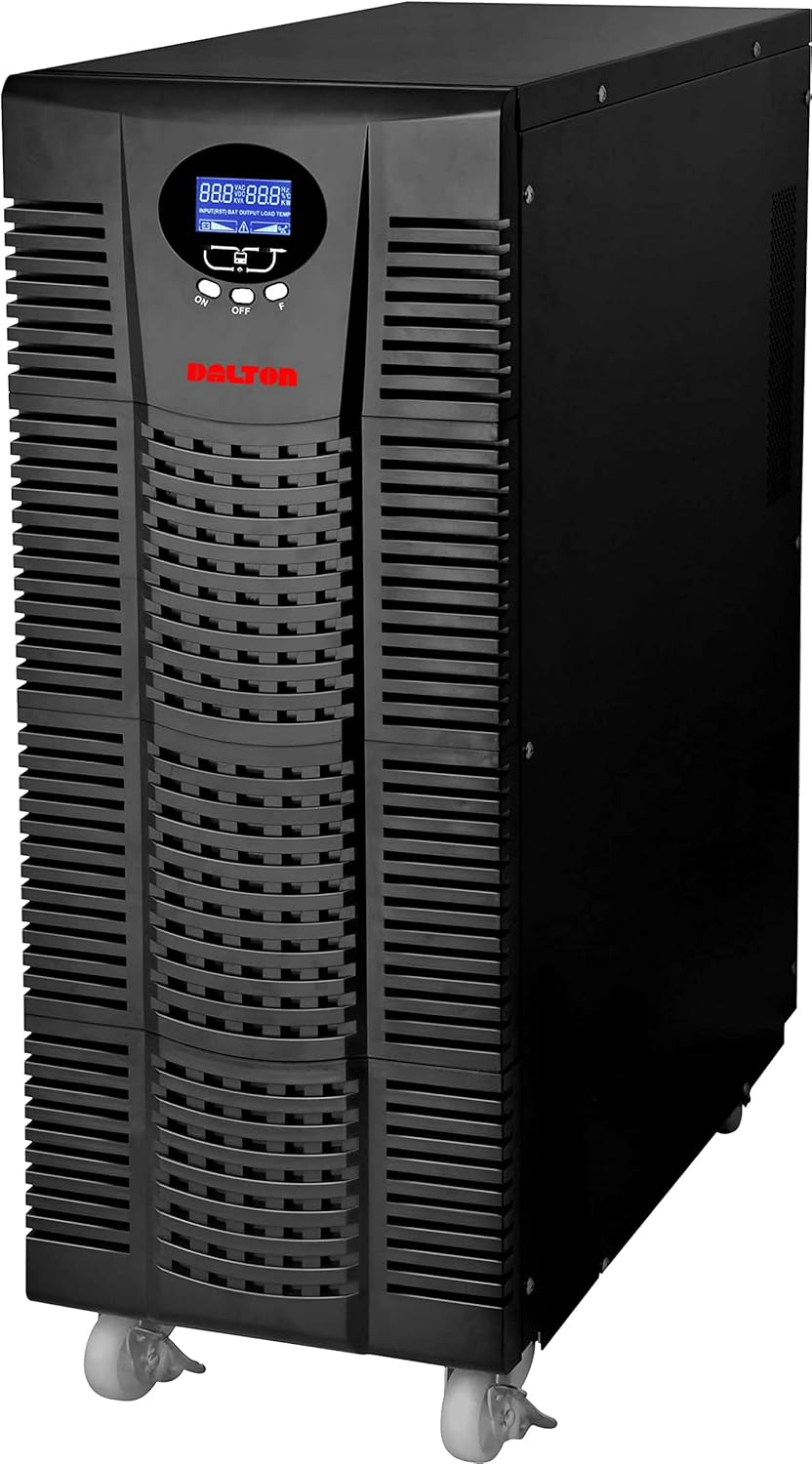
그림 4.1: 전면 view of the Dalton 10 kVA UPS unit. This image displays the tall, black tower design of the UPS, featuring a prominent vented front panel for airflow and integrated wheels at the base for easy mobility. The control panel and display are visible towards the top of the unit.
4.1 전면 패널
- LCD 디스플레이: 실시간 상태 및 입력/출력 볼륨을 표시합니다.tage, battery level, load percentage 및 오류 코드.
- 제어 버튼: Used to navigate menus, acknowledge alarms, and perform system tests.
- 전원 버튼: 무정전 전원 공급 장치(UPS)를 켜거나 끕니다.
4.2 후면 패널
- 입력 전원 커넥터: For connecting the UPS to the main AC power source.
- 출력 리셉터클: For connecting protected equipment.
- 통신 포트(USB/RS232): 모니터링 및 관리를 위해 컴퓨터에 연결하는 데 사용합니다.
- External Battery Connector (if applicable): For connecting optional external battery packs.
- 회로 차단기: 과부하 보호 기능을 제공합니다.
5. 설정 및 설치
Follow these steps for proper installation of your UPS unit:
- 놓기:
- Place the UPS in a clean, dry, and well-ventilated area.
- 적절한 공기 흐름을 위해 장치 주변에 충분한 공간을 확보하십시오.
- 직사광선, 열원 및 과도한 습기를 피하십시오.
- 초기 배터리 충전:
- UPS를 접지된 AC 전원 콘센트에 연결하십시오.
- Allow the UPS to charge for at least 8 hours before connecting any equipment to ensure full battery capacity. The display will indicate charging status.
- 연결 장비:
- With the UPS turned off and fully charged, connect your critical equipment (computers, servers, networking devices) to the UPS output receptacles.
- Do not connect laser printers or other high-surge current devices to the battery-backed outlets, as this may overload the UPS.
- 전원 켜기:
- Press and hold the power button on the front panel until you hear a beep and the display illuminates.
- The UPS will perform a self-test and then enter normal operating mode.
6. 사용 설명서
6.1 정상 작동
Once powered on, the UPS continuously monitors the incoming AC power. In normal mode, it provides clean and stable power to connected devices.
6.2 배터리 모드
If the utility power fails or fluctuates outside acceptable limits, the UPS will automatically switch to battery mode, providing power from its internal batteries. An audible alarm will sound, and the LCD display will indicate "Battery Mode".
- During battery mode, save your work and shut down connected equipment gracefully to prevent data loss.
- The duration of battery backup depends on the load connected and the battery charge level.
6.3 UPS 전원 끄기
To turn off the UPS and disconnect power to connected devices:
- Shut down all connected equipment.
- Press and hold the power button on the UPS until it powers off.
- Disconnect the UPS from the AC power outlet.
7. 유지관리
7.1 배터리 관리
- Regularly charge the batteries by keeping the UPS connected to AC power.
- Perform a battery self-test periodically (refer to your UPS display menu for this option) to check battery health.
- Batteries have a limited lifespan (typically 3-5 years). Contact service for battery replacement when performance degrades.
7.2 청소
- Clean the exterior of the UPS with a soft, dry cloth.
- 액체 또는 에어로졸 세척제를 사용하지 마십시오.
- 환기구에 먼지나 이물질이 없는지 확인하세요.
8. 문제 해결
이 섹션에서는 UPS 사용 중 발생할 수 있는 일반적인 문제에 대한 해결책을 제공합니다.
| 문제 | 가능한 원인 | 해결책 |
|---|---|---|
| UPS가 켜지지 않습니다. | AC 전원 입력 없음; 배터리 부족; UPS 오류. | Check power cord connection and wall outlet. Allow UPS to charge for several hours. Contact service if problem persists. |
| UPS beeps continuously in normal mode. | Overload; Battery fault. | Reduce connected load. Perform battery self-test. |
| 백업 시간이 짧습니다. | Overload; Old battery; Insufficient charging. | Reduce load. Replace battery. Ensure UPS is fully charged. |
For issues not listed here, or if solutions do not resolve the problem, please contact Dalton customer support.
9. 사양
| 특징 | 세부 사항 |
|---|---|
| 상표 | 달튼 |
| 모델 | 10kVA UPS |
| 최대 전력 | 10,000 와트 |
| 출력 전력 | 10,000 와트 |
| 주파수 범위 | 50/60Hz(±3Hz) |
| 커넥터 유형 | IEC 320, Battery |
| 색상 | 검은색 |
| 재료 | 금속 |
| ASIN | B09NC2FXNC |
| 첫 번째 가능한 날짜 | 9년 2021월 XNUMX일 |
10. 보증 및 지원
Dalton provides comprehensive support for its products. As authorized distributors in the Arab Republic of Egypt, we maintain an authorized service center for all Dalton UPS units.
- For technical assistance, troubleshooting, or warranty claims, please contact our authorized service center.
- Ensure you have your product model and ASIN (B09NC2FXNC) ready when contacting support.
- 허가받지 않은 수리 또는 개조는 제품 보증을 무효화합니다.
For more information, please visit the official Dalton web사이트를 방문하거나 현지 유통업체에 문의하세요.


