1. 서론
The CAS DBI Weighing Indicator is designed for precise weight measurement in various applications, including open markets and retail environments. This indicator offers multiple functions such as counting, weight comparison, and percentage calculations, providing versatility for different weighing needs. This manual provides essential information for the proper setup, operation, and maintenance of your DBI Weighing Indicator.
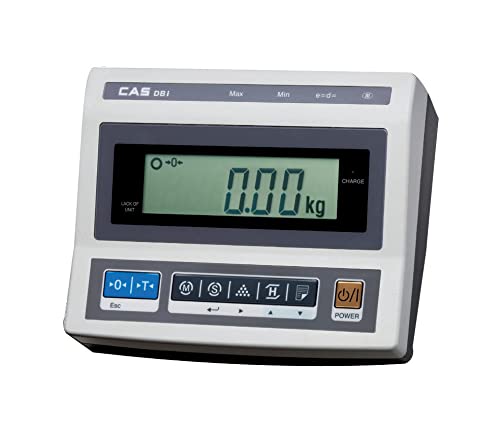
Image: CAS DBI Weighing Indicator in operation with a platform scale.
2. 상자 안에 무엇이 들어있나요?
- 1 x CAS DBI Weighing Indicator
3. 설정
- 짐 풀기: Carefully remove the DBI Weighing Indicator from its packaging.
- 놓기: Place the indicator on a stable, level surface. Ensure it is free from vibrations and direct sunlight.
- Connecting to Platform Scale: Connect the indicator to a compatible weighing platform scale using the appropriate cable (not included, typically supplied with the platform scale). Ensure the connection is secure.
- 전원 연결: Connect the provided power adapter to the indicator's DC input port and then to a suitable power outlet. The internal rechargeable battery will begin charging.
- 초기 전원 켜기: 를 누르세요 힘 button to turn on the indicator. Allow a few moments for the display to stabilize.

Image: DBI Weighing Indicator connected to a platform scale, ready for use.
4. 사용 설명서
4.1 기본 작업
- 전원 켜기/끄기: 를 누르세요 힘 버튼을 눌러 장치를 켜거나 끕니다.
- 기본 계량:
- Ensure the indicator displays "0.00 kg" before placing any item on the connected platform. If not, press the 영 단추.
- Place the item to be weighed on the center of the platform.
- LCD 화면에 표시된 무게를 읽으세요.
- 용기 기능:
- 플랫폼에 빈 용기를 놓습니다.
- 를 누르세요 살갈퀴 button. The display will show "0.00 kg" and the tare indicator will illuminate.
- Add items to the container; only the net weight will be displayed.
- To clear tare, remove the container and press 살갈퀴 다시.
4.2 고급 모드
- 계산 모드: This mode allows for counting a large number of identical items. Follow the on-screen prompts to set a sample quantity, then place the items to get a total count.
- 퍼센tage 모드: Use this mode to display the weight of an item as a percentag사전 설정된 기준 무게의 e.
- Accumulation Mode (Σ): This function enables the summing of multiple individual weighments. After each stable weighment, activate the accumulation function to add the weight to a running total.
- Weight Comparison (HI/LOW/OK): Set upper (HI) and lower (LOW) weight limits. The indicator will visually or audibly signal if the current weight is above, below, or within the acceptable range.
4.3 추가 기능
- 백라이트 디스플레이: The large LCD display features a backlight (20mm character height) for improved visibility in various lighting conditions.
- RS-232C Interface: Use the RS-232C port to connect the indicator to a compatible printer (e.g., DEP-50) or a computer for data transfer and ticket print-out.
- 충전식 배터리: The indicator includes a rechargeable battery providing approximately 100 hours of operation. Charge the battery when the low battery indicator appears.
- 자동 전원 끄기: The auto power off function conserves battery life by automatically shutting down the unit after a period of inactivity.
5. 기능 이상view
The CAS DBI Weighing Indicator is equipped with several features to enhance its functionality and user experience:
- OIML Approval: Certified for 3,000 divisions, ensuring accuracy and reliability in commercial applications.
- 대형 LCD 디스플레이: A 20mm large LCD with backlight provides clear and easy-to-read weight indications.
- 다양한 응용 분야: Designed for use with various bench and platform scales, making it suitable for diverse weighing tasks.
- Advanced Weighing Modes: Includes Counting Mode for item quantity, Percentage Mode for comparative weighing, and Accumulation Mode for summing multiple weights.
- Weight Comparison: Features HI/LOW/OK comparison function for efficient check-weighing against predefined limits.
- Ticket Print-out (DEP-50 Compatible): Supports connection to a DEP-50 printer for generating physical records of weighments.
- RS-232C Interface: Enables serial communication with external devices like printers or computers.
- 긴 배터리 수명: Integrated rechargeable battery offers approximately 100 hours of continuous operation.
- 자동 전원 끄기: An energy-saving feature that automatically turns off the indicator after a period of inactivity.
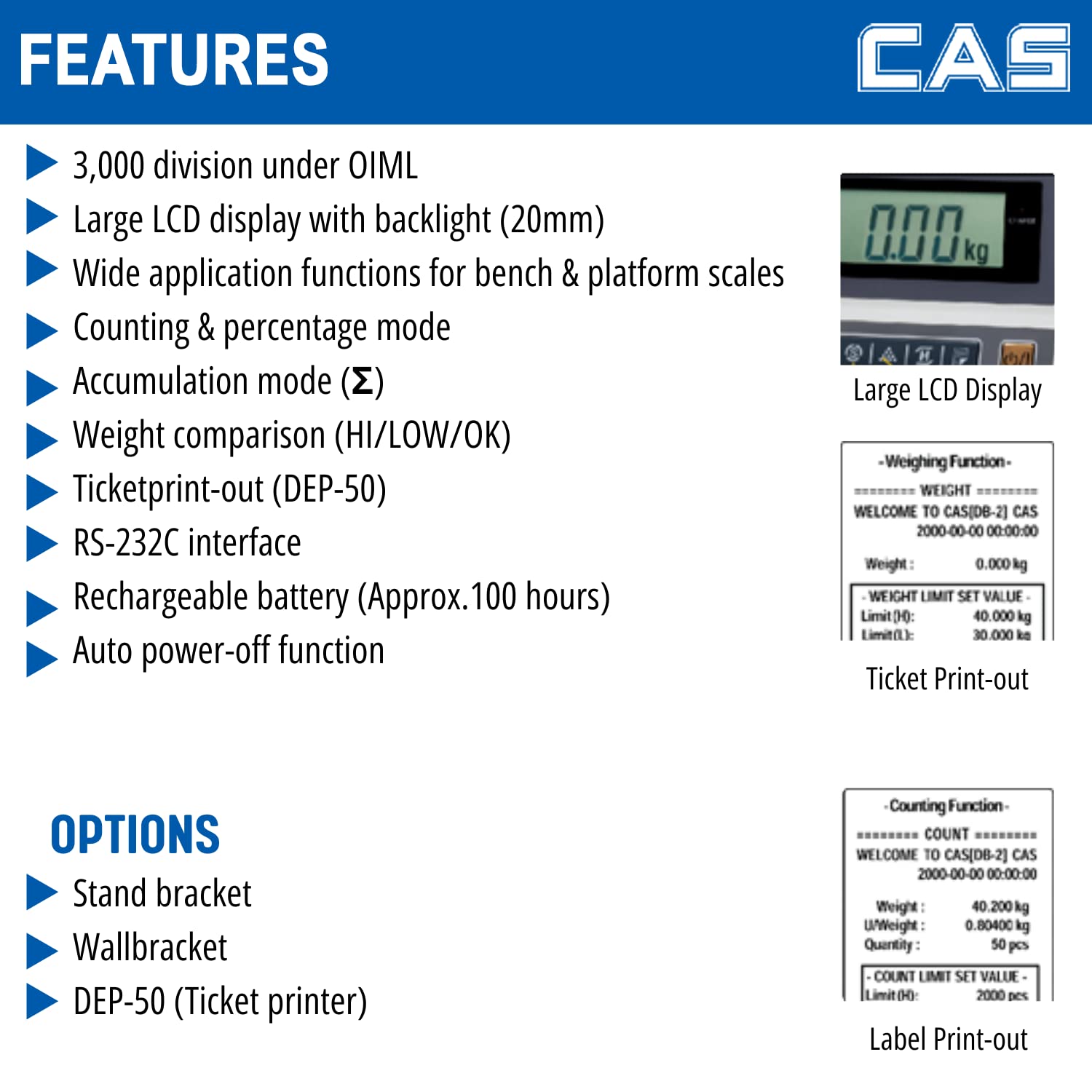
Image: Detailed features of the DBI Weighing Indicator.
6. 유지관리
- 청소: Wipe the indicator with a soft, damp 천으로 닦으세요. 연마성 세제나 용제는 사용하지 마세요. 액체가 기기 안으로 들어가지 않도록 주의하세요.
- 배터리 관리 : For optimal battery life, charge the battery regularly and avoid deep discharges. If storing the unit for an extended period, ensure the battery is partially charged.
- 저장: Store the indicator in a dry, dust-free environment away from extreme temperatures.
- 점검: 케이블과 연결부에 마모나 손상 흔적이 있는지 주기적으로 점검하십시오.
7. 문제 해결
- No Display/Unit Does Not Turn On:
- Check power connection and ensure the adapter is securely plugged in.
- 전원 콘센트가 작동하는지 확인하세요.
- Ensure the rechargeable battery is not completely depleted; charge the unit for several hours.
- 부정확한 판독:
- Ensure the indicator and platform scale are on a stable, level surface.
- Check for any obstructions under the platform.
- Verify the platform scale is properly connected to the indicator.
- Perform a zero calibration if necessary (refer to advanced calibration procedures, usually requiring a service technician or specific key sequence).
- Display Shows "OVERLOAD" or "----":
- Remove any excessive weight from the platform.
- Ensure the platform scale's capacity is not exceeded.
- 버튼이 응답하지 않음:
- 장치의 전원이 켜져 있는지 확인하십시오.
- Restart the indicator by turning it off and then on again.
- 문제가 지속되면 고객 지원에 문의하십시오.
8. 사양
| 사양 | 세부 사항 |
|---|---|
| 상표 | CAS |
| 모델 번호 | DBI_Indicator |
| 색상 | 검은색 |
| 특징 | Auto Shut Off, Backlit Display |
| 디스플레이 유형 | 액정표시장치 |
| 폼 팩터 | 미니 |
| 재료 | 아크릴로 니트릴 부타디엔 스티렌 |
| 저울 유형 | 카운터 스케일 |
| 품목 무게 | 1kg 500g |
| 제품 크기(LxWxH) | 14.5 x 27.8 x 18.7cm |
| 전원 | DC |
| 포함된 구성 요소 | 1 Weighing indicator |
| 배터리 수명(대략) | 100시간 |
| OIML Approval | 3,000개의 사단 |

Image: Dimensions of the DBI Weighing Indicator.
9. 보증 및 지원
보증: For warranty information, please refer to the documentation provided at the time of purchase or contact CAS customer service directly.
고객 지원: For technical assistance, service, or spare parts, please contact CAS Weighing India Pvt Ltd.
- 핸드폰: +91-9212559707
- 주소: Plot No. 788, Udyog Vihar, Phase -V, Gurugram, Haryana -122016 INDIA

Image: CAS DBI Indicator for retail weighing solutions, showing contact details.


