1. 서론
Thank you for choosing the Dalton 2000VA Uninterruptible Power Supply (UPS). This device is designed to provide reliable power backup and protection for your electronic equipment against power outages, surges, and fluctuations. Please read this manual thoroughly before installation and operation to ensure optimal performance and safety.
2. 중요 안전 지침
화재, 감전, 부상의 위험을 줄이려면 항상 다음의 기본 안전 예방 조치를 따르세요.
- UPS c를 열지 마십시오.asing. 내부에는 사용자가 수리할 수 있는 부품이 없습니다. 수리는 자격을 갖춘 서비스 담당자에게 맡기십시오.
- Do not use the UPS in environments with excessive dust, humidity, or extreme temperatures.
- 무정전 전원 공급 장치(UPS)가 접지된 전원 콘센트에 연결되어 있는지 확인하십시오.
- Do not connect non-computer related items like medical equipment, life support equipment, or household appliances to the UPS.
- UPS는 통풍이 잘 되는 곳에 설치하고 직사광선이나 열원으로부터 멀리 떨어뜨려 놓으십시오.
- 비상시 전원 버튼을 눌러 UPS를 끄고 AC 전원 콘센트에서 분리하십시오.
3. 패키지 내용
패키지에 모든 품목이 들어 있는지 확인하세요.
- Dalton 2000VA UPS Unit
- 전원 코드
- USB 통신 케이블 (해당되는 경우)
- 사용 설명서 (본 문서)

그림 3.1: 전면 view of the Dalton 2000VA UPS unit, showing the display screen and power button.
4. 설정 및 설치
Follow these steps to set up your UPS:
- 짐 풀기: UPS를 포장에서 조심스럽게 꺼내세요. 배송 중 손상된 부분이 있는지 확인하세요.
- 놓기: Place the UPS on a flat, stable surface in a cool, dry, and well-ventilated area. Ensure there is adequate space around the unit for airflow.
- 초기 청구 : Before connecting any devices, plug the UPS power cord into a grounded wall outlet. Allow the unit to charge for at least 8 hours to ensure the battery is fully charged. The display will indicate charging status.
- 연결 장치:
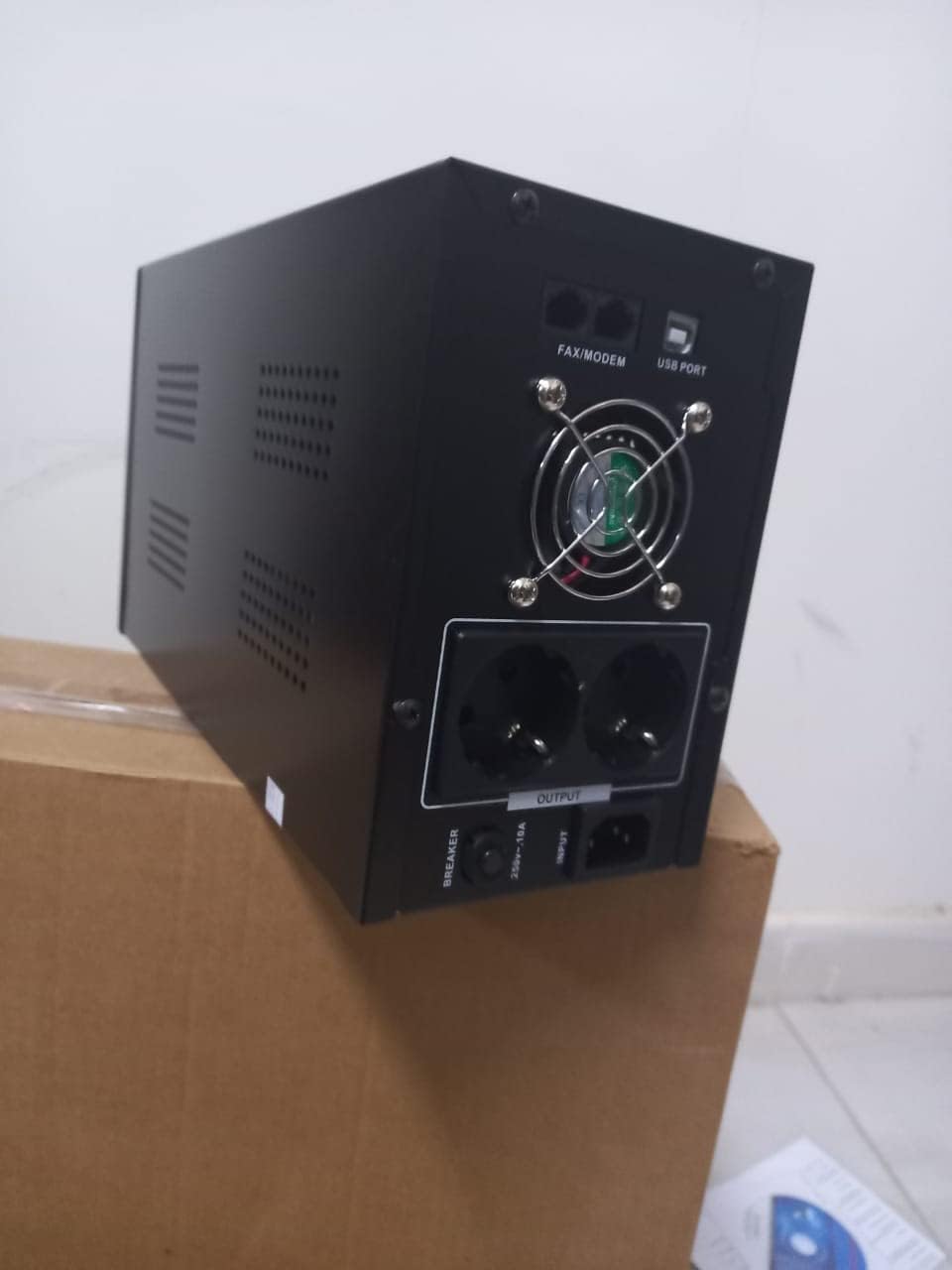
그림 4.1: 후면 view of the Dalton 2000VA UPS, highlighting the input power port, output sockets, and USB/Modem ports.
- Once the battery is charged, connect your computer, monitor, and other critical electronic devices to the UPS output sockets.
- Do not overload the UPS. Refer to the specifications section for maximum load capacity.
- If applicable, connect the USB communication cable from the UPS to your computer for monitoring software (software not included, check manufacturer's web대지).
5. UPS 작동 방법
5.1 전원 켜기/끄기
- 전원을 켜려면: After connecting to AC power and charging, press and hold the power button on the front panel for approximately 3 seconds until you hear a beep and the display illuminates.
- 전원을 끄려면: Press and hold the power button for approximately 3 seconds until you hear a beep and the display turns off. If the UPS is running on battery, it will shut down immediately. If connected to AC, it will switch to bypass mode before shutting down.
5.2 디스플레이 이해
The front panel LCD display provides real-time status information:
- 안에: 입력 볼륨 표시tag전력 회사에서 공급하는 e.
- 밖으로: 출력 볼륨 표시tage provided by the UPS to connected devices.
- 정상: 무정전 전원 공급 장치(UPS)가 일반 전원을 사용하여 작동 중임을 나타냅니다.
- 박쥐: 현재 배터리 충전량을 보여줍니다.
- 짐: 백분율을 나타냅니다.tag연결된 장치들이 사용하고 있는 UPS 용량의 일부입니다.
- Battery Mode Icon: Appears when the UPS is running on battery power during an outage.

그림 5.1: 측면 view of the UPS, showing the illuminated display with power status indicators.
5.3 Battery Backup Function
정전이 발생한 경우tage, the UPS will automatically switch to battery power, providing continuous power to your connected devices. The duration of backup power depends on the load connected and the battery's charge level. The UPS will emit an audible alarm during battery operation.
When utility power returns, the UPS will automatically switch back to AC power and begin recharging its battery.
6. 유지관리
- 배터리 관리 : To maximize battery life, ensure the UPS is always connected to an AC outlet to keep the battery charged. If the UPS is stored for an extended period, recharge it every three months for at least 8 hours.
- 청소: 청소하기 전에 UPS의 모든 전원을 차단하십시오. 부드럽고 마른 천으로 외부를 닦으십시오. 액체 또는 에어로졸 세척제를 사용하지 마십시오.
- 통풍: Regularly check that the ventilation openings are not blocked by dust or debris to prevent overheating.
7. 문제 해결
일반적인 문제와 해결 방법은 아래 표를 참조하세요.
| 문제 | 가능한 원인 | 해결책 |
|---|---|---|
| UPS가 켜지지 않습니다. | Battery not charged or power cord disconnected. | Ensure power cord is securely plugged in and allow battery to charge for 8 hours. |
| UPS beeps continuously in normal mode. | 과부하 상태. | Disconnect non-essential equipment until the alarm stops. Check total load. |
| 백업 시간이 짧습니다. | Battery not fully charged or battery nearing end of life. | Allow UPS to charge for 8 hours. If issue persists, battery may need replacement (contact service center). |
| UPS does not provide power during outage. | Battery discharged or internal fault. | Ensure UPS was fully charged. If problem persists, contact authorized service center. |
8. 기술 사양
| 특징 | 세부 사항 |
|---|---|
| 제품 치수 | 12.5 x 22.5 x 38cm |
| 제조업체 | 달튼 |
| 브랜드 이름 | 일반적인 |
| 색상 | 검은색 |
| 재료 | 금속 |
| 현재의 | 5 Amp오히려 |
| 폼 팩터 | 고문 |
| 주파수 범위 | 50-60Hz |
| 출력 볼륨tage | 220 볼트 |
| 커넥터 유형 | AC |
9. 보증 및 지원
Dalton provides an authorized maintenance center for all Uninterruptible Power Supply units. For warranty claims, technical support, or service inquiries, please contact your local Dalton authorized distributor or service center. Keep your purchase receipt as proof of purchase for warranty validation.
For further assistance, please visit the official Dalton web사이트를 방문하거나 고객 지원팀에 문의하세요.


