Important Information Before Installation
다시 부탁드립니다view the following critical information before proceeding with installation to ensure proper functionality and safety.
- 배선 방법:
- No Neutral Conductor Required: This switch operates with only a single live wire. A yellow adapter must be connected to two sides of the lamp on L1 (not L2 or L3) and cannot be connected directly to a switch socket. Regardless of whether you purchase a 1-gang, 2-gang, or 3-gang version, only one adapter needs to be installed.
- Neutral Conductor Required: For models requiring a neutral conductor, no adapter is necessary.
- 스위치 기능: The smart switch features a changeover switch or multi-control functionality within the Smart Life APP, allowing it to work with other smart switches. Wi-Fi connectivity is essential for these features.
- 설치 주의 사항: Do not touch the switch before the glass plate is fully installed. Failure to do so may prevent the device from functioning correctly.
- 비조광: This product is not a dimmer switch and does not support dimming functions.

This image illustrates key considerations before installing the CNBINGO Smart Touch Switch, emphasizing wiring, non-dimmable nature, and installation sequence.
제품 끝view
The CNBINGO Smart Touch Wi-Fi Switch with Double Schuko Socket combines a smart touch-sensitive light switch with two standard Schuko power outlets. Designed for modern homes, it offers convenient control over lighting and power, integrating with smart home ecosystems.
주요 특징:
- 간편한 설치: Features a removable wall plate for screw-free installation and clear wiring guidance.
- Double Schuko Socket: Two non-smart power outlets, supporting AC 16A 250V max, with child protection and phosphore copper for optimal conductivity and safety.
- Wi-Fi Smart Switch: A 2-way, 1-pole touch system that does not require a neutral conductor. Supports up to 1500W per compartment, AC 90-240V.
- 스마트 홈 호환성: Works with Amazon Alexa, Google Assistant, and IFTTT for voice control and automation.
- 앱 제어: Utilize the Smart Life app (iOS and Android) for remote light control, scheduling, timers, scene creation, and family sharing.
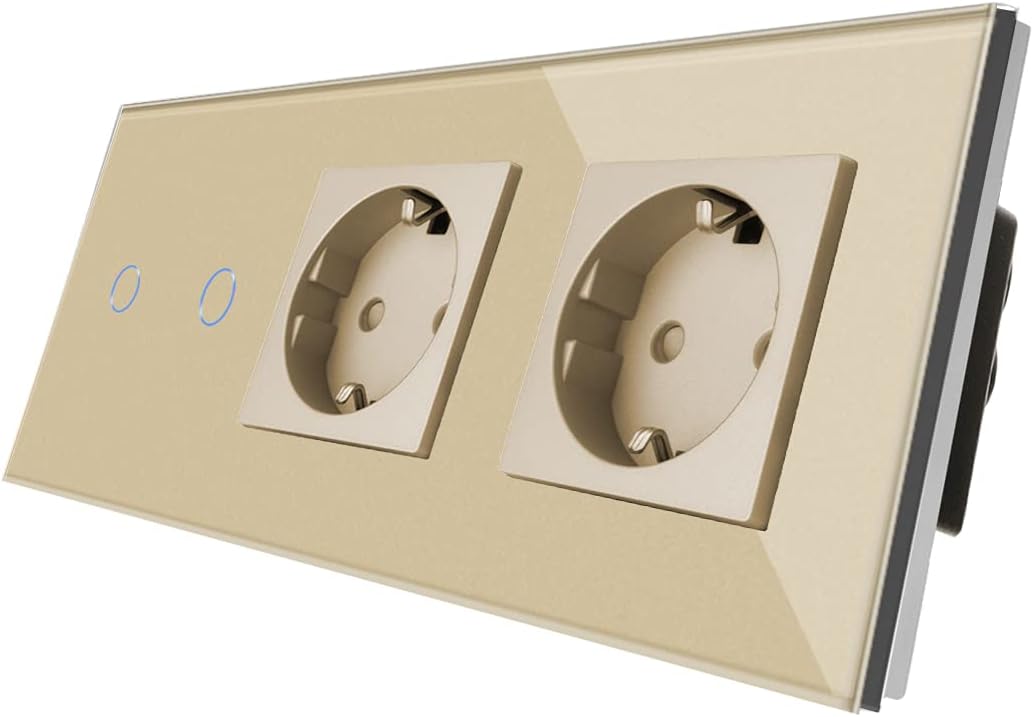
이 이미지는 각도를 제공합니다 view of the CNBINGO Smart Touch Wi-Fi Switch with Double Schuko Socket, highlighting its design and components.
명세서
| 특징 | 사양 |
|---|---|
| 제조업체 | 씨엔빙고 |
| 모델 번호 | L1-201+M1-P111.2 |
| 치수(길이 x 너비 x 높이) | 15.7 x 8.6 x 3.9cm |
| 무게 | 420그램 |
| 입력 Voltage | 교류 90-240V |
| 운영 볼륨tage | 250 볼트 |
| Current Rating (Socket) | 16아 |
| 최대 부하(스위치) | 1500W / compartment |
| 스위치 스타일 | 만지다 |
| 제어 방법 | Application (Smart Life App) |
| 커넥터 유형 | 1 pole, 2 sockets |
| 중성선 요구 사항 | Not required for switch (adapter needed for lamp) |
| 필요한 배터리 | 아니요 |
설치
안전 경고:
- 설치 또는 유지보수를 하기 전에 항상 회로 차단기에서 전원을 차단하십시오.
- 전기 배선에 대해 잘 모르시겠다면 자격을 갖춘 전기 기술자에게 문의하십시오.
- Ensure the product's specifications match your electrical system.
- 젖어 있거나 d인 곳에는 설치하지 마십시오.amp 환경.
배선도:
Follow the wiring instructions carefully. For the no-neutral-wire switch, ensure the yellow adapter is correctly installed at the lamp's L1 connection.

This image displays the rear of the switch, indicating the wiring terminals for electrical connections. Note the specific terminals for live (L) and neutral (N) wires, and switch outputs (L1, L2, L3).
설치:
The switch is designed for easy installation into standard EU flush-mounted boxes. The removable wall plate allows for a clean, screw-free finish. The unit can be mounted vertically or horizontally to suit your preference.

This image illustrates the flexibility of installing the switch either horizontally or vertically to match your room's aesthetic and functional needs.
물리적 설치 단계:
- 회로 차단기에서 주전원을 끕니다.
- Remove the existing switch/socket from the wall box.
- Connect the wires to the appropriate terminals on the CNBINGO switch as per the wiring diagram. Ensure all connections are secure.
- For no-neutral-wire models, install the yellow adapter at the lamp's L1 connection.
- Mount the switch mechanism into the wall box using screws.
- Attach the glass front panel. Ensure it clicks securely into place.
- 회로 차단기에서 전원을 복구하세요.
Setup (App & Voice Control)
App Download & Account Creation:
- 앱스토어(iOS) 또는 구글 플레이 스토어(안드로이드)에서 '스마트 라이프' 앱을 다운로드하세요.
- 새 계정을 등록하거나 이미 계정이 있는 경우 로그인하세요.
Wi-Fi에 연결:
- Open the Smart Life app and tap '+' to add a new device.
- Select 'Switch (Wi-Fi)' or 'Socket (Wi-Fi)' depending on the device type.
- Follow the in-app instructions to put the device into pairing mode (usually by pressing and holding a button on the switch).
- Enter your Wi-Fi network credentials (2.4GHz network only).
- 연결되면 장치 이름을 변경하여 더 쉽게 제어할 수 있습니다.
음성 지원 통합:
The CNBINGO Smart Touch Switch is compatible with Amazon Alexa and Google Assistant, allowing for convenient voice control.

This image demonstrates the voice control feature, showing the smart switch alongside Amazon Alexa and Google Home devices.
- 아마존 알렉사의 경우:
- Open the Alexa app, go to 'Skills & Games', and search for 'Smart Life'.
- Enable the skill and link your Smart Life account.
- Discover devices. You can now control your switch using voice commands like "Alexa, turn on Switch 1."
- Google 어시스턴트의 경우:
- Google Home 앱을 열고 '+'를 탭하여 '기기 설정'을 선택한 다음 'Google과 연동'을 선택하세요.
- 검색 'Smart Life', link your account, and assign the switch to a room.
- Control your switch with commands like "Hey Google, turn off the living room light."

This image confirms the product's compatibility with Google Assistant and Amazon Alexa for voice control.
작동 지침
수동 터치 컨트롤:
The touch-sensitive panel allows for direct control of the connected lights. A gentle touch on the designated area will toggle the light on or off. The blue LED indicator will show the current status (bright for ON, dim for OFF).
App Control (Smart Life App):
Once connected to the Smart Life app, you can access a range of smart features:
- 원격 제어: Turn lights on or off from anywhere using your smartphone.
- 일정 및 타이머: Set specific times for lights to turn on or off automatically, or create countdown timers.
- 장면: Create custom scenes to control multiple lights or devices with a single tap.
- 장치 공유: Share control of the switch with family members through the app.

This image displays the Smart Life app interface, demonstrating remote control capabilities and various smart features like scheduling and scene creation.
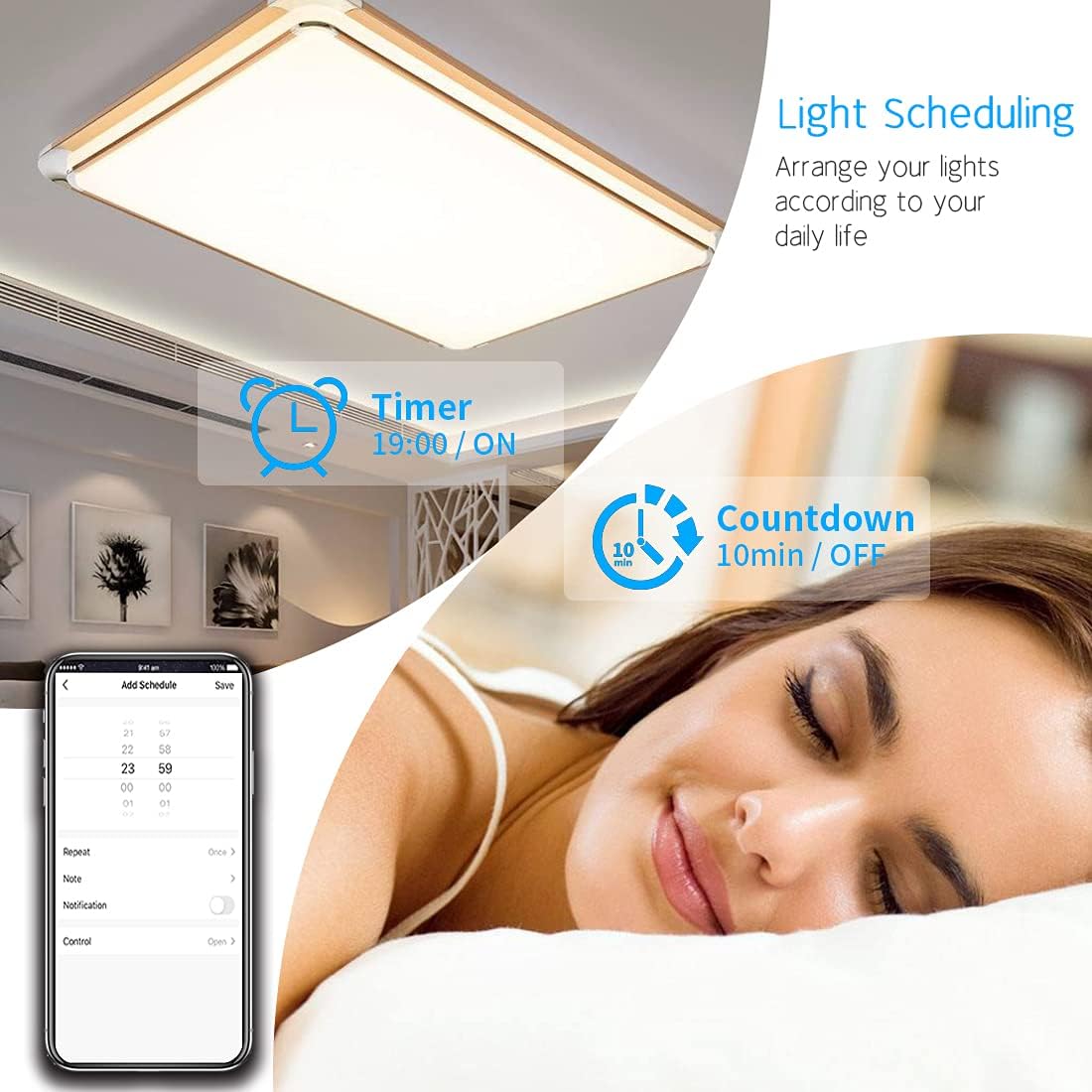
This image illustrates the light scheduling feature within the Smart Life app, allowing users to set timers and countdowns for automated lighting control.
유지
- 유리 패널은 부드럽고 마른 천으로 닦으십시오. 연마성 세척제나 용제는 사용하지 마십시오.
- Ensure the switch and sockets are free from dust and debris.
- Regularly check for any loose connections or signs of damage. If damage is found, discontinue use and consult a qualified electrician.
문제 해결
- 스위치가 응답하지 않습니다: Ensure power is supplied to the switch. Check the circuit breaker. Verify the glass panel is correctly installed.
- Wi-Fi 연결 문제: Ensure your Wi-Fi network is 2.4GHz. Check if the router is within range. Try resetting the switch to pairing mode and re-connecting via the app.
- 음성 제어가 작동하지 않습니다: Confirm that your Smart Life account is correctly linked to Alexa or Google Assistant. Ensure the device is discovered and named appropriately in the respective voice assistant app.
- Light flickering or not turning on (no neutral wire model): Verify the yellow adapter is correctly installed at the lamp's L1 connection. Ensure the lamp is compatible with no-neutral-wire switches.
- Sockets not working: The sockets are not smart and do not connect to Wi-Fi. Check if power is supplied to the unit. Ensure devices plugged in are within the 16A 250V limit.
보증 및 지원
This CNBINGO product comes with a 5년 무료 보증. For any issues or support, please contact CNBINGO customer service. Ensure you have your purchase details and model number (L1-201+M1-P111.2) available when contacting support.

This image highlights the general advantages offered by CNBINGO products, including energy efficiency and smart home integration.


