1. 서론
This manual provides detailed instructions for the proper setup, operation, and maintenance of your Bower 12-inch RGB LED Selfie Ring Light Studio Kit. Please read this manual thoroughly before using the product to ensure optimal performance and longevity.
2. 상자 안에 무엇이 들어있나요?
- 1 x 링 라이트
- 1 x 삼각대
- 1 x Remote (Wireless)
3. 특징
- Premium 12-inch RGB LED Ring Light: Offers 9 dynamic RGB colors, 3 white light modes (White, Natural, Warm), and 7 special effects for diverse lighting needs.
- Adjustable 62-Inch Tripod: Customizable height from 16 inches (fully collapsed) to 62 inches (fully extended) for various shooting angles and setups.
- In-line & Wireless Remote Controls: Manage lighting modes, effects, and brightness instantly with the attached in-line remote and a convenient wireless remote for maximum flexibility.
- 360-Degree Ball Head Adapter & Smartphone Mount: Provides versatile setup options for professional photography and videography, securely holding your smartphone.
- 조정 가능한 밝기: Features 12 levels of brightness, suitable for capturing quality photos and videos in any lighting condition.
- USB 전원: Conveniently powered via USB, enhancing portability for content creators.
4. 설정 지침
- 삼각대 조립:
Unfold the tripod legs to create a stable base. Extend the tripod to your desired height by loosening the locking knobs on the center column and then tightening them once the desired height is reached. The tripod can extend from 16 inches to 62 inches.
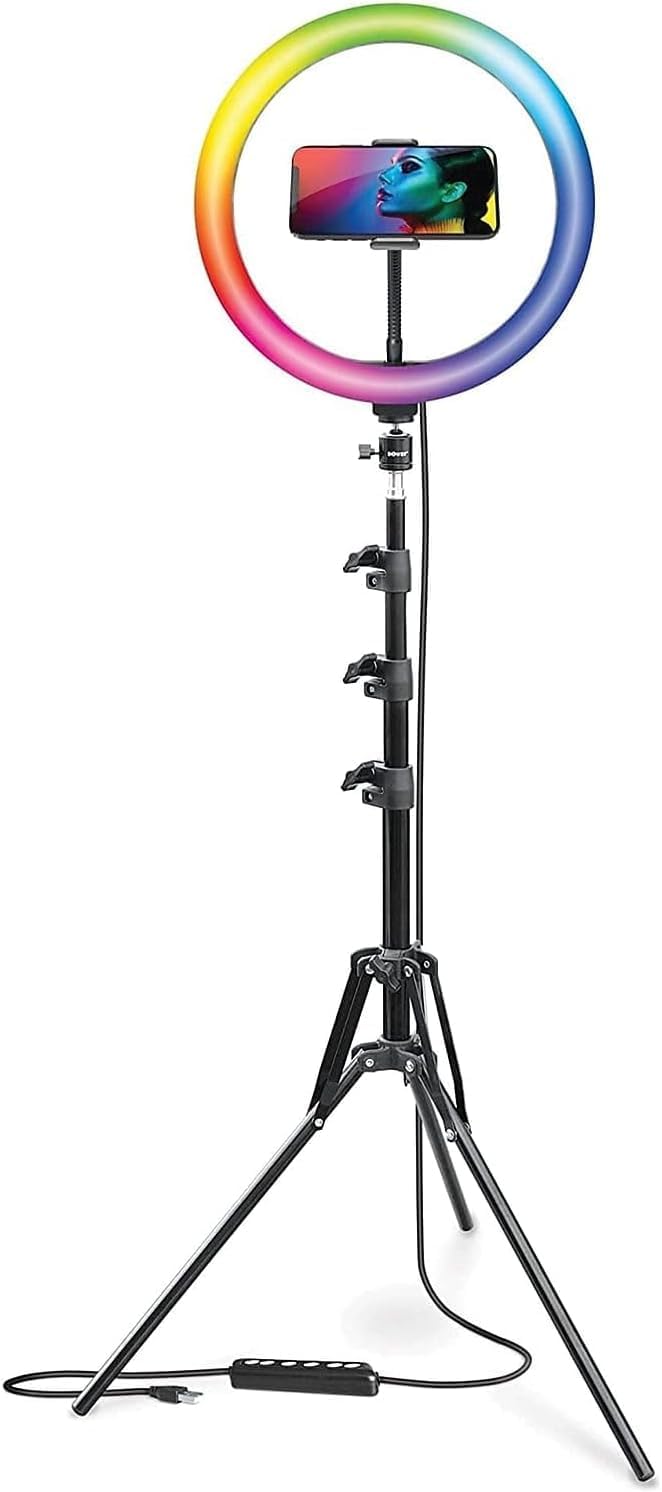
Figure 4.1: Fully assembled ring light kit on its adjustable tripod.
- 링 라이트 부착:
Securely screw the 12-inch RGB LED ring light onto the top of the tripod stand. Ensure it is firmly attached to prevent wobbling.

그림 4.2: 전면 view of the ring light and tripod.
- 스마트폰 거치대를 설치하세요:
Attach the 360-degree ball head adapter and smartphone mount to the center of the ring light. Adjust the mount to securely hold your smartphone in either vertical or horizontal orientation.

그림 4.3: 상세 view of the adjustable smartphone mount.
- 전원 연결:
Connect the USB cable from the ring light to a compatible USB power source (e.g., computer, wall charger, power bank). The in-line remote is integrated into this cable.

Figure 4.4: USB power cable with in-line remote.
5. 사용 설명서
- 전원 켜기/끄기:
Press the power button on the in-line remote or the wireless remote to turn the ring light on or off.
- 밝기 조정:
Use the '+' and '-' buttons on the in-line remote or the wireless remote to cycle through 12 levels of brightness.
- Changing White Light Modes:
Press the mode button on the in-line remote or the wireless remote to switch between the 3 white light modes: White, Natural, and Warm.

Figure 5.1: Ring light displaying various white light modes.
- Changing RGB Colors and Special Effects:
Press the RGB/Effect button on the in-line remote or the wireless remote to cycle through 9 RGB colors and 7 special effects (Spectrum, Cycle, Cycle 2, Strobe, Transition, Transition 2, Swirl).

그림 5.2: 이상view of RGB colors and special effects.
- 무선 리모컨 사용 방법:
The wireless remote connects via Bluetooth to your smartphone. Pair the remote with your device to control photo and video capture remotely, in addition to light settings.
6. 유지관리
- 청소: Use a soft, dry cloth to clean the ring light and tripod. Avoid abrasive cleaners or solvents.
- 저장: When not in use, collapse the tripod and store the kit in a dry, cool place away from direct sunlight and moisture.
- 손질: Handle the ring light and tripod with care to prevent damage to the LED bulbs or mechanical components.
7. 문제 해결
- 불이 켜지지 않음: Ensure the USB cable is securely connected to a working power source. Check if the power button on the in-line remote has been pressed.
- 무선 리모컨이 연결되지 않습니다. Ensure Bluetooth is enabled on your smartphone and the remote is in pairing mode. Refer to your smartphone's manual for Bluetooth pairing instructions.
- 불안정한 삼각대: Ensure the tripod legs are fully extended and the locking knobs are tightened. Place the tripod on a flat, stable surface.
- Smartphone not fitting in mount: The mount is designed to fit most smartphones up to 3.6 inches wide. Ensure your phone is within this size range and remove any bulky cases if necessary.
8. 사양
| 특징 | 세부 사항 |
|---|---|
| 제품 치수 | 62 x 12 x 62 인치 |
| 품목 무게 | 3.09파운드 |
| ASIN | B09MMG4DZ7 |
| 품목 모델 번호 | WA-RLSRGB12 |
| 연결 기술 | 블루투스 |
| 하드웨어 인터페이스 | USB |
| 한국어: | 636980879468 |
| 제조업체 | 나무 그늘 |
| 첫 번째 이용 가능 날짜 | 26년 2021월 XNUMX일 |
9. 보증 및 지원
For warranty information and customer support, please refer to the official Bower web사이트를 방문하거나 고객 서비스에 직접 문의하세요. 보증 청구를 위해 구매 영수증을 보관하세요.
10. 공식 제품 영상
No official product videos from the seller were available in the provided data. Please refer to the manufacturer's web이용 가능한 모든 비디오 자료를 찾을 수 있는 사이트입니다.


