1. 서론
This manual provides detailed instructions for the safe and effective use of your Flashpoint Zoom Li-on III R2 TTL On-Camera Flash for Fujifilm cameras. Please read this manual thoroughly before operation to ensure proper functionality and to prevent damage to the unit or injury to yourself.
The Flashpoint Zoom Li-on III R2 is a high-performance speedlight designed for Fujifilm cameras, featuring a powerful 76Ws output, 2.4GHz wireless R2 system, 1/8000s High-Speed Sync (HSS), and a quick manual-TTL switch for versatile lighting control. It is powered by a 7.2V/2600mAh Li-ion battery, providing up to 450 full-power flashes with a rapid 1.5s recycle time.

Image: The Flashpoint Zoom Li-on III R2 TTL On-Camera Flash unit.
2. 안전 정보
- 플래시 장치를 분해하거나 개조하지 마십시오. 고음량tage 구성 요소가 존재합니다.
- 제품을 건조한 곳에 보관하십시오. 비나 습기에 노출시키지 마십시오.
- 플래시를 터뜨린 후에는 플래시 튜브가 뜨거울 수 있으므로 만지지 마십시오.
- 특히 가까운 거리에서 플래시를 사용할 때는 눈에 직접 빛이 닿지 않도록 주의하십시오. 시력이 손상될 수 있습니다.
- 어린이의 손이 닿지 않는 곳에 보관하세요.
- 지정된 배터리와 충전기만 사용하십시오.
- Ensure the flash is securely mounted to the camera or stand to prevent accidental drops.
3. 제품 구성품
The Flashpoint Zoom Li-on III R2 package typically includes the following items:
- Flashpoint Zoom Li-on III R2 TTL On-Camera Flash Unit
- Li-ion Battery (7.2V/2600mAh)
- 배터리 충전기
- USB 충전 케이블
- 미니 스탠드
- 보호 케이스
- 사용 설명서(본 문서)

Image: Contents of the Flashpoint Zoom Li-on III R2 package, including the flash unit, battery, charger, cable, mini stand, and case.
4. 설정
4.1 배터리 설치 및 충전
- 플래시 장치의 배터리 덮개를 엽니다.
- Insert the 7.2V/2600mAh Li-ion battery, ensuring correct polarity.
- 배터리 덮개를 단단히 닫으세요.
- To charge, connect the battery to the charger and plug the charger into a power outlet. The indicator light will show charging status.

Image: Close-up of the Flashpoint Zoom Li-on III R2 showing the battery compartment and the 2600mAh Li-ion battery.
4.2 플래시 장착
- Slide the flash's mounting foot into your Fujifilm camera's hot shoe.
- Tighten the locking knob or lever on the flash unit to secure it firmly in place.
- Alternatively, mount the flash onto a light stand using the included mini stand or a compatible cold shoe adapter.

Image: The Flashpoint Zoom Li-on III R2 flash mounted on a camera hot shoe.
5. 플래시 작동법
5.1 Power On/Off and Interface
Press and hold the power button to turn the flash on or off. The backlit matrix LCD provides clear information and settings. Use the multipurpose buttons and dial for navigation and adjustments.
Image: The control panel of the Flashpoint Zoom Li-on III R2, showing the backlit LCD and multipurpose buttons.
5.2개의 플래시 모드
The flash supports various modes for different shooting scenarios:
- TTL(Through-The-Lens) 모드: The flash automatically adjusts its output based on the camera's metering system. Use the Quick Manual-TTL switch for fast transitions.
- 수동(M) 모드: 플래시 출력값을 1/1에서 1/256까지 수동으로 설정할 수 있습니다.
- 멀티(스트로보스코픽) 모드: 단일 노출 중에 일련의 빠른 플래시를 발사하여 피사체의 다양한 움직임을 포착합니다.
- 고속 동기화(HSS): Enables flash synchronization with shutter speeds up to 1/8000s, useful for overpowering ambient light or using wide apertures in bright conditions.

Image: Visual representation of different flash modes including TTL, Manual, Stroboscopic, and High-Speed Sync (HSS) capabilities.
5.3 플래시 헤드 조정
The flash head offers flexible positioning for bounce flash or direct lighting:
- 수평 회전: The flash head rotates 0 to 330 degrees.
- 수직 기울기: The flash head tilts from -7 to 120 degrees.
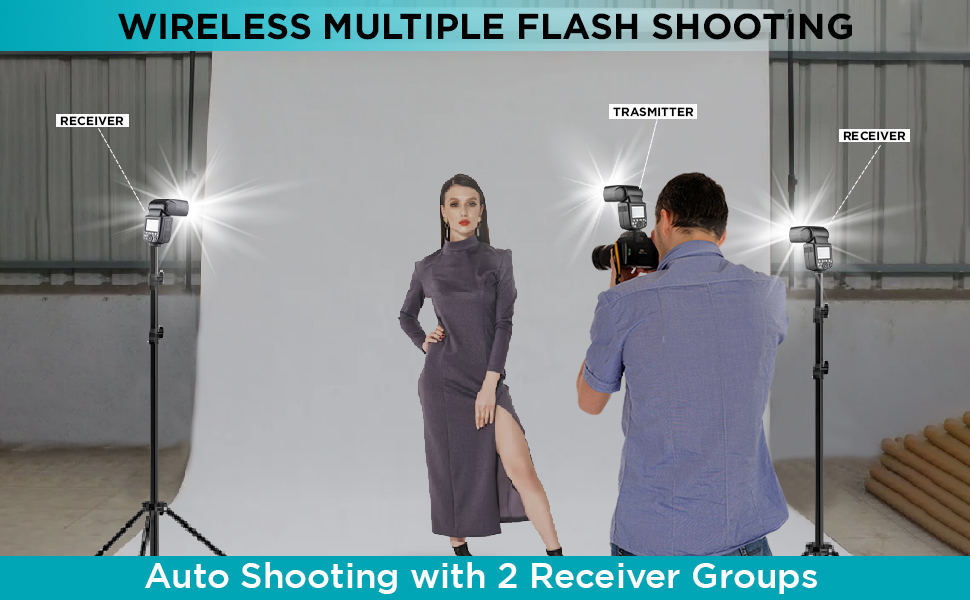
Image: Diagram illustrating the horizontal rotation (330 degrees) and vertical tilt (120 degrees) capabilities of the flash head.
6. Wireless Control (R2 System)
The Flashpoint Zoom Li-on III R2 features a built-in 2.4GHz R2 wireless system, allowing for reliable remote triggering and multi-flash setups.
6.1 Master and Slave Modes
- 마스터 모드 : The flash can act as a master unit to control other Fujifilm compatible flashes with built-in R2 receivers.
- 슬레이브 모드: The flash can be triggered wirelessly by a master unit or transmitter, allowing for off-camera lighting.

Image: Illustration of the flash operating in both Master and Slave modes for wireless multi-flash setups.
6.2 무선 전송
The 2.4GHz wireless transmission offers 32 channels and a range of up to 100 meters, providing robust connectivity for complex lighting arrangements.

Image: Diagram showing the 2.4GHz wireless transmission capabilities of the Flashpoint Zoom Li-on III R2, including channel and range information.
7. 유지관리
- 플래시 장치는 부드럽고 마른 천으로 정기적으로 닦아주세요. 용제나 연마성 세척제를 사용하지 마세요.
- Ensure the hot shoe contacts are clean and free of debris for proper communication with the camera.
- 사용하지 않을 때는 먼지와 손상을 방지하기 위해 플래시를 보호 케이스에 보관하세요.
- If storing for extended periods, remove the battery and store it separately in a cool, dry place.
8. 문제 해결
| 문제 | 가능한 원인 | 해결책 |
|---|---|---|
| 플래시가 터지지 않습니다. | Battery low or depleted; incorrect mode; flash not securely mounted; camera settings incorrect. | Charge or replace battery; check flash mode (TTL/M); ensure flash is fully seated in hot shoe; verify camera flash settings. |
| 플래시 출력이 일관되지 않습니다. | Low battery; environmental interference (wireless); dirty contacts. | Ensure battery is fully charged; change wireless channel; clean hot shoe contacts. |
| 무선 트리거링이 실패했습니다. | Incorrect channel/group settings; distance too far; obstructions; master/slave not properly set. | Verify matching channel and group settings on all units; reduce distance; ensure clear line of sight; confirm master/slave roles. |
| 플래시 메모리의 재충전 시간이 느립니다. | Battery is low; high power output setting. | Recharge battery; use lower power settings if possible. |
9. 사양
| 특징 | 세부 사항 |
|---|---|
| 가이드 번호 | 197ft/60m @ISO 100 |
| 전력 출력 | 76Ws |
| 플래시 모드 | TTL, 수동, 멀티(스트로보스코픽) |
| 고속동기화(HSS) | 최대 1/8000초 |
| 재활용 시간 | 약 1.5초 |
| 풀 파워 플래시 | 약. 450 |
| 배터리 | 7.2V/2600mAh 리튬 이온 |
| 무선 시스템 | 2.4GHz R2 Wireless |
| 무선 채널 | 32 |
| 무선 범위 | 최대 100미터 |
| 플래시 헤드 회전 | 0 to 330 degrees (horizontal) |
| Flash Head Tilt | -7 to 120 degrees (vertical) |
| 모델링 엘amp | 2W integrated |
| 치수 | 9 x 8.3 x 4 인치 |
10. 보증 및 지원
Flashpoint products are designed for reliability and performance. For warranty information and technical support, please refer to the official Flashpoint web웹사이트를 방문하거나 공인 대리점에 문의하세요. 보증 청구를 위해 구매 증빙 자료로 구매 영수증을 보관하세요.
For further assistance, you may visit the Flashpoint store online: 플래시포인트 스토어


