1. 서론
The Raspberry Pi Zero 2 W is a compact, high-performance single-board computer designed for a wide range of applications, from embedded systems to IoT projects. It features a powerful quad-core processor and integrated wireless connectivity, making it a versatile tool for developers and hobbyists.
주요 특징:
- Broadcom BCM2710A1, quad-core 64-bit SoC (Arm Cortex-A53 @ 1GHz)
- 512MB RAM (DDR2 SDRAM)
- Integrated Wi-Fi (2.4GHz 802.11 b/g/n)
- Integrated Bluetooth 4.2 / Bluetooth Low Energy (BLE)
- Mini HDMI port for video output
- Two Micro USB ports (one for power, one for data/OTG)
- MicroSD card slot for operating system and storage
- 40-pin GPIO header for expansion
- CSI-2 카메라 커넥터

그림 1: 이상view of the Raspberry Pi Zero 2 W board, showcasing its compact size and various ports and components.
2. 설정 가이드
Follow these steps to set up your Raspberry Pi Zero 2 W:
- MicroSD 카드를 준비하세요:
The Raspberry Pi Zero 2 W requires an operating system installed on a microSD card. Download the desired OS image (e.g., Raspberry Pi OS Lite) from the official Raspberry Pi website. Use an imaging tool like Raspberry Pi Imager to write the OS image to a microSD card (minimum 8GB recommended).
- 디스플레이 연결(선택 사항):
If you require a graphical interface, connect a display to the Mini HDMI port using a Mini HDMI to HDMI adapter or cable. Ensure your display is powered on.
- 주변 장치 연결(선택 사항):
For initial setup or desktop use, you may need to connect a keyboard and mouse. Use a Micro USB OTG (On-The-Go) cable to connect a USB hub to the data Micro USB port (labeled 'USB'). Then, connect your keyboard and mouse to the USB hub.
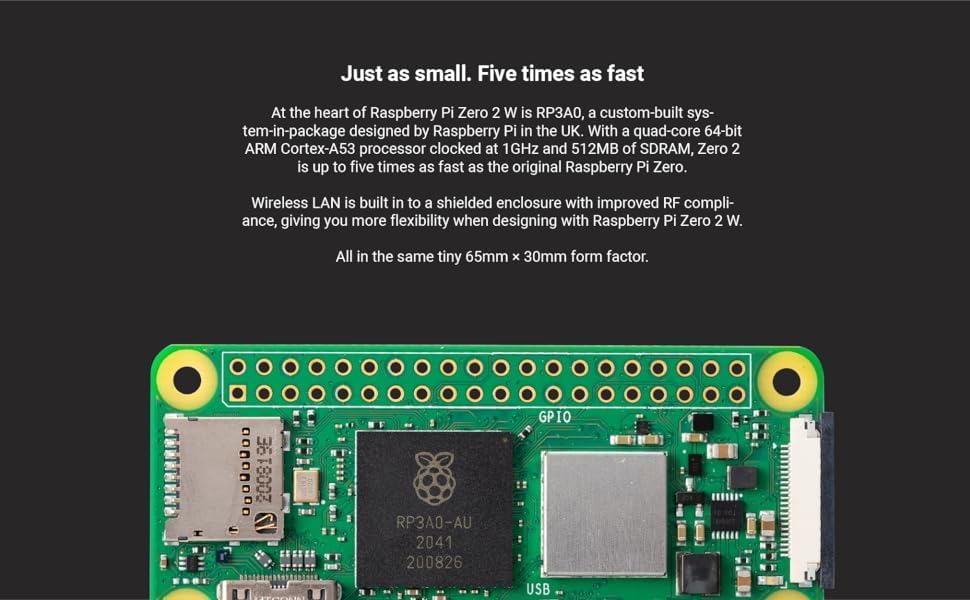
Figure 2: Raspberry Pi Zero 2 W connected to essential peripherals like a keyboard and mouse for initial configuration.
- MicroSD 카드 삽입:
Carefully insert the prepared microSD card into the microSD card slot on the Raspberry Pi Zero 2 W.
- 전원 적용:
Connect a 5V power supply to the power Micro USB port (labeled 'PWR IN'). The Raspberry Pi Zero 2 W will begin to boot. Observe the activity LED for boot status.

그림 3: 상세 view of the Micro USB ports on the Raspberry Pi Zero 2 W, indicating the power input and data/OTG ports.
3. 운영
Once your Raspberry Pi Zero 2 W has successfully booted, you can interact with it based on the installed operating system. Most users will interact via a command-line interface (CLI) or a graphical desktop environment (if a full OS like Raspberry Pi OS Desktop is installed).
기본 사용법:
- Accessing the Desktop: If you installed a desktop version of Raspberry Pi OS, the desktop environment will load automatically.
- 명령줄 인터페이스(CLI): For headless setups or advanced users, access the CLI via SSH (Secure Shell) from another computer on the same network. Ensure SSH is enabled on your Raspberry Pi.
- 무선 연결 : The integrated Wi-Fi and Bluetooth allow for network access and peripheral connections without external adapters. Configure Wi-Fi through the OS settings or command line.
- GPIO 핀: The 40-pin GPIO header provides a versatile interface for connecting sensors, actuators, and other electronic components for custom projects. Refer to the official Raspberry Pi documentation for GPIO pinout and programming guides.
4. 유지관리
Proper maintenance ensures the longevity and optimal performance of your Raspberry Pi Zero 2 W.
- 소프트웨어 업데이트: Regularly update your operating system and installed software to ensure security and access to the latest features. Use commands like
sudo apt update그리고sudo apt full-upgradeon Debian-based systems. - 전원 공급 장치: Always use a stable 5V power supply with sufficient current (e.g., 2.5A) to prevent power-related issues.
- 물리적 환경: Keep the board in a clean, dry environment. Avoid extreme temperatures and humidity. Consider a protective case for long-term use.
- 안전 종료: Always shut down the Raspberry Pi Zero 2 W gracefully through the operating system (e.g.,
sudo shutdown now) before disconnecting power to prevent data corruption on the microSD card.
5. 문제 해결
일반적으로 발생할 수 있는 문제에 대한 해결책은 다음과 같습니다.
- 전원/부팅 안 됨:
Ensure the power supply is correctly connected to the 'PWR IN' Micro USB port and provides adequate voltage and current. Check the power LED on the board; if it's not lit, there might be a power issue. Verify the microSD card is properly inserted and contains a valid OS image.
- 디스플레이 출력 없음:
Confirm the Mini HDMI cable and adapter are securely connected to both the Raspberry Pi and the display. Test with a different Mini HDMI cable or display if possible. Ensure the display is set to the correct input source. Some users have reported issues with analog video output on older firmware; ensure your OS is up to date if using composite video.
- Wi-Fi/Bluetooth 연결 문제:
Check your OS settings to ensure Wi-Fi and Bluetooth are enabled and configured correctly. Verify your network credentials. Ensure there are no physical obstructions or excessive distance from your wireless access point.
- 주변 장치가 감지되지 않음:
If using a USB hub, ensure it is powered and connected to the 'USB' Micro USB port via an OTG cable. Test peripherals directly if possible or with a different hub. Ensure the OS has the necessary drivers (usually included with Raspberry Pi OS).
6. 기술 사양
| 특징 | 세부 사항 |
|---|---|
| 프로세서 | Broadcom BCM2710A1, quad-core 64-bit SoC (Arm Cortex-A53 @ 1GHz) |
| 숫양 | 512MB DDR2 SDRAM |
| 무선 연결 | 2.4GHz 802.11 b/g/n Wi-Fi, Bluetooth 4.2 / BLE |
| 비디오 출력 | Mini HDMI, Composite video (via test points) |
| USB 포트 | 1x Micro USB (Power In), 1x Micro USB (Data/OTG) |
| 저장 | MicroSD 카드 슬롯 |
| GPIO | 40-pin GPIO header (unsoldered) |
| 카메라 커넥터 | CSI-2 카메라 커넥터 |
| 치수 | 65mm X 30mm X 5mm (2.6 "X 1.18"X 0.2 ") |
| 운영 체제 | 리눅스(예: 라즈베리 파이 운영체제) |
7. 보증 및 지원
보증 정보 및 기술 지원에 대해서는 라즈베리 파이 공식 웹사이트를 참조하십시오. web사이트를 방문하거나 판매점에 문의하세요. 보증 청구를 위해 구매 증빙 자료를 보관하세요.
공식 라즈베리 파이 Web대지: www.라스베리파이.org


