소개
This manual provides comprehensive instructions for the VINABTY ERF2F60G Voice Remote Control. This remote is designed as a replacement for various Hisense Smart Android TV models, offering standard remote functions and integrated voice control capabilities. Please read this manual carefully to ensure proper setup and operation.
설정
1. 배터리 설치
The VINABTY ERF2F60G remote control requires two AAA batteries for operation. Follow these steps to install them:
- 리모콘 뒷면에 있는 배터리함 덮개를 찾으세요.
- 덮개를 아래로 밀거나 걸쇠를 누르고 들어 올려서 보관 공간을 엽니다.
- 새 AAA 배터리 2개를 넣고 양극(+)과 음극(-) 단자가 배터리 보관함 내부 표시와 올바르게 맞춰졌는지 확인합니다.
- 배터리 칸 덮개를 제자리에 다시 밀어 넣어 딸깍 소리가 날 때까지 단단히 고정합니다.

The back of the remote control is shown, highlighting the battery compartment cover. This is where two AAA batteries are inserted for operation.
2. Initial Pairing (for Voice Functionality)
For the voice control feature to work, the remote may need to be paired with your Hisense Smart Android TV. If the remote does not respond or voice commands are not recognized after battery installation, follow your TV's specific pairing instructions. Generally, this involves:
- TV의 전원이 켜져 있는지 확인하세요.
- Navigate to the TV's settings menu (often under 리모컨 및 액세서리 or 블루투스 설정).
- Select the option to add a new device or pair a new remote.
- 를 누르고 계세요 OK 버튼과 볼륨 낮추기 button simultaneously on the remote for a few seconds until a pairing indicator appears on the TV screen or the remote's LED flashes.
- 화면의 지시에 따라 페어링 과정을 완료하세요.
Note: Specific pairing steps may vary slightly depending on your Hisense TV model and Android TV version. Refer to your TV's user manual for precise instructions.
작동 지침
The VINABTY ERF2F60G remote control provides intuitive access to your Hisense Smart Android TV's features. Below are the primary functions:

This image displays the front of the VINABTY ERF2F60G remote control, showing all buttons including the power, number pad, navigation, volume, channel, and dedicated app buttons for Netflix, YouTube, and Google Play. The microphone button for voice control is also visible.
- 전원 버튼 (●): TV를 켜거나 끕니다.
- 입력 버튼입력 소스(HDMI, AV 등)를 선택합니다.
- 숫자 패드(0-9)채널 번호를 직접 입력합니다.
- GUIDE / Info Buttons: Accesses the TV program guide or displays information about the current content.
- 탐색 패드(위, 아래, 왼쪽, 오른쪽, 확인): 메뉴를 탐색하고 선택 사항을 확인합니다.
- 뒤쪽에 (↶) / Home (⌂) 버튼: Returns to the previous screen or goes to the TV's home screen.
- Subtitle Button자막을 켜거나 끕니다.
- 볼륨 높이기/낮추기(VOL +/-): TV의 볼륨을 조절합니다.
- 음소거 버튼(🔇): TV 오디오를 음소거하거나 음소거 해제합니다.
- 채널 위/아래(CH +/-): TV 채널을 바꿉니다.
- Media Control Buttons (Play/Pause, Fast Forward, Rewind, Stop)미디어 재생을 제어합니다.
- Dedicated App Buttons (Netflix, YouTube, Google Play)이러한 스트리밍 애플리케이션에 빠르게 접근할 수 있도록 해줍니다.
음성 제어 기능
The ERF2F60G remote features a voice control button for hands-free operation and search. To use this feature:
- 를 누르고 계세요 마이크 버튼 (🎙) located below the Home button.
- While holding the button, speak your command clearly into the remote. For example, you can say "Open Netflix," "검색 action movies," or "What's the weather?"
- Release the button once you have finished speaking. The TV will process your command.

This image focuses on the microphone button located on the VINABTY ERF2F60G remote control, indicating its function for voice commands. A visual representation of the voice assistant's active state is also depicted.
유지
배터리 교체
Replace the AAA batteries when the remote's performance degrades or it stops responding. Always replace both batteries at the same time with new ones. Do not mix old and new batteries, or different types of batteries.
청소
리모컨을 청소하려면 부드럽고 마른 천을 사용하세요. 잘 지워지지 않는 오염의 경우, 가볍게 두드리세요.amp천에 물이나 순한 비연마성 세제를 묻혀 닦으십시오. 강한 화학 물질이나 연마성 물질은 리모컨 표면이나 내부 부품을 손상시킬 수 있으므로 사용하지 마십시오.
문제 해결
- 리모컨이 응답하지 않음:
- 배터리가 극성에 맞게 올바르게 설치되었는지 확인하십시오.
- 배터리를 새 AAA 배터리로 교체하세요.
- 리모컨과 TV 적외선 수신기 사이에 장애물이 없는지 확인하세요.
- If it's a paired remote, try re-pairing it with the TV (refer to the "Initial Pairing" section).
- 음성 제어가 작동하지 않습니다:
- Ensure the remote is properly paired with your TV for voice functionality.
- 명확하게 말하고 말하는 동안 마이크 버튼을 누르세요.
- 음성 명령은 종종 온라인 처리가 필요하므로 TV의 인터넷 연결을 확인하세요.
- Verify that the TV's voice assistant settings are enabled.
- 버튼이 고정되어 있거나 반응하지 않습니다.
- 유지 관리 섹션에 설명된 대로 리모컨을 청소하십시오.
- 리모컨에 액체를 쏟지 않도록 주의하세요.
명세서
| 모델 번호 | ERF2F60G |
| 상표 | 비나티 |
| 제품 치수 | 8 x 2 x 0.7인치(20.32 x 5.08 x 1.78cm) |
| 품목 무게 | 2.9 온스(82.2그램) |
| 필요한 배터리 | AAA 2개(포함되지 않음) |
| 특징 | 음성 검색 |
| 색상 | 검은색 |
| 지원되는 최대 장치 수 | 1 |
| 호환 장치 | 텔레비전 |
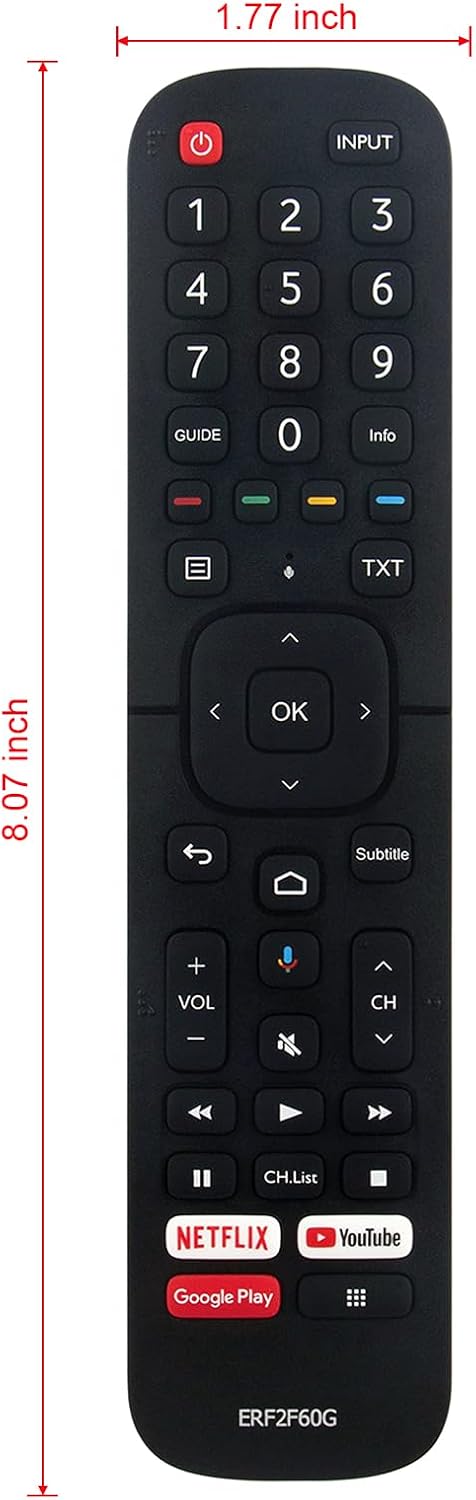
The remote control is displayed with its approximate dimensions: 8.07 inches in length and 1.77 inches in width, providing a clear understanding of its physical size.
Compatible Hisense Smart Android TV Models:
This remote control is compatible with a wide range of Hisense Smart Android TV models, including but not limited to:
- 32A56E, 40A56E, ERF2B60H
- 55Q7G, 65Q7G, 75Q7G, 50Q8G, 65Q8G, 75Q8G
- 50H8G, 55H8G, 75H8G, 55H9G, 65H9G
- 55Q9G, 65Q9G
- 32H5500F, 32H5520F, 32H5530F, 32H5540F
- 40H5609, 40H5500F, 40H5520F, 40H5530F, 40H5540F
- 32H5550F, 32H5560F, 32H5570F, 32H5580F, 32H5590F
- 40H5550F, 40H5560F, 40H5570F, 40H5580F, 40H5590F
- 32H56G, 40H56G, 50Q7G
- 65H9F, 55H9F, 55H8F, 65H8F, 50H8F
- 43H6570F, 50H6570F, 55H6570F, 65H6570
- 55H9020F, 55H9030F, 55H9040F, 55H9050F, 55H9070F
- 55H9F1, 65H9F1
- 65H9020F, 65H9030F, 65H9040F, 65H9050F, 65H9070F
- 65H8030F, 65H8050F, 65H8090F
- 55H8030F, 55H8050F, 55H8090F
- 55Q9809, 55H9809, 65Q9809, 65H9809
- 55H8809, 65H8809, H6590, 43H6590F
- 50H8G, 55H8G, 65H8G, 65H6570F
- 55Q8G, 55Q8G, 65Q8G, 75Q8G
- 50H6510G, 55H6510G, 65H6510G, 75H6510G, 85H6510G
- 55A6501EU, 65A6501EU, 50A6501EU
- 55U6EU, 65U6EU, HU100L5, HU120L5
보증
This product is typically covered by a standard manufacturer's warranty against defects in materials and workmanship. Please refer to the retailer's return policy or contact the seller for specific warranty details and duration. Keep your purchase receipt as proof of purchase.
지원하다
For further assistance or technical support, please contact the retailer or the manufacturer directly. You may find contact information on the product packaging or the seller's website. When contacting support, please have your product model number (ERF2F60G) and purchase details ready.
