1. 서론
This manual provides essential information for the setup, operation, and maintenance of your Donner DDP-100 88-Key Weighted Action Digital Piano. Please read it thoroughly to ensure proper use and to maximize your instrument's lifespan.
주요 특징:
- 88 Fully-Weighted Keys: Designed to precisely match finger strength changes, restoring the feel of an acoustic piano for stable and responsive touch.
- 현실적인 사운드: Features a pure tone sampled from real acoustic grand pianos, utilizing AWM sampling technology for realistic and excellent sound quality.
- 다양한 연결성: Supports MP3 input, external sound systems, and headphones for varied practice and performance needs.
- 통합 Amp정수기: 내장형 amplifier for direct sound output.
- 간소화된 디자인: Wooden cabinet with a sliding key cover for key protection and a modern aesthetic.
- 128음 폴리포니: Ensures complex musical passages can be played without notes cutting off.

Figure 1: The Donner DDP-100 Digital Piano in white, showcasing its full 88-key keyboard, integrated music stand, and three foot pedals.
2. 설정 지침
2.1 포장 풀기 및 구성품 확인
Carefully unpack all components from the packaging. Ensure all items listed below are present:
- Donner DDP-100 Digital Piano Unit
- Furniture Stand
- 전원 어댑터
- 슬라이딩 키 커버
- 3페달 유닛
- 보면대
2.2 조립
- 가구 받침대를 조립하세요: Follow the instructions provided with the furniture stand to securely assemble its components.
- Attach the Piano Unit: Carefully place the DDP-100 digital piano unit onto the assembled furniture stand. Secure it using the provided screws or fasteners.
- 페달 유닛을 연결하세요: Locate the pedal unit cable and connect it to the corresponding port on the underside of the piano unit.
- 악보 받침대를 설치하세요: 피아노 상단 패널의 지정된 슬롯에 악보대를 삽입합니다.
- 전원 어댑터 연결: Plug the power adapter into the DC IN port on the piano's rear panel, then plug the adapter into a wall outlet.

Figure 2: Dimensions of the Donner DDP-100 Digital Piano, illustrating its compact design for home integration.
3. 사용 설명서
3.1 전원 켜기/끄기 및 볼륨 제어
- 전원 켜기: Locate the 'POWER' button on the left side of the keyboard. Press it to turn on the piano. A red indicator light will illuminate.
- 볼륨 조절: Use the 'VOLUME' knob to adjust the overall sound level. Turn clockwise to increase volume, counter-clockwise to decrease.
- 전원 끄기 : 피아노를 끄려면 'POWER' 버튼을 다시 누르세요.
비디오 1: 끝view of the Donner DDP-100 Digital Piano, demonstrating power on, volume control, and key action.
3.2 Playing the Piano
- Weighted Keys: The 88 fully-weighted keys provide a realistic piano feel, with heavier touch in lower registers and lighter touch in higher registers.
- 페달 The three pedals (soft, sostenuto, sustain) allow for expressive playing, similar to an acoustic grand piano.
- 사운드 품질: The DDP-100 features a single, high-quality grand piano tone, sampled for authenticity.

Figure 3: Diagram illustrating the graded hammer action of the 88 weighted keys, providing a realistic playing experience.
3.3 헤드폰 모드
For private practice, connect headphones to the 3.5mm headphone jack located on the rear panel. This mutes the internal speakers, allowing you to play without disturbing others.

Figure 4: Demonstrating the headphone mode for silent practice, ideal for shared living spaces.
3.4 외부 장치 연결
The rear panel of the DDP-100 offers various ports for connecting external devices:
- MP3 인터페이스: Connect an MP3 player for audio playback.
- USB Transmission Interface: MIDI 데이터 전송을 위해 컴퓨터에 연결하세요.
- Audio Interface (IN/OUT): 외부 오디오 시스템이나 녹음 장치에 연결합니다.
- 서스테인 페달 소켓: For connecting the included three-pedal unit.
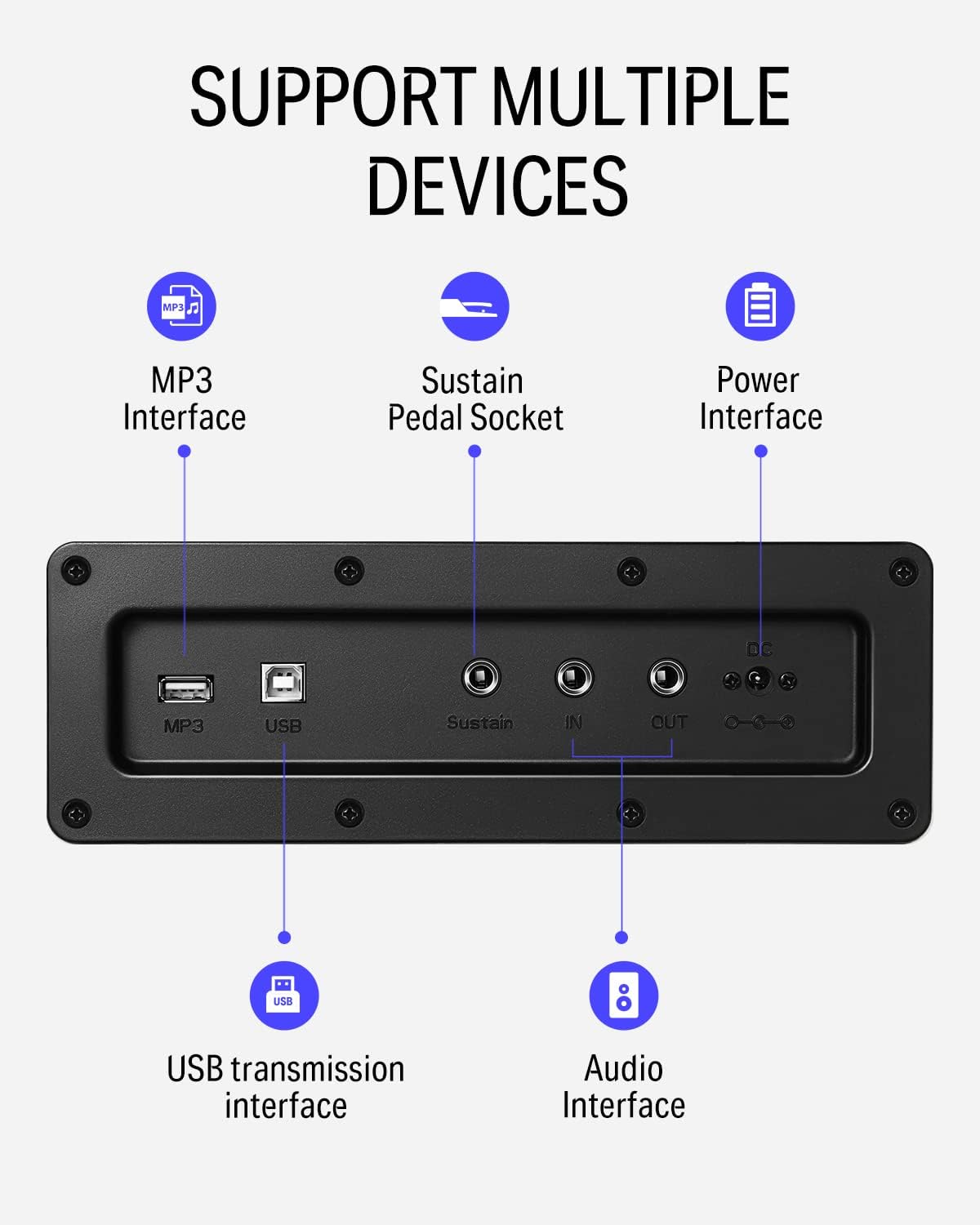
그림 5: 상세 view of the rear panel connectivity options, including MP3, USB, Sustain, and Audio In/Out ports.
Video 2: Demonstrates the versatility of the DDP-100 when connected to other devices, such as DJ equipment.
4. 유지관리
4.1 청소
- Use a soft, dry cloth to wipe the surface of the piano.
- 완고한 먼지에는 약간 damp물과 순하고 마모성이 없는 세제를 사용하여 천을 적셔주세요. 과도한 물기는 피하십시오.
- Do not use chemical solvents, alcohol, or abrasive cleaning agents, as these can damage the finish.
4.2 보관 및 관리
- Keep the piano away from direct sunlight, heat sources, and excessive humidity to prevent damage to the wood and electronic components.
- Use the sliding key cover to protect the keys from dust and spills when not in use.
- 피아노 위에 무거운 물건을 올려놓지 마십시오.
5. 문제 해결
5.1 소리가 나지 않습니다
- 전원 어댑터가 제대로 연결되어 있고 피아노 전원이 켜져 있는지 확인하십시오.
- Check the volume knob and ensure it is turned up.
- 헤드폰이 연결되어 있다면, 내장 스피커를 사용하려면 헤드폰을 분리하십시오.
- If connected to an external sound system, check the system's volume and connections.
5.2 키가 응답하지 않음
- 피아노의 전원이 켜져 있는지 확인하세요.
- 특정 키에만 문제가 발생하는 경우 고객 지원팀에 문의하십시오.
5.3 Abnormal Sound
- Check for loose connections of cables (power, pedals, audio).
- 소리가 너무 커서 왜곡되지 않도록 음량을 조절하십시오.
- If the issue persists, power cycle the unit (turn off, wait 10 seconds, turn on).
6. 사양
| 특징 | 세부 사항 |
|---|---|
| 상표 | 도너 |
| 모델명 | 디디피-100 |
| 키의 개수 | 88 |
| 키 유형 | Fully-Weighted Action |
| 다음 | 128음표 |
| 사운드 소스 | AWM Sampling Technology (Grand Piano Tone) |
| 페달 | 3-Pedal Unit (Sustain, Sostenuto, Soft) |
| 연결성 | MP3 Interface, USB Transmission, Audio In/Out, 3.5mm Headphone Jack |
| 전원 | 어댑터, 전기 |
| 제품 치수 | 54.33인치 깊이 x 16.14인치 너비 x 33.27인치 높이 |
| 품목 무게 | 97.7파운드 |
| 본체 소재 | 목재 |
| 색상 | 하얀색 |
7. 보증 및 지원
For warranty information, please refer to the documentation included with your purchase or contact Donner customer support. General customer support is available for assistance with product inquiries, troubleshooting, and service requests.
For additional support, visit the official Donner web사이트를 방문하거나 고객 서비스 채널에 문의하세요.


