1. 제품 오버view
The HP Envy x360 Convertible 13-bd0063dx is a versatile 2-in-1 laptop designed for adaptability and performance. Featuring a 13.3-inch IPS Touch Full HD (1920x1080) display, it seamlessly transitions between laptop and tablet modes. Powered by an Intel Core i5-1135G7 processor with Intel Iris Xe Graphics, 8GB of DDR4 RAM, and a 256GB PCIe SSD, this device is equipped for everyday tasks, creative work, and entertainment. It operates on Windows 10 Home, offering a familiar and efficient user experience.

Image 1: The HP Envy x360 Convertible laptop in a folded-back tablet configuration, showcasing 유연한 디자인 덕분입니다.
2. 설정 가이드
2.1 초기 전원 켜기 및 구성
- 장치 포장 풀기: 노트북과 모든 액세서리를 포장에서 조심스럽게 꺼내세요.
- 전원 연결: Plug the power adapter into the laptop's charging port and then into a wall outlet. Allow the battery to charge for at least 30 minutes before first use.
- 전원 켜기: Open the laptop lid and press the power button, usually located on the side or top-right of the keyboard.
- 화면의 지시를 따르세요: Windows 10 Home will guide you through the initial setup process, including language selection, network connection, account creation, and privacy settings.
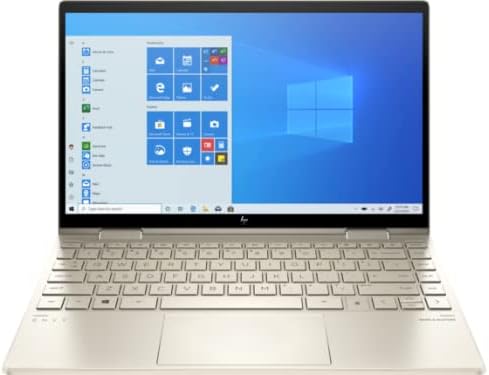
Image 2: The HP Envy x360 Convertible laptop fully open, showing the keyboard and the Windows 10 desktop interface on the screen.
3. 사용 설명서
3.1 Using Convertible Modes
- 노트북 모드: Use the device as a traditional laptop for typing and productivity tasks.
- 텐트 모드: Fold the screen back to form an inverted "V" shape. Ideal for watching videos or presentations.
- 스탠드 모드: Fold the screen back further, resting the keyboard face down. This positions the screen upright for view주고받음.
- 태블릿 모드: Fold the screen completely back against the base, transforming the laptop into a tablet for touch-based interaction. The operating system will automatically prompt you to switch to tablet mode.
3.2 Touchscreen and Keyboard Usage
- 터치스크린: Interact directly with the display using your fingers for navigation, drawing, and app control.
- 키보드 및 터치패드: Utilize the full-size keyboard for typing and the precision touchpad for cursor control and gestures.
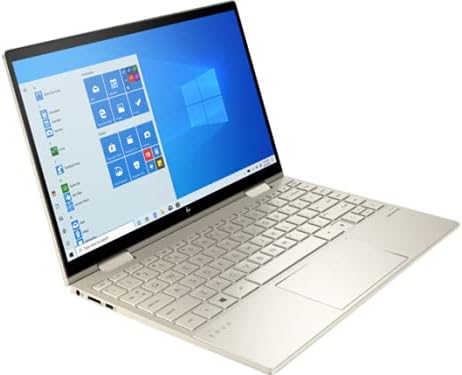
Image 3: The HP Envy x360 Convertible laptop in a partially folded stand mode, highlighting the touchscreen capabilities and flexible hinge.
4. 유지관리 및 관리
- 화면 청소: 부드럽고 털이 없는 천을 살짝 사용하세요.amp물이나 화면 세척제로 닦으세요. 강한 화학 물질은 피하세요.
- 키보드 청소: Use compressed air to remove dust and debris from between the keys. Wipe keys with a soft, damp 옷감.
- 배터리 관리 : To maximize battery life (up to 21 hours), avoid extreme temperatures and fully discharging the battery frequently. Store the laptop with a partial charge if not used for extended periods.
- 소프트웨어 업데이트: Regularly install Windows updates and HP driver updates to ensure optimal performance and security.
- 통풍: 노트북의 통풍구가 막히지 않도록 하여 과열을 방지하십시오.
5. 일반적인 문제 해결
| 문제 | 해결책 |
|---|---|
| 노트북 전원이 켜지지 않음: | 전원 어댑터가 제대로 연결되어 있고 콘센트가 정상적으로 작동하는지 확인하십시오. 다른 콘센트에 연결해 보십시오. 배터리가 완전히 방전된 경우, 전원을 연결한 후 몇 분 정도 기다려야 작동할 수 있습니다. |
| 터치스크린이 반응하지 않음: | Restart the laptop. Check for any pending Windows updates or driver updates for the touchscreen. Ensure the screen is clean and free of obstructions. |
| 느린 성능: | Close unnecessary applications. Check Task Manager for resource-intensive processes. Ensure sufficient free space on the SSD. Run a disk cleanup and defragmentation (for HDD, not typically needed for SSD). Update drivers and Windows. |
| Wi-Fi 연결 문제: | Restart your router and modem. Restart the laptop. Check Wi-Fi settings and ensure the correct network is selected. Update Wi-Fi drivers. |
6. 사양
| 특징 | 세부 사항 |
|---|---|
| 모델명 | HP Envy x360 Convertible 13-bd0063dx |
| 화면 크기 | 13.3 인치 |
| 화면 해상도 | 1920x1080 Pixels (Full HD IPS Touch) |
| 프로세서 | 인텔 코어 i5-1135G7 (2.4GHz) |
| 숫양 | 8GB DDR4(3200MHz) |
| 하드 드라이브 | 256GB PCIe NVMe SSD |
| 그래픽 코프로세서 | 인텔 아이리스 Xe 그래픽 |
| 운영 체제 | 윈도우 10 홈 |
| 평균 배터리 수명 | 최대 21시간 |
| 포트 | 2x SuperSpeed USB-A, 2x SuperSpeed USB-C, 1x HDMI 2.1 |
| 무선형 | 801.11ac (Wi-Fi 6E capable) |
| 품목 무게 | 2.86파운드 |
| 제품 치수 | 12.05 x 8.35 x 0.58 인치 |
| 색상 | 옅은 금색 |
7. 공식 제품 영상
Below are official product videos from the seller, providing additional visual guidance and information about the HP Envy x360 Convertible laptop.
HP AI Business laptop for student and everyday use
Video Description: This video highlights the HP Envy x360 as an AI-powered business laptop suitable for students and daily use, showcasing its capabilities for various tasks.
8. 보증 및 지원
For detailed warranty information, please refer to the documentation included with your HP Envy x360 Convertible laptop or visit the official HP support website. HP offers various support resources, including online troubleshooting, driver downloads, and customer service contact options.
온라인 지원: www.hp.com/support