1. 서론
This manual provides essential information for the safe and efficient use of your Aligator A675 Senior Double SIM 2G Mobile Phone. Please read it carefully before using the device and keep it for future reference. The Aligator A675 is designed for ease of use, featuring large buttons and a clear display, making it ideal for senior users.
2. 패키지 내용
패키지에 모든 품목이 들어 있는지 확인하세요.
- Aligator A675 Mobile Phone
- 배터리
- 충전기
- 사용 설명서 (본 문서)
품목이 누락되었거나 손상된 경우 판매점에 문의하세요.
3. 디바이스 오버view
Familiarize yourself with the key components of your Aligator A675 phone.

이미지 3.1: 앞면과 뒷면 view of the Aligator A675 mobile phone. The front shows the display, keypad, and navigation buttons. The back features the speaker and camera module.
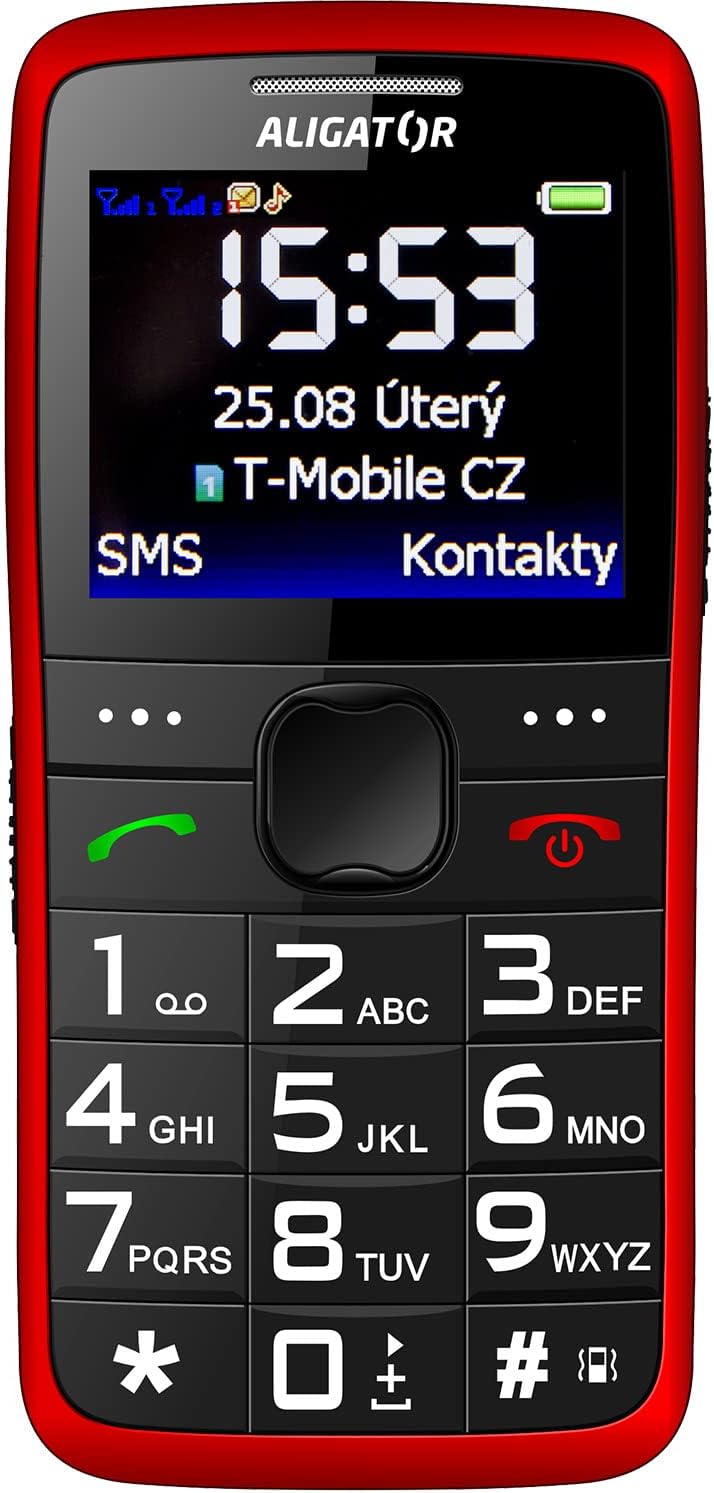
이미지 3.2: 자세한 앞면 view of the Aligator A675 mobile phone, highlighting the large display, clear numeric keypad, and dedicated call/end buttons.
3.1 정면 View
- 표시하다: Shows time, date, network status, battery level, and menu options.
- 탐색 키: 메뉴와 옵션을 스크롤하는 데 사용됩니다.
- 통화 버튼(녹색): Initiates calls and answers incoming calls.
- 종료/전원 버튼(빨간색): Ends calls, returns to the home screen, and powers the phone on/off.
- 키패드 : Numeric keys (0-9), asterisk (*), and hash (#) for dialing and text input.
3.2 뒤로 View
- 라우드 스피커 : For ringtones and hands-free calls.
- 카메라: For basic photo capture.
- SOS 버튼: A dedicated button for emergency calls/SMS (refer to section 5.4 for setup).
4. 설정
Follow these steps to prepare your phone for first use.
4.1 SIM 카드 삽입
- 노치 부분을 살살 들어 올려 휴대폰 뒷면 커버를 분리하세요.
- 배터리가 삽입되어 있다면 제거하십시오.
- Locate the SIM card slots. The Aligator A675 supports two SIM cards (Dual SIM).
- Carefully insert your 2G GSM SIM card(s) into the designated slot(s) with the gold contacts facing down, ensuring they are correctly oriented.
- Ensure the SIM cards are securely in place.
4.2 배터리 삽입
- 배터리 접점을 휴대폰 배터리 칸의 접점과 맞춰주세요.
- Gently press the battery into place until it fits snugly.
- 뒷면 덮개를 다시 씌우고 딸깍 소리가 나면서 제자리에 고정되었는지 확인하십시오.
4.3 휴대폰 충전
- Connect the charger cable to the charging port on the phone (usually located at the bottom).
- 충전기를 전원 콘센트에 꽂으세요.
- 디스플레이의 배터리 아이콘은 충전 상태를 나타냅니다.
- Allow the phone to charge completely before first use. This typically takes a few hours.
5. 전화 작동
Basic functions and features of your Aligator A675.
5.1 전원 켜기/끄기
- 전원을 켜려면: 를 누르고 계세요 End/Power Button (red button) until the screen lights up.
- 전원을 끄려면: 를 누르고 계세요 End/Power Button until the power-off options appear, then confirm.
5.2 전화 걸기 및 받기
- 전화를 걸려면: 키패드를 사용하여 전화번호를 입력하고 누르세요. 호출 버튼 (녹색 버튼).
- 전화를 받으려면: 를 누르세요 호출 버튼 전화가 울릴 때.
- 통화를 종료하려면: 를 누르세요 End/Power Button.
5.3 SMS 송수신
- Navigate to the 'Messages' menu using the navigation key.
- '메시지 작성'을 선택하여 새 SMS를 작성하세요.
- 수신자 번호를 입력하거나 연락처에서 선택하세요.
- 키패드를 사용하여 메시지를 입력하세요. 다른 글자를 입력하려면 해당 키를 여러 번 누르세요(예: A, B, C는 '2'번).
- '보내기'를 선택하세요.
- Incoming messages will be displayed on the screen and stored in the 'Inbox'.
5.4 SOS 기능
The SOS function allows you to quickly contact pre-set emergency numbers.
- SOS 번호 설정하기: Go to 'Settings' > 'SOS Settings'. Add up to 5 emergency contact numbers.
- SOS 활성화: 를 누르고 계세요 SOS 버튼 휴대폰 뒷면에 몇 초 동안 올려놓으세요.
- The phone will automatically send an emergency SMS to the pre-set numbers and then start dialing them one by one until a call is answered.
5.5 연락처
- 연락처 추가: Go to 'Contacts' > 'Add New'. Enter the name and phone number, then save.
- 연락처 검색: Go to 'Contacts' and use the navigation key to scroll or type the first letters of the name.
6. 유지관리 및 관리
Proper care ensures the longevity of your Aligator A675 phone.
- 청소: 부드럽고 마른 천으로 휴대폰 표면을 닦으세요. 액체 세척제나 연마성 재질은 사용하지 마세요.
- 배터리 관리 : Do not expose the battery to extreme temperatures. Avoid fully discharging the battery frequently.
- 저장: 휴대폰은 직사광선과 습기를 피해 시원하고 건조한 곳에 보관하세요.
- 방수 기능: 이 휴대전화는 방수 기능이 없습니다. 액체와의 접촉을 피하십시오.
7. 문제 해결
일반적인 문제와 해결책.
| 문제 | 가능한 원인 | 해결책 |
|---|---|---|
| 전화기 전원이 켜지지 않습니다 | 배터리 부족; 배터리가 제대로 삽입되지 않았습니다 | 배터리를 충전한 후, 배터리를 올바르게 다시 장착하십시오. |
| 전화를 걸거나 받을 수 없습니다 | No network signal; SIM card not inserted; SIM card not activated | Move to an area with better signal; Reinsert SIM card; Contact your network provider |
| 통화 중 소리가 나지 않습니다 | Volume too low; Speaker blocked | Increase call volume; Check if speaker is obstructed |
| SOS 기능이 작동하지 않습니다 | SOS numbers not set; No network signal | Set up SOS numbers in settings; Ensure network coverage |
문제가 지속되면 고객 지원팀에 문의하세요.
8. 사양
Key technical details of the Aligator A675.
- 상표: 앨리게이터
- 모델: A675
- 무선 캐리어: 잠금 해제됨
- 무선 네트워크 기술: 2세대(XNUMXG)
- 화면 크기: 3인치
- 휴먼 인터페이스 입력: 키패드
- SIM 지원: 듀얼 SIM
9. 보증 및 지원
Your Aligator A675 phone is covered by a standard manufacturer's warranty. Please refer to the warranty card included in your package for specific terms and conditions, including the warranty period and coverage details.
For technical support, service, or warranty claims, please contact your retailer or the official Aligator customer service. Contact information can typically be found on the manufacturer's web웹사이트 또는 포장에 표시되어 있습니다.
보증 서비스를 받으려면 구매 증빙서(영수증이나 송장)가 필요하므로 보관하세요.


