1. 서론
This manual provides instructions for the proper use and maintenance of your Sena Parani A20 Bluetooth Intercom Headset. Please read this manual thoroughly before operating the device to ensure optimal performance and safety.
The Parani A20 is designed for motorcycle communication, offering features such as 4-way Bluetooth intercom, HD 2-way intercom, and smartphone connectivity for music and calls.
2. 패키지 내용
The Sena Parani A20 package typically includes the following components:
- 파라니 A20 헤드셋 유닛
- 스피커 세트
- 붐 마이크
- 유선 마이크
- 장착 Clamp 전부
- USB 충전 케이블
- 사용 설명서 (본 문서)

이미지: 이상view of the Sena Parani A20 headset and its included components, such as the main unit, speakers, boom microphone, and wired microphone.
3. 설정 및 설치
3.1 장치 충전
Before first use, fully charge the Parani A20 headset. Connect the USB charging cable to the headset and a power source. The charging time is approximately 2.5 hours.
3.2 헤드셋 장착
파라니 A20은 포함된 클립을 사용하여 대부분의 오토바이 헬멧에 장착할 수 있습니다.amp kit. Ensure the mounting location allows for clear access to the controls and does not obstruct helmet functionality.
- Choose a suitable location on the left side of your helmet.
- 장착 클립을 단단히 부착하십시오.amp 헬멧 쉘에.
- 파라니 A20 본체를 장착된 클립에 밀어 넣으세요.amp 제자리에 고정될 때까지.

Image: The Sena Parani A20 headset unit attached to the side of a motorcycle helmet, showing its position relative to the helmet's structure.
3.3 스피커 및 마이크 설치
Install the speakers inside the helmet's ear pockets and route the microphone cable to the front of the helmet. Two microphone options are provided:
- 붐 마이크: Recommended for open-face or modular helmets. Position the microphone close to your mouth.
- 유선 마이크: Suitable for full-face helmets. Secure it inside the chin bar.
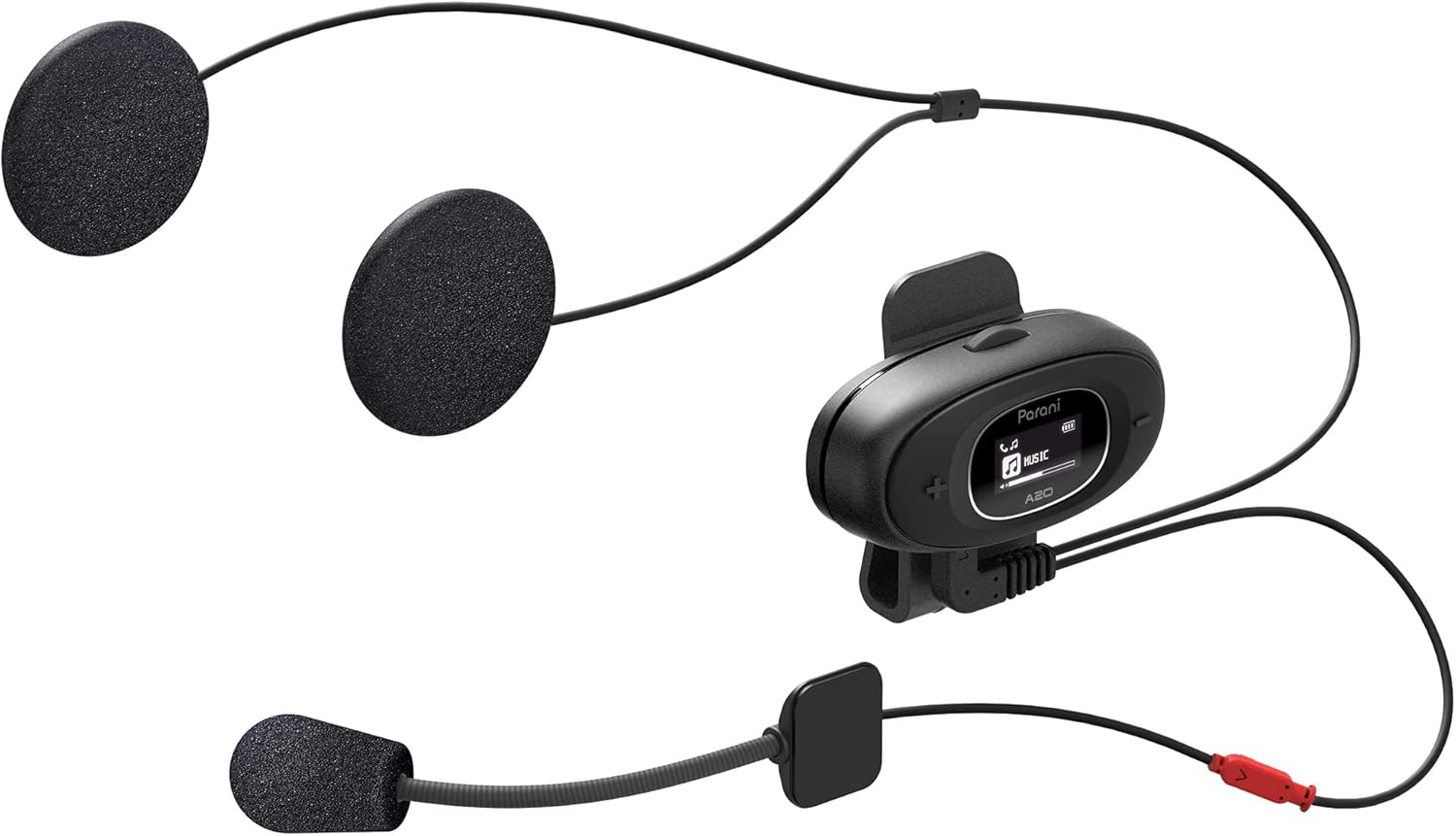
Image: The Sena Parani A20's speakers and both microphone types (boom and wired) are displayed, ready for installation inside a helmet.
4. 사용 설명서
4.1 전원 켜기/끄기
- 전원 켜기: 를 누르고 계세요 가운데 버튼 1초 동안.
- 전원 끄기 : 를 누르고 계세요 가운데 버튼 5초 동안.
4.2 스마트폰과의 블루투스 페어링
To connect your Parani A20 to a smartphone for music, GPS, or phone calls:
- 헤드셋을 끈 상태에서 버튼을 길게 누르세요. 가운데 버튼 for 5 seconds until the LED flashes red and blue, indicating pairing mode.
- On your smartphone, go to Bluetooth settings and select "Parani A20" from the list of available devices.
- 페어링이 완료되면 LED가 파란색으로 깜박입니다.
4.3 인터콤 통신
The Parani A20 supports 4-way Bluetooth intercom and HD 2-way intercom with a range of up to 1 km (0.6 miles).
- 인터콤 시작하기: 짧게 누르세요 가운데 버튼 to initiate intercom with a paired Parani A20 unit.
- 인터콤 종료: 짧게 누르세요 가운데 버튼 다시.
- Multi-way Intercom: Follow the specific pairing instructions in the full manual for connecting multiple units.

이미지: 자세한 view of the Parani A20 unit, highlighting its LCD screen which displays intercom status and battery level, along with the control buttons.
4.4 음악 재생 및 볼륨 조절
- 재생/일시 중지: 를 누르세요 가운데 버튼 during music playback.
- 볼륨 업: 를 누르세요 (+) 버튼.
- 볼륨 작게 : 를 누르세요 (-) 버튼.
- The Parani A20 offers exceptional sound quality with enhanced bass and clarity.
4.5 전화 통화
- 전화 받기: 짧게 누르세요 가운데 버튼.
- 통화 종료: 짧게 누르세요 가운데 버튼.
- 전화 거부: 를 누르고 계세요 가운데 버튼 2초 동안.

Image: A motorcycle rider on the road, wearing a helmet equipped with the Sena Parani A20 intercom, demonstrating its use in a riding context.
5. 유지관리 및 관리
- Keep the device dry. The Parani A20 is not water-resistant.
- 부드러운 천으로 장치를 청소하십시오. damp 옷감. 강한 화학물질이나 용제를 사용하지 마십시오.
- 사용하지 않을 때는 장치를 서늘하고 건조한 곳에 보관하십시오.
- 충전 포트에 먼지나 이물질이 없는지 확인하세요.
6. 문제 해결
6.1 장치 전원이 켜지지 않음
- Check battery level. Charge the device for at least 30 minutes.
- Ensure the power button is pressed correctly (hold for 1 second).
6.2 스피커에서 소리가 나지 않습니다
- Verify that the speakers are correctly plugged into the headset unit.
- Check the volume level on both the headset and your connected smartphone.
- Ensure the headset is properly paired with your audio source.
6.3 인터콤 연결 안 됨
- Ensure both units are within the specified intercom range (up to 1 km).
- Re-pair the intercom units if connection issues persist.
- 장애물이나 간섭이 있는지 확인하세요.
6.4 공장 초기화
If the device is not functioning correctly, a factory reset may resolve the issue. Refer to the full manual for specific instructions on performing a factory reset.
7. 사양
| 모델명 | 파라니 A20 |
| 블루투스 버전 | 5.1 |
| 인터콤 범위 | 최대 1km(0.6마일) |
| 인터콤 유형 | 4-way Bluetooth, HD 2-way |
| 충전 시간 | 약 2.5시간 |
| 주파수 스펙트럼 | 20Hz - 10,000Hz |
| 무게 | 240g |
| 치수 | 18.7 x 11.8 x 6.4cm |
| 재료 | 플라스틱 |
| 방수성 | 방수가 안됩니다 |
| 호환 장치 | Mobile phones, Motorcycles |
8. 보증 및 지원
For warranty information and technical support, please refer to the official Sena web해당 웹사이트를 방문하거나 가까운 대리점에 문의하십시오. 보증 청구를 위해 구매 증빙 자료를 보관하십시오.
온라인 리소스: 방문하세요 세나 web대지 for the latest firmware updates, FAQs, and detailed product manuals.
9. 중요한 안전 정보
- 항상 도로 안전을 최우선으로 생각하세요. 주행에 방해가 되는 방식으로 기기를 조작하지 마세요.
- Ensure the device is securely mounted to your helmet.
- 장시간 극한의 온도나 직사광선에 기기를 노출시키지 마세요.
- 어린이의 손이 닿지 않는 곳에 보관하세요.


