1. 서론
The Innova 7111 OBD2 Tablet is a professional-grade diagnostic tool designed for both automotive enthusiasts and service technicians. This tablet provides OEM-level services with an intuitive user interface, enabling quick and accurate vehicle issue identification and resolution. It offers comprehensive diagnostics across all vehicle systems, including ABS, SRS, engine, and transmission, along with advanced bi-directional control and special reset functions.

그림 1: Innova 7111 OBD2 Tablet. This image displays the diagnostic tablet with its protective casing, 쇼casin컴팩트하고 견고한 디자인입니다.
2. 설정
2.1 초기 충전
Before first use, fully charge the tablet using the included USB-C cable and power adapter. The tablet will automatically power on during charging.
2.2 Tablet Preferences & Wi-Fi Connection
Set your tablet preferences, including Wi-Fi connection, preferred units, idle time, volume level, brightness, and theme. A stable Wi-Fi connection is essential for updates and accessing online resources.
2.3 소프트웨어 업데이트
To ensure optimal performance and access to the latest features, regularly check for and install software and firmware updates via the 'Settings' menu.
2.4 Account Creation
Create an RSPro account to gain full access to the tablet's powerful features, including repair tips, diagnostic reports, and updates.

그림 2: Connecting the Innova 7111 OBD2 Tablet. The image shows a user connecting the diagnostic cable from the tablet to the vehicle's OBD2 port, highlighting the ease of connection.
3. Operating the Innova 7111 Tablet
3.1 OBDII 진단
Access standard OBD2 functions to read and clear engine codes, view freeze frame data, and monitor various system statuses such as misfire, fuel system, comprehensive component, EGR, catalyst, EVAP, and oxygen sensors.
3.2 OEM Diagnostics
Perform in-depth diagnostics on specific vehicle systems beyond standard OBD2, including adaptive front lighting, accessory gateway, acoustic vehicle alerting, air conditioner, back door, blind spot monitoring (master/slave), brake booster, brake/EPB, central gateway, pre-collision system, radar cruise, electric power steering, front recognition camera, lane control, circumference monitoring camera, steering angle sensor, main body, sliding roof, combination meter, road sign assist, digital rear-view mirror, intuitive P/A, clearance warning, rear camera, rain/humidity sensor, and more. The tablet can scan all systems or allow for custom scans.
3.3 Live Data & Bi-Directional Control
View real-time data from multiple systems simultaneously. Utilize bi-directional control to send commands to your vehicle to test actuators and functionalities, such as fuel pump on/off, A/C clutch on/off, and electronic parking brake retraction.

그림 3: Pro Level Features Interface. This image displays the tablet's main menu with options for ABS Codes, Live Data, Bi-Directional Control, Special Reset, RS2 App, and American Owned, indicating its comprehensive capabilities.
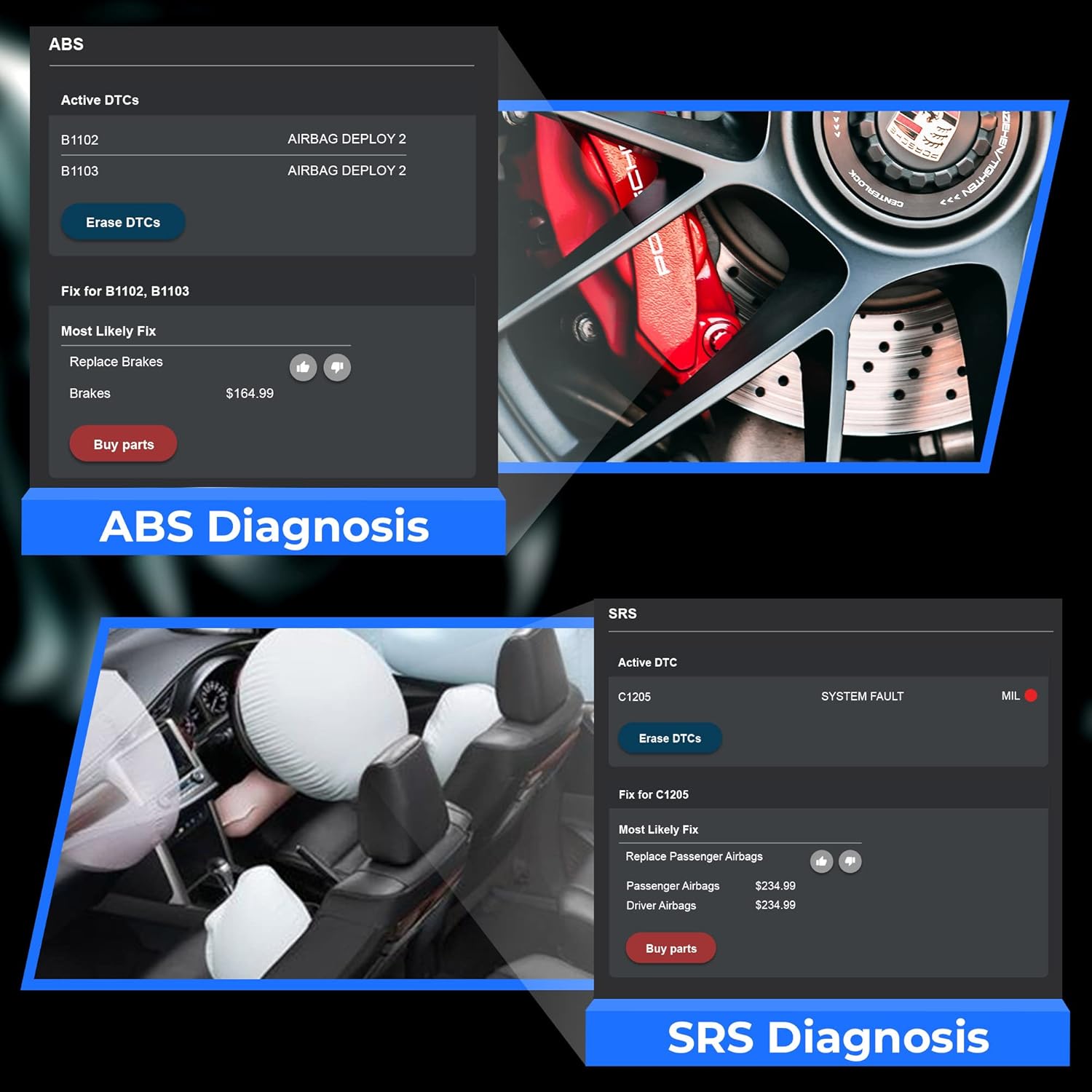
그림 4: ABS and SRS Diagnosis. A split screen view on the tablet showing active DTCs for ABS (B1102, B1103) and SRS (C1205), along with suggested fixes and part replacement options.
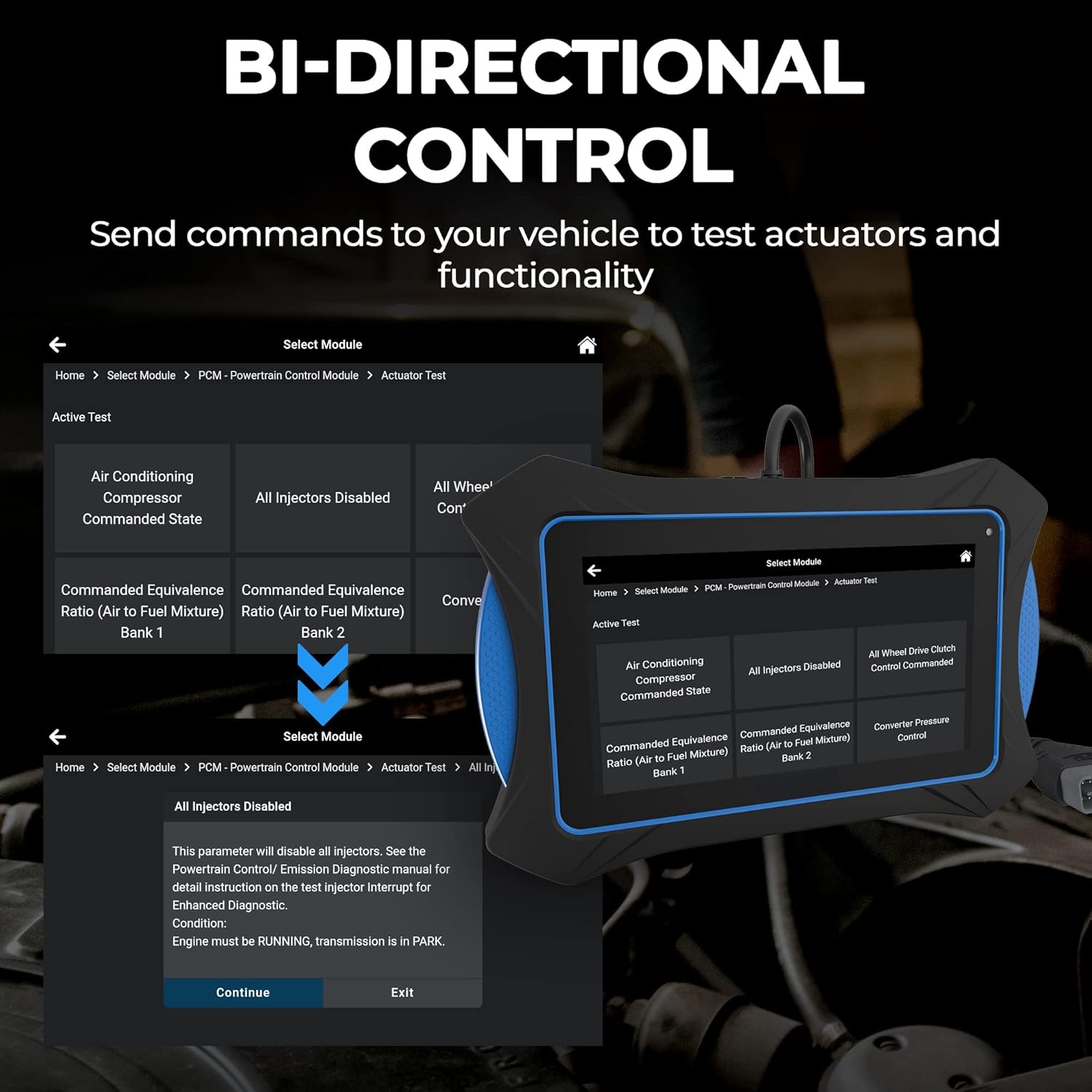
그림 5: Bi-Directional Control Interface. The tablet screen displays various active tests for powertrain control modules, such as Air Conditioning Compressor, All Injectors Disabled, and Commanded Equivalence Ratio, allowing users to send commands to vehicle actuators.
4. 유지 관리 기능
The Innova 7111 offers a wide array of workshop tools for maintenance and resets, including:
- Resets: Oil Maintenance Reset, Battery Reset, Electronic Parking Brake Reset, Maintenance Reset, Transmission Reset, Transmission Fluid Change Reset, DPF Reset, Reset Electric Traction System, Immobilizer Reset, Read/Write Odometer Settings, Language Change Reset, NOx Sensor Reset, Cylinder Reset, Adblue Reset, HV Battery Reset, Rain/Light Sensor Reset, EGR Reset, Electronic Water Pump Start Reset, Tire Size Reset, Stop/Start Reset.
- Relearns: TPMS Relearn, Throttle Body Relearn/TEC Learn, AC System Relearn, Clutch Relearn.
- 루틴: ABS Bleeding, EV/HEV/PHEV Battery Health, Transmission Fluid Temperature, Transmission Fluid Level Check, Injector Coding, Window Door Roof, Key Coding Procedure, A/F Setting, Transport Mode, Coolant Bleeding, Limit Speed, Oxygen Sensor Test.

그림 6: Oil Light Reset Procedure. The tablet displays step-by-step instructions for performing an oil light reset, including turning off ignition, pressing and holding the trip meter reset button, and turning on the ignition.
5. Troubleshooting with the Innova 7111
The Innova 7111 tablet is designed to assist in diagnosing and resolving vehicle issues. It provides:
- 진단 보고서: Generate detailed reports for various systems, including powertrain, ABS, and SRS.
- RepairSolutions2 App: Integrated into the tablet, this app provides verified fixes, repair tips, maintenance schedules, technical bulletins, dealer and safety recalls, and access to a comprehensive repair database.
- Vehicle Inspection Reports: Create diagnostic, customer, collision industry, and pre/post-scan reports to thoroughly assess vehicle condition.
동영상 1 : Innova 7111 OBD2 Tablet Overview. This video provides a detailed demonstration of the tablet's diagnostic capabilities, including OBD2 and OEM diagnostics, workshop tools, and support features, showcasing its intuitive interface and comprehensive functionality for vehicle maintenance and repair.
6. 사양
| 특징 | 세부 사항 |
|---|---|
| 모델 | 7111 |
| 품목 무게 | 4.5파운드 |
| 제품 치수 | 8.5 x 6 x 1 인치 |
| 배터리 | 1개의 리튬 이온 배터리 필요(포함) |
| 전원 | 배터리 구동 |
| 운영 체제 | 안드로이드 9.0 |
| 화면 크기 | 2.8 Inches (Note: Product title mentions 7" touchscreen, this specification might be for a sub-component or an error in source data. User interface is displayed on a larger screen.) |
| 한국어: | 042173071111 |
| 특별 기능 | ABS Scanner (Read & Erase ABS Brake Fault Codes, Reset, Bleeding, Caliper Service), Bi-directional tests/Active Test, Enhanced Data stream (Engine, AT, ABS, SRS), Special Functions, Battery Service (Car Battery Test, Reset), Alternator Test, Optional OBD1 Coverage, Live Data Graphing, Recording, Playback, All System Scan, Network Scan, OBD2 Scanner (Check Engine Code Reader, Read & Erase Engine Fault Codes, Check Engine Light Reset, View Issue Severity, Drive Cycle Procedures, All 10 OBD2 Modes), Oil Services (Oil Reset, Oil Level, Oil Life), Readiness Monitors, Smog Test Readiness LED Indicators, SRS Scanner (Read & Erase SRS Airbag Fault Codes, Reset), Electronic Parking Brake, DPF Reset, Steering Angle Sensor Reset. |
7. 보증 및 지원
7.1 보증
The Innova 7111 OBD2 Tablet comes with a 1-year warranty.
7.2 지원 리소스
Innova provides comprehensive support for the 7111 tablet:
- 평생 무료 업데이트: Ensure your device always has the latest software and vehicle coverage.
- Free Customer Support: Access to a California-based, ASE-certified customer support team.
- Repair Database: Free access to Innova's extensive repair database.
- 도구 라이브러리: On-device resource for tool-related information.
- DLC Locator: Helps locate the Diagnostic Link Connector in various vehicles.
- User's Manual: Digital access to the complete user manual.
- 튜토리얼: Step-by-step video tutorials covering various features and functions.
- 데모 모드 : Practice using the tablet's features without connecting to a vehicle.


