1. 서론
This manual provides essential information for the safe and efficient operation of your RCF Art 945-A Powered Speaker. Please read this manual thoroughly before using the product and retain it for future reference. The RCF Art 945-A is a high-performance, bi-amplified active speaker designed for professional audio applications, featuring a 15-inch neodymium woofer and a 4-inch titanium/neodymium compression driver, delivering 2,100W of power.
2. 안전 정보
중요 안전 지침:
- 이 지침을 읽어보세요.
- 이 지침을 잘 보관하세요.
- 모든 경고를 주의하세요.
- 모든 지시를 따르세요.
- 이 기기를 물 근처에서 사용하지 마십시오.
- 마른 천으로만 닦으십시오.
- 환기구를 막지 마십시오. 제조업체의 지침에 따라 설치하십시오.
- 라디에이터, 난방 조절기, 스토브 또는 기타 장치(다음을 포함)와 같은 열원 근처에 설치하지 마십시오. amp열을 생성하는 발전기.
- 극성 또는 접지형 플러그의 안전 목적을 저버리지 마십시오. 극성 플러그에는 두 개의 날이 있으며, 하나는 다른 하나보다 넓습니다. 접지형 플러그에는 두 개의 날과 세 번째 접지 갈래가 있습니다. 넓은 날 또는 세 번째 갈래는 안전을 위해 제공됩니다. 제공된 플러그가 콘센트에 맞지 않으면 전기 기술자에게 문의하여 오래된 콘센트를 교체하십시오.
- 전원 코드가 밟히거나 끼지 않도록 보호하세요. 특히 플러그, 편의용 콘센트 및 기기에서 나오는 부분은 보호하세요.
- 제조사가 지정한 부속품/액세서리만 사용하세요.
- 번개 폭풍 시 또는 장기간 사용하지 않을 때는 기기의 플러그를 뽑아두세요.
- 모든 서비스는 자격을 갖춘 서비스 담당자에게 의뢰하십시오. 전원 코드나 플러그가 손상되었거나, 액체가 쏟아졌거나, 물체가 기기에 떨어졌거나, 기기가 비나 습기에 노출되었거나, 정상적으로 작동하지 않거나, 떨어졌을 때와 같이 기기가 어떤 식으로든 손상된 경우 서비스가 필요합니다.
주의: To prevent electrical shock, do not remove the cover. No user-serviceable parts inside. Refer servicing to qualified personnel.
3. 패키지 내용
아래 나열된 모든 품목이 패키지에 포함되어 있는지 확인하세요.
- RCF Art 945-A Powered Speaker
- 전원 케이블
- Vertical mount bracket
- 폴 마운트
- 비로부터 보호
- 사용 설명서 (본 문서)
4. 제품 오버view

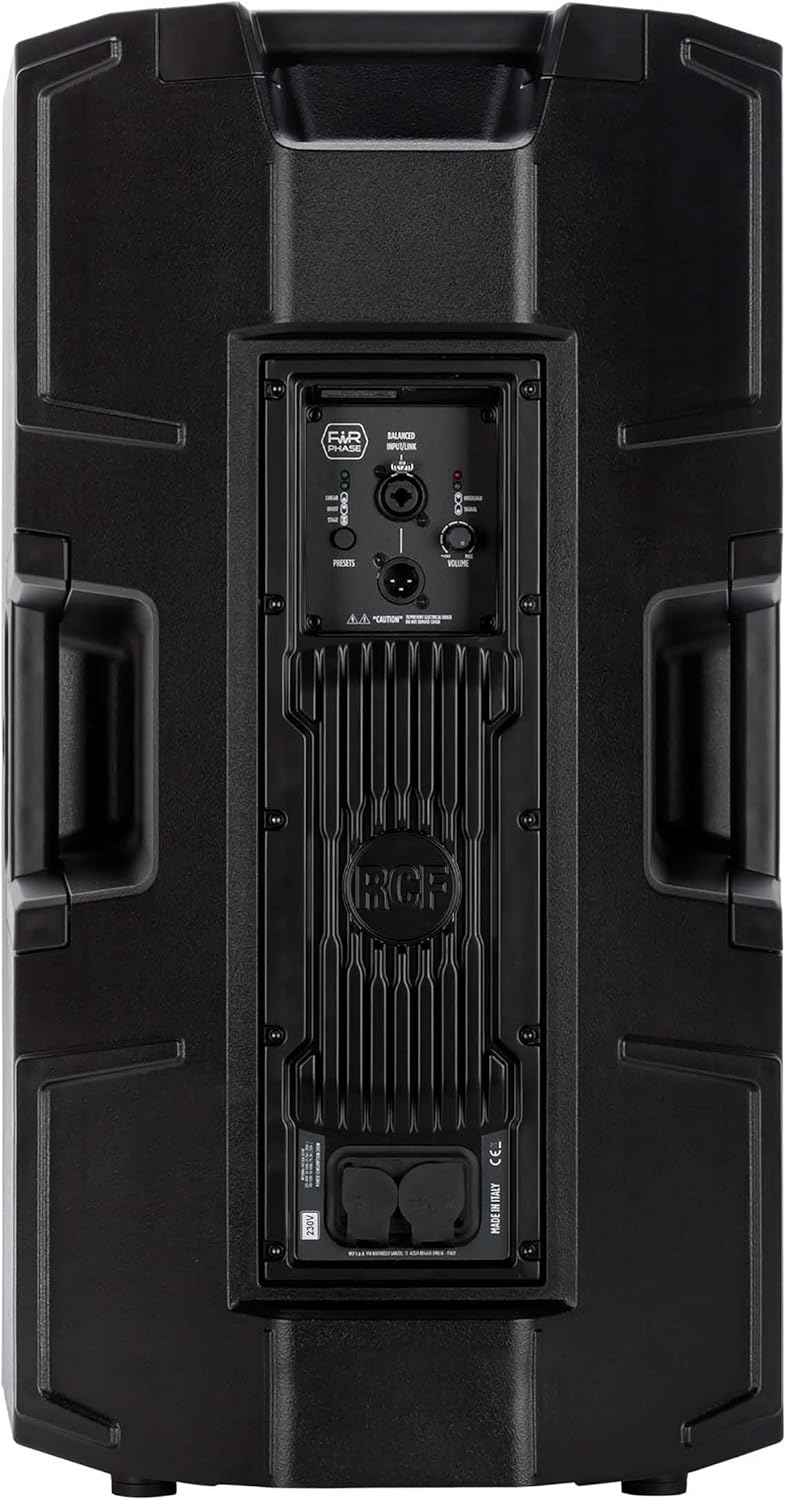


4.1. Rear Panel Controls and Connections
- BALANCED INPUT/LINK (XLR): XLR input for audio signal and XLR link output to connect to another speaker.
- PRESETS Button: Cycles through different DSP presets (LINEAR, BOOST, STAGE) to optimize sound for various applications.
- LINEAR LED: Indicates the 'Linear' preset is active, providing a flat frequency response.
- BOOST LED: Indicates the 'Boost' preset is active, enhancing bass and treble frequencies.
- STAG전자 LED: Indicates the 'Stage' preset is active, optimized for stag전자 모니터링 응용 프로그램.
- 볼륨 노브: 스피커의 전체 출력 레벨을 조절합니다.
- 과부하 LED: Illuminates when the input signal is too high, indicating potential clipping. Reduce input level if this LED lights up consistently.
- 신호 LED: 입력에 오디오 신호가 있을 때 불이 켜집니다.
- POWERCON TRUE1 Input: Secure power connector for AC mains input.
- POWERCON TRUE1 Link: Power output to link power to another speaker.
5. 설정
5.1. 배치
The RCF Art 945-A speaker can be used in various configurations:
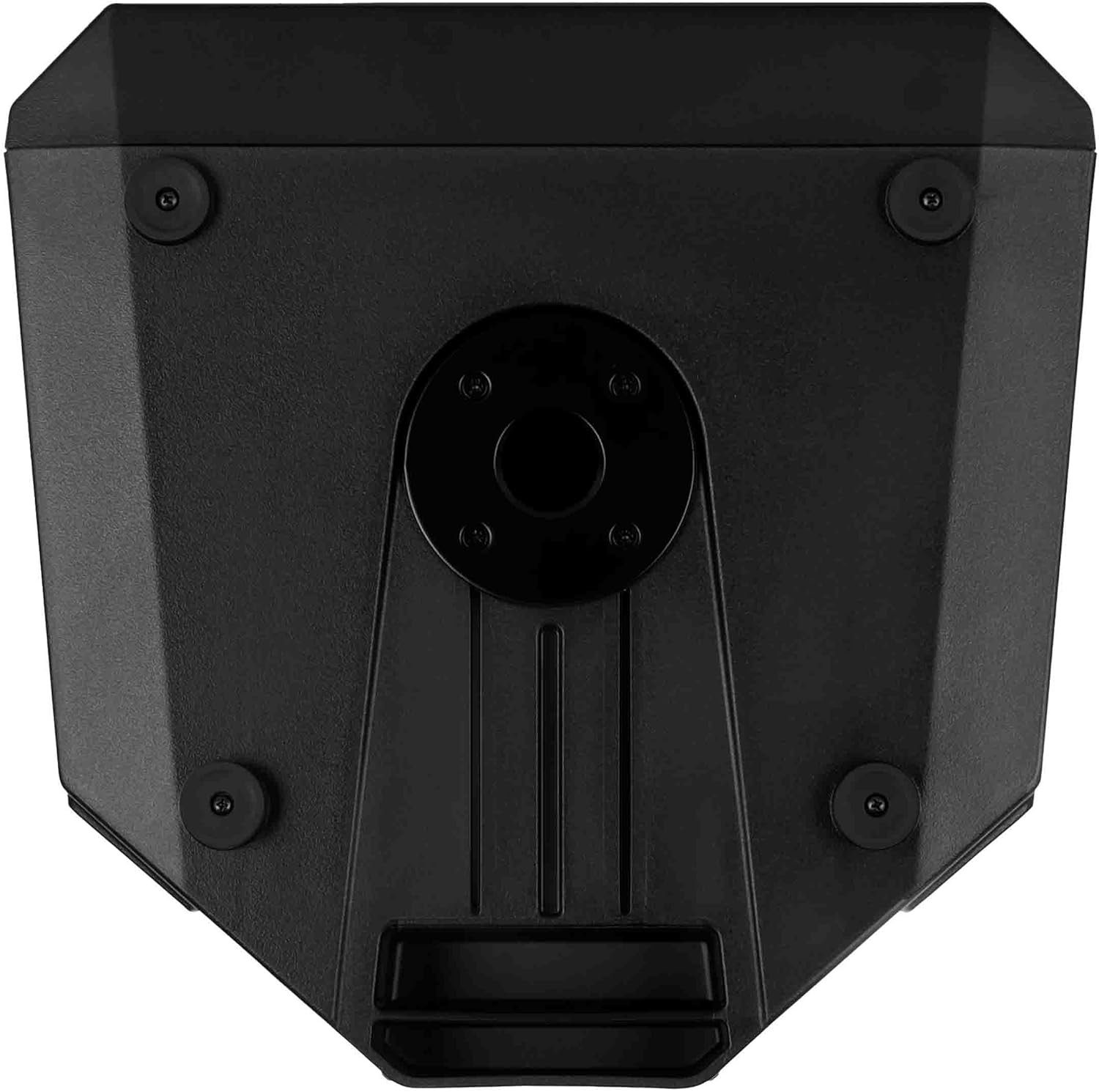
- 극 장착: Insert the speaker onto a standard 35mm speaker pole or tripod stand using the integrated pole mount socket on the bottom of the speaker. Ensure the stand is stable and rated for the speaker's weight (approximately 49.3 lbs / 22.4 kg).
- 바닥 배치: The speaker can be placed directly on a flat, stable surface. The rubber feet on the bottom provide stability and isolation.
- Stag전자 모니터: 캐비닛 디자인은 다음과 같은 용도로 사용할 수 있도록 설계되었습니다.tage monitor. Position the speaker on its side with the appropriate angle for monitoring.
- 벽면 장착: Utilize the provided vertical mount bracket for secure wall installation. Ensure the wall structure can support the speaker's weight.
5.2. 전원 연결
- Ensure the speaker's VOLUME knob is set to minimum (fully counter-clockwise).
- Connect the supplied Powercon TRUE1 power cable to the POWERCON TRUE1 Input on the rear panel of the speaker.
- Connect the other end of the power cable to a suitable AC mains outlet. Verify that the voltage matches the speaker's requirements (e.g., 100-120V or 220-240V).
- If linking power to another speaker, use a Powercon TRUE1 link cable from the POWERCON TRUE1 Link output to the input of the next speaker.
5.3. 오디오 연결
- Connect your audio source (e.g., mixer, audio interface) to the BALANCED INPUT (XLR) on the rear panel using a balanced XLR cable.
- If connecting multiple speakers in a daisy chain, use an XLR cable from the BALANCED LINK output of the first speaker to the input of the next speaker.
6. 운영
6.1. 전원 켜기 / 끄기
- Before powering on, ensure all connections are secure and the VOLUME knob is at its minimum setting.
- Locate the power switch (typically near the power input) and switch it to the 'ON' position. The power LED on the front of the speaker will illuminate.
- To power off, set the VOLUME knob to minimum, then switch the power switch to 'OFF'.
6.2. 볼륨 조절
The VOLUME knob on the rear panel controls the output level of the speaker. Slowly turn the knob clockwise to increase the volume to the desired level. Monitor the OVERLOAD LED to prevent clipping.
6.3. Preset Selection
The PRESETS button allows you to select between three different DSP modes:
- 선의: Provides a flat frequency response, suitable for general sound reinforcement where a neutral sound is desired.
- 후원: Enhances low and high frequencies, often used for music playback or when a more pronounced bass and treble response is needed.
- STAGE: 다음과 같은 용도로 최적화되었습니다.tage monitor, providing clarity and feedback suppression for performers.
Press the PRESETS button repeatedly to cycle through these modes. The corresponding LED (LINEAR, BOOST, or STAGE) will illuminate to indicate the active preset.
6.4. Signal and Overload Indicators
- 신호 LED: This green LED illuminates when an audio signal is detected at the input. It indicates that the speaker is receiving an audio signal.
- 과부하 LED: This red LED illuminates when the input signal level is too high, causing the amplifier to clip. If this LED lights up frequently or stays on, reduce the input level from your source or the speaker's VOLUME knob to prevent distortion and potential damage.
7. 유지관리
7.1. 청소
스피커의 외관과 성능을 유지하려면:
- Disconnect the speaker from the power supply before cleaning.
- Use a soft, dry cloth to wipe down the cabinet.
- 완고한 먼지의 경우 약간 damp 순한 비누를 묻힌 천으로 닦은 후 마른 천으로 닦아주세요.
- 연마성 세척제, 용제 또는 강한 화학 물질을 사용하지 마십시오. 이러한 물질은 마감재를 손상시킬 수 있습니다.
- 스피커 그릴에 먼지와 이물질이 쌓이지 않도록 하여 소리가 제대로 분산되도록 하십시오.
7.2. 보관
장시간 사용하지 않을 경우:
- 스피커는 직사광선과 극한의 온도를 피해 서늘하고 건조한 곳에 보관하세요.
- If possible, use the original packaging or a protective cover to shield the speaker from dust and physical damage.
8. 문제 해결
This section addresses common issues you might encounter with your RCF Art 945-A speaker.
| 문제 | 가능한 원인 | 해결책 |
|---|---|---|
| 사운드 출력이 없습니다 |
|
|
| Distorted sound / OVERLOAD LED on |
|
|
| 윙윙거리는 소리 |
|
|
| 스피커가 켜지지 않습니다 |
|
|
If the problem persists after attempting these solutions, please contact RCF customer support or a qualified service technician.
9. 사양
The following table outlines the technical specifications for the RCF Art 945-A Powered Speaker:
| 특징 | 사양 |
|---|---|
| 모델명 | 13000691 |
| 품목 모델 번호 | ART945-A |
| 스피커 유형 | 우퍼 |
| 우퍼 직경 | 15 인치 |
| 트위터 직경 | 4 인치 |
| 스피커 최대 출력 전력 | 2100 와트 |
| 오디오 출력 모드 | D 클래스 |
| 연결 기술 | 같은 축의 |
| 전원 | 코드식 전기 |
| 제어 방법 | Touch (for presets) |
| 제품 치수 | 폭 16.34인치 x 높이 28.23인치 |
| 품목 무게 | 49.3파운드(22.4킬로그램) |
| 포함된 구성 요소 | Vertical mount bracket, pole mount, rain protection |
| 장착 유형 | 벽걸이형, 기둥형 |
| 방수 | 거짓 |
| 제조업체 | 리시피에이 |
| ASIN | B09GWCSX7R |
10. 보증
The RCF Art 945-A Powered Speaker comes with a 한정 보증. Specific terms and conditions of the warranty may vary by region and retailer. Please refer to the warranty card included with your product or visit the official RCF web자세한 보증 정보는 해당 사이트를 참조하세요. 보증 청구를 위해 구매 증빙 자료를 보관하세요.
11. 지원
For technical assistance, service, or further information regarding your RCF Art 945-A Powered Speaker, please contact RCF customer support:
- 온라인 지원: Visit the official RCF web사이트 (www.rcf.it) for FAQs, product registration, and support resources.
- 연락처 정보: Refer to the contact section on the RCF website for regional phone numbers or email support.
When contacting support, please have your product model (ART945-A) and serial number (if applicable) ready.


