1. 서론
구매해주셔서 감사합니다asing the YABER V5 Mini Projector. This manual provides detailed instructions for setting up, operating, and maintaining your projector to ensure optimal performance and longevity. Please read this manual thoroughly before use and keep it for future reference.

Image: The YABER V5 Mini Projector, shown with its included carrying bag and mini tripod, highlighting its portability and accessories.
2. 상자 안에 무엇이 들어있나요?
Upon opening your YABER V5 Mini Projector package, please verify that all the following items are included:
- 야버 V5 미니 프로젝터
- 운반 가방
- 미니 삼각대
- 리모콘(배터리는 포함되어 있지 않음)
- 전원 케이블
- HDMI 케이블
- AV 케이블
- 사용자 설명서
- 렌즈 캡

Image: The retail packaging for the YABER V5 Mini Projector, indicating the product and its branding.
3. 제품 특징
- Dual-Band WiFi Connectivity (5G/2.4G): The V5 supports both 5GHz and 2.4GHz WiFi bands, providing faster and more stable wireless screen mirroring for smoother video and image transmission from your smartphone or tablet.
- 블루투스 5.0 : Equipped with Bluetooth 5.0, allowing seamless connection to external Bluetooth speakers, headphones, or AirPods for enhanced audio experience.
- Enhanced Brightness & 1080P Full HD Support: Features enhanced German jade glass lenses and increased brightness for clearer and more vibrant images. Supports Full HD 1080P resolution for a high-quality view경험.
- Giant Screen & Zoom Function: Capable of projecting images from 45 to 200 inches. The digital zoom function allows you to reduce the image size from 100% to 50% using the remote control without moving the projector.
- 폭넓은 호환성: Multiple input ports including HDMI, USB, VGA, AV, Audio, and TF card ensure compatibility with a wide range of devices such as TV boxes, Fire Stick TV, Chromecast, PCs, laptops, tablets, and smartphones.
- 롱 Lamp 삶: Utilizes SmarEco technology to minimize power consumption, extending the lamp수명은 최대 100,000만 시간입니다.

Image: Illustration of the projector's dual-band (2.4GHz and 5GHz) WiFi capability, emphasizing faster transmission speeds for a smoother experience.

Image: The projector wirelessly connected to various Bluetooth audio devices like headphones and speakers, demonstrating its Bluetooth 5.0 capability.
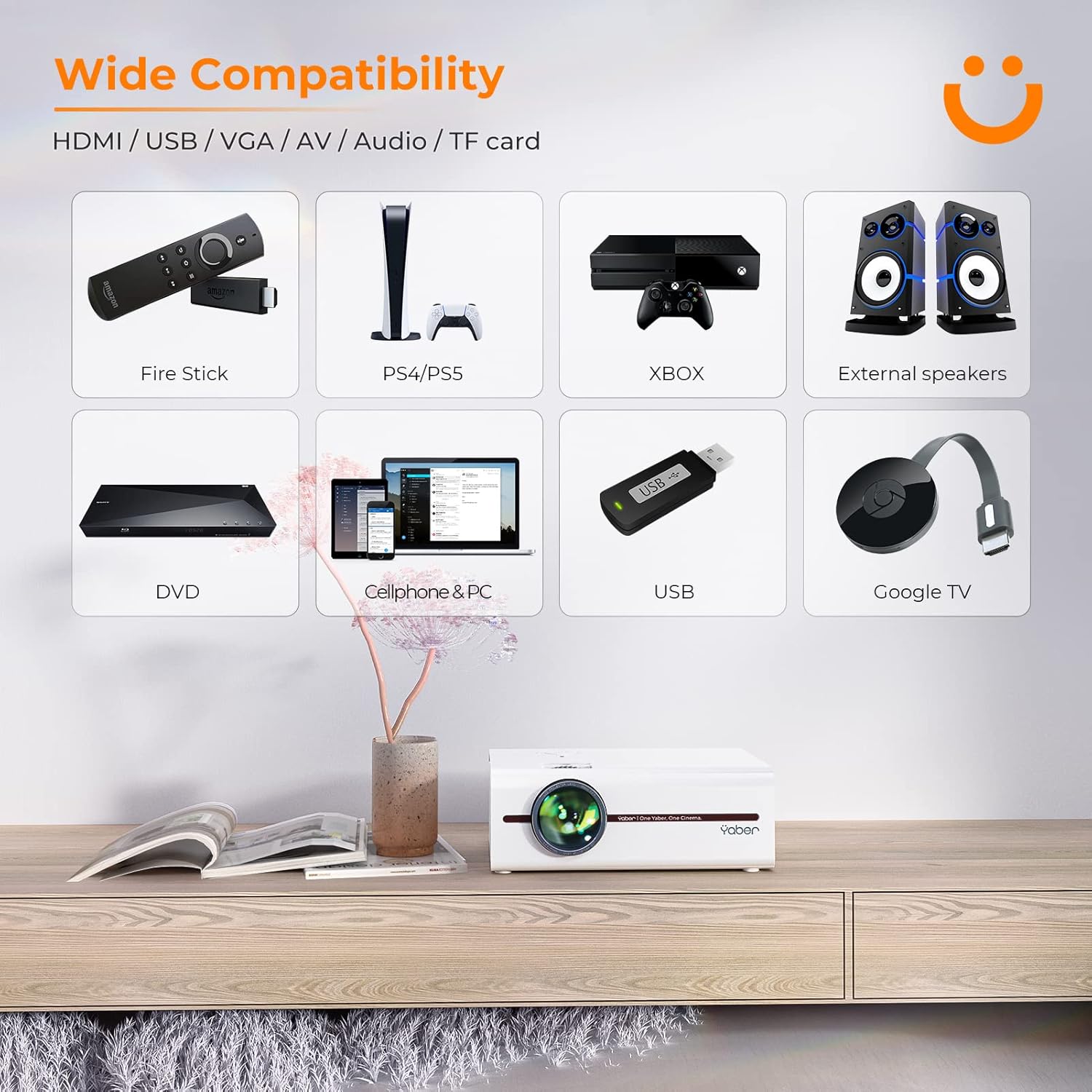
Image: A visual representation of the projector's wide range of compatible devices, including Fire Stick, PS4/PS5, Xbox, external speakers, DVD players, cellphones, PCs, USB drives, and Google TV, connected via various ports.
4. 설정
4.1 초기 배치 및 전원
- Place the projector on a stable, flat surface or mount it using a compatible tripod. Ensure proper ventilation around the unit.
- 프로젝터의 전원 입력 단자에 전원 케이블을 연결한 다음 전원 콘센트에 연결하십시오.
- 프로젝터나 리모컨의 전원 버튼을 눌러 전원을 켜세요.
4.2 이미지 초점 및 키스톤 조정
After powering on, adjust the focus and keystone correction for a clear, rectangular image.
- 집중하다: 프로젝터 렌즈의 초점 링을 돌려 이미지가 선명하고 깨끗하게 보이도록 하십시오.
- 키스톤 보정: Use the keystone adjustment dial or the remote control to correct any trapezoidal distortion, ensuring the image is perfectly rectangular. The V5 supports both mechanical and digital keystone correction.

Image: A hand holding the projector's remote control, illustrating the ease of adjusting the projected image, including focus and keystone correction.
4.3 장치 연결
The YABER V5 offers various connectivity options:
- HDMI : Connect your laptop, game console, or streaming device via an HDMI cable.
- USB: 미디어를 재생하려면 USB 드라이브를 삽입하세요. file직접적으로.
- 유명인 : Use the AV cable for older devices like DVD players.
- VGA : Connect to computers with a VGA output.
- TF 카드: 미디어 재생을 위해 TF 카드를 삽입하세요.
4.4 Wireless Screen Mirroring (WiFi)
스마트폰이나 태블릿 화면을 무선으로 미러링하려면 다음 단계를 따르세요.
- 프로젝터와 모바일 기기가 동일한 Wi-Fi 네트워크에 연결되어 있는지 확인하십시오.
- On the projector, select the 'Screen Mirroring' input source.
- For iOS devices, open Control Center and tap 'Screen Mirroring' or 'AirPlay Mirroring', then select the projector from the list.
- For Android devices, enable 'Wireless Display', 'Smart View', 'Multi-screen', or similar function in your device settings, then select the projector.

Image: A visual comparison demonstrating the faster loading and transmission speed of 5GHz WiFi compared to 2.4GHz, highlighting the benefit for screen mirroring.
4.5 블루투스 오디오 연결
To connect to a Bluetooth audio device:
- 외부 스피커나 헤드폰에서 Bluetooth를 활성화하고 페어링 모드로 설정하세요.
- 프로젝터에서 블루투스 설정 메뉴로 이동하세요.
- 페어링할 수 있는 기기 목록에서 기기를 선택하세요.

Image: The YABER V5 projector wirelessly connected to an external Bluetooth speaker, illustrating the enhanced audio experience possible.
5. 사용 설명서
5.1 전원 켜기/끄기
- To power on, press the power button on the projector or remote.
- 전원을 끄려면 전원 버튼을 다시 누르십시오. 종료하라는 메시지가 나타나면 확인하십시오.
5.2 입력 소스 선택
Use the 'Source' button on the remote or projector to cycle through available input sources (HDMI, USB, AV, VGA, TF Card, Screen Mirroring).
5.3 메뉴 탐색
Use the arrow keys on the remote or projector to navigate through the on-screen menu. Press 'OK' or 'Enter' to confirm selections. Use 'Return' or 'Exit' to go back or close the menu.
5.4 투사 크기 조정 (줌 기능)
To adjust the projection size without moving the projector, use the digital zoom function via the remote control. This allows you to shrink the image from 100% down to 50%.

Image: An illustration showing the digital zoom function, allowing the projected image size to be adjusted from 100% down to 50% without physically moving the projector.
6. 유지관리
6.1 렌즈 청소
광학 렌즈 전용으로 제작된 부드럽고 보풀 없는 천으로 프로젝터 렌즈를 살살 닦아주세요. 연마성 세척제나 과도한 압력을 사용하지 마십시오.
6.2 프로젝터 본체 청소
프로젝터 외부를 부드럽고 마른 천으로 닦으십시오. 액체 세척제나 용제를 사용하지 마십시오.
6.3 환기
Ensure the projector's ventilation vents are clear and unobstructed to prevent overheating. Do not block the vents during operation.
6.4리터amp 삶
The YABER V5 projector lamp has an estimated lifespan of up to 100,000 hours. No user replacement is typically required for the lamp.
7. 문제 해결
If you encounter issues with your YABER V5 Mini Projector, please refer to the following common problems and solutions:
| 문제 | 가능한 원인 | 해결책 |
|---|---|---|
| 화면 없음/신호 없음 | 잘못된 입력 소스가 선택되었습니다. 케이블 연결이 느슨합니다. 기기의 전원이 켜져 있지 않습니다. | Select the correct input source. Check all cable connections. Ensure connected device is powered on. |
| 흐릿한 이미지 | 초점이 조정되지 않았습니다. 키스톤 보정이 되지 않았습니다. | Adjust the focus ring on the lens. Use keystone correction to square the image. |
| 소리가 나지 않습니다 | 볼륨이 너무 낮음; 음소거됨; 외부 오디오 장치가 연결/페어링되지 않았습니다. | Increase volume. Unmute the projector. Ensure Bluetooth device is paired or external speakers are properly connected. |
| Screen mirroring issues (freezing/disconnection) | 와이파이 신호 약함; 네트워크 혼잡; 기기 호환성. | Ensure strong WiFi signal (preferably 5G). Reduce network traffic. Try a wired connection if wireless is unstable. |
| 리모컨이 작동하지 않습니다 | 배터리 방전; 리모컨과 프로젝터 사이에 장애물이 있음. | Replace batteries. Ensure no objects are blocking the IR receiver on the projector. |
If the problem persists after trying these solutions, please contact YABER customer support for assistance.
8. 사양
| 특징 | 세부 사항 |
|---|---|
| 모델 번호 | YABER-V5-MINI |
| 디스플레이 해상도 | 1920 x 1080 (풀 HD 지원) |
| 연결 기술 | Bluetooth, Wi-Fi (5G/2.4G), USB, HDMI, VGA, AV, TF Card |
| 특별 기능 | Portable, Built-in Wi-Fi, Bluetooth, Digital Zoom, Hi-Fi Stereo Speaker |
| 권장 사용 | 홈시네마 |
| 제품 치수 | 8.19 x 6.63 x 3.07 인치 |
| 품목 무게 | 2.2파운드 |
| Lamp 삶 | 최대 100,000시간 |
9. 보증 및 지원
YABER provides comprehensive support for your V5 Mini Projector:
- 6-Month Return Policy: Enjoy a 6-month return period from the date of purchase.
- 3년 보증: The projector is covered by a 3-year warranty for repairs.
- 평생 전문 기술 지원: YABER offers professional technical assistance for the lifetime of the product.
For any inquiries or support needs, please contact YABER customer service through their official channels or the retailer where you purchased the product.


