1. 서론
구매해주셔서 감사합니다asing the KEPLUG Sunrise Alarm Clock. This device is designed to enhance your waking and sleeping experience with its unique features, including sunrise and sunset simulations, dual alarms, FM radio, and various natural sounds. Please read this manual carefully to ensure proper use and optimal performance.
패키지 내용:
- 1 x KEPLUG Sunrise Alarm Clock
- 1 x 마이크로 USB 케이블
- 1 x 벽면 어댑터
- 1 x 사용자 설명서
2. 제품 오버view
Familiarize yourself with the main components and controls of your KEPLUG Sunrise Alarm Clock.

이미지 2.1: 앞쪽 view of the KEPLUG Sunrise Alarm Clock, showing the digital time display and the illuminated light panel. The clock face is round with a white base.
제어 버튼 및 포트:
Refer to the diagram below for button identification (exact button layout may vary slightly by model, but functions are consistent).
- 시간 설정 버튼: 시간 설정 모드로 들어가는데 사용됩니다.
- 알람 1 버튼: Used to set and activate Alarm 1.
- 알람 2 버튼: Used to set and activate Alarm 2.
- FM 라디오 버튼: Activates and controls FM radio functions.
- 라이트 버튼: Controls the light brightness and color modes.
- 볼륨 +/- 버튼: 소리의 볼륨을 조절합니다.
- 위/아래 버튼: 메뉴를 탐색하고 값을 조정합니다.
- Snooze/Sleep Aid Button: Activates snooze during an alarm or sleep aid function.
- USB 충전 포트 : 외부 장치를 충전하는 데 사용됩니다.
- 마이크로 USB 전원 입력: 전원 어댑터에 연결합니다.
3. 설정
3.1 전원 연결
- Connect the micro USB cable to the power input port on the back of the alarm clock.
- 벽면 어댑터를 일반 전기 콘센트에 꽂으세요.
- 디스플레이에 불이 들어오면 기기가 켜진 것입니다.
The clock includes a built-in backup battery to retain settings during power outages 또는 연결 끊김.
3.2 시간 설정
- 를 누르세요 시간 설정 버튼 (often represented by a clock icon). The hour display will start flashing.
- 사용하세요 위/아래 버튼 시간을 조정합니다.
- 를 누르세요 시간 설정 버튼 again to confirm the hour and move to minute setting. The minute display will flash.
- 사용하세요 위/아래 버튼 분을 조정합니다.
- 를 누르세요 시간 설정 버튼 a third time to confirm the minutes.
- 12시간 형식과 24시간 형식을 전환하려면 다음을 누릅니다. 위/아래 버튼 while the time is flashing during setup, or refer to the specific instructions in your manual for a dedicated time format button.
3.3 Time Display Brightness
The time display offers three brightness settings: High, Low, and Off. This can typically be adjusted by repeatedly pressing a dedicated display brightness button or by holding the Time Setting button. Refer to your specific model's instructions for exact control.
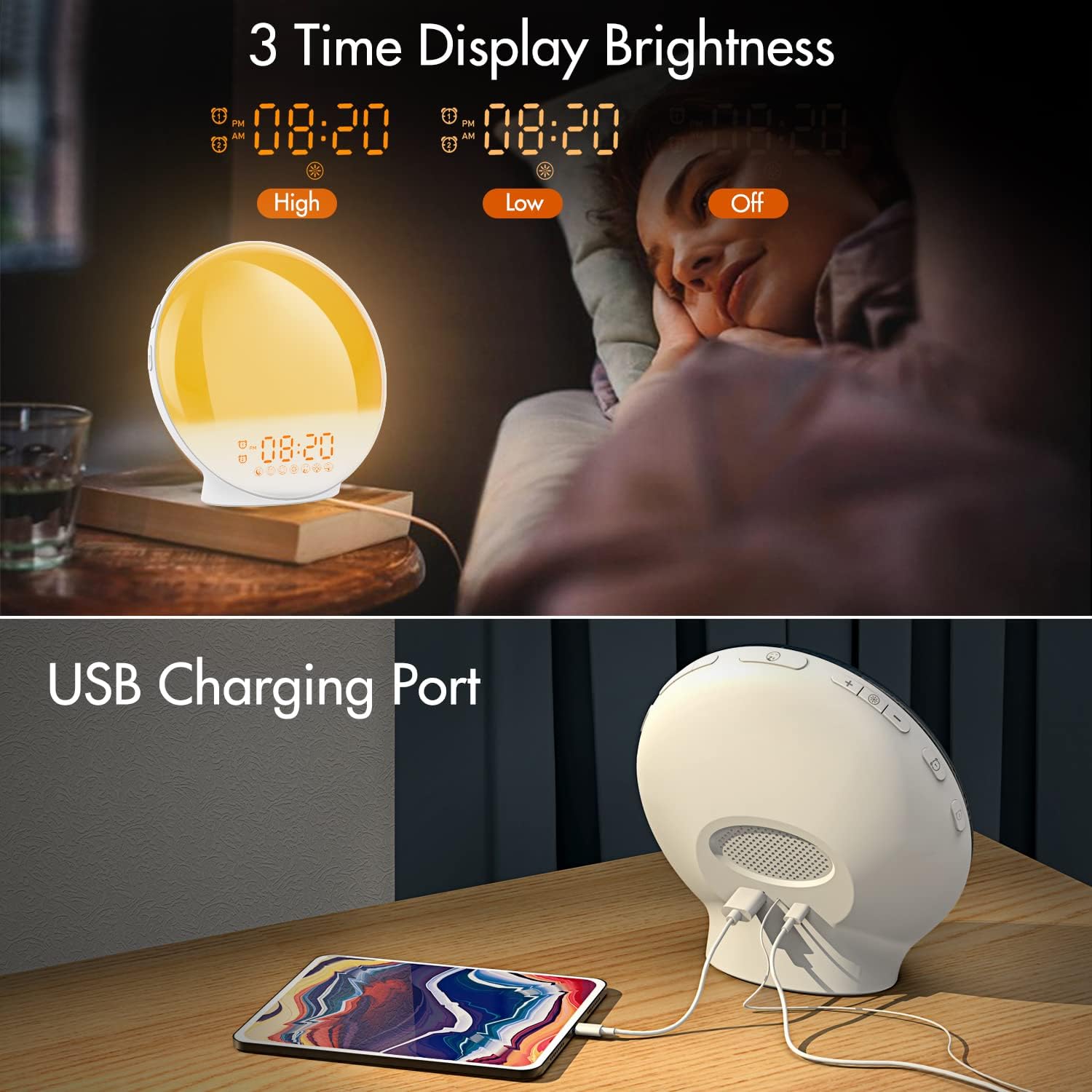
이미지 3.1: Illustration of the three time display brightness options: High, Low, and Off, allowing users to customize visibility for different times of day or night.
4. 사용 설명서
4.1 알람 설정 (알람 1 및 알람 2)
The clock features two independent alarms, allowing for separate wake-up times (e.g., weekday and weekend).

이미지 4.1: Depiction of the dual alarm functionality, allowing users to set different alarms for weekdays and weekends, along with the snooze feature.
- 를 누르세요 알람 1 버튼 (또는 알람 2 버튼) to activate and enter alarm setting mode. The alarm time will flash.
- 사용하세요 위/아래 버튼 원하는 알람 시간을 설정하세요.
- 를 누르세요 알람 버튼 again to confirm the hour and set the minutes.
- 사용하세요 위/아래 버튼 원하는 알람 시간을 분 단위로 설정하세요.
- 를 누르세요 알람 버튼 again to select the wake-up sound. Use 위/아래 버튼 to cycle through 7 nature sounds or FM radio.
- 를 누르세요 알람 버튼 again to set the volume level (1-16) for the alarm sound. Use 위/아래 버튼 조정하다.
- 를 누르세요 알람 버튼 one last time to confirm all settings and activate the alarm. An alarm icon will appear on the display.
4.2 스누즈 기능
When an alarm sounds, tap the 음소거 버튼 (often the large button on top or front) to pause the alarm for 9 minutes. This can be repeated up to 5 times.
4.3 일출 시뮬레이션
The sunrise simulation gradually brightens the light before your alarm time, mimicking a natural sunrise.

이미지 4.2: Visual representation of the sunrise simulation feature, where the light intensifies gradually over a set period before the alarm, designed for a gentle wake-up.
- When setting an alarm, after selecting the sound and volume, you will typically be prompted to set the sunrise duration.
- 사용하세요 위/아래 버튼 to choose a duration between 10 to 60 minutes. The light will gradually increase from 0% to the set brightness level (0-20) during this period.
- The light color will transition from deep red to bright yellow, simulating a natural sunrise.
4.4 Sunset Simulation / Sleep Aid
The sunset simulation gradually dims the light and can play soothing sounds to help you fall asleep.

이미지 4.3: Illustration of the sunset simulation, where the light gradually dims over a period of 10 to 120 minutes, accompanied by optional sleep sounds like rain, forest, river, or FM radio.
- 를 누르세요 Snooze/Sleep Aid Button (or a dedicated Sleep Aid button) to activate the sleep aid function.
- 사용하세요 위/아래 버튼 to select a duration for the dimming process (10-120 minutes).
- You can also select a natural sound (Rain, Forest, River) or FM radio to play during this period.
- The light will gradually dim from 100% to 0% over the selected duration, and the sound will fade out.
4.5 FM 라디오
The built-in FM radio allows you to listen to your favorite stations or use them as an alarm sound.

이미지 4.4: 위에view of the 7 available alarm sounds and the FM radio option, providing diverse choices for waking up.
- 를 누르세요 FM 라디오 버튼 라디오를 켜거나 끄다.
- 잡아라 FM 라디오 버튼 to automatically scan and save available stations.
- 사용하세요 위/아래 버튼 to manually tune to a specific frequency or cycle through saved stations.
- 를 사용하여 볼륨을 조정합니다. 볼륨 +/- 버튼.
4.6 Night Light / Color Light
The clock can function as a night light with various color options and adjustable brightness.

이미지 4.5: Display of the 7 color atmosphere light options and 20 brightness levels, highlighting the clock's versatility as a mood light or reading lamp.
- 를 누르세요 라이트 버튼 조명을 켜려면.
- 를 누르세요 라이트 버튼 repeatedly to cycle through 7 static colors (e.g., Red, Green, Blue, Yellow, Indigo, Purple, White) or an automatic color-changing mode.
- 사용하세요 위/아래 버튼 to adjust the brightness level (0-20) of the selected color or white light.
- 잡아라 라이트 버튼 불을 끄십시오.
4.7 USB 충전 포트
A 5V/2.4A USB port is located on the back of the device, allowing you to charge your smartphone or other small electronic devices.
이미지 4.6: 뒤쪽 view of the alarm clock showing the USB charging port in use, connected to a tablet for charging.
5. 유지관리
- 청소: 부드럽고 마른 천으로 기기를 닦으세요. 연마성 세제나 용제를 사용하지 마세요.
- 저장: 장기간 사용하지 않을 때는 기기를 서늘하고 건조한 곳에 보관하세요.
- 힘: Always use the provided power adapter to prevent damage.
6. 문제 해결
| 문제 | 가능한 원인 | 해결책 |
|---|---|---|
| 시계 전원이 켜지지 않습니다. | 전원 어댑터가 연결되지 않았거나 결함이 있습니다. | 전원 어댑터가 시계와 작동하는 콘센트에 제대로 연결되어 있는지 확인하십시오. 다른 콘센트에 연결해 보십시오. |
| 알람이 울리지 않습니다. | 경보가 작동하지 않거나 소리가 너무 작습니다. | 알람 아이콘이 표시되는지 확인하십시오. 알람을 재설정하고 소리가 잘 들리는 수준으로 설정되어 있는지 확인하십시오. |
| 일출 시뮬레이션이 작동하지 않습니다. | Sunrise duration not set during alarm setup. | Ensure you have set a sunrise duration (10-60 minutes) when configuring the alarm. |
| FM 라디오 잡음이 있거나 수신 상태가 좋지 않습니다. | 신호가 약하거나 안테나 위치가 잘못되었을 수 있습니다. | Extend the antenna wire fully. Reposition the clock to improve reception. Perform an auto-scan for stations. |
| USB 충전이 작동하지 않습니다. | 기기가 호환되지 않거나 케이블에 문제가 있습니다. | Ensure the device you are charging is compatible with 5V/2.4A USB charging. Try a different USB cable. |
7. 사양
- 상표: 케플러그
- 모델: B09FRY71NH
- 제품 크기: 16 x 16 x 6.1cm
- 품목 무게: 481g
- 권tage: 5 볼트
- 전원: 배터리 구동식 (AC 어댑터 필요)
- 디스플레이 유형: 디지털
- 특별 기능: Charging Port, Dimmable Light, Sunrise/Sunset Simulation, Dual Alarm, FM Radio, Nature Sounds
- 첫 이용 가능 날짜: 12년 2021월 XNUMX일
8. 보증 및 지원
For warranty information or technical support, please refer to the contact details provided with your purchase documentation or visit the official KEPLUG web사이트. 구매 증빙 자료로 구매 영수증을 보관하세요.