1. 서론
This manual provides essential instructions for the safe and efficient use of your Xiaomi Mi Portable Bluetooth Speaker. Please read this manual thoroughly before using the product and retain it for future reference. The speaker features high-quality sound, True Wireless Stereo (TWS) capability, Bluetooth 5.0 connectivity, and IPX7 waterproofing, making it suitable for various environments.

이미지: 각도 view of the Xiaomi Mi Portable Bluetooth Speaker, highlighting its compact design and control panel.
2. 패키지 내용
패키지에 모든 품목이 들어 있는지 확인하세요.
- Xiaomi Mi Portable Bluetooth Speaker x1
- Charging Cable x1 (USB-C)
- 사용 설명서 x1
3. 제품 특징
- 고품질 사운드: 깨끗하고 균형 잡힌 오디오를 제공합니다.
- 진정한 무선 스테레오(TWS): Connect two speakers for an immersive stereo experience.
- 블루투스 5.0 : 안정적이고 효율적인 무선 연결.
- IPX7 방수 : Protected against immersion in water up to 1 meter for 30 minutes.
- 긴 플레이 시간: Approximately 13 hours of playback at 50% volume.
- 내장 마이크: 핸즈프리 통화를 위해.
- 보조 입력: 유선 오디오 연결용.
4. 컨트롤 및 표시기
Familiarize yourself with the speaker's control buttons and indicators:
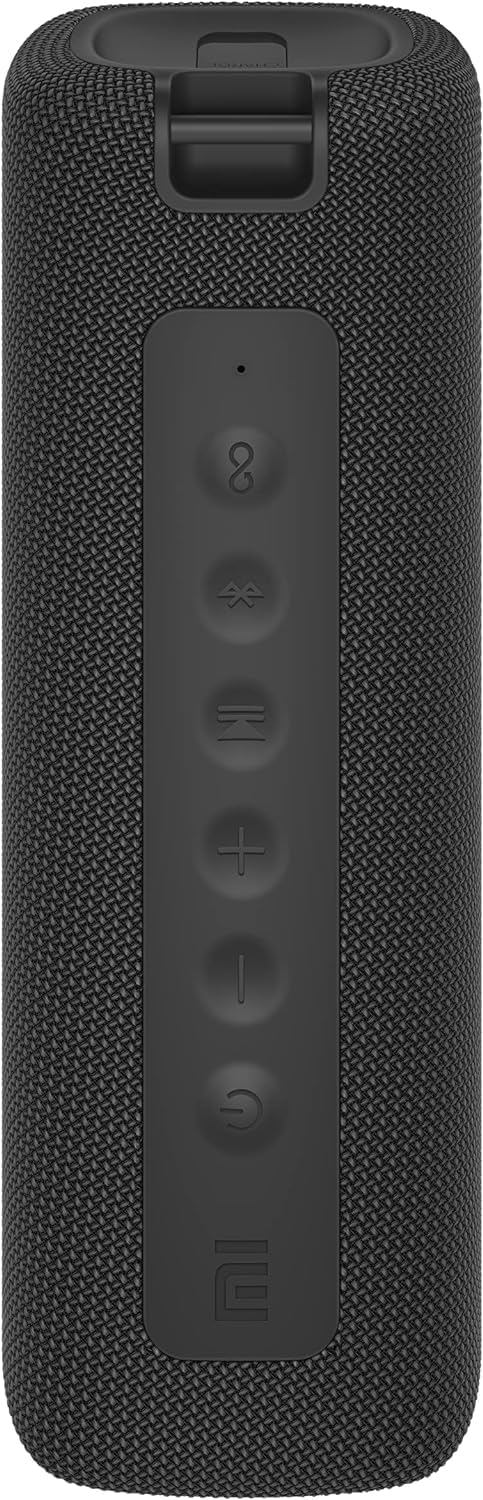
이미지: 앞면 view of the speaker with clearly visible control buttons.
| 버튼/표시등 | 기능 |
|---|---|
| 전원 버튼 (⏻) | Press and hold for 2 seconds to power on/off. Short press to play/pause music or answer/end calls. |
| 볼륨 낮추기 (−) | 짧게 누르면 볼륨이 감소합니다. 길게 누르면 이전 트랙으로 돌아갑니다. |
| 볼륨을 높이다 (+) | 짧게 누르면 볼륨이 커지고, 길게 누르면 다음 트랙으로 넘어갑니다. |
| 블루투스 버튼 (Ⓑ) | 짧게 누르면 블루투스 페어링 모드로 들어갑니다. |
| TWS 버튼 (무한대) | Press to initiate True Wireless Stereo pairing with another Mi Portable Bluetooth Speaker. |
| LED 표시등 | Indicates power status, charging status, and Bluetooth pairing status. |
5. 설정
5.1 스피커 충전
- 제공된 USB-C 충전 케이블을 스피커의 충전 포트에 연결하세요.
- Connect the other end of the cable to a 5V 1A USB power adapter (not included) or a computer's USB port.
- LED 표시등은 충전 상태를 보여줍니다(예: 충전 중에는 빨간색, 충전이 완료되면 꺼짐).
- 완전 충전에는 약 4시간이 걸립니다.
5.2 전원 켜기/끄기
- 전원을 켜려면: Press and hold the Power button for 2 seconds. You will hear an audible prompt, and the LED indicator will light up.
- 전원을 끄려면: Press and hold the Power button for 2 seconds. You will hear an audible prompt, and the LED indicator will turn off.
5.3 블루투스 페어링
- Ensure the speaker is powered on. The LED indicator will flash blue, indicating it's in pairing mode.
- 기기(스마트폰, 태블릿, 컴퓨터)에서 Bluetooth를 활성화하고 사용 가능한 기기를 검색하세요.
- 기기 목록에서 "Mi 휴대용 블루투스 스피커"를 선택하세요.
- 페어링이 완료되면 LED 표시등이 파란색으로 켜지고 확인음이 들립니다.
- 스피커는 전원을 켜면 범위 내에 있는 경우 마지막으로 페어링된 장치에 자동으로 연결됩니다.
5.4 True Wireless Stereo(TWS) 페어링
To pair two Xiaomi Mi Portable Bluetooth Speakers for stereo sound:
- 두 스피커의 전원이 켜져 있고 다른 Bluetooth 장치에 연결되어 있지 않은지 확인하세요.
- On one speaker (this will be the primary speaker), short press the TWS button (무한대). The LED indicator will flash.
- On the second speaker, short press the TWS button (무한대).
- The two speakers will automatically connect to each other. You will hear a confirmation sound, and the LED indicators on both speakers will turn solid blue.
- Now, connect your device to the primary speaker via Bluetooth as described in section 5.3. The sound will play in stereo through both speakers.
5.5 AUX 연결
For wired audio playback:
- Connect a 3.5mm audio cable (not included) from your audio source to the AUX IN port on the speaker.
- 스피커가 자동으로 AUX 모드로 전환됩니다.
- Control playback and volume from your audio source device.
6. 사용 설명서
6.1 음악 재생
- 재생/일시 중지: 전원 버튼을 짧게 누릅니다.
- 볼륨 업: 볼륨 높이기 버튼을 짧게 누르세요(+) 버튼을 클릭하세요.
- 볼륨 작게 : Short press the Volume Down (−) 버튼을 클릭하세요.
- 다음 트랙: Press and hold the Volume Up (+) 버튼을 클릭하세요.
- 이전 트랙 : Press and hold the Volume Down (−) 버튼을 클릭하세요.
6.2 통화 관리
- 전화 받기/종료: Short press the Power button when a call comes in or during a call.
- 전화 거부: 전화가 걸려오면 전원 버튼을 2초 동안 길게 누르세요.
7. 유지관리
- 청소: 부드러운 천으로 스피커를 닦고 damp 천. 연마성 세척제나 용매를 사용하지 마십시오.
- 저장: 스피커는 직사광선과 극한의 온도를 피해 시원하고 건조한 곳에 보관하세요.
- 방수 기능: The speaker is IPX7 waterproof. Ensure the charging port cover is securely closed before exposure to water. Do not submerge the speaker for extended periods or beyond specified depths.
- 배터리 관리 : 배터리 수명을 연장하려면 스피커를 자주 완전히 방전시키지 마십시오. 장기간 사용하지 않더라도 정기적으로 충전하십시오.
8. 문제 해결
| 문제 | 가능한 해결책 |
|---|---|
| 스피커의 전원이 켜지지 않습니다. | 배터리가 충전되어 있는지 확인하세요. 전원에 연결한 후 다시 시도해 보세요. |
| 블루투스로 페어링할 수 없습니다. |
|
| 소리가 나지 않거나 볼륨이 작습니다. |
|
| TWS 페어링이 실패합니다. |
|
| 음질이 좋지 않습니다. |
|
9. 사양

이미지: 하단 view of the speaker, displaying model number and certifications.
| 매개변수 | 값 |
|---|---|
| 모델 | MDZ-36-DB |
| 제품 치수 | W 213 x D 74 x H 74 mm (approx. 8 x 3 x 3 inches) |
| 연결성 | Bluetooth 5.0, 3.5mm AUX IN |
| 정격 출력 | 2 x 8W (총 16W) |
| 신호 대 잡음 비율 | ≥ 70dB |
| TWS Connection Range | ≤ 5m |
| 방수 등급 | IPX7 |
| 배터리 유형 | 리튬이온, 3.7V |
| 배터리 용량 | 2600mAh |
| 배터리 충전 시간 | 약 4시간 |
| 재생 시간 | 약 13시간(볼륨 50% 기준) |
| 주파수 범위 | 80Hz ~ 20KHz |
| 정격 임피던스 | 4Ω입니다 |
| 전송 거리 | 15m |
| 정격 입력 | 5V 1A |
| 품목 무게 | 500그램(1.1파운드) |
10. 보증 및 지원
자세한 보증 정보는 제품과 함께 제공된 보증 카드를 참조하거나 공식 Xiaomi 웹사이트를 방문하세요. web대지.
If you encounter any issues not covered in this manual, please contact Xiaomi customer support or visit their official support channels for assistance.