소개
The SilverStone Technology RC05 is a 220mm flexible PCIe 4.0 x16 riser cable designed to extend the connection between a PCIe 4.0 supported motherboard and a compatible graphics or expansion card. This cable facilitates alternative mounting orientations for components within a computer chassis, offering high-speed data transmission and robust signal integrity.

Image: The SilverStone RC05 220mm Flexible PCIe 4.0 x16 Riser Cable, showcasing its overall design and length.
주요 특징
- 고속 데이터 전송: Supports PCIe 4.0 x16 for optimal performance with compatible motherboards and graphics cards.
- 유연한 디자인: 220mm length with a flexible ribbon design allows for folding and twisting without impacting signal reliability or performance.
- EMI 차폐: Incorporates comprehensive EMI shielding to prevent electromagnetic interference and maintain signal integrity.
- Strengthened Connection Protection: Enhanced durability at connector points to minimize signal loss.
- 다양한 설치: Ideal for various graphics card installation orientations, including vertical mounts.
설정 및 설치
Proper installation of the SilverStone RC05 riser cable is crucial for stable system operation and optimal performance. Follow these steps carefully:
- 시스템 준비:
- Power off your computer completely and unplug it from the power outlet.
- Open your computer case to access the motherboard and PCIe slots.
- Ensure you are working in a static-free environment or use an anti-static wrist strap.
- Identify PCIe Slots:
Locate the primary PCIe x16 slot on your motherboard where the graphics card would normally be installed. Also, identify the desired mounting location for your graphics card within the chassis.

이미지: 클로즈업 view of the male PCIe connector on the riser cable, designed to plug into the motherboard's PCIe slot.
- 마더보드에 연결:
Carefully insert the male end of the RC05 riser cable into the PCIe x16 slot on your motherboard. Ensure it is fully seated and the retention clip (if present on your motherboard slot) is engaged.
- 그래픽 카드에 연결하세요:
Take your graphics card and carefully insert it into the female PCIe x16 slot on the other end of the RC05 riser cable. Ensure it is fully seated. If a protective cover is present on the female connector, remove it before insertion.
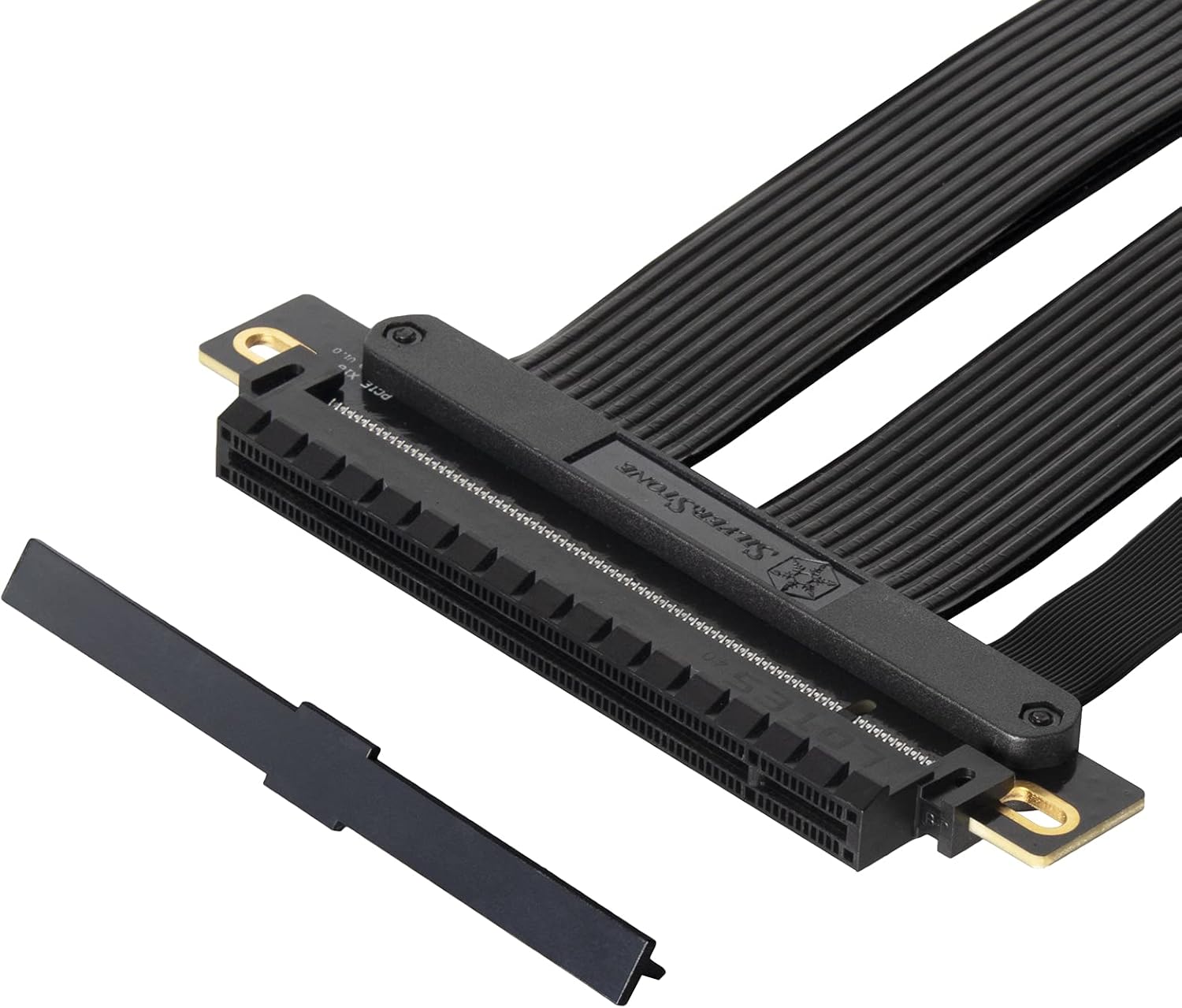
이미지: 클로즈업 view of the female PCIe connector on the riser cable, showing a protective cover that should be removed before connecting a graphics card.
- 보안 구성 요소:
Once both ends are connected, carefully route the flexible cable to the desired position for your graphics card. Secure the graphics card in its new mounting location within the chassis using appropriate screws or retention mechanisms. Ensure the cable is not sharply bent or under excessive tension.

Image: This diagram highlights the durability and flexibility of the RC05 cable, demonstrating how it can be routed and bent to accommodate various graphics card orientations within a computer case.
- 전원 켜기 및 테스트:
Close your computer case, reconnect the power cable, and power on your system. Verify that the graphics card is detected and functioning correctly in your operating system.
중요 참고 사항: For systems with PCIe 3.0 motherboards, it is recommended to manually set the PCIe slot speed to Gen3 in the motherboard's BIOS/UEFI settings before installing a PCIe 4.0 riser cable to ensure compatibility and stability. While the RC05 is designed for PCIe 4.0, some older motherboards may require this adjustment for proper operation with riser cables.
작업
The SilverStone RC05 PCIe riser cable is a passive component designed to extend a PCIe connection. Once correctly installed, it operates transparently, allowing your graphics card or other PCIe expansion card to communicate with the motherboard as if it were directly plugged in. No additional software or drivers are required for the cable itself.

Image: This diagram illustrates the high-speed data transmission capabilities of the RC05, ensuring minimal performance loss when extending a PCIe 4.0 x16 connection.
유지
The SilverStone RC05 riser cable requires minimal maintenance. To ensure longevity and optimal performance:
- 깨끗하게 유지하십시오: Periodically inspect the cable and connectors for dust accumulation. Use compressed air to gently clean any dust.
- 스트레스를 피하세요: Do not excessively bend, twist, or pull on the cable, especially near the connectors. While flexible, extreme stress can damage internal wiring.
- 보안 연결: Ensure both ends of the cable remain firmly seated in their respective slots. Loose connections can lead to intermittent issues or performance degradation.
- 환경 조건: Operate the cable within standard computer operating temperatures and humidity levels.
문제 해결
If you encounter issues after installing the RC05 riser cable, consider the following troubleshooting steps:
- 화면이 안 나오거나 시스템이 부팅되지 않습니다:
- Ensure the riser cable and graphics card are fully seated in their slots.
- Verify that all necessary power cables are connected to the graphics card.
- If your motherboard is PCIe 3.0, try setting the PCIe slot speed to Gen3 in the BIOS/UEFI.
- Test the graphics card by plugging it directly into the motherboard's PCIe slot to rule out a card issue.
- 성능 저하:
- Confirm that your motherboard and graphics card both support PCIe 4.0 for optimal speed.
- Check BIOS/UEFI settings to ensure the PCIe slot is configured for PCIe 4.0 (if supported by all components).
- Ensure the cable is not excessively bent or kinked, which could affect signal integrity.
- 간헐적인 문제/충돌:
- Reseat the riser cable and graphics card.
- 케이블이나 커넥터에 물리적인 손상이 있는지 확인하세요.
- Ensure proper airflow within the case to prevent overheating of components.
명세서
| 특징 | 세부 사항 |
|---|---|
| 상표 | 실버스톤 |
| 모델 번호 | SST-RC05-220 |
| 케이블 길이 | 220mm |
| PCIe 버전 | PCIe 4.0 x16 |
| 커넥터 유형 | PCIe x16 Male to PCIe x16 Female |
| 데이터 전송 속도 | Up to 16 Gigabits Per Second (PCIe 4.0) |
| 특별 기능 | Flexible ribbon design, EMI shielding, strengthened connection protection |
| 호환 장치 | PCIe 4.0 supported motherboards and graphics/expansion cards |
| 제품 치수 | 10.35 x 4.61 x 0.35인치(약 263 x 117 x 9mm) |
| 품목 무게 | 7온스(약 0.2kg) |
제품 끝view 동영상
Video: An official SilverStone overview of the PCIe Riser Cable, highlighting its features and compatibility. This video provides a visual demonstration of the product's design and functionality.
보증 및 지원
보증 정보 및 기술 지원에 대해서는 실버스톤 공식 기술 자료를 참조하십시오. web사이트를 방문하거나 고객 서비스에 직접 문의하세요. 보증 청구를 위해 구매 영수증을 보관하세요.
Official SilverStone Web대지: www.silverstonetek.com


