1. 서론
This manual provides essential information for the safe and efficient operation of your Innosilicon T3+ BTC SHA-256 ASIC Miner 57TH. Please read this manual thoroughly before setting up and operating the device to ensure optimal performance and longevity.
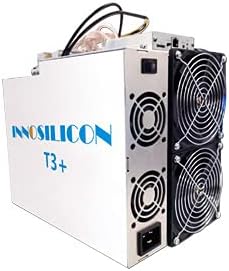
An image showing the Innosilicon T3+ ASIC Miner, a rectangular white unit with cooling fans visible on one side and power connections on the other.
2. 안전 정보
부상이나 기기 손상을 방지하기 위해 다음 안전 수칙을 준수하십시오.
- 모든 전기 연결에 대해 적절한 접지가 이루어졌는지 확인하세요.
- Do not operate the miner in environments with high humidity or extreme temperatures outside the specified range (0-40°C).
- Maintain adequate ventilation around the device to prevent overheating.
- 공기 흡입구나 배출구를 막지 마십시오.
- 유지관리나 청소를 하기 전에 전원을 분리하세요.
- Only use the provided power supply unit (PSU) or a compatible, certified replacement.
- 어린이의 손이 닿지 않는 곳에 보관하세요.
3. 패키지 내용
패키지에 모든 구성 요소가 들어 있는지 확인하세요.
- Innosilicon T3+ BTC SHA-256 ASIC Miner 57TH
- Integrated Power Supply Unit (PSU)
- 전원 케이블 (지역별 상이)
- Ethernet Cable (optional, may not be included)
4. 설정
4.1 환경 고려 사항
The T3+ miner requires a stable and controlled environment for optimal performance and longevity. Ensure the operating temperature is between 0-40°C and the humidity is low. A dedicated mining farm with proper cooling and a dust filter environment is highly recommended to prevent dust accumulation and maintain efficient operation.
4.2 물리적 배치
Place the miner on a stable, flat surface. Ensure there is sufficient space around the device for proper airflow, especially around the cooling fans. Do not place the miner near heat sources or in enclosed spaces.
4.3 전기 연결
- Connect the power cable to the integrated PSU on the miner.
- Plug the other end of the power cable into a grounded electrical outlet. The miner operates at approximately 3300W (+/- 10%) and requires a stable power source with a maximum input voltage of 240 Volts. Ensure your electrical infrastructure can support this load.
4.4 네트워크 연결
- Connect one end of an Ethernet cable to the Ethernet port on the miner.
- 이더넷 케이블의 다른 쪽 끝을 네트워크 라우터나 스위치에 연결합니다.
- Ensure your network provides a stable internet connection for mining operations.
5. 사용 설명서
5.1 초기 전원 켜기
Once all connections are secure, power on the miner. The fans will start, and the device will begin its boot sequence. This may take a few minutes.
5.2 구성
The Innosilicon T3+ typically uses a web-based interface for configuration. To access it:
- Determine the IP address of your miner. This can often be found through your router's connected devices list or by using an IP scanner tool on your network.
- 열기 web browser on a computer connected to the same network and enter the miner's IP address in the address bar.
- Log in using the default credentials (refer to the manufacturer's documentation or common default credentials for Innosilicon devices).
- Configure your mining pool settings (URL, Worker, Password) within the web interface. The T3+ is designed for SHA-256 algorithm mining.
- 설정을 저장하고 메시지가 표시되면 마이너를 다시 시작하십시오.
5.3 성능 모니터링
Regularly monitor the miner's performance through its web interface. Key metrics to observe include:
- 해시레이트 : Aim for the specified 57TH/s (+/-6%). Fluctuations may indicate issues.
- 온도: Ensure the operating temperature remains within safe limits to prevent damage to the ASIC chips.
- 팬 속도: Verify fans are operating correctly and at appropriate speeds.
- 가동 시간: Monitor continuous operation.
6. 유지관리
Regular maintenance ensures the longevity and efficiency of your T3+ miner:
- 먼지 제거: Periodically clean the miner, especially the fans and heatsinks, to prevent dust buildup. Dust can impede airflow and lead to overheating. Use compressed air or a soft brush. Ensure the device is powered off and unplugged before cleaning.
- 환경 점검: Continuously monitor the ambient temperature and humidity of the operating environment. Adjust cooling solutions as needed to maintain optimal conditions.
- 케이블 검사: 전원 및 네트워크 케이블에 마모나 손상 흔적이 있는지 정기적으로 점검하십시오. 손상된 케이블은 즉시 교체하십시오.
7. 문제 해결
이 섹션에서는 다음과 같은 일반적인 문제에 대해 설명합니다.
| 문제 | 가능한 원인 | 해결책 |
|---|---|---|
| Miner does not power on | No power, faulty cable, PSU issue | Check power cable connection, test outlet, ensure PSU is connected correctly. |
| Low Hashrate / No Hashrate | Incorrect pool settings, network issue, overheating, faulty hashboard | Verify pool settings, check network connection, ensure proper cooling, restart miner. If issue persists, contact support. |
| 과열 | Insufficient ventilation, dust buildup, fan failure | Improve airflow, clean dust from fans/heatsinks, check fan operation. |
| 접근할 수 없습니다 web 인터페이스 | Incorrect IP address, network connectivity issue, miner not booted | Verify IP address, check Ethernet cable, ensure miner is fully booted. |
If you encounter issues not listed here or if solutions do not resolve the problem, please contact Innosilicon customer support.
8. 사양
| 특징 | 세부 사항 |
|---|---|
| 모델명 | T3+ |
| 연산 | SHA-256 |
| 해시레이트 | 57TH/초(±6%) |
| 전력 소비 | 3300W (±10%, normal mode, PSU efficiency: 93%, temperature 25°C) |
| 출력 와트tage | 3300 와트 |
| 최대 입력 볼륨tage | 240 볼트 |
| 치수(L×W×H) | 338mm x 207mm x 293mm |
| 품목 무게 | 12.3kg (약 30파운드) |
| 냉각 방식 | 공기 냉각 |
| 작동 온도 | 0~40도 |
| 호환 장치 | Personal Computer (for configuration/monitoring) |
9. 보증 정보
For detailed warranty terms and conditions, please refer to the official Innosilicon website or the warranty card included with your purchase. Typically, warranty coverage addresses manufacturing defects. Any unauthorized modifications, improper installation, or operation outside of specified environmental conditions may void the warranty.
10. 고객 지원
If you require technical assistance, have questions about your miner, or need to report an issue, please contact Innosilicon customer support through their official channels. Have your product model (T3+) and serial number ready when contacting support for faster service.
You can typically find support contact information on the official Innosilicon web대지: www.innosilicon.com


