소개
The Logitech POP Mouse is a compact, wireless mouse designed for enhanced productivity and personal expression. Featuring SilentTouch Technology for quiet clicks, a customizable top button for emojis or shortcuts, and a SmartWheel that shifts between precision and speed scrolling, it offers a versatile user experience. This mouse supports multi-device connectivity via Bluetooth, allowing seamless switching between up to three devices. It is built with durability in mind, offering up to 24 months of battery life and auto-sleep power-saving features.
상자 안에 무엇이 들어있나요?
- 로지텍 POP 마우스
- AA 배터리 1개 (사전 장착됨)
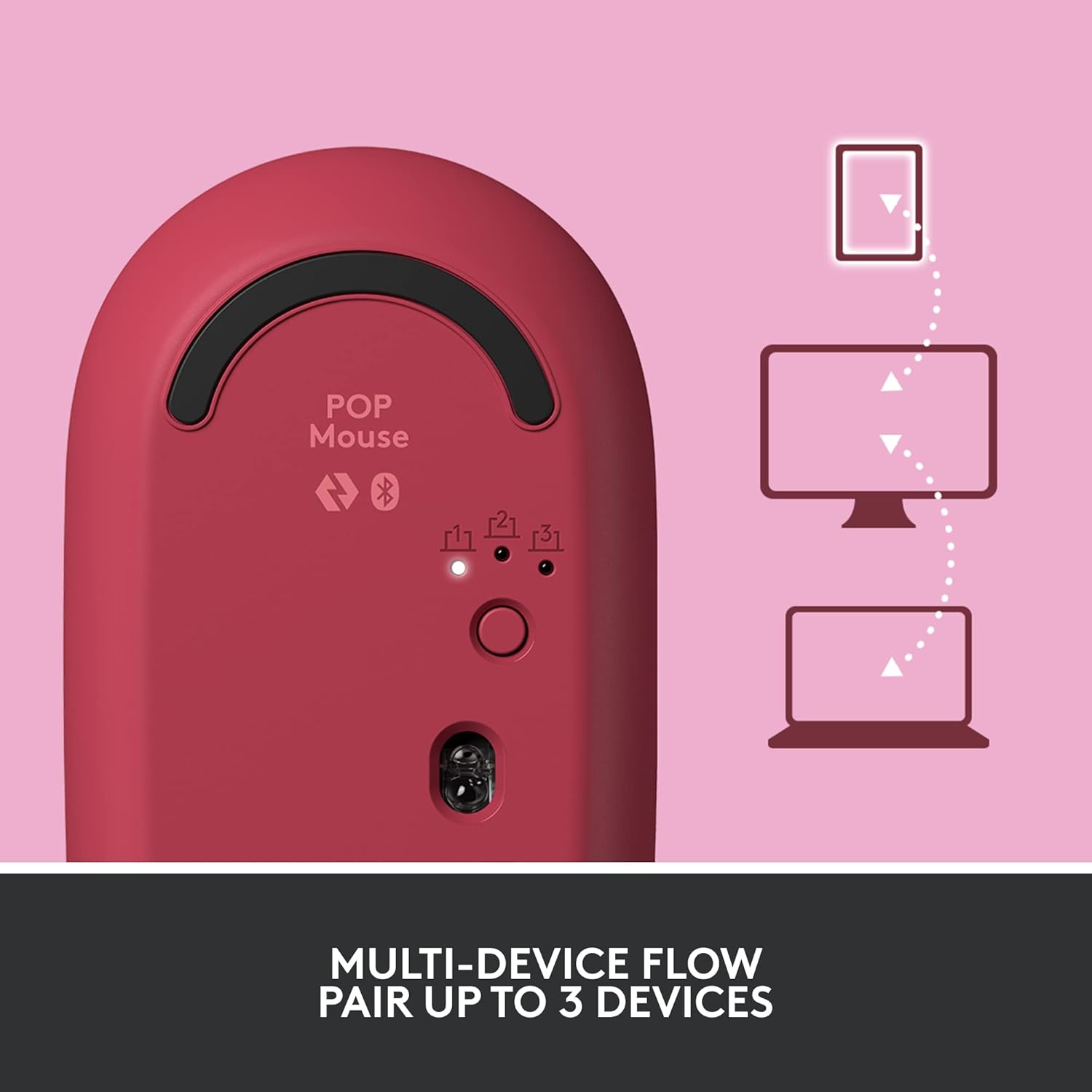
Image: The Logitech POP Mouse and an included AA battery, as typically found in the product packaging.
설정
1. 배터리 설치
- 마우스 밑면에서 배터리 칸을 찾으세요.
- 마우스의 윗 덮개를 뒤로 살짝 밀어서 제거하세요.
- 동봉된 AA 배터리를 삽입할 때, 극성(+/-)을 정확히 확인하십시오.
- 윗덮개를 제자리에 맞춰 끼운 후 딸깍 소리가 나면서 제자리에 고정될 때까지 앞으로 밀어 넣으세요.
2. 전원 켜기
- Flip the mouse over. Locate the On/Off switch on the bottom of the mouse.
- Slide the switch to the 'On' position (usually indicated by green color).
3. 기기 페어링 (블루투스)
- On the bottom of the mouse, press and hold the Easy-Switch button (labeled with 1, 2, or 3) for 3 seconds until the LED light starts blinking rapidly. This indicates pairing mode.
- On your computer, tablet, or phone, open your Bluetooth settings.
- 사용 가능한 장치 목록에서 "Logitech POP 마우스"를 선택하십시오.
- Follow any on-screen prompts to complete the pairing process. The LED light on the mouse will turn solid for 5 seconds when connected.
4. 다중 장치 전환
- The POP Mouse can be paired with up to three devices. To switch between paired devices, simply press the Easy-Switch button on the bottom of the mouse. The corresponding LED (1, 2, or 3) will light up to indicate the active device.
Image: The Logitech POP Mouse can seamlessly connect and switch between up to three different devices, such as a tablet, desktop computer, and laptop.
마우스 작동
1. 기본 기능
- 좌 클릭: 1차 선택 및 상호작용.
- 마우스 오른쪽 버튼으로 클릭: 상황에 맞는 메뉴에 접근합니다.
- 스크롤 휠: 문서를 수직으로 스크롤합니다. web 페이지.
2. SmartWheel Technology
- The SmartWheel automatically shifts between high-precision scrolling for detailed work and super-fast scrolling for quickly navigating long documents or web 페이지.

Image: The SmartWheel on the Logitech POP Mouse dynamically adjusts its scrolling mode for precision or speed.
3. 사일런트터치 기술
- Enjoy a quiet working environment with SilentTouch Technology, which significantly reduces click noise without compromising tactile feedback.

Image: SilentTouch Technology ensures a quiet and comfortable user experience.
사용자 정의
1. 사용자 정의 가능한 상단 버튼
- The top button, located below the scroll wheel, is customizable. By default, it opens an emoji menu for quick access to your favorite emojis.

Image: The customizable top button allows for quick access to an emoji menu on your screen.
2. Logi Options+ App
- 다운로드 Logi Options+ 앱 (Windows and macOS only) to personalize your POP Mouse.
- You can reassign the top button to perform various shortcuts, such as Snip Screen, Mic Mute, Voice-to-Text, or any other function you desire.
- The app also allows you to adjust pointer speed, scroll speed, and enable Flow for cross-computer control.
유지
- 청소: 부드러운 d를 사용하세요amp cloth to clean the exterior of the mouse. Avoid harsh chemicals or abrasive materials.
- 배터리 교체: Replace the AA battery when the low battery indicator light appears.
- 저장: When not in use for extended periods, turn off the mouse using the On/Off switch to conserve battery life.
문제 해결
- 마우스가 연결되지 않음: Ensure the mouse is powered on and within range of your device. Check your device's Bluetooth settings to confirm it's enabled and the mouse is paired. Try re-pairing the mouse.
- 지연 또는 불규칙한 움직임: Replace the battery if it's low. Ensure there are no obstructions between the mouse and your device. Avoid using the mouse on highly reflective or uneven surfaces.
- Custom button not working: Verify that the Logi Options+ App is installed and running on your computer. Check the button assignments within the app.
명세서
| 상표 | 로지텍 |
| 모델 번호 | 910-006545 |
| 연결 기술 | 블루투스 5.1 |
| 무선 범위 | 32.81피트(10m) |
| 센서 기술 | 로지텍 고정밀 광학 트래킹 |
| 버튼의 수 | 4 (Left/Right click, Scroll wheel click, Top button) |
| 맞춤형 버튼 | Yes (Top button, via Logi Options+ App) |
| 배터리 유형 | AA 배터리 1개 |
| 배터리 수명 | 최대 24개월 (사용량에 따라 다를 수 있음) |
| 운영 체제 호환성 | Windows 10 이상, macOS 10.15 이상, iPadOS, Chrome OS, Android |
| 품목 무게 | 2.89 온스 |
| 제품 크기(LxWxH) | 4.3 x 2.6 x 1.7 인치 |
| 재료 | Plastic parts include certified post-consumer recycled plastic (Heartbreaker Rose: 29%) |
보증 및 지원
보증 정보 및 기술 지원은 로지텍 공식 지원 페이지를 방문하십시오. website or refer to the warranty card included with your product. You can find detailed FAQs, troubleshooting guides, and contact options for customer service.
- 온라인 지원: 방문하다 support.logi.com
- 제품 등록 : 업데이트와 지원을 받으려면 제품을 등록하세요.


