소개
This manual provides detailed instructions for the safe and effective operation of your Nitecore P10ix Type-C Rechargeable Ultra Compact Flashlight. Please read this manual thoroughly before use and retain it for future reference.

Image: The Nitecore P10ix flashlight shown with its included accessories: two extra NL2150HPi batteries, a USB-C charging cable, and a tactical holster.
패키지 내용
택배를 개봉하시면 아래 나열된 모든 품목이 있는지, 그리고 양호한 상태인지 확인해 주십시오.
- Nitecore P10ix Flashlight
- 3x NL2150HPi Rechargeable Batteries (including one pre-installed or packaged separately)
- NTH10 Tactical Holster
- 클립
- 매는 밧줄
- 예비 O- 링
- USB-C 충전 케이블
설정
배터리 설치
- 손전등의 뒷뚜껑을 시계 반대 방향으로 돌려서 빼내세요.
- Insert the NL2150HPi 21700 Li-ion battery with the positive (+) terminal facing towards the head of the flashlight.
- 꼬리 캡을 시계 방향으로 돌려 단단히 조여질 때까지 다시 조입니다.
배터리 충전
The Nitecore P10ix features a built-in USB-C charging port for convenient recharging of the 21700 Li-ion battery.
- Locate the USB-C charging port cover on the flashlight body.
- 고무 덮개를 열어 USB-C 포트를 드러내십시오.
- Connect one end of the provided USB-C charging cable to the flashlight's port and the other end to a USB power source (e.g., USB adapter, computer, power bank).
- The power indicator light will illuminate to show charging status. Refer to the flashlight's specific indicator behavior for full charge notification (typically solid green or off).
- Once charging is complete, disconnect the cable and securely close the rubber cover to protect the port from dust and water.
작동 지침
스위치 기능
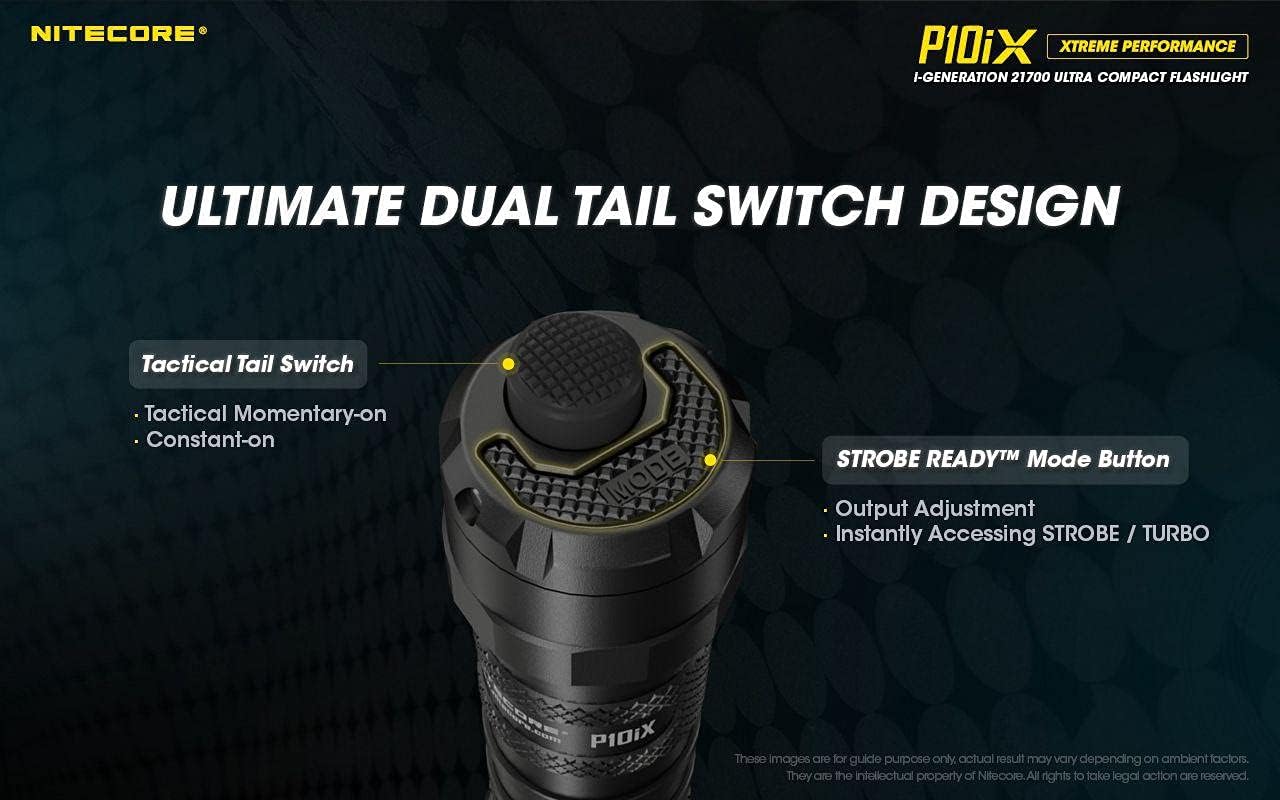
이미지: 상세 view of the flashlight's tail cap, highlighting the main Tactical Tail Switch and the smaller STROBE READY Mode Button for output adjustment and instant strobe/turbo access.
- 전술 테일 스위치: This is the primary power button located at the very end of the tail cap.
- 순간 켜짐: Half-press and hold for momentary illumination. Release to turn off.
- 지속적으로 켜짐: Full-press until a click is heard for constant illumination. Full-press again to turn off.
- STROBE READY™ Mode Button: This smaller, raised button is located next to the Tactical Tail Switch.
- 출력 조정: When the flashlight is on, press this button to cycle through brightness levels (e.g., Ultra-low, Low, Mid, High, Turbo).
- Instant Strobe/Turbo: When the flashlight is off, half-press or full-press the Tactical Tail Switch to directly access TURBO mode if Strobe is not memorized. This provides an instant dazzling strike, ideal for self-defense and law enforcement.

Image: The Nitecore P10ix flashlight demonstrating its 4000 lumens instant dazzle strike capability, useful for immediate disorientation.
특수 모드
The P10ix features a specialized Strobe mode designed for tactical applications.

Image: An illustration emphasizing the 2nd Generation STROBE READY Technology, which allows instant strobe access from any state and features an inset pedal design to prevent accidental activation.
- 스트로브 모드: To activate Strobe mode, ensure the flashlight is off. Half-press and hold the STROBE READY™ Mode Button. Release to turn off. This mode provides randomly changing frequencies (16Hz-20Hz) for stronger dizzying effects.

Image: A visual representation of the randomly changing strobe mode, designed to create a disorienting effect due to its variable frequency.
유지
- 청소: Periodically clean the threads of the tail cap and the O-rings with a clean cloth. Apply a thin layer of silicone grease to the threads and O-rings to maintain water resistance.
- 배터리 관리 : If the flashlight is to be stored for an extended period, remove the battery to prevent leakage. Recharge batteries every three months to prolong their lifespan.
- 방수 기능: The P10ix is not water resistant. Avoid exposing the flashlight to water or high humidity. Ensure the USB-C port cover is securely closed at all times when not charging.
문제 해결
| 문제 | 가능한 원인 | 해결책 |
|---|---|---|
| 손전등이 켜지지 않습니다. | 배터리가 방전되었거나 잘못 삽입되었습니다. | Recharge or replace the battery. Ensure the positive (+) terminal faces the head. |
| 불빛이 깜빡이거나 어둡습니다. | 꼬리 캡이 헐거워졌거나 접점이 더럽습니다. | Tighten the tail cap. Clean battery contacts and flashlight threads. |
| 충전 표시등이 작동하지 않습니다. | USB 케이블 또는 전원 문제. | 다른 USB 케이블이나 전원 어댑터를 사용해 보세요. 케이블이 완전히 꽂혀 있는지 확인하십시오. |
명세서

Image: An illustration detailing the quad-core LED setup of the Nitecore P10ix, emphasizing its 4000 lumens maximum output and 158m beam throw.
| 특징 | 세부 사항 |
|---|---|
| 최대 출력 | 4000루멘 |
| 최대 빔 거리 | 158 미터 |
| 최대 빔 강도 | 6250cd |
| 최대 런타임 | 38시간 |
| 주도의 | 4x CREE XP-L2 V6 |
| 특수 모드 | 스트로브 |
| 길이 | 137.2mm(5.40인치) |
| 머리 크기 | 25.4mm(1.00인치) |
| 무게 | 79.5g(2.80온스) |
| 전원 | Battery Powered (3x Lithium Ion batteries required) |
| 재료 | 알류미늄 |
| 방수 레벨 | 방수가 되지 않음 |

Image: A comparison chart illustrating the significant lumen output increase of the P10ix (4000 lumens) compared to previous Nitecore P10 series models.
보증 정보
특정 보증 세부 사항은 일반적으로 제품 포장이나 제조업체의 공식 문서에 제공됩니다. website. Please refer to the documentation included with your Nitecore P10ix flashlight for the most accurate and up-to-date warranty policy.
지원 및 연락처
For technical support, troubleshooting assistance beyond this manual, or inquiries regarding your Nitecore P10ix flashlight, please visit the official Nitecore web사이트 또는 고객 서비스 부서에 문의하십시오.
Nitecore Official Web대지: www.nitecore.com
Please have your product model number (P10iX_2xNL2150HPi) and purchase date ready when contacting support.


