1. 서론
The VIOFO T130 is a high-performance 3-channel dashcam designed to provide comprehensive surveillance for your vehicle. It records simultaneously from the front, interior, and rear, ensuring all-around protection. Key features include high-resolution video recording, advanced night vision, integrated Wi-Fi for app control, GPS logging, and multiple parking surveillance modes.
This manual provides detailed instructions for the setup, operation, and maintenance of your VIOFO T130 dashcam.
2. 패키지 내용
Please check the package contents upon unboxing. If any items are missing or damaged, contact VIOFO customer support.
- VIOFO T130 Front Camera
- Interior Camera (integrated with front camera)
- 후방 카메라
- 후방 카메라 케이블
- 자동차 충전기
- USB 데이터 케이블
- GPS Module (integrated)
- 장착 액세서리
- 사용 설명서 (본 문서)
3. 설정 및 설치
3.1 MicroSD 카드 삽입
Before first use, insert a high-speed MicroSD card (Class 10 or higher, up to 256GB recommended) into the designated slot on the dashcam. Ensure the card is inserted correctly until it clicks into place. Format the MicroSD card within the dashcam settings before initial use to ensure optimal performance.
3.2 전면 카메라 장착
Clean the windshield area where the dashcam will be mounted. Attach the adhesive mount to the front camera and then firmly press it onto the windshield, ensuring a clear view of the road. Position the camera to avoid obstructing your driving view.

Image: The VIOFO T130 front dashcam mounted on a car windshield, showing its compact design.
3.3 후방 카메라 설치
Mount the rear camera on the rear windshield using the adhesive mount. Route the rear camera cable discreetly along the vehicle's headliner and pillars to connect it to the main front camera unit. Ensure the rear camera has a clear view of the road behind the vehicle.
3.4 전원 연결
Connect the car charger to your vehicle's 12V power outlet (cigarette lighter socket) and then connect the other end to the dashcam's power input. The dashcam will automatically power on and begin recording when the vehicle's ignition is turned on.
3.5 Adjusting Camera Angles
Adjust the front, interior, and rear camera lenses to cover the desired viewing areas. The front camera offers a 140° field of view, while the interior and rear cameras each provide a 165° field of view. The interior camera is rotatable by 90 degrees for optimal positioning.
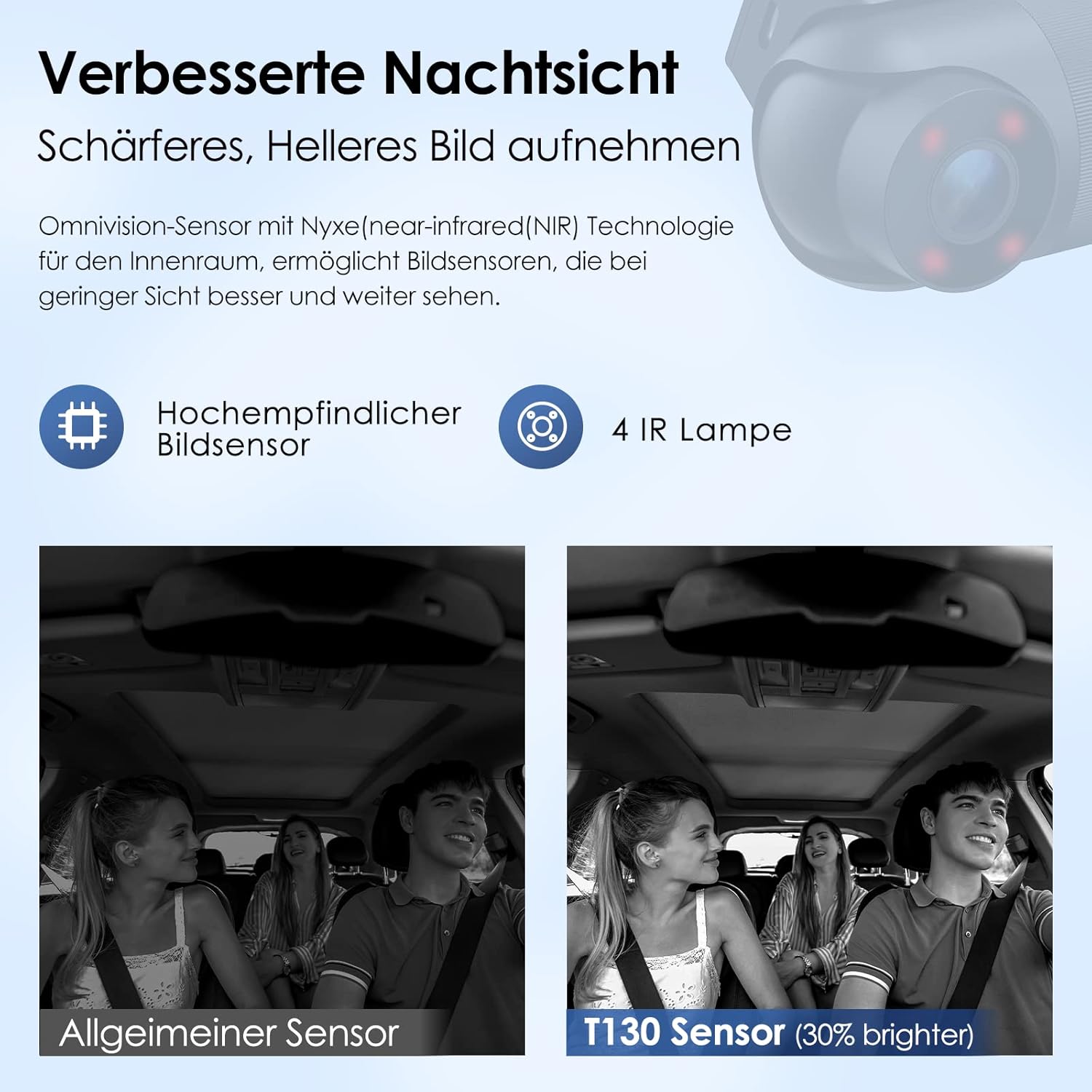
Image: Illustration of the VIOFO T130's 3-channel recording capability, showing the 140° front, 165° interior, and 165° rear camera angles.
4. 사용 설명서
4.1 기본 녹음
Once powered on, the dashcam automatically starts recording in a continuous loop. Older files are overwritten by new ones when the MicroSD card is full. Important footage can be protected from overwriting by manually locking the file or through the G-sensor's automatic emergency lock feature.
4.2 Wi-Fi Connectivity and VIOFO App
The VIOFO T130 features built-in Wi-Fi, allowing you to connect your iOS or Android device via the VIOFO app. Through the app, you can:
- View 라이브 푸tage from the front, interior, and rear cameras.
- Change dashcam settings.
- Download recorded video file스마트폰에 연결하세요.
- 비디오 공유 files.

Image: The VIOFO T130 dashcam's built-in Wi-Fi feature, enabling connection to a smartphone for live view설정 및 관리.
4.3 GPS 기능
The integrated GPS module records precise speed and location data, which is embedded into the video files. 이 데이터는 다음과 같습니다. viewed during playback using compatible software. The real-time speed is displayed on the dashcam screen in KM/H or MP/H.

Image: The VIOFO T130's built-in GPS module records speed, time, and route data, which can be viewed during video playback on a computer or smartphone.
4.4 Parking Surveillance Modes
The T130 offers three parking surveillance modes to protect your vehicle when parked:
- 자동 이벤트 감지: The dashcam automatically starts recording when an impact or motion is detected.
- 타임 랩스: Records video continuously at a low frame rate, compressing long periods into short videos.
- 낮은 비트레이트 녹화: Maintains continuous recording in smaller file sizes, conserving MicroSD card space.
These parking modes support simultaneous recording from all three cameras (front, interior, and rear). A hardwire kit (sold separately) is recommended for continuous power during parking surveillance.

이미지: 이상view of the VIOFO T130's 24-hour parking monitoring features, illustrating the three available modes: Motion Detection, Time Lapse, and Low Bitrate recording.
4.5 Superior IR Night Vision
Equipped with a high-performance Sony IMX335 Starvis Sensor for the front and rear cameras, and an Omnivision sensor for the interior camera, the T130 provides enhanced night vision. Four infrared (IR) LEDs and WDR (Wide Dynamic Range) technology ensure clear recordings both outside and inside the vehicle, even in low-light conditions.

Image: Comparison demonstrating the superior night vision capabilities of the VIOFO T130, featuring a high-sensitivity image sensor and 4 IR lamps for clearer, brighter recordings in low light.
4.6 음성 알림
The dashcam provides spoken English voice notifications to inform you about its status and setting changes, such as "Wi-Fi Connected" or "Recording Started." This helps in monitoring the dashcam's operation without needing to look at the screen.
Image: The VIOFO T130 dashcam provides English voice output for status updates, such as confirming Wi-Fi connection.
5. 유지관리
5.1 MicroSD 카드 포맷
It is recommended to format the MicroSD card regularly (e.g., once a month) to maintain optimal recording performance and prevent data corruption. This can be done through the dashcam's menu settings or via the VIOFO app.
5.2 렌즈 청소
Gently clean the camera lenses with a soft, lint-free cloth to ensure clear video quality. Avoid using abrasive cleaners or solvents that could damage the lens coating.
5.3 펌웨어 업데이트
VIOFO 공식을 주기적으로 확인하세요 website for firmware updates. Updating the firmware can improve performance, add new features, and fix bugs. Follow the instructions provided with the firmware update carefully.
6. 문제 해결
- Dashcam does not power on: Ensure the power cable is securely connected to both the dashcam and the vehicle's power outlet. Check if the vehicle's power outlet is functioning.
- 녹화가 중단되거나 멈춥니다. Format the MicroSD card. If the issue persists, try a different high-quality MicroSD card. Ensure the card meets the recommended specifications (Class 10 or higher).
- Wi-Fi 연결 문제: Ensure Wi-Fi is enabled on the dashcam and your smartphone. Try restarting both devices. Make sure you are within range of the dashcam's Wi-Fi signal.
- GPS가 속도/위치를 기록하지 못함: 블랙박스 영상이 선명한지 확인하세요. view of the sky to receive GPS signals. It may take a few minutes for the GPS to acquire a signal after startup.
- 야간 시야 품질이 좋지 않음: Ensure the camera lenses are clean. Check if the IR LEDs are functioning (they emit a faint red glow).
- Voice notifications are not heard: Check the volume settings in the dashcam menu or via the VIOFO app.
7. 사양
| 상표 | 비오포 |
| 모델 | T130 |
| 차량 서비스 유형 | Car, Bus |
| 연결 기술 | 와이파이 |
| 특별 기능 | Loop Recording, Night Vision, GPS, Parking Monitor, G-Sensor, Voice Notifications |
| 비디오 캡처 해상도 | Front: 1440p, Interior: 1080p, Rear: 1080p |
| 분야 View | Front: 140°, Interior: 165°, Rear: 165° |
| 감지기 | Sony IMX335 Starvis (Front/Rear), Omnivision (Interior) |
8. 고객 지원
For further assistance, technical support, or warranty inquiries, please visit the official VIOFO website or contact their customer service directly. Refer to your product packaging or the VIOFO web최신 연락처 정보는 사이트에서 확인하세요.


