1. 서론
The EZVIZ C3W Pro is a high-performance wired outdoor smart Wi-Fi security camera designed to provide reliable surveillance for your property. Featuring 1080p Full HD video, advanced color night vision, and AI-powered human shape detection, this camera offers comprehensive monitoring day and night. Its IP67 weather-resistant design ensures durability in various outdoor conditions. The camera also supports two-way talk, local storage via MicroSD card, and seamless integration with smart home ecosystems like Amazon Alexa and Google Assistant.

Figure 1: EZVIZ C3W Pro Outdoor Smart Wi-Fi Security Camera.
2. 상자 안에 무엇이 들어있나요?
Upon unboxing your EZVIZ C3W Pro camera, verify that all the following items are included:
- EZVIZ C3W Pro Camera
- 전원 어댑터
- 장착베이스
- 장착 나사 및 벽면 플러그
- 드릴 템플릿
- 네트워크 케이블용 방수 키트
- 빠른 시작 가이드

Figure 2: Included items in the EZVIZ C3W Pro package.
3. 설정
3.1. 물리적 설치
- 장착 위치를 선택하세요: 맑은 야외 장소를 선택하세요 view of the area you wish to monitor. Ensure the camera is within Wi-Fi range and has access to a power outlet. The camera is IP67 rated for dust and water resistance.
- 드릴 템플릿을 사용하십시오: Place the provided drill template on the desired mounting surface and mark the screw holes.
- 드릴 구멍: Drill pilot holes at the marked positions. Insert the wall plugs if mounting on masonry or concrete.
- 베이스 장착: 제공된 나사를 사용하여 카메라 장착 베이스를 표면에 고정합니다.
- 카메라 부착: Attach the camera to the mounting base and adjust its angle for optimal coverage.
Figure 3: EZVIZ C3W Pro camera mounted for outdoor use.
3.2. MicroSD 카드 설치 (선택 사항)
For local video storage, you can install a MicroSD card (up to 256GB). Locate the MicroSD card slot on the camera, typically protected by a cover secured with screws. Carefully open the cover, insert the MicroSD card, and then re-secure the cover to maintain the camera's weather resistance.
3.3. 전원 켜기
Connect the camera to the power adapter and plug it into a suitable outdoor power outlet. The camera will power on and its indicator light will begin to flash blue, indicating it's ready for network configuration.
3.4. EZVIZ App Configuration
- EZVIZ 앱을 다운로드하세요: Download and install the EZVIZ app from the App Store (iOS) or Google Play Store (Android).
- 계정 생성: Launch the app and register for a new EZVIZ account if you don't already have one.
- 장치 추가: Log in to your EZVIZ account. Tap the '+' icon in the upper right corner of the home screen to add a new device. Select 'Cameras'.
- QR 코드 스캔: Scan the QR code located on the camera body or on the Quick Start Guide.
- Wi-Fi에 연결: Follow the in-app prompts to connect your camera to your 2.4GHz Wi-Fi network. Ensure your phone is connected to the same 2.4GHz Wi-Fi network during this process.
- 설정 완료: 연결되면 카메라 이름을 지정하고 초기 설정을 조정할 수 있습니다.
Video 1: EZVIZ C3W Pro Setup Guide. This video demonstrates the step-by-step setup process for the camera.
4. 카메라 작동
4.1. 라이브 View & Basic Controls
Access the live video feed from your camera through the EZVIZ app. From the live view 인터페이스에서 다음을 수행할 수 있습니다.
- Take Snapshots: 라이브 피드에서 정지 이미지를 캡처합니다.
- 비디오 녹화: 수동으로 비디오 클립을 녹화하세요.
- 디지털 줌: Zoom in up to 8x to view 세부.
4.2. 양방향 대화
The C3W Pro features a built-in microphone and speaker, allowing for two-way communication. Tap the 'Talk' button in the app to speak through the camera and hear responses from the monitored area.
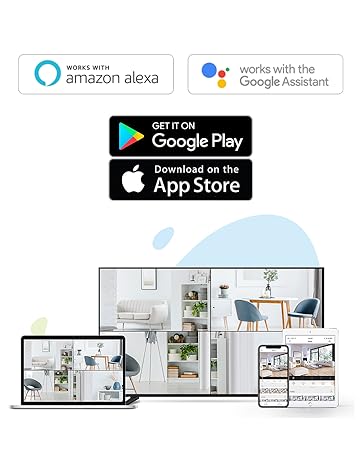
Figure 4: Using the two-way talk feature via the EZVIZ app.
4.3. 야간 투시 모드
카메라는 3가지 야간 시야 모드를 제공합니다.
- IR 모드(흑백): 저조도 환경에서 선명한 흑백 이미지를 제공하는 표준 적외선 야간 투시경입니다.
- 색상 모드: Utilizes built-in spotlights to provide full-color night vision, even in complete darkness.
- 스마트 나이트 비전: By default, the camera operates in black and white mode. When motion is detected, it automatically switches to color night vision and activates the spotlights.

Figure 5: Night vision modes: Color Night Vision and Black & White Vision.
4.4. 동작 감지 및 알림
The C3W Pro uses AI-powered human shape detection to minimize false alarms. You can customize detection settings:
- 사람 형상 감지: Enable this feature to only receive alerts when a human shape is detected.
- 모션 감지 영역: 카메라 내의 특정 영역을 정의합니다. view where motion detection will be active. This helps to ignore irrelevant movements (e.g., trees swaying).
- 모션 감지 감도: Adjust the sensitivity level to fine-tune how easily motion triggers an alert.
- 능동적 방어: When motion is detected, the camera can trigger a loud siren and flash its spotlights to deter intruders.
그림 6: AI 기반 사람 감지 기능 작동 모습.
4.5. 스마트 홈 통합
The EZVIZ C3W Pro is compatible with popular smart home platforms:
- 아마존 알렉사: 음성 명령을 사용하여 view 호환되는 Alexa 기기에서 카메라 영상을 시청하세요.
- 구글 어시스턴트: Integrate with Google Assistant for voice control and viewing on Google Home devices.

Figure 7: EZVIZ C3W Pro working with Amazon Alexa.
영상 2: 공식 종료view of the EZVIZ C3W Pro's key features, including color night vision, AI detection, and two-way talk.
5. 유지관리
- 정기 청소: 카메라 렌즈와 하우징을 부드러운 천으로 주기적으로 청소하십시오.amp cloth to ensure clear image quality. Avoid harsh chemicals.
- 펌웨어 업데이트: Keep your camera's firmware updated through the EZVIZ app to ensure optimal performance, security, and access to new features.
- 연결 확인: Regularly inspect power and network cable connections for any signs of wear or damage, especially in outdoor environments.
6. 문제 해결
6.1. No Power / Offline
- 전원 어댑터가 카메라와 작동하는 전원 콘센트에 모두 단단히 연결되어 있는지 확인하세요.
- 다른 장치를 연결해 전원 콘센트가 작동하는지 확인하세요.
- Wi-Fi 네트워크가 활성화되어 있고 카메라가 범위 내에 있는지 확인하십시오.
6.2. 이미지 품질이 좋지 않음
- 카메라 렌즈에 묻은 먼지나 얼룩을 닦아내세요.
- 렌즈 앞에 장애물이 없는지 확인하세요.
- Check your Wi-Fi signal strength in the EZVIZ app; a weak signal can affect video quality.
- Adjust the video resolution settings in the app if your network bandwidth is limited.
6.3. Excessive False Alarms
- Enable AI-powered Human Shape Detection in the app settings.
- Adjust the Motion Detection Area to exclude areas with frequent irrelevant motion (e.g., trees, busy roads).
- Lower the Motion Detection Sensitivity in the app.
7. 사양
| 모델 번호 | EZC3W3H2L28 |
| 비디오 캡처 해상도 | 1080p |
| 연결 기술 | Wireless (Wi-Fi 2.4GHz with Dual External Antennas) |
| 국제 보호 등급 | IP67(방수 및 방진) |
| 나이트 비전 범위 | 98 피트 |
| 특별 기능 | Motion Sensor, Night Vision (Color, Black & White, Smart), AI-Powered Human Detection, Two-Way Talk, Active Defense (Siren & Strobe Light) |
| 저장 | MicroSD Slot (up to 256GB), Secure Cloud Storage (Optional) |
| 호환 장치 | iOS, Android, Amazon Alexa, Google Assistant |
| 전원 | Wired (Power Adapter Included) |
| 치수(길이 x 너비 x 높이) | 9 x 4.1 x 3.7 인치 |
| 품목 무게 | 1.28파운드 |
8. 보증 및 지원
For warranty information, technical support, or service inquiries, please refer to the official EZVIZ web해당 웹사이트를 방문하거나 고객 지원팀에 직접 문의하십시오. 자세한 내용은 일반적으로 빠른 시작 가이드 또는 제품 포장에서 확인할 수 있습니다.


