1. 제품 오버view
The OhO Smart Glasses A8 Pro combine the functionality of eyewear with advanced audio technology. These glasses feature an open-ear Bluetooth speaker system, voice control capabilities, and UV protection, making them suitable for various indoor and outdoor activities. The transitional lenses automatically adjust their tint based on light conditions, providing convenience and eye protection.
주요 특징:
- Open Ear Bluetooth Headset: Listen to music and calls while remaining aware of your surroundings.
- Voice Control Smart Glasses: Hands-free phone calls, voice assistant activation (Siri, Cortana, Google Now) for music, directions, weather, and traffic updates.
- 볼륨 조절 버튼: Integrated buttons for volume adjustment and track navigation.
- Ultra Slim Unisex Design: Lightweight and comfortable frame made from flexible material.
- Safety Glasses with Transitional Lenses: Lenses change from light grey to dark grey outdoors and vice versa indoors. Impact-resistant, anti-eyestrain, anti-scratch, and anti-smudge properties.

Image: OhO Smart Glasses A8 Pro showcasing the transitional lens technology, changing from clear to dark grey based on light exposure.
2. 상자 안에 무엇이 들어있나요?
Your OhO Smart Glasses A8 Pro package typically includes:
- OhO Smart Glasses A8 Pro (with transitional grey lenses)
- USB-C 충전 케이블
- 보호용 하드 케이스
- Soft Pouch/Cleaning Cloth
- Additional Interchangeable Lenses (e.g., blue light blocking, polarized black, yellow/orange - availability may vary by package)
- 사용 설명서

Image: A USB-C charging cable, included for charging your smart glasses.

Image: Various interchangeable lenses, offering different tints and functionalities for your smart glasses.
3. 설정
3.1 안경 충전하기
- Locate the USB-C charging port on the right temple of the glasses.
- 제공된 USB-C 케이블을 충전 포트에 연결하고 다른 한쪽 끝을 호환되는 USB 전원(예: 컴퓨터, 벽면 어댑터)에 연결하십시오.
- The LED indicator on the glasses will illuminate during charging and change color or turn off when fully charged. A full charge typically provides up to 10 hours of battery life.
3.2 블루투스 페어링
- Ensure the glasses are charged and powered off.
- Press and hold the Power/Multi-function button on the right temple until the LED indicator flashes, indicating pairing mode.
- 스마트폰이나 Bluetooth 지원 기기에서 Bluetooth 설정으로 이동하세요.
- 검색 available devices and select "OhO sunshine" from the list.
- Once connected, the LED indicator will stop flashing or change to a steady light.
Video: An official product video demonstrating the Bluetooth pairing process and smart features of the OhO Smart Glasses.
4. 사용 설명서
4.1 전원 켜기/끄기
- 전원 켜기: Press and hold the Power/Multi-function button for approximately 3 seconds until you hear a power-on prompt or see the LED indicator light up.
- 전원 끄기 : Press and hold the Power/Multi-function button for approximately 5 seconds until you hear a power-off prompt or see the LED indicator turn off.
4.2 음악 재생
- 재생/일시 중지: Single-press the Power/Multi-function button.
- 다음 트랙: 볼륨 높이기 버튼을 두 번 누르세요.
- 이전 트랙 : 볼륨 낮추기 버튼을 두 번 누르세요.
4.3 통화 처리
- 전화 받기: Single-press the Power/Multi-function button when a call comes in.
- 통화 종료: Single-press the Power/Multi-function button during an active call.
- 전화 거부: Press and hold the Power/Multi-function button for 2 seconds when a call comes in.
4.4 음성 지원 활성화
- Double-press the Power/Multi-function button to activate your device's voice assistant (Siri, Cortana, Google Now). You can then issue commands hands-free.
4.5 볼륨 조절
- 볼륨 업: Single-press the Volume Up button.
- 볼륨 작게 : Single-press the Volume Down button.
4.6 렌즈 교체
The OhO Smart Glasses A8 Pro feature interchangeable lenses. To change lenses:
- Gently push the lens from the inside of the frame outwards until it detaches.
- Align the new lens with the frame and carefully press it into place until it clicks securely.
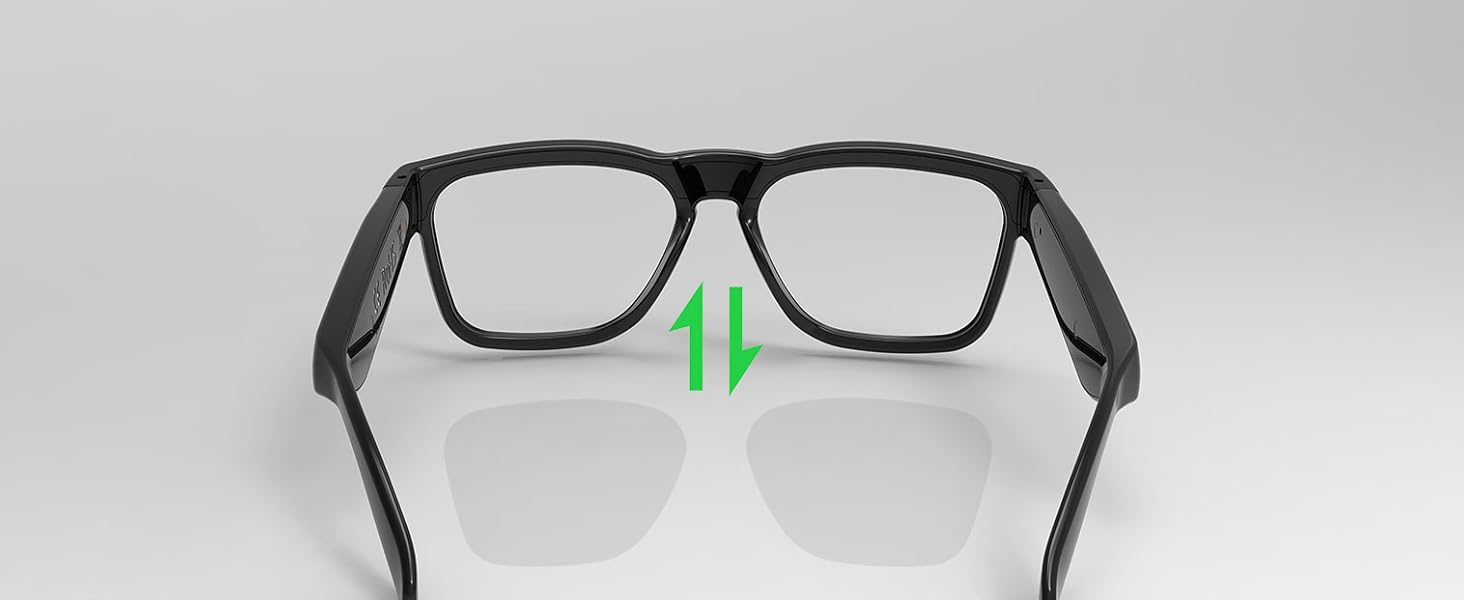
Image: A visual guide demonstrating the process of removing and inserting interchangeable lenses into the smart glasses frame.
4.7 Transitional Lens Functionality
The included transitional grey lenses automatically adapt to changing light conditions. They will darken when exposed to UV light outdoors and become lighter when indoors, providing continuous comfort and protection without needing to switch between different pairs of glasses.

Image: The smart glasses demonstrating the transitional lens feature, showing the lenses changing from clear to dark in response to light.
5. 유지관리
5.1 청소
- 제공된 부드러운 청소용 천으로 렌즈와 프레임을 부드럽게 닦아주세요.
- For stubborn smudges, use a lens cleaning spray specifically designed for eyewear. Avoid harsh chemicals or abrasive materials.
- The lenses are designed with anti-smudge and anti-scratch properties, but proper care is still recommended to maintain their quality.
5.2 방수성
The OhO Smart Glasses A8 Pro are water-resistant, suitable for light rain or sweat. They are ~ 아니다 designed for swimming or heavy water exposure. Avoid submerging the glasses in water.

Image: The smart glasses with water droplets on the frame, illustrating their water-resistant design.
6. 문제 해결
- 전원 없음: Ensure the glasses are fully charged. Connect to the USB-C charger and check the LED indicator.
- 블루투스를 페어링할 수 없습니다: Make sure Bluetooth is enabled on your device and the glasses are in pairing mode (flashing LED). Try turning both devices off and on again. Ensure the glasses are not already connected to another device.
- 소리가 나지 않음/볼륨이 낮음: Check the volume levels on both the glasses and your connected device. Ensure the glasses are properly positioned on your head for optimal open-ear audio.
- 음성 지원이 응답하지 않음: Confirm that your device's voice assistant is enabled and that the glasses are properly connected via Bluetooth. Double-press the multi-function button firmly.
- Lenses Not Changing Tint: Ensure the glasses are exposed to sufficient UV light for the transitional lenses to activate. This feature works best in direct sunlight.
7. 사양
| 제품 치수 | 6.3 x 5.71 x 1.85 인치 |
| 품목 무게 | 1.2 온스 |
| 품목 모델 번호 | a8 pro |
| 배터리 | 1개의 리튬 금속 배터리 필요(포함) |
| 무선 통신 | 블루투스 |
| 특별 기능 | Voice Control, Open-Ear Speaker, Transitional Lenses, UV Protection |
| 제조업체 | 오오 선샤인 |
| 첫 번째 이용 가능 | 10년 2023월 XNUMX일 |

Image: A technical diagram illustrating the precise dimensions of the OhO Smart Glasses A8 Pro.
8. 보증 및 지원
For warranty information and customer support, please refer to the documentation included with your product or visit the official OhO sunshine web사이트. 판매자에게 직접 연락하여 도움을 받으실 수도 있습니다.


