1. 서론
This manual provides detailed instructions for the Orbic Speed Mobile Hotspot, Model VZORB400LBVZRT. This device allows you to create a personal Wi-Fi network using a 4G LTE cellular connection, enabling up to 10 Wi-Fi enabled devices to connect to the internet simultaneously. It is designed for portability, offering up to 12 hours of usage time and up to 5 days of standby time on a single charge.
Please read this manual thoroughly to ensure proper setup, operation, and maintenance of your device.
2. 제품 오버view
The Orbic Speed Mobile Hotspot is a compact and efficient device for on-the-go internet access. Familiarize yourself with its components:
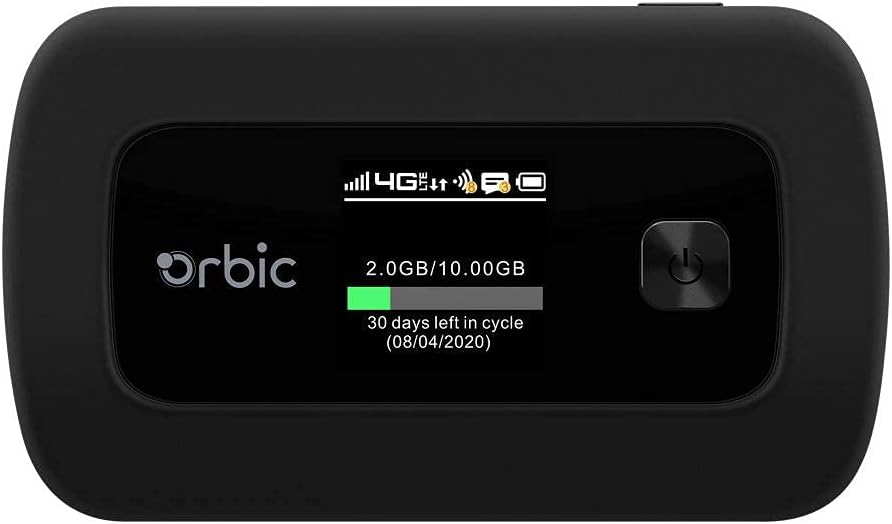
그림 2.1: 앞쪽 view of the Orbic Speed Mobile Hotspot, displaying the screen with network status, data usage, and power button.

그림 2.2: 뒤쪽 view of the Orbic Speed Mobile Hotspot, showing the Verizon logo, indicating network compatibility.
패키지 내용:
- Orbic Speed Mobile Hotspot (Model VZORB400LBVZRT)
- 리튬 이온 배터리
- 충전 케이블(USB)
- 전원 어댑터(벽면 충전기)
- 빠른 시작 가이드(포함된 경우)
3. 설정
Follow these steps to set up your Orbic Speed Mobile Hotspot:
- SIM 카드 삽입: Open the back cover of the hotspot and carefully insert your activated 4G LTE SIM card into the designated slot. Ensure it is correctly oriented.
- 배터리 삽입: Place the provided Lithium Ion battery into the battery compartment, ensuring the contacts align. Replace the back cover.
- 기기 충전: Connect the charging cable to the hotspot and the power adapter. Plug the adapter into a wall outlet. Allow the device to charge fully before first use. The screen will indicate charging status.
- 전원 켜기: Press and hold the power button (located on the front panel) until the screen illuminates. The device will boot up and attempt to connect to the 4G LTE network.
- 초기 구성: Once powered on, the screen will display network status, Wi-Fi name (SSID), and password. Note these details for connecting your devices.
4. 사용 설명서
4.1 Connecting Devices to Your Hotspot
- Ensure your Orbic Speed Mobile Hotspot is powered on and connected to the 4G LTE network.
- On your Wi-Fi enabled device (e.g., laptop, smartphone, tablet), open the Wi-Fi settings.
- Scan for available Wi-Fi networks. Locate the network name (SSID) displayed on your hotspot's screen.
- Select the hotspot's SSID and enter the Wi-Fi password (also displayed on the hotspot's screen) when prompted.
- Your device should now be connected to the internet via the hotspot. The hotspot supports up to 10 connected devices simultaneously.
4.2 WPS(Wi-Fi Protected Setup) 사용
The Orbic Speed Mobile Hotspot supports WPS for easy connection of compatible devices:
- On your Wi-Fi device, initiate the WPS connection process.
- On the Orbic Speed Mobile Hotspot, navigate to the WPS option (refer to the on-screen menu or a dedicated WPS button if available) and activate it.
- The devices will automatically connect without needing to manually enter the password.
4.3 Monitoring Data Usage
The hotspot's screen displays real-time data usage information, including current usage and remaining data in your billing cycle. This helps you manage your data plan effectively.
4.4 접근하기 Web Interface (Advanced Settings)
For advanced settings such as changing Wi-Fi name/password, managing connected devices, or configuring network settings, you can access the hotspot's web interface. Typically, you connect a device to the hotspot's Wi-Fi, then open a web browser and enter a specific IP address (e.g., 192.168.1.1 or 192.168.0.1) or a web address provided in the device's documentation. You will need to log in with administrator credentials, usually found on a sticker inside the battery compartment or in the quick start guide.
5. 유지관리
5.1 배터리 관리
- 배터리 수명을 최대한 늘리려면 기기를 극한 온도에 노출시키지 마십시오.
- Charge the battery regularly. If the device will not be used for an extended period, charge it to about 50% before storing.
- 정품 또는 승인된 충전 액세서리만 사용하십시오.
5.2 청소
부드럽고 마른 천으로 기기를 닦으십시오. 액체 세척제나 연마성 재질은 기기를 손상시킬 수 있으므로 사용하지 마십시오.
5.3 소프트웨어 업데이트
Periodically check for software updates for your hotspot. Updates can improve performance, add features, and enhance security. These are typically managed through the device's web 인터페이스.
6. 문제 해결
If you encounter issues with your Orbic Speed Mobile Hotspot, refer to the following common solutions:
- 네트워크 연결 없음:
- SIM 카드가 올바르게 삽입되었고 데이터 요금제로 활성화되었는지 확인하세요.
- Check for 4G LTE network coverage in your current location.
- 핫스팟을 재시작하세요.
- 기기가 Wi-Fi에 연결할 수 없습니다:
- Verify the Wi-Fi name (SSID) and password on the hotspot's screen match what you are entering.
- Ensure the hotspot is powered on and broadcasting its Wi-Fi signal.
- 연결 가능한 기기의 최대 개수(10)에 도달했는지 확인하세요.
- Restart both the hotspot and the device attempting to connect.
- 인터넷 속도가 느립니다:
- Relocate the hotspot to an area with better cellular signal strength.
- 연결된 기기의 수를 줄이세요.
- Check your data plan for any speed throttling or data limits.
- Battery Drains Quickly / Not Charging:
- Ensure the charging cable and adapter are securely connected and functioning.
- Avoid using the hotspot in extremely hot or cold environments.
- If the battery life has significantly degraded, it may need replacement.
- 장치가 응답하지 않음:
- Perform a soft reset by holding the power button until the device turns off, then power it back on.
- If a soft reset fails, locate the reset pinhole (if available) and use a paperclip to perform a factory reset (note: this will erase all custom settings).
7. 사양
| 특징 | 세부 사항 |
|---|---|
| 모델 번호 | VZORB400LBVZRT |
| 상표 | Orbic (Verizon compatible) |
| 연결 기술 | 4G LTE, Wi-Fi (802.11ac) |
| 주파수 대역 클래스 | 듀얼 밴드 |
| 최대 연결 장치 수 | 최대 10개 |
| 사용 시간 | 최대 12시간 |
| 대기 시간 | 최대 5일 |
| 배터리 유형 | 1 리튬이온 배터리 |
| 특징 | WPS (Wi-Fi 보호 설정) |
| 안테나 유형 | 내부 |
| 제품 치수 | 2.55 x 3.46 x 1.85 인치 |
| 품목 무게 | 8.8 온스 |
8. 보증 및 지원
For warranty information and technical support, please refer to the documentation provided with your purchase or contact the retailer/manufacturer directly. As this product may be a renewed item, specific warranty terms may vary. Please consult your purchase agreement for details regarding Amazon Renewed Guarantee or other applicable warranties.
For further assistance, you may need your device's serial number, which is typically located on a sticker inside the battery compartment or on the original packaging.


