소개
Thank you for choosing the ieGeek 2K Magnetic Base WiFi Security Camera S2. This camera offers advanced features such as 2K resolution, color night vision, 300° pan, Wi-Fi 6 connectivity, AI/PIR motion detection, and two-way audio. This manual will guide you through the installation, operation, and maintenance to ensure optimal performance and security for your home or property.
상자 안에 무엇이 들어있나요?
패키지 내용물을 확인하여 모든 품목이 들어 있는지 확인하세요.
- ieGeek Camera S2
- 사용자 설명서
- 마그네틱 카메라 마운트
- 자성베이스
- USB-C 충전 케이블
- Screw Bag (3 x Screws & Nuts)
- 3M 접착제

Image: All components included in the ieGeek S2 camera package.
제품 끝view
카메라 부품

앞쪽 view: Ultra HD lens, spotlight, PIR sensor.

뒤쪽에 view: Speaker grille, QR code for setup.
주요 특징
- 2K Ultra HD 비디오: 선명하고 자세한 음식 사진을 촬영합니다.tage.
- 300° Pan Field of View: 파노라마 제공 views, covering a wide area.
- Wi-Fi 6 연결: Provides faster and more reliable image transfer, reduced interference, and enhanced security.
- 컬러 나이트 비전: See in full color even in low-light conditions up to 10 meters.
- AI/PIR Motion Detection: Advanced detection system recognizes individuals and sends real-time alerts (0.2s to 3s).
- 알람 사이렌: Automatically or manually trigger a siren to deter intruders.
- 양방향 오디오 : Built-in microphone and speaker for real-time conversations.
- 100% Wire-Free & Rechargeable Battery: Easy installation without cables, suitable for both indoor and outdoor use.
- IP65 방수: 다양한 기후 조건을 견딜 수 있도록 설계되었습니다.
설정 및 설치
초기 충전
Before first use, ensure the camera is fully charged using the provided USB-C cable. A standard 5V USB power adapter (not included) is required.
앱 설치 및 연결
- Step 1: Download the ieGeek Cam App. 검색 "ieGeek Cam" on your smartphone's app store (Android 5.0+ or iOS 8.0+).
- Step 2: Connect to 2.4GHz Wi-Fi. Ensure your camera is within range of a 2.4GHz Wi-Fi network for initial setup.
- Step 3: Start Recording. Follow the in-app instructions to pair your camera and begin monitoring.
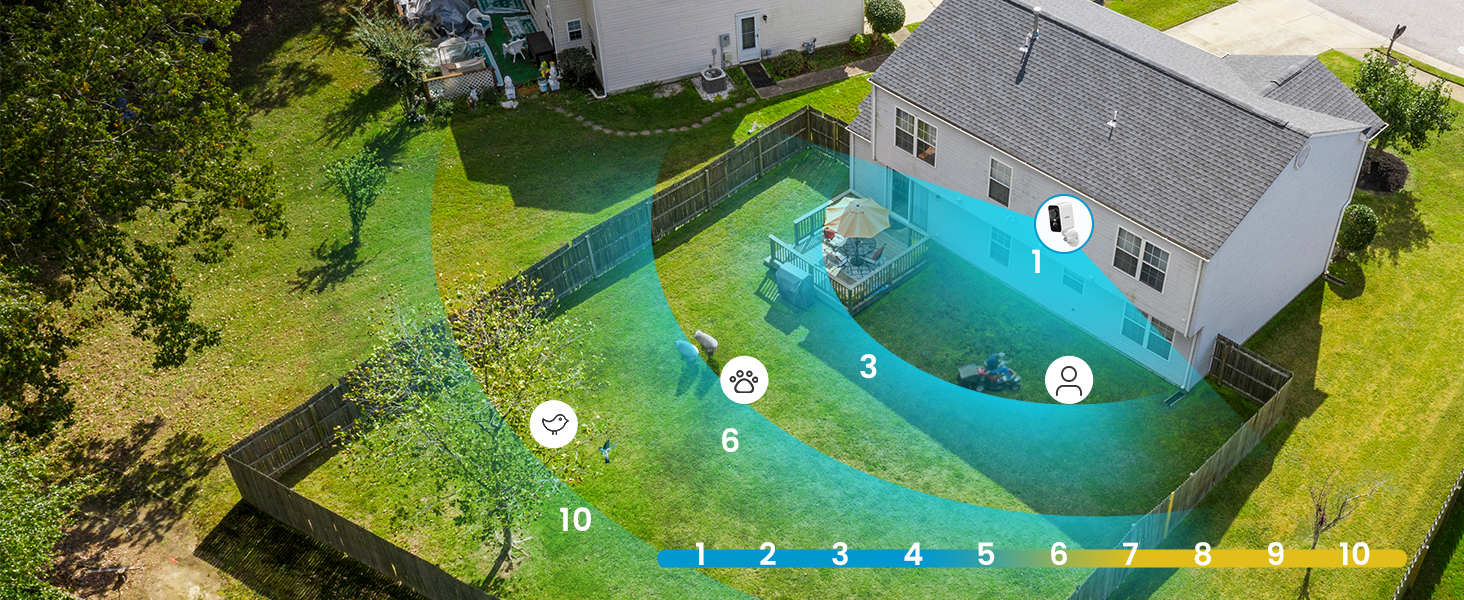
Image: Simplified setup process using the ieGeek Cam app.
장착 옵션
The ieGeek S2 camera offers flexible installation with its magnetic base. You can choose between adhesive mounting or screw mounting:
- Method 1: Adhesive Mounting (Tool-free).
- Install the 3M adhesive on a clean, flat wall surface.
- Allow the adhesive to rest for 8 hours to achieve optimal adhesion before attaching the magnetic base.
- Fix the magnetic base to the adhesive.
- 카메라를 자기 베이스에 부착합니다.
- Method 2: Screw Mounting.
- Drill three holes in the desired location.
- Fix the magnetic camera mount to the wall using the provided screws and nuts.
- 카메라를 자석 마운트에 부착합니다.
The magnetic base allows for easy removal of the camera for recharging or repositioning.

Image: Magnetic base for easy, tool-free installation.

Image: Two installation methods for the ieGeek S2 camera.
작동 지침
살다 View 및 재생
실시간 비디오 스트림과 녹화된 콘텐츠를 시청하세요.tage through the ieGeek Cam app. The app supports simultaneous viewing of up to 4 cameras and allows sharing access with family members.
300° Pan Control
Utilize the in-app controls to remotely adjust the camera's horizontal viewing angle up to 300°, ensuring comprehensive coverage without blind spots.

Image: The camera's 300° pan capability provides wide area surveillance.
2K Ultra HD and Color Night Vision
The camera records in 2K resolution, providing sharp images. With its color night vision feature, you can see clear, full-color images even at night, up to 10 meters. Infrared night vision is also available.

Image: 2K 3MP HD image quality for clear details.

Image: Color night vision provides clear, vibrant images in low light.
AI/PIR Motion Detection and Alarm
The camera's advanced AI/PIR detection system identifies human shapes, reducing false alarms. Upon detection, you receive real-time alerts (0.2s to 3s) on your phone. You can also configure the camera to automatically trigger a siren or a strong light alarm to deter intruders.

Image: AI recognition minimizes false alarms by focusing on human shapes.

Image: PIR motion detection with siren and light alarm for immediate deterrence.
양방향 오디오
Communicate directly with visitors or deter unwanted guests using the camera's integrated microphone and speaker. This feature allows for real-time, two-way conversations through the app.

Image: Two-way audio for real-time communication.
저장 옵션
The camera supports local storage via a Micro SD card (up to 128GB, not included). Additionally, a free 6-second loop cloud storage is available through the ieGeek Cam app.

Image: Storage options including Micro SD card and cloud storage.
유지
- 배터리 충전: Recharge the camera battery as needed. The magnetic base allows for easy removal for charging.
- 청소: 카메라 렌즈와 본체는 부드러운 천으로 주기적으로 닦아주세요.amp 먼지와 이물질을 제거하는 데는 천을 사용하십시오. 독한 화학 약품은 사용하지 마십시오.
- 날씨 보호: While the camera is IP65 weatherproof, ensure it is installed in a location that minimizes direct exposure to extreme weather conditions for prolonged durability.
문제 해결
- 카메라가 Wi-Fi에 연결되지 않음:
- Wi-Fi 네트워크가 2.4GHz인지 확인하세요. 카메라는 5GHz Wi-Fi를 지원하지 않습니다.
- Check the Wi-Fi signal strength at the camera's installation location.
- 앱에 입력한 Wi-Fi 비밀번호가 올바른지 확인하세요.
- 라우터와 카메라를 다시 시작하세요.
- 과도한 배터리 소모:
- Frequent motion detection events, especially in high-traffic areas, can increase battery consumption. Adjust motion detection sensitivity and detection zones in the app.
- 살다 viewing for extended periods also consumes more battery.
- 배포 전에 카메라가 완전히 충전되었는지 확인하십시오.
- 허위 경보:
- Adjust the AI/PIR detection sensitivity in the app.
- Define specific detection zones to exclude areas with irrelevant movement (e.g., trees swaying, distant traffic).
- 카메라 렌즈가 깨끗하고 이물질이 없는지 확인하십시오.
- 이미지 품질이 좋지 않음:
- 인터넷 연결 속도를 확인하세요.
- 카메라 렌즈가 깨끗한지 확인하세요.
- 앱 설정에서 카메라 해상도가 2K로 설정되어 있는지 확인하십시오.
For further assistance, please refer to the ieGeek Cam app's help section or contact ieGeek customer support.
명세서
| 특징 | 사양 |
|---|---|
| 비디오 녹화 해상도 | 2K |
| 효과적인 비디오 해상도 | 1296p |
| 색상 | 하얀색 |
| 무선 통신 기술 | 와이파이(2.4GHz) |
| View잉 각도 | 300° (Pan) |
| 나이트 비전 범위 | 10 미터 |
| 방수 레벨 | IP65 (방수) |
| 재료 | Extra resistant ABS+PC material (heat and rust resistant) |
| 전원 | 배터리 구동식 (리튬 이온) |
| 메모리 지원 | 32-128GB (Micro SD card) |
| 운영 체제 호환성 | Android 5.0 이상, iOS 8.0 이상 |
| 품목 치수(L x W x H) | 17.5 x 6.6 x 5.5cm |
보증 및 지원
The ieGeek 2K Magnetic Base WiFi Security Camera S2 comes with a 2년 제조사 보증.
For any questions, technical support, or warranty claims, please contact ieGeek customer service. Their team is available to assist you within 24 hours on business days.
You can find contact information and additional resources within the ieGeek Cam app or on the official ieGeek web대지.


