1. 이상view
The Total Digital Kitchen Scale (Model TES1201) is designed for precise weighing in kitchen environments. It features a high capacity of 30 kilograms and a clear LED display, making it suitable for various culinary tasks.
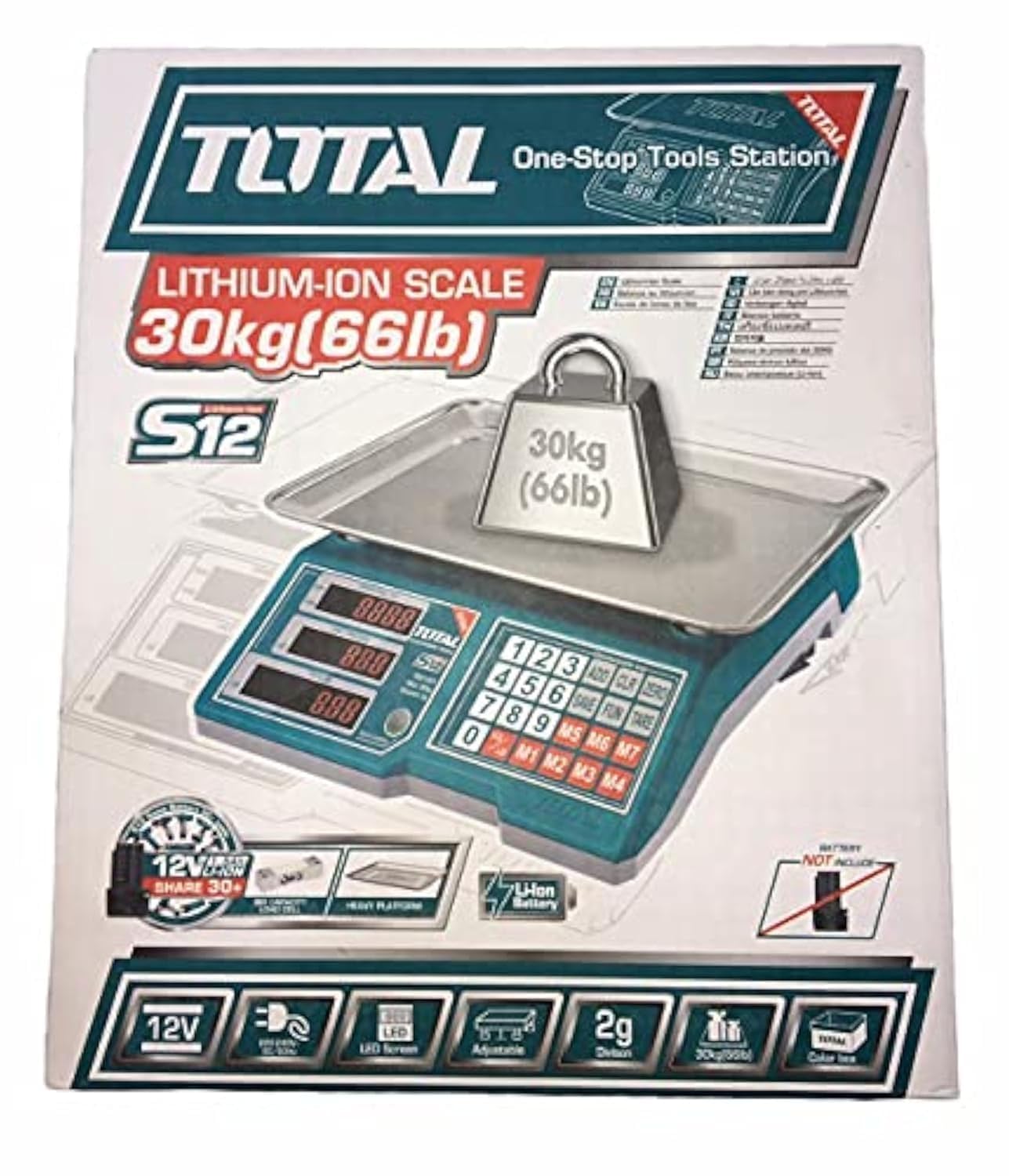
Image 1.1: Total Digital Kitchen Scale Model TES1201. This image displays the scale's main body, weighing platform, and digital display.
2. 제품 특징
- 대용량: Weighs up to 30 kilograms, suitable for a wide range of ingredients.
- 디지털 정확도: Provides precise measurements for consistent results.
- LED 디스플레이: 명확하고 읽기 쉬운 디지털 디스플레이.
- 용기 기능: Allows you to subtract the weight of a container to get an accurate measurement of its contents.
- 내구성 있는 구조: Made with metal material for longevity.
- 컴팩트한 디자인: Mini form factor for easy storage and use.
3. 안전 정보
Please read all safety instructions before using the scale to prevent injury or damage to the device.
- 최대 중량인 30kg을 초과하지 마십시오.
- 정확한 측정값을 얻으려면 평평하고 안정적인 표면에 저울을 놓으세요.
- 저울을 극한의 온도, 직사광선 또는 높은 습도에 노출시키지 마십시오.
- 저울을 물이나 다른 액체에 담그지 마십시오.amp 천만.
- 저울의 정확도가 떨어질 수 있으므로 강한 전자기장에서 멀리 떨어뜨려 놓으십시오.
- This product is not intended for commercial use or for weighing hazardous materials.
4. 패키지 내용
패키지를 열었을 때 모든 품목이 들어 있는지 확인하세요.
- Total Digital Kitchen Scale (Model TES1201) - 1 unit
- User Manual - 1 copy
- 참고: 배터리는 포함되어 있지 않으므로 별도로 구매해야 합니다.
5. 설정
- 저울 풀기: 저울을 포장에서 조심스럽게 꺼내세요.
- 배터리 설치: Locate the battery compartment on the underside of the scale. Open the cover and insert the required batteries (e.g., AA or AAA, typically 2 or 3, though not specified in data) according to the polarity indicators (+/-). Close the battery compartment securely.
- 놓기: 저울을 단단하고 평평하며 안정적인 표면에 놓으십시오. 카펫과 같은 부드러운 표면은 정확도에 영향을 줄 수 있으므로 피하십시오.
6. 사용 설명서
- 전원 켜기: 를 누르세요 켜짐/꺼짐 button to turn on the scale. The display will show "0.0" or "0" when ready.
- Select Unit (if applicable): If your scale supports multiple units (e.g., grams, kilograms, pounds, ounces), press the 단위 button to cycle through the available units until your desired unit is displayed.
- 계량 품목: Place the item directly onto the center of the weighing platform. The weight will be displayed on the LED screen.
- 용기 기능: To weigh items in a container, first place the empty container on the scale. Press the 살갈퀴 button (sometimes labeled "Z/T" or "T"). The display will reset to "0.0". Now, add the items you wish to weigh into the container, and the display will show only the net weight of the items.
- 전원 끄기 : 를 누르고 계세요 켜짐/꺼짐 button for a few seconds to turn off the scale. The scale may also have an auto-off function to conserve battery life.
7. 유지관리 및 관리
- 청소: 부드러운 천으로 저울 표면을 닦으세요.amp 천으로 닦아주세요. 연마성 세제를 사용하거나 스케일을 물에 담그지 마세요.
- 저장: 저울은 서늘하고 건조한 곳에 보관하세요. 사용하지 않을 때는 저울 위에 무거운 물건을 올려놓지 마세요.
- 배터리 교체: If the display shows a low battery indicator (e.g., "Lo"), replace the batteries promptly to ensure accurate operation. Remove batteries if the scale will not be used for an extended period.
8. 문제 해결
| 문제 | 가능한 원인 | 해결책 |
|---|---|---|
| 저울이 켜지지 않습니다. | 배터리가 방전되었거나 잘못 설치되었습니다. | 배터리 극성을 확인하세요. 필요하면 배터리를 교체하세요. |
| 부정확한 판독값. | Uneven surface, overloaded, or interference. | Place on a flat, stable surface. Do not exceed 30 kg. Keep away from electronic devices. |
| "Lo" 또는 "Err"가 표시됩니다. | 배터리 부족 또는 과부하. | Replace batteries. Remove excess weight if overloaded. |
9. 사양
| 특징 | 세부 사항 |
|---|---|
| 상표 | 총 |
| 모델 번호 | TES1201 |
| 유형 | 디지털 주방 저울 |
| 최대 중량 용량 | 30킬로그램 |
| 읽기 정확도 | 1그램 |
| 디스플레이 유형 | 주도의 |
| 재료 | 금속 |
| 색상 | 녹색 |
| 품목 무게 | 10그램 |
| 패키지 크기 | 37.2 x 32.4 x 11.8cm |
| 필요한 배터리 | Yes (Not included) |
| 특별 기능 | High weight capacity, Tare function |
10. 보증 및 지원
보증 정보 또는 기술 지원이 필요하시면 구매 시 동봉된 설명서를 참조하시거나 판매점/제조업체에 직접 문의하십시오. 보증 청구를 위해서는 구매 증빙 자료를 보관해 두시기 바랍니다.
일반적으로 제조업체의 공식 연락처 정보를 찾을 수 있습니다. web사이트 또는 제품 포장에 표시되어 있습니다.


