소개
This manual provides comprehensive instructions for the setup, operation, maintenance, and troubleshooting of your Poly Voyager 4310 UC Wireless Headset with Charge Stand. Designed for seamless connectivity across various devices, this single-ear headset offers clear audio and extended wireless freedom for both home and office environments.
상자 안에 무엇이 들어있나요?
패키지에 모든 품목이 들어 있는지 확인하세요.
- Poly Voyager 4310 UC 무선 헤드셋
- 충전 스탠드
- USB-A 블루투스 어댑터(BT700)
- USB 충전 케이블
- 운반 파우치

Image: The Poly Voyager 4310 UC Wireless Headset resting on its dedicated charge stand, showcasing its design and primary components.
설정
1. 헤드셋 충전
Before initial use, fully charge your headset. Connect the charge stand to a power source using the provided USB charging cable. Place the headset onto the charge stand. The headset's LED indicator will show charging status.
- 충전 시간: 완전 충전에는 약 1.5시간이 소요됩니다.
- 배터리 수명: 완충 시 최대 24시간 통화 가능.
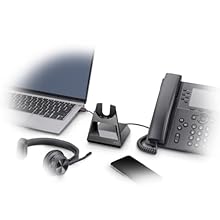
Image: An illustration showing the headset on its charge stand, connected to a laptop and a mobile phone, demonstrating connectivity options.
2. Connecting to PC/Mac via USB-A Bluetooth Adapter (BT700)
- Insert the BT700 USB-A Bluetooth adapter into an available USB port on your computer.
- The adapter's LED will flash red and blue, indicating pairing mode.
- Power on your headset. The headset will automatically attempt to pair with the adapter.
- Once paired, the adapter's LED will turn solid blue. A voice prompt will confirm "PC connected."
- Ensure the Poly Voyager 4310 UC is selected as the default audio device in your computer's sound settings and communication applications (e.g., Microsoft Teams, Zoom).
3. Connecting to Mobile Phone via Bluetooth
- With the headset powered off, press and hold the Power button until the headset's LED flashes red and blue, indicating pairing mode.
- On your mobile phone, navigate to Bluetooth settings and enable Bluetooth.
- Select "Poly V4310 Series" from the list of available devices.
- Once paired, the headset's LED will turn solid blue, and a voice prompt will confirm "Phone connected."
헤드셋 작동
1. 헤드셋 착용하기
Position the headset with the ear cup comfortably over one ear. Adjust the headband for a secure fit. The microphone boom is flexible; position it approximately two finger-widths from the corner of your mouth for optimal voice pickup.

Image: A man wearing the Poly Voyager 4310 UC headset, demonstrating proper wearing style and microphone positioning.
2. 통화 관리
- 전화 받기/종료: Press the Call Control button (usually located on the ear cup).
- 음소거/음소거 해제: Press the dedicated Mute button on the microphone boom. A voice prompt will confirm "Mute on" or "Mute off."
- 볼륨 조절: Use the Volume Up (+) and Volume Down (-) buttons on the ear cup.
3. 음질 및 소음 제거
The headset features dual-mic Acoustic Fence technology, designed to minimize background noise for your callers. This technology focuses on your voice, reducing distractions from your surroundings.
4. 무선 범위
When connected via the BT700 USB adapter, the headset offers a wireless range of up to 50 meters (164 feet), allowing for mobility during calls. Range may vary based on environment and obstacles.
유지
- 청소: Use a soft, dry cloth to clean the headset and charge stand. Avoid using abrasive cleaners or solvents.
- 저장: When not in use, store the headset on its charge stand or in the provided carrying pouch to protect it from dust and damage.
- 배터리 관리 : For optimal battery longevity, avoid fully discharging the battery frequently. Charge the headset regularly.
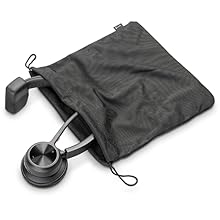
Image: The Poly Voyager 4310 UC headset neatly folded and placed inside its mesh carrying pouch for protection and portability.
문제 해결
| 문제 | 가능한 해결책 |
|---|---|
| Headset not pairing with PC/Mac |
|
| 헤드셋이 휴대폰과 페어링되지 않습니다 |
|
| 오디오가 없거나 오디오 품질이 좋지 않습니다. |
|
| 마이크가 작동하지 않습니다 |
|
| 배터리 수명이 짧음 |
|
명세서
| 특징 | 세부 사항 |
|---|---|
| 모델명 | 보이저 4310 UC |
| 연결 기술 | 블루투스 5.2, USB |
| 무선 통신 | 블루투스 |
| 헤드폰 잭 | USB |
| 착용 스타일 | Single-ear (On Ear) |
| 마이크로폰 | Dual-mic with Acoustic Fence technology |
| 무선 범위 | Up to 50 meters (164 feet) with BT700 adapter |
| 배터리 수명(통화 시간) | 최대 24시간 |
| 충전 시간 | 완전 충전까지 약 1.5시간 소요 |
| 호환 장치 | Laptops, Computers, Mobile Devices |
| 제어 유형 | Media Control, Push Button |
| 품목 무게 | 122그램(4.3온스) |
| 제품 치수 | 4.6 x 7.4 x 8.3 인치 |
| 포함된 구성 요소 | Headset, Charge Stand, USB-A Bluetooth Adapter (BT700), USB Cable |
보증 및 지원
Your Poly Voyager 4310 UC Wireless Headset is covered by a manufacturer's warranty. For specific warranty details, registration, and technical support, please refer to the official Poly web해당 사이트를 방문하거나 고객 서비스에 문의하세요. 보증 청구를 위해 구매 증빙 자료를 보관하세요.
온라인 지원: Visit the official Poly support page for FAQs, software downloads, and contact information.


