1. 서론
구매해주셔서 감사합니다asing the BYTECH BYMCLB116BK Projector Decor Light-Rainbow. This device is designed to project vibrant rainbow light effects, enhancing room ambiance and providing unique lighting for creative photography. Please read this manual thoroughly before use to ensure proper operation and maintenance.

Image 1.1: The BYTECH BYMCLB116BK Projector Decor Light-Rainbow packaging, highlighting its key features including rainbow glow, secure stabilization, 360-degree rotation and tilt, and USB connectivity.
2. 안전 정보
- 장치를 물과 습기로부터 멀리하십시오.
- 장치를 극한의 온도나 직사광선에 노출시키지 마십시오.
- 장치를 떨어뜨리거나 강한 충격을 가하지 마십시오.
- 기기를 직접 분해하거나 수리하지 마십시오. 모든 정비는 자격을 갖춘 기술자에게 맡기십시오.
- 전원 공급에는 제공된 USB 케이블 또는 인증된 동등 케이블만 사용하십시오.
- 기기가 넘어지지 않도록 안정적이고 평평한 표면에 놓으십시오.
- 어린이와 애완동물의 손이 닿지 않는 곳에 보관하세요.
3. 패키지 내용
포장 내용물을 꼼꼼히 확인해 주세요. 누락되었거나 손상된 품목이 있는 경우 판매점에 문의하세요.
- 1 x BYTECH BYMCLB116BK Projector Decor Light-Rainbow
- 1 x USB Power Cable (with wired remote control)
- 1 x 사용자 설명서
4. 설정
- 풀다: Carefully remove the Projector Decor Light from its packaging.
- 놓기: Place the projector on a stable, flat surface. Consider the desired projection area and distance from the wall or ceiling for optimal effect. The device features 360-degree rotation and tilt for flexible positioning.
- 전원 연결: Insert the small end of the USB power cable into the USB port on the projector. Connect the larger end of the USB cable to a standard USB power adapter (not included) or a powered USB port (e.g., on a computer or power bank).
- Secure Stabilization: Ensure the base is firmly placed to prevent accidental movement, utilizing its secure stabilization feature.
5. 사용 설명서
The BYTECH Projector Decor Light is designed for simple operation.
- 전원 켜기/끄기: Once connected to a power source, locate the wired remote control on the USB cable. Press the power button on the remote to turn the light on or off.
- Adjust Brightness/Mode: Use the other buttons on the wired remote control to cycle through different brightness levels or projection modes, if available. Refer to the remote's markings for specific functions.
- 투사 각도 조정: 수동으로 조정amp head to rotate and tilt 360 degrees to direct the rainbow light projection to your desired area.
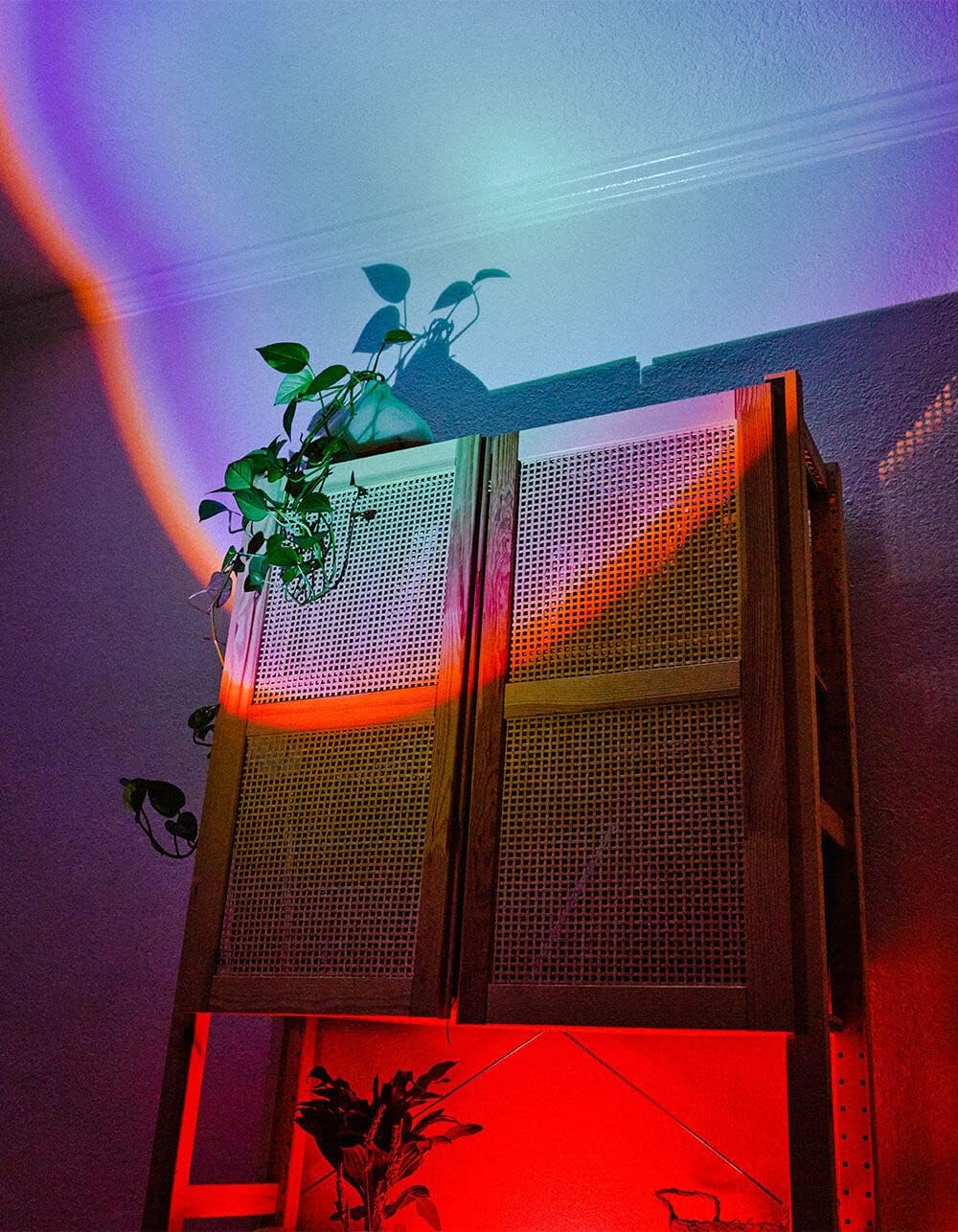
Image 5.1: The BYTECH Projector Decor Light-Rainbow in operation, casting vibrant rainbow light patterns onto a room's wall and furniture, demonstrating its ambient effect.
6. 유지관리
- 청소: Disconnect the power before cleaning. Use a soft, dry cloth to wipe the surface of the projector. Do not use abrasive cleaners or solvents.
- 저장: When not in use for extended periods, store the device in a cool, dry place, away from direct sunlight and moisture.
- 손질: Handle the device with care to avoid damage to the lens or internal components.
7. 문제 해결
| 문제 | 가능한 원인 | 해결책 |
|---|---|---|
| 장치가 켜지지 않습니다. | 전원이 연결되지 않았거나 케이블에 결함이 있습니다. | Ensure the USB cable is securely connected to both the projector and a powered USB port/adapter. Try a different USB port or adapter. |
| 빛이 어둡거나 깜빡인다. | Insufficient power supply or dirty lens. | Ensure the power source provides adequate power. Clean the projector lens gently with a soft, dry cloth. |
| 영상이 흐릿합니다. | 렌즈가 더럽습니다. | Gently clean the projector lens with a soft, dry cloth. |
8. 사양
- 모델: BYMCLB116BK
- 상표: 바이텍
- 전원 입력: USB Powered (5V DC, current not specified, typical for USB)
- 빛의 출처: 주도의
- 프로젝션 유형: Rainbow Glow
- 조정 성 : 360° Rotation & Tilt
- 패키지 크기: 5 x 5 x 5 인치
- 품목 무게: 1파운드
- 제조업체: 바이테크
9. 보증 및 지원
This product is covered by a limited warranty provided by BYTECH. For specific warranty terms and conditions, please refer to the warranty card included with your purchase or visit the official BYTECH website. For technical support, troubleshooting assistance, or to inquire about replacement parts, please contact BYTECH customer service through their official channels.
보증 청구를 위해 구매 증명서를 보관하십시오.


