소개
구매해주셔서 감사합니다asing the Kitchen 10L Desktop Electric Oven. This manual provides important information regarding the safe operation, maintenance, and troubleshooting of your new appliance. Please read this manual thoroughly before use and retain it for future reference.
중요 안전 지침
전기 제품을 사용할 때는 다음을 포함한 기본적인 안전 예방 조치를 반드시 따라야 합니다.
- 모든 지침을 읽으세요.
- 뜨거운 표면을 만지지 마십시오. 손잡이나 손잡이를 사용하십시오.
- 감전을 예방하려면 코드, 플러그 또는 가전제품을 물이나 기타 액체에 담그지 마십시오.
- 어린이가 가전제품을 사용하거나 어린이 근처에서 사용할 때는 면밀한 감독이 필요합니다.
- 사용하지 않을 때와 세척하기 전에는 콘센트에서 플러그를 뽑으세요. 부품을 끼우거나 떼기 전에 식히세요.
- 코드나 플러그가 손상된 경우 또는 기기가 오작동하거나 어떤 식으로든 손상된 경우에는 기기를 작동하지 마십시오.
- 가전제품 제조업체가 권장하지 않는 부속품을 사용하면 부상을 입을 수 있습니다.
- 옥외에서는 사용하지 마십시오.
- 코드가 테이블이나 카운터 가장자리에 걸려 있거나 뜨거운 표면에 닿지 않도록 하세요.
- 뜨거운 가스나 전기 버너 근처 또는 가열된 오븐에 두지 마십시오.
- 뜨거운 기름이나 기타 뜨거운 액체가 담긴 가전제품을 옮길 때는 극히 조심해야 합니다.
- 항상 제품에 플러그를 먼저 꽂은 후, 코드를 벽면 콘센트에 꽂으세요. 전원을 끊으려면 모든 조절기를 "끔"으로 돌린 후 벽면 콘센트에서 플러그를 뽑으세요.
- 본 제품을 본래 용도 외에는 사용하지 마십시오.
제품 끝view
Familiarize yourself with the components of your electric oven.

그림 1: 전면 view of the 10L Desktop Electric Oven, showing the glass door, handle, and control knobs on the right side.
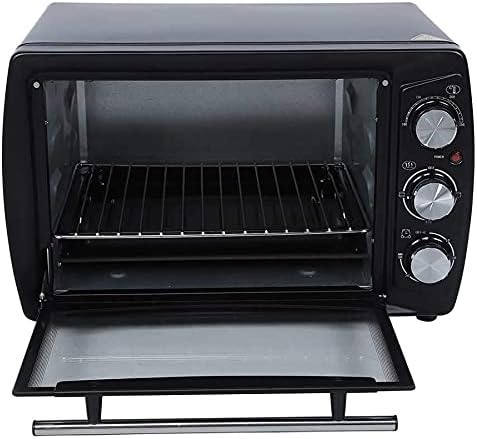
그림 2: 내부 view of the oven with the door open, revealing the wire rack and the removable crumb tray at the bottom.
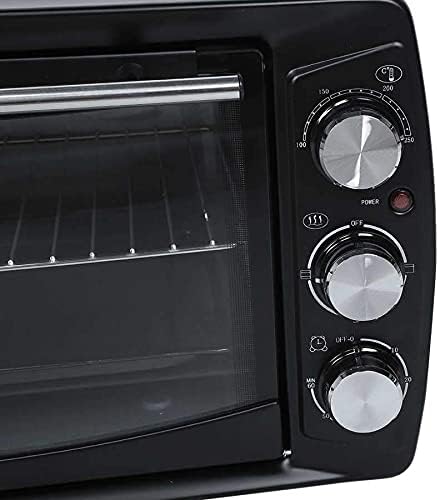
Figure 3: Close-up of the control panel, featuring three rotary knobs for temperature, function, and timer settings, along with a power indicator light.
구성 요소:
- 온도 조절 손잡이: 원하는 조리 온도를 설정하는 데 사용됩니다.
- 기능 제어 노브: Selects heating elements (e.g., upper, lower, or both).
- 타이머 제어 노브: 조리 시간을 설정합니다.
- 전원 표시등: 오븐이 작동 중이면 켜집니다.
- 유리문: 허용합니다 view요리하는 동안 음식을 먹는 것.
- 철제 선반: 음식물을 놓기 위해.
- 부스러기 쟁반: 부스러기와 물방울을 모아서 쉽게 청소할 수 있습니다.
- 가열 요소: Four heating elements for efficient cooking.
설정
- 짐 풀기: 오븐과 모든 부속품을 포장에서 조심스럽게 꺼내세요. 나중에 보관하거나 운반할 수 있도록 포장을 보관하세요.
- 놓기: Place the oven on a stable, heat-resistant, and flat surface. Ensure there is adequate ventilation around the oven (at least 4 inches of clearance on all sides). Do not place it near flammable materials or heat sources.
- 초기 청소: 처음 사용하기 전에 오븐 내부와 외부를 깨끗한 물로 닦아주세요.amp cloth. Wash the wire rack and crumb tray with warm, soapy water, rinse thoroughly, and dry completely.
- 첫 번째 사용 번오프: It is recommended to run the oven empty for about 10-15 minutes at maximum temperature (250°C) with the function set to both upper and lower heating. This will burn off any manufacturing residues and odors. A slight smoke or odor is normal during this process. Ensure the area is well-ventilated.
- 전원 연결: 전원 코드를 접지된 220V 콘센트에 꽂으세요.
작동 지침
Follow these steps to operate your electric oven:
- 음식을 준비하다: Place your food item on the wire rack. Ensure proper cookware is used that is safe for oven use.
- 삽입형 랙: Slide the wire rack with food into the desired rack position inside the oven.
- 문 닫기: 오븐 문을 단단히 닫으세요.
- 설정 온도: 켜다 온도 조절 손잡이 to your desired cooking temperature (e.g., 100°C to 250°C).
- 기능 선택 : 켜다 기능 제어 노브 to select the desired heating mode (e.g., upper heating, lower heating, or both).
- 타이머 설정 : 켜다 타이머 컨트롤 노브 to the desired cooking time (up to 60 minutes). The power indicator light will illuminate, indicating the oven is heating. The oven will automatically turn off when the timer reaches zero, and a bell will sound. For continuous operation, turn the timer past the 60-minute mark to the "Stay On" position (if available).
- 요리 모니터링: You can observe the cooking progress through the glass door.
- 음식을 제거하세요: Once cooking is complete and the timer has sounded, carefully open the oven door. Use oven mitts to remove the hot food and rack.
- 쿨다운: Allow the oven to cool down completely before cleaning or storing.
유지관리 및 청소
정기적인 청소와 유지관리를 통해 오븐의 수명과 최적의 성능을 보장할 수 있습니다.
- 항상 플러그를 뽑으세요: Before cleaning, always unplug the oven from the power outlet and allow it to cool down completely.
- 외부 청소: 부드러운 d로 외부 표면을 닦으십시오.amp 천으로 닦으세요. 연마성 세제나 수세미는 마감재를 손상시킬 수 있으므로 사용하지 마세요.
- 내부 청소 : 내부는 광고용 세정제로 닦아주세요.amp cloth and mild detergent. For stubborn stains, a non-abrasive oven cleaner designed for small appliances can be used, following the product's instructions. Ensure all cleaner residue is wiped away.
- 부스러기 쟁반: The crumb tray should be emptied and cleaned regularly to prevent grease buildup and potential fire hazards. Wash with warm, soapy water, rinse, and dry thoroughly.
- 철제 선반: The wire rack can be washed in warm, soapy water or placed in a dishwasher.
- 담그지 마십시오: 오븐 본체, 전원 코드 또는 플러그를 물이나 기타 액체에 절대 담그지 마십시오.
- 저장: 사용하지 않을 때는 오븐을 깨끗하고 건조한 곳에 보관하십시오.
문제 해결
오븐에 문제가 발생하면 다음의 일반적인 문제와 해결 방법을 참조하세요.
| 문제 | 가능한 원인 | 해결책 |
|---|---|---|
| 오븐이 켜지지 않습니다. | 플러그가 꽂혀 있지 않음; 전원 콘센트 문제; 타이머가 설정되지 않음. | Ensure the oven is securely plugged into a working 220V outlet. Check if the timer knob is set to a cooking time or "Stay On". |
| 음식이 고르게 익지 않습니다. | 선반 위치가 잘못되었거나, 음식이 고르게 놓여 있지 않거나, 문이 완전히 닫히지 않았습니다. | Adjust rack position for optimal heat distribution. Ensure food is placed centrally. Check that the oven door is fully closed during operation. |
| 요리하는 동안 연기나 냄새가 너무 심합니다. | Food spills; crumb tray not cleaned; first use burn-off. | Clean any food spills immediately. Empty and clean the crumb tray regularly. If it's the first use, this is normal; ensure ventilation. |
| 타이머가 작동하지 않습니다. | Timer knob malfunction. | Ensure the timer knob is turned past the initial resistance point to activate. If it still doesn't work, contact customer support. |
이러한 해결 방법을 시도한 후에도 문제가 지속되면 고객 지원팀에 문의하세요.
명세서
| 특징 | 세부 사항 |
|---|---|
| 모델 | 10L Desktop Electric Oven |
| 용량 | 10 Liters (11-20L range specified in description, but product is 10L variant) |
| 전력(W) | 1201-1500W |
| 권tag전자 (V) | 220V |
| 인증 | CE |
| 전원 | 전기 (코드식 전기) |
| 가열 요소의 수 | 4 |
| 스타일 | 수평의 |
| 재료 | 알류미늄 |
| 제어 모드 | 기계식 타이머 제어 |
| 제어 유형 | 손잡이 |
| 문 스타일 | 드롭다운 도어 |
| 포함된 구성 요소 | 부스러기 트레이 |
| 색상 | 검은색 |
| 한국어: | 808233200514 |
보증 및 지원
For information regarding warranty coverage, product registration, or technical support, please refer to the warranty card included with your product packaging or visit the manufacturer's official website. Please have your model number (10L Desktop Electric Oven) and UPC (808233200514) ready when contacting support.
추가적인 도움이 필요하시면 제품을 구매하신 판매점에 문의하셔도 됩니다.


