소개
This manual provides detailed instructions for the setup, operation, and maintenance of your 725 Digital Safe Box, model HES25A. Please read this manual thoroughly before using the safe to ensure proper function and security.
The 725 Digital Safe Box is designed to secure valuables such as cash, legal documents, passports, jewelry, and firearms. Its compact design and robust construction provide reliable protection for your precious property.
제품 끝view

그림 1: 앞쪽 view of the 725 Digital Safe Box, showing the electronic keypad, rotary knob, and the warning label to not keep emergency keys inside the safe.

그림 2: 내부 view of the safe box, illustrating its spacious capacity and approximate dimensions (12.2" length, 7.9" width, 7.9" height) for storing various valuables.
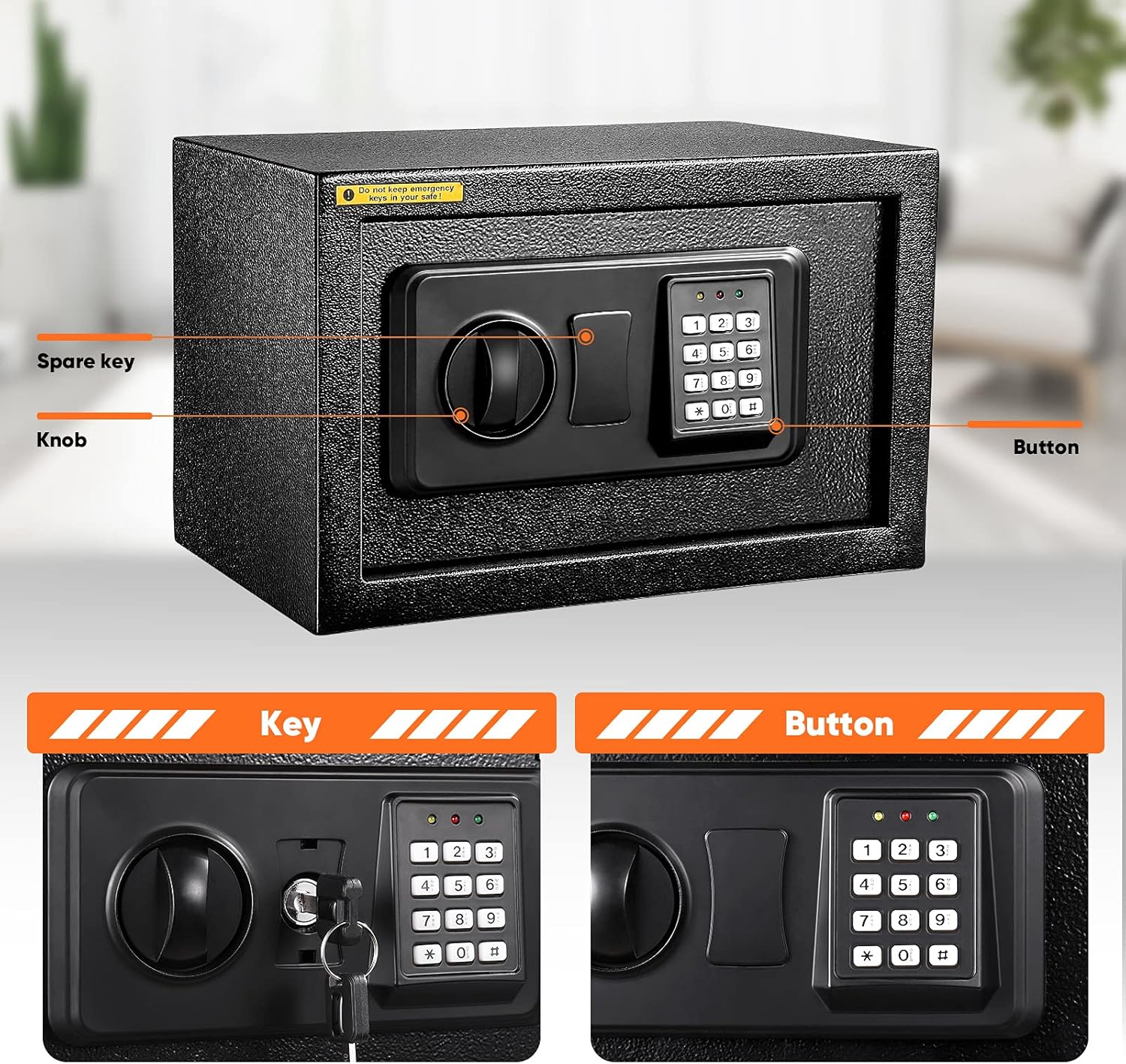
그림 3: Key components of the safe: the spare key slot, the rotary knob for opening, and the electronic keypad with buttons for code entry.

그림 4: Detail of the two solid lock bolts, highlighting the robust security mechanism that prevents prying.

그림 5: 뒤쪽 view of the safe, indicating pre-drilled holes for easy wall mounting and illustrating the installation process with screws.
설정 및 첫 사용
Unpacking and Initial Access
- 금고를 포장에서 조심스럽게 꺼내세요.
- The safe is shipped in a locked state. To open it for the first time, locate the two emergency override keys provided.
- Insert one of the keys into the keyhole located behind the electronic keypad cover (refer to Figure 3 for keyhole location). Turn the key clockwise while simultaneously rotating the knob clockwise and pulling the door outwards to open.
배터리 설치
The safe requires four (4) AA batteries (not included) for the electronic keypad to function. The battery compartment is located on the inside of the door.
- 비상키를 사용하여 금고 문을 여세요.
- 도어 안쪽에서 배터리 칸 덮개를 찾으세요.
- Remove the cover and insert four new AA batteries, ensuring correct polarity (+/-).
- 배터리 덮개를 다시 장착하세요.
암호 설정
It is highly recommended to set a new personal passcode immediately after battery installation.
- With the safe door open, locate the small red reset button on the inside of the door, near the hinge or battery compartment.
- Press the reset button. You will hear a beep, and the yellow indicator light on the keypad will illuminate.
- Within 5 seconds, enter your desired new passcode (3 to 8 digits) on the keypad. Each key press will result in a buzzer beep and a yellow light flash.
- Press the "#" button to confirm your new passcode. The green light will illuminate, indicating successful programming.
- 중요한: Test your new passcode several times with the door open before closing it to ensure it works correctly.
작동 지침
Opening the Safe with Passcode
- Enter your 3 to 8 digit passcode on the electronic keypad.
- Press the "#" button. The green light will illuminate.
- Within 5 seconds, rotate the knob clockwise and pull the door outwards to open the safe.
금고 닫기 및 잠금
- 금고 문을 단단히 닫으세요.
- Rotate the knob counter-clockwise to engage the locking bolts. The safe is now securely locked.
Using Emergency Override Key
In case of forgotten passcode or battery failure, the emergency override key can be used.
- Remove the keypad cover to expose the keyhole.
- 비상 키를 삽입하고 시계 방향으로 돌립니다.
- While holding the key turned, rotate the knob clockwise and pull the door outwards to open.
- 메모: Always store emergency keys in a secure location away from the safe.
유지
배터리 교체
When the batteries are low, the red indicator light may flash or the keypad may not respond. Replace all four AA batteries promptly to ensure continuous operation.
- 금고 문을 엽니다.
- 배터리 덮개를 제거합니다.
- 오래된 배터리를 제거하고 올바르게 폐기하십시오.
- 극성을 확인하여 새 AA 배터리 4개를 삽입하십시오.
- 덮개를 다시 덮으세요.
청소
금고 외부를 부드러운 천으로 닦으세요.amp 천. 마감재나 전자 부품을 손상시킬 수 있는 연마성 세척제나 용제는 사용하지 마세요.
내부 보호
The safe includes a soft carpet inside to protect delicate items from scratches. Ensure this carpet is properly placed before storing valuables.
문제 해결
| 문제 | 가능한 원인 | 해결책 |
|---|---|---|
| 금고가 비밀번호로 열리지 않습니다. | 잘못된 비밀번호를 입력하셨습니다. 배터리가 부족하거나 방전되었습니다. Knob not turned within 5 seconds. | 암호를 신중하게 다시 입력하십시오. 배터리를 교체하세요. Enter passcode and turn knob immediately after green light. |
| 키패드가 작동하지 않습니다. | 배터리가 소진되었거나 올바르게 설치되지 않았습니다. | 배터리를 올바른 극성으로 교체하세요. |
| Safe cannot be closed/locked. | 문틀에 장애물이 있습니다. 잠금 볼트가 확장되었습니다. | 문을 막고 있는 물건이 있는지 확인하세요. Ensure the knob is in the open position before closing the door, then rotate to lock. |
| 비상 키가 작동하지 않습니다. | 키가 완전히 삽입되지 않았거나 제대로 돌아가지 않았습니다. Knob not rotated simultaneously. | Ensure key is fully inserted and turned clockwise while rotating the knob. |
명세서
- 모델: HES25A
- 용량: 0.5입방 피트
- Exterior Dimensions (D x W x H): 9.8인치 x 13.8인치 x 9.8인치
- Interior Dimensions (D x W x H): 대략 9.5인치 x 13.5인치 x 8.75인치
- 잠금 유형: Electronic Keypad with Emergency Key Override
- 재료: 합금강, 탄소강
- 장착 유형: Freestanding, Tabletop (Wall mountable with included screws)
- 힘: AA 배터리 4개(포함되지 않음)
- 품목 무게: 15.21파운드
- 한국어: 768558984622
보증 및 지원
For warranty information or technical support, please refer to the contact details provided at the point of purchase or visit the official 725 brand web사이트. 보증 청구를 위해 구매 증빙 자료로 구매 영수증을 보관하세요.
일반적인 문제에 대해서는 이 설명서의 문제 해결 섹션을 참조하십시오.


