소개
This manual provides instructions for the installation and maintenance of the Fodsports Accessory Clamp Kits, designed for use with Fodsports FX6, FX6S, and FX-S Motorcycle Bluetooth Intercom Headsets. Please read this manual thoroughly before installation to ensure proper use and longevity of the product.
제품 끝view
The Fodsports Accessory Clamp Kit offers versatile mounting solutions for your Fodsports intercom unit. It includes both a traditional clamp and an adhesive mount, along with necessary hardware, to securely attach your intercom to various helmet types.
상자 안에 무엇이 들어있나요?
The Fodsports Accessory Clamp 키트에는 다음과 같은 구성품이 포함되어 있습니다.
- Clamp 까치발
- Adhesive Mount Base
- 장착 나사
- L자 드라이버
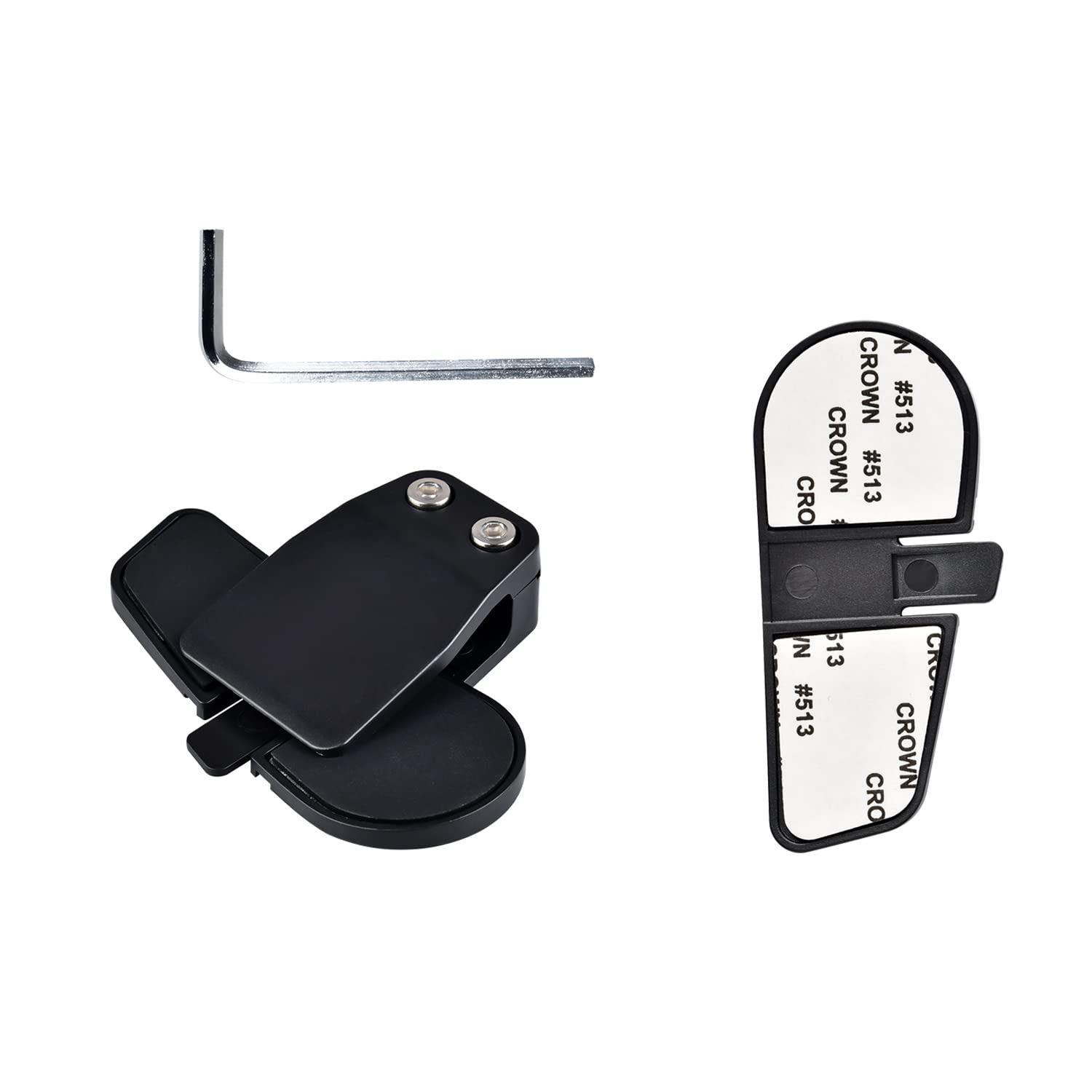
이미지 설명: 완전한 view of the Fodsports Accessory Clamp Kit components, including the clamp bracket, adhesive mount base, screws, and an L-shaped screwdriver.
설정 및 설치
Before installation, ensure your helmet surface is clean and dry.
Choosing Your Mounting Method
The kit provides two primary methods for attaching your intercom unit to your helmet: the clamp bracket or the adhesive mount base.
Clamp 브라켓 설치
- Locate a suitable position on the left side of your helmet, typically between the outer and inner shells, where the clamp can securely grip.
- cl의 나사를 풀어주세요amp bracket using the provided L-shaped screwdriver.
- cl을 슬라이드하세요amp bracket onto the edge of your helmet, ensuring it is firmly seated.
- 클립을 고정하려면 나사를 조이세요.amp bracket in place. Do not overtighten.
- Slide your Fodsports intercom unit onto the installed clamp 딸각 소리가 날 때까지 받침대를 밀어 넣으세요.

이미지 설명: 클로즈업 view of the Fodsports clamp bracket, showing its design for gripping the helmet edge.
Adhesive Mount Base Installation
- Select a flat, clean area on the left side of your helmet for the adhesive mount. Ensure the surface is free from dirt, grease, or moisture.
- Peel off the protective backing from the adhesive mount base.
- Press the adhesive mount base firmly onto the chosen helmet surface for at least 30 seconds.
- Allow the adhesive to cure for at least 24 hours before attaching the intercom unit to ensure maximum bond strength.
- Slide your Fodsports intercom unit onto the installed adhesive mount base until it clicks into place.

이미지 설명: 클로즈업 view of the Fodsports adhesive mount base, showing the adhesive backing.
Securing the Intercom Unit
일단 clamp or adhesive base is securely attached, slide your Fodsports FX6, FX6S, or FX-S intercom unit onto the mounting bracket. Ensure it is fully engaged and feels stable.

Image description: A Fodsports intercom unit securely mounted on the side of a motorcycle helmet using the clamp 전부.
Cl을 작동시키다amp 전부
더 클amp kit itself does not have operational controls. Its function is to provide a stable and secure mounting point for your Fodsports Bluetooth intercom unit. Once the intercom is attached, refer to the specific user manual for your Fodsports FX6, FX6S, or FX-S intercom for operational instructions regarding its features (e.g., power, pairing, volume, communication).
유지
- CL을 정기적으로 검사하십시오.amp bracket or adhesive mount for any signs of wear, damage, or loosening.
- Ensure all screws on the clamp bracket remain tight. Re-tighten with the L-shaped screwdriver if necessary, but avoid overtightening.
- cl을 청소하다amp kit components with a soft, damp cloth. Avoid using harsh chemicals or abrasive materials that could damage the plastic or adhesive.
- If using the adhesive mount, periodically check the bond strength. If the adhesive shows signs of weakening, consider replacing the mount or using the clamp 까치발.
문제 해결
Intercom Unit Feels Loose on Mount
- CI 확인amp 나사: cl을 사용하는 경우amp bracket, ensure the screws are sufficiently tightened.
- Verify Intercom Engagement: Make sure the intercom unit is fully slid onto the mounting bracket until it locks securely.
- 손상 여부 검사: Examine both the clamp kit and the intercom's mounting slot for any cracks or deformities that might prevent a secure fit.
Adhesive Mount Not Sticking
- 표면 준비: Ensure the helmet surface was thoroughly cleaned and dried before application.
- 경화 시간: Allow the adhesive to cure for the recommended 24 hours before attaching the intercom unit.
- 온도: Apply the adhesive in a moderate temperature environment (e.g., room temperature) for optimal bonding. Extreme cold or heat can affect adhesion.
- 표면 유형 : The adhesive works best on smooth, non-porous surfaces.
Clamp Bracket Does Not Fit Helmet Edge
- 헬멧 호환성: Some helmet designs may have edges that are too thick or shaped unusually for the standard clamp bracket. In such cases, the adhesive mount base is the recommended alternative.
명세서
| 특징 | 세부 사항 |
|---|---|
| 모델명 | Clamp Kits for FX6 FX6S FX-S |
| 상표 | 포드스포츠 |
| 재료 | 플라스틱 |
| 포함된 구성 요소 | Clamp with Screw, Adhesive Mount |
| 호환 장치 | Fodsports FX6, FX6S, FX-S Motorcycle Bluetooth Intercom Headsets |
| 품목 무게 | 0.986 온스(약 0.03 킬로그램) |
| 패키지 크기 | 6.77 x 5.04 x 0.67 인치 |
참고: 사양은 사전 통지 없이 변경될 수 있습니다.
보증 및 지원
For warranty information or technical support regarding your Fodsports Accessory Clamp Kit, please refer to the documentation included with your original Fodsports intercom unit or visit the official Fodsports website. You may also contact Fodsports customer service directly for assistance.
Official Fodsports Store on Amazon: Fodsports Store


