소개
The Vieta Pro Note True Wireless Earphones are designed to provide a high-quality audio experience with advanced features. These earphones utilize Bluetooth 5.1 for stable wireless connectivity, offer Active Noise Cancellation (ANC) up to -30dB, and include an integrated microphone for clear communication. With IPX4 water resistance, they are suitable for various activities. The charging case extends the total battery life to up to 20 hours.
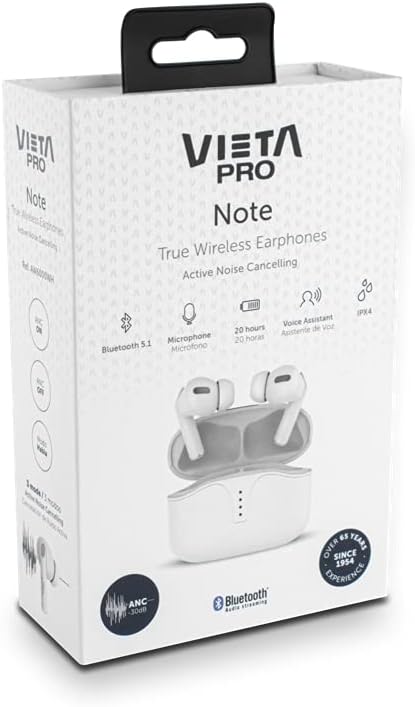
Image: Vieta Pro Note True Wireless Earphones in their retail packaging, highlighting key features like Bluetooth 5.1, microphone, 20 hours battery, Voice Assistant, and IPX4 rating.
설정
1. 초기 충전
Before first use, fully charge the earphones and the charging case. Connect the provided USB Type-C cable to the charging port on the case and to a power source. The LED indicators on the case will show the charging status and remaining battery level.
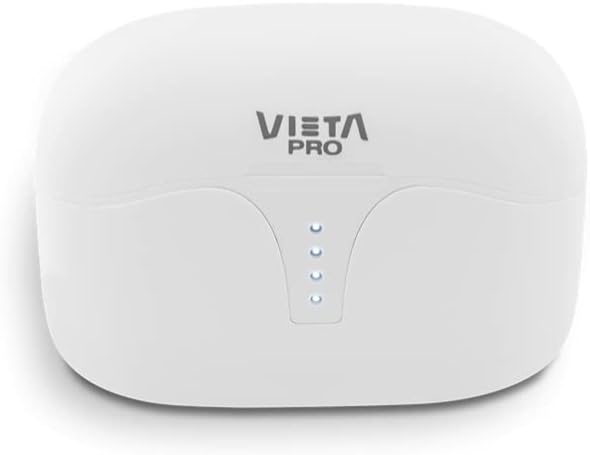
이미지: 상단 view of the Vieta Pro Note charging case, showing the four LED indicators that display battery status.
2. 장치와 페어링
- 이어폰이 충전되어 있고 충전 케이스에 넣어져 있는지 확인하세요.
- 충전 케이스 뚜껑을 여세요. 이어폰이 자동으로 페어링 모드로 진입합니다.
- 스마트폰이나 Bluetooth 지원 기기에서 Bluetooth 설정으로 이동하세요.
- Select "Vieta Pro Note" from the list of available devices.
- 연결되면 확인음이 울리고 이어폰을 사용할 준비가 됩니다.
The Vieta Pro Note earphones feature Dual Master Technology, meaning both earbuds can function independently. You can use either the left or right earbud alone after initial pairing.
Image: The Vieta Pro Note True Wireless Earphones removed from their open charging case, ready for pairing or use.
작동 지침
1. 전원 켜기/끄기
- 전원 켜기: 충전 케이스 뚜껑을 열거나 이어폰을 케이스에서 꺼내세요. 이어폰이 자동으로 켜지고 마지막으로 페어링된 장치에 연결을 시도합니다.
- 전원 끄기 : 이어폰을 충전 케이스에 다시 넣고 뚜껑을 닫으세요. 자동으로 전원이 꺼지고 충전이 시작됩니다.
2. 터치 컨트롤
The Vieta Pro Note earphones feature a touch control panel on each earbud for various functions:

이미지: 클로즈업 view of the left Vieta Pro Note earbud, showing the touch-sensitive area and microphone.
- 재생/일시 중지: 양쪽 이어버드를 한 번 탭하세요.
- 다음 트랙: 오른쪽 이어버드를 두 번 탭하세요.
- 이전 트랙 : 왼쪽 이어버드를 두 번 탭하세요.
- 볼륨 업: 오른쪽 이어버드를 세 번 탭하세요.
- 볼륨 작게 : 왼쪽 이어버드를 세 번 탭합니다.
- 전화 받기/종료: 양쪽 이어버드를 한 번 탭하세요.
- 전화 거부: 양쪽 이어버드를 2초 동안 길게 누릅니다.
- Voice Assistant 활성화 : 양쪽 이어버드를 3초 동안 길게 누릅니다.
3. 능동 소음 제거(ANC) 모드
The earphones offer three noise cancellation modes:
- 능동형 소음 제거(ANC): 주변 소음을 최대 -30dB까지 줄여주어 시끄러운 환경에 이상적입니다.
- Talk Mode (Transparency Mode): Allows you to hear your surroundings and engage in conversations without removing the earphones.
- 비활성화됨: Turns off noise cancellation for a standard listening experience.
To switch between ANC modes, press and hold the touch panel on the 왼쪽 earbud for approximately 2 seconds until you hear a voice prompt indicating the mode change.
유지
1. 청소
- 부드럽고 마른 보푸라기 없는 천으로 이어버드와 충전 케이스를 정기적으로 청소하세요.
- 연마성 세척제, 용제 또는 에어로졸 스프레이를 사용하지 마십시오.
- 작고 부드러운 솔이나 면봉을 사용하여 이어팁과 스피커 메시에 묻은 귀지나 이물질을 조심스럽게 제거하세요.
2. 보관
When not in use, store the earphones in their charging case to protect them from dust, damage, and to ensure they remain charged.
3. 방수 기능(IPX4)
The Vieta Pro Note earphones are rated IPX4 for water resistance. This means they are resistant to splashing water from any direction. They are suitable for use during workouts or in light rain. However, they are ~ 아니다 designed for submersion in water or exposure to pressurized water jets. Do not use them in a shower or while swimming.
문제 해결
- 소리 없음: Ensure earphones are charged, connected to your device, and volume is turned up on both the earphones and your device.
- 페어링할 수 없습니다: Make sure Bluetooth is enabled on your device and the earphones are in pairing mode. Try turning Bluetooth off and on again on your device. If issues persist, try resetting the earphones (refer to the full manual for specific reset instructions if available).
- 간헐적인 연결: Ensure there are no obstructions between the earphones and your device. Keep the device within the Bluetooth range (typically 10 meters/33 feet).
- 이어버드가 충전되지 않음: Check that the charging cable is securely connected and the charging case has power. Ensure the earbuds are correctly seated in the charging case.
명세서
| 모델 번호 | AW6000WH |
| 상표 | 비에타 프로 |
| 연결성 | 블루투스 5.1 |
| 소음 제거 | 능동형 소음 제거(-30dB) |
| 마이크로폰 | 통합 |
| 방수성 | IPX4 |
| 이어버드 배터리 수명 | 최대 5시간 |
| 총 배터리 수명(케이스 포함) | 최대 20시간 |
| 충전 포트 | USB 타입-C |
| 제어 유형 | 터치 컨트롤, 볼륨 컨트롤 |
| 폼 팩터 | 인이어 |
| 재료 | 플라스틱 |
보증 및 지원
For warranty information, technical support, or further assistance, please refer to the official Vieta Pro web사이트를 방문하거나 고객 서비스 부서에 문의하세요. 보증 청구를 위해 구매 증빙 자료를 보관하세요.


